Incremento
Incremento is a modern Anki add-on for incremental learning from mixed content. It brings a SuperMemo-style long-form learning workflow into Anki, combining PDFs, EPUBs, audio, videos, web pages, writing notes, and local files with normal flashcards so you can study, extract, and review in one place.
Incremento supports Anki 24.11 and newer. Optional features that depend on Anki's private reviewer API check compatibility at runtime and fail closed without rescheduling cards when the API is unavailable.
What It Does
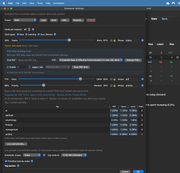
- Builds filtered study sessions with configurable card states, topic/item and document mixes, tags, priorities, ordering, and optional auto-refill
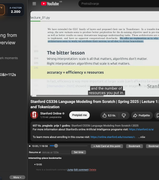
- Opens PDF, EPUB, video, web, writing, and local-file material in persistent reviewer docks that remember progress
- Imports MP3, M4A, AAC, and WAV as synced Anki audio cards with per-device playback resume on desktop and mobile
- Provides a searchable PDF-and-EPUB Document Bookshelf on
Option+Shift+P / Alt+Shift+P, with format/tag filters, possible-duplicate cleanup, and visual one-click opening
- Reviews cards attached to the current PDF, EPUB, or video with Topic/Item, direct/nested, media-range, due-state, ordering, and count controls, then restores the source position
- Creates cards from selections and highlights while preserving source metadata and links
- Imports DjVu documents as compact layered PDFs while preserving their existing selectable text
- Batch-imports
.md / .markdown learning documents with a rendered preview and per-file options; edits the current managed study copy with source/preview and a previous-version backup (separate from Markdown Writing cards)
- Provides topic A-factor scheduling, per-card custom schedules, postpone tools, and Anki-compatible Undo/Redo behavior
- Includes document search, colored Browser quick tags, a card-backed knowledge tree, 7/30-day reading and study graphs, and a focus timer
- Exports a privacy-safe support bundle with redacted settings, recent typed events, version data, and code fingerprints for easier bug reports
- Keeps runtime content and databases isolated per Anki profile
- Includes a browser bridge and companion Chrome/Brave extension for capture, import, and playback synchronization
- Connects Codex and Claude through an opt-in local MCP endpoint for search, document reading, lists, tags, note text, priorities, bookmarks, annotations, knowledge-tree links, statistics, and saved scheduling rules, plus source-linked card creation, document imports, writing edits, resource links, reviewed batches, and undo/redo that survives Anki restarts
- Detects Incremento card-format changes without touching the collection, then explains and requests consent before any Anki full-sync-requiring update
Install
Connect Codex or Claude
After installing the add-on, open Incremento → AI connections…, enable local MCP, and apply. Use Copy setup prompt in the Codex or Claude Code tab and paste it into an assistant with local computer access to apply and verify the setup. For Claude Desktop, save and install the .mcpb connector and paste the connection token. Claude Desktop supplies the connector's Node runtime; Codex connects directly over HTTP with no additional runtime to install.
Write access is a separate opt-in. The 97 tools cover search, documents, lists, tags, card authoring/cloning, OCR, rich text/media, scheduling, deck and note-type management, meaning search, audits and smart lists. list_operation_types also exposes 50 reviewed workflows across 16 areas: sessions/reviewer, filtered decks/Review All, settings/presets, FSRS/deck options, reader/player state, annotations/snapshots/citations, additional imports, video/captions, source relinking/PDF sync, image occlusion, note types, exports/backups, maintenance, timers/jobs, and administration status. Every MCP data change retains persistent undo/redo across Anki restarts. Sync, profile switching and add-on installation/removal are refused because their external effects cannot meet that contract. Keep Anki open on the paired profile. See AI connections (MCP) in MANUAL.md for recovery limits and setup; Codex and Claude have separate complete copyable setup prompts.
Install from AnkiWeb (recommended)
Incremento is available from AnkiWeb Add-ons.
- In Anki, open Tools → Add-ons → Get Add-ons….
- Enter the code
1013949798.
- Restart Anki after installation.
Install from source
For development or manual installation:
- Clone or copy this repo into your Anki add-ons folder as
incremento.
- Make sure the final path ends with
addons21/incremento.
- Restart Anki.
The repository intentionally does not ship meta.json; Anki creates and manages that local installation metadata.
Common add-on paths:
| Platform |
Add-on path |
| macOS |
~/Library/Application Support/Anki2/addons21/incremento/ |
| Windows |
%APPDATA%\Anki2\addons21\incremento\ |
| Linux |
~/.local/share/Anki2/addons21/incremento/ |
Optional Dependencies
Core functionality works without extra system setup, but some PDF features improve when these are available:
PyMuPDF >=1.26,<2: PDF rendering, text extraction, and annotation syncTesseract: OCR for image-only PDFsDjVuLibre: optional DjVu import (ddjvu and djvutxt), together with PyMuPDFyt-dlp: optional local YouTube/Vimeo downloads
Incremento can guide first-run setup from inside Anki. PyMuPDF installation is an explicit user action. A compatible Python interpreter installs and verifies it in Incremento's local .dependencies/ folder; restart Anki to activate it. yt-dlp is never silently installed into Anki's Python environment. Platform-specific details are implemented in backend/deps.py.
Webpage-to-PDF offers Website appearance and Clean article layouts, plus an optional link appendix. Set up browser component… in that dialog explicitly installs Playwright and Chromium into .dependencies/webpage-browser/ for JavaScript and lazy-loaded content. A compatible Python interpreter is required; Linux may additionally need Chromium's system libraries. The guarded offline exporter remains available without this component. Browser captures use fresh contexts and bounded public-only resource fetching; no personal browser profile or cookies are reused.
Quick Start
After installing and restarting Anki:
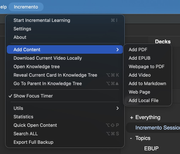
- Open Incremento → Start Incremental Learning to build a study session.
- Use Incremento → Add Content → Add PDF / DjVu to add a PDF-backed topic card from either format.
- Use Incremento → Export Full Backup to create a migration/backup ZIP.
- If something goes wrong, use Incremento → Export Support Bundle… to create a diagnostic ZIP that is safe to attach to a bug report.
For a full walkthrough, see MANUAL.md.
The support bundle is separate from Export Full Backup. It never contains card/note text, raw card or note IDs, deck/tag/profile names, media, user or media filenames, local filesystem paths, URLs, database rows, exception messages, or precise activity timestamps. Private and free-text configuration values are replaced with redaction markers. Fixed shipped-code filenames may appear beside their hashes so the developer can identify the installed build.
Companion Extension
Incremento → Settings → Review → Reviewer Controls → Companion browser defaults to Chrome and also offers Firefox. Click Set up browser extension… for the matching installation guide. Firefox 140+ users can export a .xpi directly from Settings and load it through Firefox's about:debugging → This Firefox → Load Temporary Add-on. Reload this temporary add-on after Firefox exits. See the Firefox installation and testing notes. Nothing is published automatically.
The optional companion lives in chrome_extensions/incremento_companion/. It can send PDFs, videos, web pages, and writing notes into Incremento, and capture watched video time. Browser-opening actions, including PDF/EPUB external links and webpage verification, follow the saved Chrome/Firefox choice.
Extension details and install steps:
Main Components
backend/: scheduling, persistence, import logic, browser bridge, and content managersfrontend/: Qt dialogs/docks plus React source for the PDF viewerweb/: shipped web assets used inside Ankichrome_extensions/incremento_companion/: companion Chrome extensiontests/: Python test suite
Documentation
- User manual: MANUAL.md
- Export and restore guide: EXPORTING.md
- Persistence and software architecture: ARCHITECTURE.md
- Vulnerability reporting, trust boundaries, and guarded repair automation: SECURITY.md
- Internal agent/developer notes: AGENTS.md with nested area-specific guides under
backend/, frontend/, chrome_extensions/incremento_companion/, and tests/
Interface languages
Choose Incremento → Settings → Language for English, Croatian, or Simplified Chinese, or automatically follow Anki. Save with OK, then restart Anki to apply it. The Chrome companion has an independent Settings → Language control that applies on Save, without a browser restart. All catalogs are bundled locally.
Development
Users can add a language without coding: in Settings → Language, export a CSV template (or the selected language), edit only its translation column in Excel/Google Sheets/LibreOffice, then import it and save. The same CSV covers the add-on, PDF reader and companion. Anki stores imported packs per profile and applies them after restart; Chrome stores them locally and applies them on Save. Blank translations fall back to English. The complete walkthrough, format and developer instructions are in TRANSLATING.md. GNU gettext (msgfmt) is needed only for development: brew install gettext on macOS or sudo apt install gettext on Debian/Ubuntu.
Install the version-ranged development toolchain once:
.venv/bin/python -m pip install -r requirements-dev.txt
npm --prefix frontend ci
Python tests:
.venv/bin/python -m pytest tests/ -v
Compile and validate translation catalogs after editing .po files:
.venv/bin/python scripts/compile_i18n.py
.venv/bin/python scripts/build_translation_catalog.py
.venv/bin/python scripts/compile_i18n.py --check
Static and advanced quality gates:
.venv/bin/ruff check .
.venv/bin/mypy
npm --prefix frontend run lint
.venv/bin/python scripts/mutation_smoke.py
The Python suite includes Hypothesis property and state-machine coverage. The mutation smoke runs four bounded mutants against a temporary config module and fails if any plausible broken implementation survives.
Frontend build:
cd frontend
npm run build
The frontend build writes the shipped PDF viewer bundle to web/dist/pdf_viewer.js.
Chrome extension UI build:
cd frontend
npm run build:extension
This writes the React-based extension UI bundles into chrome_extensions/incremento_companion/dist/.
Chrome extension tests:
cd frontend
npm run test:extension
Guarded LLM repair candidates
Maintainers can turn a sanitized incident into an evidence-backed patch candidate. The preferred input is structured JSON; plain text is supported for compatibility.
{
  "title": "Session refill stops early",
  "component": "session",
  "category": "bug",
  "severity": "medium",
  "expected": "The pending window refills to its configured size.",
  "actual": "The synthetic session stops after one refill.",
  "steps": ["Create a synthetic bounded session", "Trigger one refill"],
  "invariant": "Never duplicate a card already in the live queue.",
  "relevant_paths": ["backend/session.py"],
  "environment": {
    "addon_version": "1.5.0",
    "anki_version": "25.09.2",
    "os_family": "macos",
    "python_version": "3.12"
  }
}
Store the report outside the repository. Do not include support bundles, card/note text, profile/deck/tag names, local paths, URLs, credentials, cookies, tokens, or raw logs. environment accepts only the four version/OS fields shown above.
Run the loop against a committed revision and write artifacts to a new or empty directory outside the repository:
.venv/bin/python scripts/llm_repair_loop.py /tmp/incremento-incident.json \
  --base-ref HEAD \
  --max-iterations 2 \
  --output-dir /tmp/incremento-repair-result
The source checkout may contain uncommitted work: the loop uses only the selected committed base in a detached temporary worktree and leaves the source untouched. It first proves a single immutable regression is meaningfully red, then runs a separate repair role, risk-selected focused/fault-injection checks, the full fixed verification matrix, and an independent read-only critic. Repeated failures, stalled scores, timeouts, oversized diffs, protected-file edits, test edits, and ambiguous behavior stop the loop.
The output is review material, never an applied change:
candidate.patch: the highest-scoring bounded candidate, including its new regressionreproducer.patch: the isolated failing regression before production changesrun.json: privacy-sanitized gates, hashes, risk tags, stage usage, score, and stop reasonsmoke/: structured results when the optional real-Anki gate is enabled
Preview the safely framed incident without invoking a model with --dry-run. To opt into a real Anki startup check, add --anki-smoke --anki-executable /path/to/anki; the harness creates a new disposable base, copies no user_files or local metadata, disables network access, and runs only that process group.
The deterministic repair-harness eval corpus runs offline and is also enforced in CI:
.venv/bin/python scripts/llm_repair_eval.py tests/repair_cases \
  --deterministic-only --json
The loop never applies, commits, pushes, opens a pull request, publishes, deploys, or merges. A maintainer must inspect candidate.patch and run.json, reproduce the result in an appropriate environment, and make the final decision. See SECURITY.md for the complete trust and approval boundaries.
Release Packaging
Build a clean installable .ankiaddon package with:
python3 scripts/package_addon.py
Useful variants:
# Rebuild the frontend bundle first
python3 scripts/package_addon.py --build-frontend

# Run tests before packaging
python3 scripts/package_addon.py --run-tests

# Run every release gate, rebuild generated assets, and remove staging
.venv/bin/python scripts/package_addon.py --release --clean-staging

# Include local meta.json for a manual/private package
python3 scripts/package_addon.py --include-meta
The script writes the .ankiaddon into dist/ and stages the exact packaged folder next to it for inspection unless --clean-staging is used. Runtime user_files/, tests, caches, bytecode, and local installation metadata are excluded; the archive is reopened and validated before success is reported.
Repository Hygiene
meta.json is ignored because it is local Anki installation metadatauser_files/ is ignored because it contains local runtime data, imported media, and user databases- Generated viewer assets in
web/ are intentionally tracked because they are shipped with the add-on
Formula snapshot recognition uses local LaTeX-OCR (pix2tex) in a separate Python environment. Open Snapshot → Scan for MathJax… → Set up / repair local LaTeX-OCR once; an installed Python 3.10–3.12 is required. See MANUAL.md for setup and offline recognition details.
🙏 Credits
Special thanks to Ameen Shokoya for significant contributions to Incremento through testing, thoughtful feedback, and valuable suggestions. 🧪 💡