Export to Html 2025

AnkiWeb addon 1106575667

Exports Anki decks to standalone HTML files with customizable templates and CSS, embedded images, Anki search filtering, and live preview before saving.
AI-generated summary; may contain mistakes.

exportformattingshortcutsfork-or-reupload

Open on AnkiWeb GitHub Find alternatives

AnkiWeb

Votes
3 (πŸ‘ 2 Β· πŸ‘Ž 1)
Updated
2025-12-15
Anki versions
23.09~
License
MIT (from the GitHub repository)
Virus scan
No ClamAV match A match does not prove malware. No match does not prove that the code is safe.
Languages
Python, JSON
Description language
en

Maintenance

stale

  • Last update or commit: 2025-12-15 (321 days before the snapshot).
  • Commits in the last year: 4.
  • Issues: 2 open, 0 closed.
  • Pull requests: 1 open, 0 merged.

Will it work on my Anki?

Version branches
Min AnkiMax AnkiUpdated
23.09+2025-12-15
History across monthly snapshots

Loading…

Similar addons

AnkiPdffer

Exports Anki decks as print-ready PDFs or standalone offline HTML files, with customizable layouts, themes, typography, native card rendering, and an interactive image viewer.

export

14 votes 78% approval πŸ‘ 14 Β· πŸ‘Ž 0 ⭐ 8 Anki 2.1.1~ Updated 2026-06-02
Card to Image Exporter

Exports selected Anki cards' answer sides as high-quality PNG images in bulk, organized by deck, rendering HTML, CSS, embedded images and MathJax formulas with customizable output settings.

export

1 votes 21% approval πŸ‘ 1 Β· πŸ‘Ž 0 Anki 25.02.5~ Updated 2025-05-27
PDF/HTML Exporter

Exports the back sides of selected cards to a standalone HTML file, preserving styling and images, ready for printing, sharing, archiving, or saving as PDF.

export

3 votes 21% approval πŸ‘ 2 Β· πŸ‘Ž 1 ⭐ 0 Anki 25.09.2~ Updated 2025-12-16
Export Anki cards as picture

Exports Anki cards as images using customizable Jinja2 HTML templates and CSS, with configurable resolution, auto-cropping, cloze replacement, excluded fields, and per-note/card-type templates.

exportcard-templates

1 votes 0% approval πŸ‘ 0 Β· πŸ‘Ž 1 ⭐ 0 Anki 24.06.2~ Updated 2024-06-18

Description

Export Deck to HTML

Export your Anki decks to standalone HTML files with custom styling and formatting.
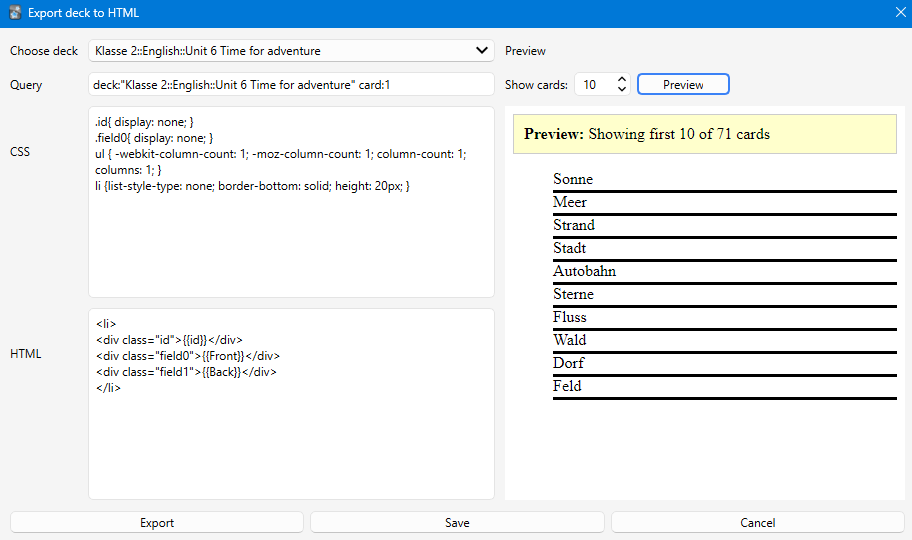
Export to HTML Screenshot

Description

This addon allows you to export Anki cards to a single HTML file with full control over the layout and styling. Based on the original "Export cards to Html" addon, this version has been updated with modern features and support for newer Anki versions.

Features

Core Functionality

  • Export entire decks to standalone HTML files with embedded images
  • Custom HTML templates - Full control over card layout and structure
  • Custom CSS styling - Style your exported cards exactly how you want
  • Flexible queries - Use Anki's search syntax to filter which cards to export
  • Image support - Images are automatically embedded as base64 data

New Features

  • ✨ Live Preview - See how your cards will look before exporting
  • Adjustable preview count - Choose how many sample cards to preview (1-100)
  • Modern UI - Split-panel interface with controls on the left and preview on the right
  • Full CSS support - Preview uses modern web engine for accurate rendering
  • Updated for modern Anki - Compatible with current Anki versions

Installation

  1. Download the addon from AnkiWeb
  2. Open Anki and go to Tools β†’ Add-ons β†’ Get Add-ons
  3. Enter the addon code or install from file
  4. Restart Anki

Usage

Basic Export

  1. Go to Tools β†’ Export deck to html (or press Ctrl+M)
  2. Select your deck from the dropdown
  3. Customize the query if you want to filter specific cards
  4. Modify the CSS and HTML template as needed
  5. Click Preview to see how your cards will look
  6. Click Export to save the HTML file

Template System

The addon uses a simple template system with placeholders:

HTML Template

Use {{fieldName}} to insert card fields:

<li>
  <div class="id">{{id}}</div>
  <div class="field0">{{Front}}</div>
  <div class="field1">{{Back}}</div>
</li>
  • {{id}} - Card number (1, 2, 3, etc.)
  • {{Front}}, {{Back}}, etc. - Your card fields
  • {{Front//Text}} - Fallback syntax for multiple card types

CSS Styling

Add any CSS to style your cards:

.id { display: none; }
li { border-bottom: solid; height: 20px; }
ul { column-count: 3; }

Query Syntax

Use Anki's search syntax to filter cards:

  • deck:"Deck Name" - All cards in a deck
  • deck:"Deck Name" card:1 - Only specific card type
  • tag:important - Cards with specific tag
  • Combine with AND, OR, etc.

Save and Reuse

Click Save to store your current template, CSS, and query for the selected deck. The next time you open the dialog, your settings will be restored.

Preview Feature

The preview panel shows how your exported HTML will look:

  1. Set the number of cards to preview (default: 10)
  2. Click Preview to generate
  3. The preview shows the first N cards with your CSS applied
  4. Adjust your template/CSS and preview again until satisfied

Tips

  • Start with a small preview count (5-10) while designing your layout
  • Use the preview to test your CSS before exporting large decks
  • Save your templates for each deck to reuse them later
  • Images are automatically embedded, so the HTML file is completely standalone
  • The exported HTML file can be opened in any web browser

Credits

Based on the original "Export cards to Html" addon. Updated and enhanced with modern features including live preview, better UI, and support for current Anki versions.

Support

If you encounter any issues or have suggestions, please report them on the addon's GitHub page or AnkiWeb reviews.

Keyboard Shortcut

  • Ctrl+M - Open the Export deck to HTML dialog

README

Export Deck to HTML

Export your Anki decks to standalone HTML files with custom styling and formatting.

Export to HTML Screenshot

Description

This addon allows you to export Anki cards to a single HTML file with full control over the layout and styling. Based on the original "Export cards to Html" addon, this version has been updated with modern features and support for newer Anki versions.

Features

Core Functionality

  • Export entire decks to standalone HTML files with embedded images
  • Custom HTML templates - Full control over card layout and structure
  • Custom CSS styling - Style your exported cards exactly how you want
  • Flexible queries - Use Anki's search syntax to filter which cards to export
  • Image support - Images are automatically embedded as base64 data

New Features

  • ✨ Live Preview - See how your cards will look before exporting
  • Adjustable preview count - Choose how many sample cards to preview (1-100)
  • Modern UI - Split-panel interface with controls on the left and preview on the right
  • Full CSS support - Preview uses modern web engine for accurate rendering
  • Updated for modern Anki - Compatible with current Anki versions

Installation

  1. Download the addon from AnkiWeb
  2. Open Anki and go to Tools β†’ Add-ons β†’ Get Add-ons
  3. Enter the addon code or install from file
  4. Restart Anki

Usage

Basic Export

  1. Go to Tools β†’ Export deck to html (or press Ctrl+M)
  2. Select your deck from the dropdown
  3. Customize the query if you want to filter specific cards
  4. Modify the CSS and HTML template as needed
  5. Click Preview to see how your cards will look
  6. Click Export to save the HTML file

Template System

The addon uses a simple template system with placeholders:

HTML Template

Use {{fieldName}} to insert card fields:

<li>
  <div class="id">{{id}}</div>
  <div class="field0">{{Front}}</div>
  <div class="field1">{{Back}}</div>
</li>
  • {{id}} - Card number (1, 2, 3, etc.)
  • {{Front}}, {{Back}}, etc. - Your card fields
  • {{Front//Text}} - Fallback syntax for multiple card types

CSS Styling

Add any CSS to style your cards:

.id { display: none; }
li { border-bottom: solid; height: 20px; }
ul { column-count: 3; }

Query Syntax

Use Anki's search syntax to filter cards:

  • deck:"Deck Name" - All cards in a deck
  • deck:"Deck Name" card:1 - Only specific card type
  • tag:important - Cards with specific tag
  • Combine with AND, OR, etc.

Save and Reuse

Click Save to store your current template, CSS, and query for the selected deck. The next time you open the dialog, your settings will be restored.

Preview Feature

The preview panel shows how your exported HTML will look:

  1. Set the number of cards to preview (default: 10)
  2. Click Preview to generate
  3. The preview shows the first N cards with your CSS applied
  4. Adjust your template/CSS and preview again until satisfied

Tips

  • Start with a small preview count (5-10) while designing your layout
  • Use the preview to test your CSS before exporting large decks
  • Save your templates for each deck to reuse them later
  • Images are automatically embedded, so the HTML file is completely standalone
  • The exported HTML file can be opened in any web browser

Credits

Based on the original "Export cards to Html" addon. Updated and enhanced with modern features including live preview, better UI, and support for current Anki versions.

Support

If you encounter any issues or have suggestions, please report them on the addon's GitHub page or AnkiWeb reviews.

Keyboard Shortcut

  • Ctrl+M - Open the Export deck to HTML dialog