[BETA] Anki Hide Deck

AnkiWeb addon 1341090014

Lets you right-click decks to hide them and their sub-decks from the main deck list, with unhiding available through Tools > Hidden Decks, without altering the decks.
AI-generated summary; may contain mistakes.

deck-managementbeta

Open on AnkiWeb GitHub Find alternatives

AnkiWeb

Votes
4 (πŸ‘ 4 Β· πŸ‘Ž 0)
Updated
2026-04-12
Anki versions
2.1.1~
License
MIT (from the GitHub repository)
Virus scan
No ClamAV match A match does not prove malware. No match does not prove that the code is safe.
Languages
Python, JSON
Description language
en

Maintenance

active

  • Last update or commit: 2026-09-01 (61 days before the snapshot).
  • Test files: 1.
  • GitHub Actions workflows: 2.
  • Commits in the last year: 6.
  • Issues: 0 open, 0 closed.
  • Pull requests: 0 open, 0 merged.

Will it work on my Anki?

Version branches
Min AnkiMax AnkiUpdated
2.1.1+2026-04-12
History across monthly snapshots

Loading…

Similar addons

Anki Quick AI

Collects note field values from Anki, sends customizable multilingual prompts to OpenAI, and displays or plays generated text and audio responses.

aibeta

5 votes 57% approval πŸ‘ 5 Β· πŸ‘Ž 0 ⭐ 49 Anki 23.10~ Updated 2024-07-11
No Screen Due

Hides due-card counts on the main screen and per deck to reduce review overwhelm, manipulating only the interface so review statistics remain accurate.

motivationappearancebeta

3 votes 44% approval πŸ‘ 3 Β· πŸ‘Ž 0 ⭐ 0 Anki 2.1.52~ Updated 2023-03-20
Study-Review Deck

Adds Study and Review buttons per deck to separate new-card study from due-card review, plus a Wrap Up button that clears new cards so the session can finish.

review-flowdeck-management

7 votes 65% approval πŸ‘ 7 Β· πŸ‘Ž 0 ⭐ 0 Anki 2.1.61~ Updated 2024-07-16
Duolingo Dictionary

Provides a searchable Duolingo dictionary interface in the editor and card browser, letting users find translations and paste usage examples, though example sentences currently cannot be fetched.

card-creationdictionaryobsoletebeta

2 votes 9% approval πŸ‘ 1 Β· πŸ‘Ž 1 ⭐ 3 Anki 2.1.49~ Updated 2022-05-10
Study Time & Efficiency Tracker

Automatically tracks study sessions and displays daily, deck, and historical review-time statistics with efficiency estimates, integrating with Review Heatmap (required) and offering customizable panels.

statisticstimerappearance
2 votes 34% approval πŸ‘ 2 Β· πŸ‘Ž 0 Anki 2.1.1~ Updated 2026-10-20

Description

Anki Hide Deck

Hide decks from the main deck list without changing the decks themselves.

This add-on is visual only and local only.

It does not:

  • delete decks
  • rename or move decks
  • change cards or notes
  • change scheduling or review history
  • change Anki's database schema

It only hides decks from the deck browser UI.

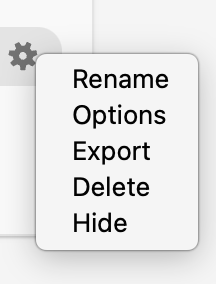
Hide deck context action

What it does

  • adds Hide when you right-click a deck
  • removes the deck from the main deck list immediately
  • hides all sub-decks if you hide a parent deck
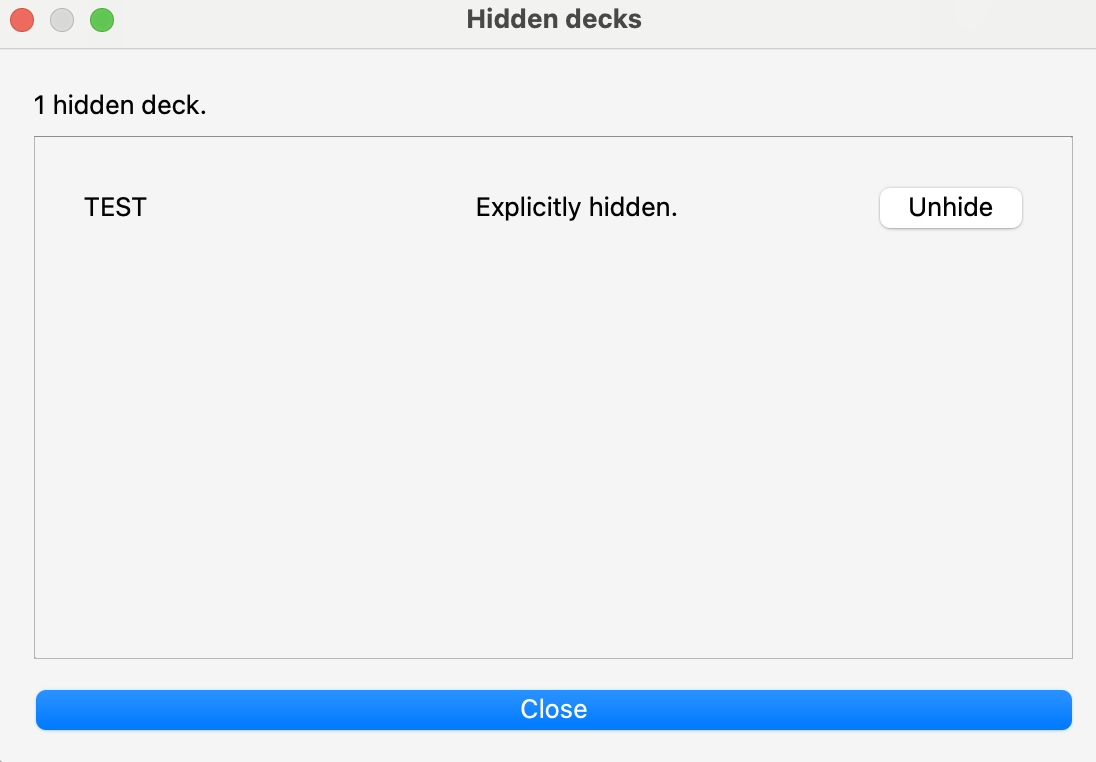
  • lets you unhide decks from Tools > Hidden Decks

Sub-decks

If you hide a parent deck, the whole subtree is hidden too.

That means:

  • sub-decks disappear with the parent
  • sub-decks stay hidden while the parent stays hidden
  • the parent should be unhidden from Tools > Hidden Decks

Hidden decks manager

How to use it

  1. Go to the main deck screen.
  2. Right-click a deck.
  3. Click Hide.
  4. To restore it, open Tools > Hidden Decks and click Unhide.

MVP

  • right-click hide
  • deck-list filtering
  • Tools > Hidden Decks dialog

README

πŸ™ˆ Anki Hide Deck

CI License: MIT

Hide decks from Anki's main deck list without touching the decks themselves.

It is visual only and local only.

  • no deck deletion
  • no deck rename or move
  • no card or note changes
  • no scheduling or review changes
  • no schema changes

Hidden decks still exist in your collection. The add-on only filters what is shown on the deck screen.

Hide deck context action

What It Does

  • Right-click a deck -> Hide
  • The deck disappears from the main deck list immediately
  • Hide a parent deck -> all its sub-decks are hidden too
  • Unhide from Tools > Hidden Decks
  • Hidden state survives restart

Important Behavior

  • Hiding is a local UI preference stored in add-on config
  • Hidden decks are not deleted or modified
  • Sub-decks stay hidden while the parent deck is hidden
  • Only explicitly hidden parent decks can be directly unhidden

Hidden decks manager

How To Use It

  1. Open the main deck screen.
  2. Right-click a deck.
  3. Click Hide.

To bring it back:

  1. Open Tools > Hidden Decks.
  2. Click Unhide.

MVP Scope

  • right-click hide
  • deck-list render filtering
  • Tools > Hidden Decks dialog with unhide

Development

make install-dev
make check
make test
make build
make install