OmniPrompt Anki
v1.1.5


Your AI Anki Assistant! OmniPrompt Anki is an Anki add-on that enhances your flashcards with AI-powered content generation. It supports multiple AI providers — including OpenAI, Google Gemini, Anthropic (Claude), DeepSeek, xAI, and local models (Ollama, LM Studio) — giving you full control over how your content is created. With features like prompt management, batch processing, filter mode, debug mode, multi-field output, and multi-provider support, OmniPrompt helps you build richer, smarter decks in less time.
Features
✅ AI-Powered Content – Generate definitions, translations, explanations, synonyms, and more.
✅ Multiple AI Providers – OpenAI, DeepSeek, Anthropic, xAI, Google Gemini, Ollama, LM Studio
✅ Local Model Support – Use Ollama or LM Studio for private, offline AI processing
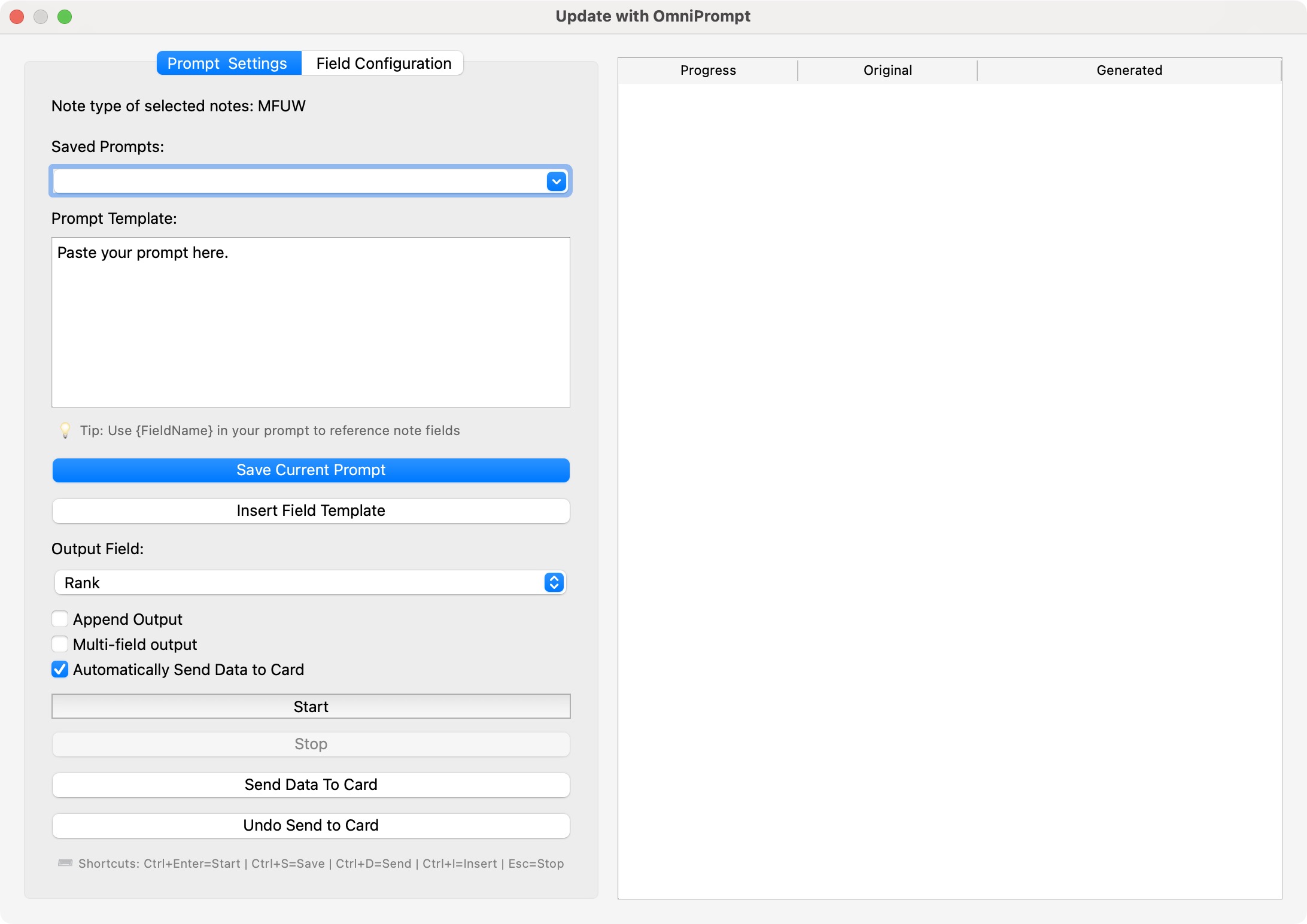
✅ Custom Prompts – Save and reuse prompt templates with field placeholders.
✅ Batch Processing – Process multiple notes simultaneously with real-time progress tracking.
✅ Multi-field Output – Parse AI responses into multiple note fields automatically with confidence scoring, auto-mapping, and field mismatch handling.
✅ Flexible Field Selection – Choose which field to update dynamically, with Select All/None and auto-parse from prompt.
✅ Custom Models per Provider – Add, remove, and manage custom model names for any AI provider.
✅ Connection Testing – Test API connectivity and fetch available models for local providers (Ollama/LM Studio).
✅ Auto-Save – Generated content can be automatically saved to selected fields.
✅ Formatting Cleanup – Use AI to clean or modify existing text formatting.
✅ OpenAI API Version Selector – Choose between modern (GPT-5), legacy (Chat Completions), or auto-detect based on model name.
✅ GPT-5.4 Settings – Fine-tune reasoning effort and verbosity for GPT-5.4 models.
✅ Advanced Settings – Fine-tune timeout, delay, debug mode, and filter mode.
✅ Keyboard Shortcuts – Ctrl+Shift+O to open, Ctrl+Return to start, Ctrl+S/D/I/P shortcuts for common actions.
Quick Start
- Install via AnkiWeb (code:
1383162606) or from source
- Configure your AI provider in Tools → OmniPrompt-Anki → Settings
- Select notes in the Anki Browser, right-click and choose "Update with OmniPrompt"
- Choose a prompt and let AI enhance your flashcards!

For detailed instructions, see the Complete User Guide.
Documentation
📚 Complete User Guide – Installation, setup, usage, examples, configuration, and troubleshooting.
The user guide covers:
- Installation (AnkiWeb, Codeberg, GitHub)
- Setup & Configuration (all AI providers)
- User Interface Walkthrough
- Single-field & Multi-field Processing
- Custom Models & Connection Testing
- Prompt Templates & Management
- Advanced Features (Filter Mode, Debug Mode, Auto-send, GPT-5.4 Settings)
- Keyboard Shortcuts
- Troubleshooting & Logging
🤝 Contributing
How to Contribute
- Fork the repository on Codeberg or GitHub.
- Create a new branch (
feature-new-functionality).
- Make your changes and test in Anki.
- Submit a pull request with a clear description.
Ways to Help
- Bug reports & feature requests: Open an issue on Codeberg or GitHub.
- Improve documentation.
- Optimize code & performance.
🛠️ Roadmap
✅ Completed
- [x] Full multi-field output with confidence scoring, auto-parsing, and field mapping
- [x] Custom models per provider (+/- buttons)
- [x] Connection testing with model fetching for Ollama/LM Studio
- [x] OpenAI API version selector (modern, legacy, auto)
- [x] GPT-5.4 reasoning effort and verbosity settings
- [x] Note type consistency checking with filtering dialog
- [x] Field mismatch detection with auto-mapping dialog
- [x] Parse Prompt button to auto-select fields from prompt text
- [x] Global progress bar for batch processing (>10 notes)
- [x] Ollama and LM Studio local model support
- [x] Auto-send to card feature
- [x] Prompt template management (save, edit, delete)
- [x] Append mode for multi-field and single-field output
- [x] xAI (Grok) provider support
🚀 Planned
- [ ] Support for more AI models and providers
- [ ] Enhanced template variable system
- [ ] Additional output formatting options
- [ ] Drag-and-drop field mapping
- [ ] Preset configurations per note type
📜 License
This project is licensed under the MIT License. Feel free to use, modify, and distribute it with attribution.
❤️ Support & Feedback
- Found a bug? Open an issue on Codeberg or GitHub.
- Have suggestions? We'd love to hear your feedback!
- Want to contribute? See the Contributing section above.
OmniPrompt-Anki is completely free and open-source, created to help learners enhance their flashcards with AI-powered content. If you find this add-on useful, you can support its development by leaving a positive review on AnkiWeb. Your feedback helps more users discover the add-on and encourages further improvements.
🙏 Special Thanks
Huge thanks to u/Smooth-Put5476 for their thoughtful suggestions and feedback on the OmniPrompt-Anki Reddit thread.
Special thanks to our GitHub contributors for their code contributions:
Many of the improvements in recent versions would not have been possible without their input!
Your support and ideas make this project better for everyone. ❤️
👉 Rate add-on on AnkiWeb
Thank you for your support!