Copy 'Text' Fields in Browser

AnkiWeb addon 1409846895

Copies the Text field from multiple selected cards in the Browser in one click, letting you paste them elsewhere to generate consolidated explanations or summaries.
AI-generated summary; may contain mistakes.

note-management

Open on AnkiWeb Find alternatives

AnkiWeb

Votes
0 (πŸ‘ 0 Β· πŸ‘Ž 0)
Updated
2025-12-30
Anki versions
25.09.2~
License
Not found (this does not mean that the addon has no license)
Virus scan
No ClamAV match A match does not prove malware. No match does not prove that the code is safe.
Languages
Python
Description language
en

Maintenance

stale

  • Last update or commit: 2025-12-30 (306 days before the snapshot).

GitHub

No GitHub repository linked.

Will it work on my Anki?

Version branches
Min AnkiMax AnkiUpdated
25.02.725.09.2+2025-12-30
History across monthly snapshots

Loading…

Similar addons

Copy Text Field to Clipboard

Adds right-click Browser options to copy a selected field from multiple notes to the clipboard, either as clean plain text with header and Note ID or as raw HTML.

exportnote-management

7 votes 49% approval πŸ‘ 6 Β· πŸ‘Ž 1 Anki 2.1.1~ Updated 2025-10-27
Copy Note Fields as Markdown

Copies a single selected card’s non-empty note fields, in order and with HTML stripped, to the clipboard as Markdown via the Browser context menu, without modifying the collection.

exportnote-management

2 votes 34% approval πŸ‘ 2 Β· πŸ‘Ž 0 ⭐ 0 Anki 2.1.1~ Updated 2026-04-18
AnkiBulk

Bulk-adds many notes at once via an editable table or YAML text view, exporting to the clipboard for LLMs or spreadsheets, using existing notes as context.

card-creationnote-management

2 votes 44% approval πŸ‘ 3 Β· πŸ‘Ž 0 ⭐ 0 Anki 26.05~ Updated 2026-08-05

Description

This is a lightweight Anki add-on that lets you copy the Text field from multiple selected cards directly from the Browser. Select a batch of cards, copy their Text fields in one click. You can then paste them into ChatGPT or another editor to generate consolidated explanations, summaries, or teaching notes.

Example purpose: select 10 cards in browser, copy their Text fields, paste them into ChatGPT, and generate a single high-yield explanation to add back into the Extra field (or just to learn).

Note: future update will have GPT integration prepared. Still light weight.
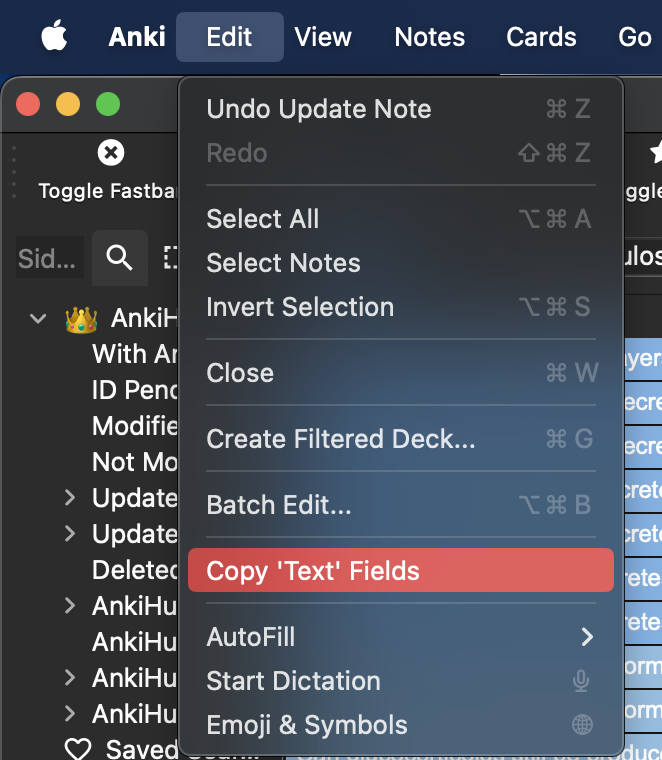
Example

Made by DS