Hover Glossary
Plain-English definitions for hard medical terms, right on your Anki cards.
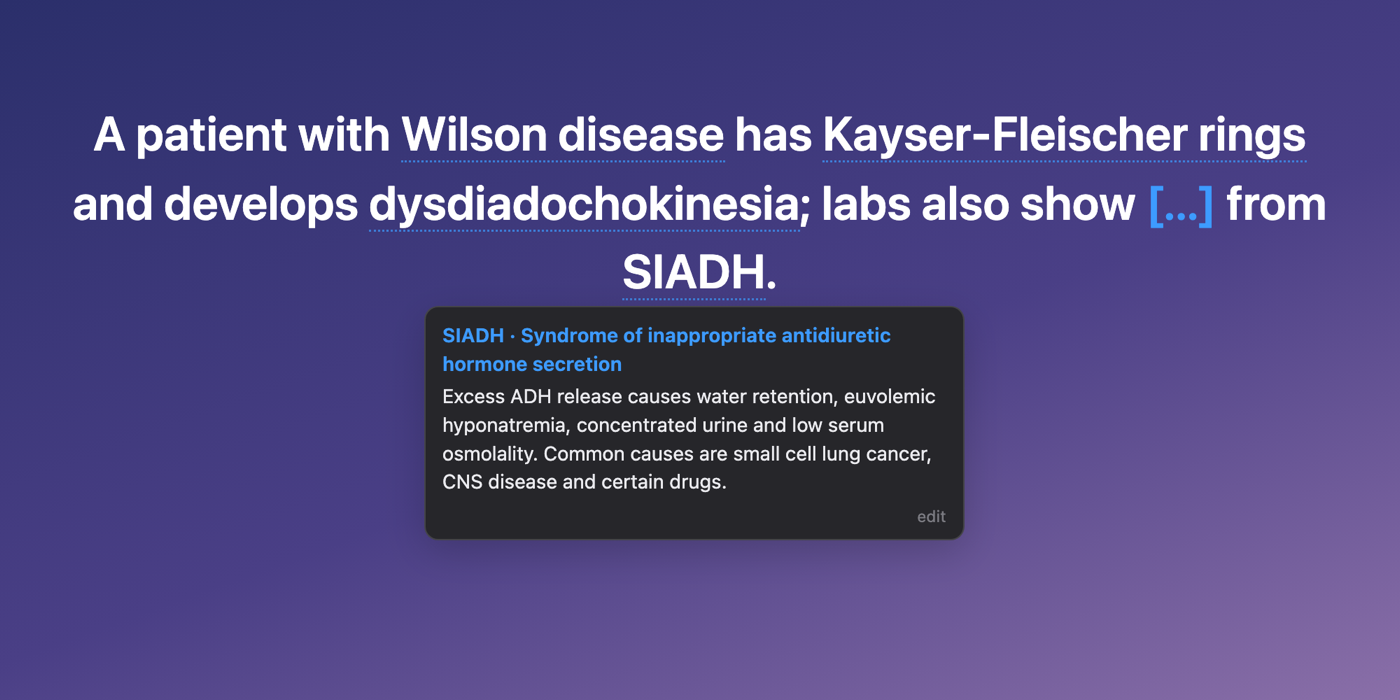
Hard terms on a card get a faint dotted underline. Hover one (or click it) and a short
definition pops up: what it is, plus the one association that makes the card click.
Abbreviations work too. Hover SIADH and the pop-up spells it out before defining it.

- About 9,000 terms and 1,160 abbreviations, picked from the vocabulary of the
AnKing Step deck and the U.S. National Library of Medicine's MeSH vocabulary.
- Only the terms you'd actually look up. "Urticaria" gets a pop-up and "hives" doesn't.
Definitions are written at a college reading level, not for the general public.
- Works on any card and note type: AnKing, your own decks, cloze, basic and Image
Occlusion.
- Never changes your notes. Terms are marked on screen after the card is drawn, so
AnkiHub/AnKing updates, syncing and shared decks are unaffected.
- Works offline and collects nothing. The glossary ships inside the add-on.
Install
- AnkiWeb (recommended, updates itself): Tools → Add-ons → Get Add-ons…, enter code
1450038911
(AnkiWeb page).
- From a file: download
hover_glossary-<version>.ankiaddon from
Releases, then
Tools → Add-ons → Install from file….
Needs Anki 2.1.50 or newer on desktop (Mac, Windows, Linux). AnkiMobile and AnkiDroid
don't run add-ons.
Use
| Action |
What happens |
| Hover a dotted term |
Definition appears |
| Click a term |
Pins the pop-up open (click elsewhere or press Esc to close) |
| edit in a pop-up |
Reword that definition for yourself; kept across updates |
| Tools → Hover Glossary definitions |
Turn the whole thing on/off |
Settings (Tools → Add-ons → Hover Glossary → Config):
showOnQuestion (default true): set to false to mark terms only after the answer is shown.markEveryOccurrence (default false): set to true to underline repeats too.hoverDelayMs (default 120): how long to rest on a term before the pop-up opens.
Compatibility
- Onigiri: supported. Clicking a term won't flip the card, and the underlines step
aside while you edit a card in the reviewer, so they never get saved into a note.
- Other add-ons that underline terms (for example AMBOSS): use one at a time, or
terms will be marked twice.
Accuracy and corrections
Definitions are short study aids. They can be incomplete or occasionally wrong, so don't
use them for patient care. Found a bad or missing definition? Open an
issue with the term and the
fix, or send a pull request (see below).
How it's built
addon/                 the add-on (what ships in the .ankiaddon)
  web/glossary.js      finds terms in the drawn card and runs the pop-up
  web/glossary_data.js compiled glossary (generated, don't edit by hand)
data/defs/*.jsonl      the definitions, one JSON line per candidate term
DEFINE.md              the writing rules every definition follows
tools/                 extraction, checks and packaging scripts
Each line in data/defs is either a kept term:
{"id": 1234, "term": "Koilonychia", "def": "Spoon-shaped nails…", "syn": [], "abbr": []}
or a skipped candidate ({"id": 1235, "skip": "obvious"}).
To change a definition, edit its line, then rebuild:
python3 tools/build_data.py data/defs/batch_*.jsonl -o addon/web/glossary_data.js
To build the installable file:
python3 tools/package.py
To try changes in a browser without Anki, serve the repo folder and open
tools/test_harness.html. It mimics the review screen, including Onigiri's
click-to-reveal and inline editing.
The candidate list was generated from a local copy of the AnKing deck
(tools/dump_anking.py → match.py / extra_terms.py → make_candidates.py). It isn't
in this repo because it quotes AnKing card text. The definitions themselves are original
writing.
License
- Code: MIT
- Definitions (
data/defs, addon/web/glossary_data.js):
CC BY-SA 4.0. Reuse them freely with credit, and share
adaptations under the same license.
Term list built in part from MeSH, courtesy of the U.S. National Library of Medicine.
Not affiliated with or endorsed by AnKing, AnkiHub, AMBOSS or NLM.