Graphs from this addon are available in a much more accessable format in the stats menu.
Github: https://github.com/Luc-Mcgrady/Anki-Search-Stats-Extended
Ankiweb: https://ankiweb.net/shared/info/1613056169
Anki Animated Graphs
Video
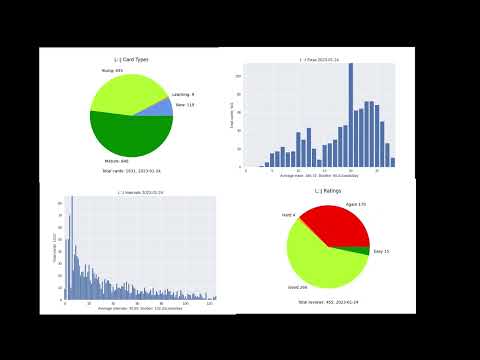
*Edited together in Kdenlive
Usage
- Download the addon and put it in your addons folder
- Select the deck you want to generate a graph for and select one of the 4 new options.
- Download matplotlib if prompted. (I didn't test the install code and especially didn't test it on mac so if it doesn't work)
Options
Create Interval Bars
Create a time-lapse of your intervals over time

Full disclosure, for some reason the intervals at the end and the intervals in the anki stats are different. The reason for this I don't know but the graph looks pretty regardless.
Create Ease Bars
Bar animated chart but this time for your ease.

Known Issues
- For some reason matplotlib made changing the numbers on the bottom of the bar difficult, so the ease is actually 10* what it says it is)
- I opted to make it so that "ease" was actually $\frac{current review}{next review}$ to support custom schedulers)
- (Due after a card does its last review it dissapears from the graph. This is probably fixable but I tried and it was annoying 😐)
- I left the burden stat on which is totally unrelated to the thing that is graphed. Its good to know I guess.
Create Card Type Pie
This is the animated version of your card types (young, mature etc).

This wont be perfect because the new cards come in when they are created not when they are moved into your deck. Also learning cards are just counted as cards with an interval less than 1. Theres probably a way to fix that but it shouldn't make too big a difference.
Create Rating Pie
This option creates an animated pie chart of all the ratings you gave to reviews on every day you rated them.

Matplotlib install
For all of these your going to need python installed with pip. All the automatic install does is run these commands so its probably more reliable than doing this manually. Only read this if the automatic install has failed.
Linux
Just install matplotlib
$ pip install matplotlib
If this doesn't work then my only guess is your pip is probably for a different python than the one anki uses. so try find the one python uses and run that ones pip.
Windows
Try and run anki in administrator mode if you get errors regarding permissions in folders.
In windows it wont count if you install matplotlib in your python site-packages like if you did the linux way. Anki has its own python runtime and its own packages. Conveniently these packages are in the lib folder
pip install --target=".../anki/lib" matplotlib
Where .../anki = your anki install location.
Mac
Probably the same as windows, otherwise good luck.