note: If you use a Mac see the heading MacOS below.
note: In Anki 2.1.55 (released in 2022-12) you might have to close and reopen the add/browser/editCurrent window to see the changes you've made in an external app. This is a known issue due to changes in the editor in this most recent anki version. I'll look into this when I have more time in 2024.
This add-on handles images, sound files, and videos: You can open them in an external program: e.g. you can open images in paint or "paint.NET" and edit them, add some text or arrows, crop them, etc. You can also duplicate the files. You can also rename them to e.g. later find them better when you are searching. This add-on adds context menu entries when you rightclick on an image (left screenshot below) or for audio/video when you have selected the whole "[sound:...]" text (middle screenshot below).
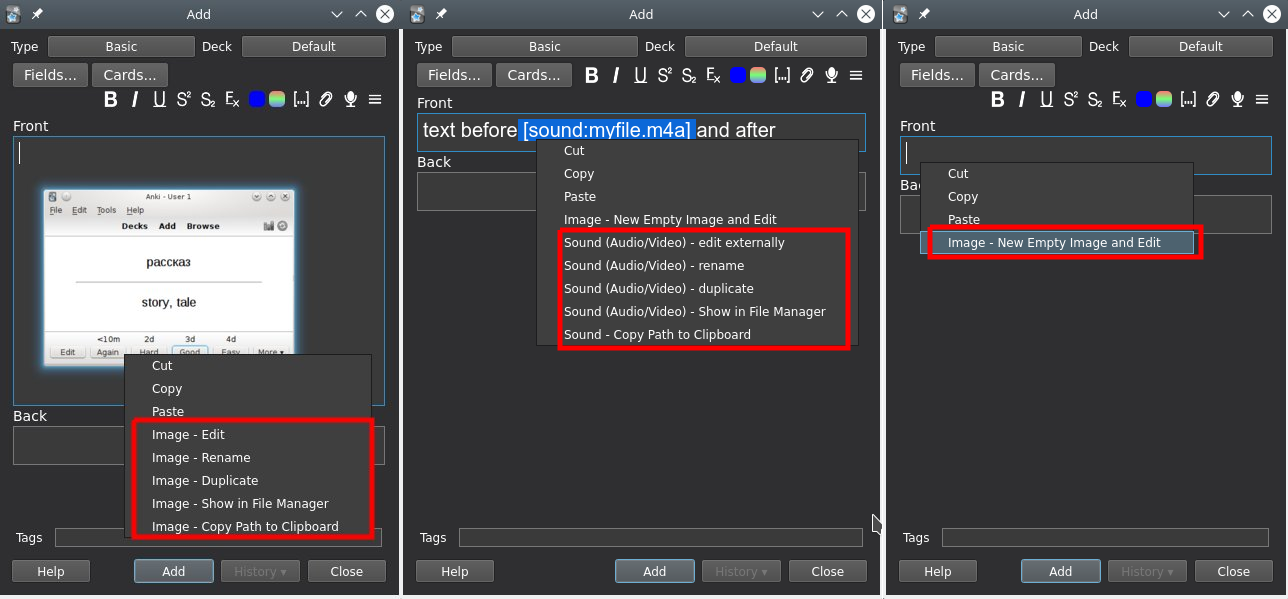 This add-on mainly works in the editor (AddCards Dialog, bottom of the browser). During reviews you'll have fewer context menu entries.
Use this at your own risk.
# Details
On MacOS some functions don't work because by default MacOS for security reasons prohibitis apps from interacting with each file on the disk. What's possible depends on your MacOS version and what you've set in your system setttings. for details on macos see the next heading
-edit the file in an external application. If you edit an image and don't use a Mac the editor is reloaded by default so that your changes are shown.
-duplicate the file. A copy will be put into the media folder and it will be inserted right after the current file in the editor. By default a number is appended ("_1","_2"). If shift is pressed when you click duplicate in the context menu you can select the new file name. This function might be more useful if you also use the add-on Copy notes (in the browser) or Frozen Fields or Field History (in the add window).
-rename the file. By default this is disabled because this is experimental. If you use this make sure to have backups and know how to restore them.
-show in file manager.
-edit an empty file and edit it. I use this as an alternative for DrawingPad on machines where I don't have Java or when I need extended drawing options (see the right screenshot above)
# MacOS
I tested with 2.1.55rc1 in MacOS 12 in 2022-12 with the default security settings:
-editing in an external application does not work. Maybe have a look at the add-on "image editor", https://ankiweb.net/shared/info/307397307, that loads a javascript image editor into a website inside Anki so that technically Anki does not send the file to a different program installed on your mac. Anoher workaround might be to use the option "copy path to clipboard" from my add-on and then use this path in your image editor.
-renaming: works for me
-duplicate: works for me
-show in file manager: does not work, it only shows the finder but doesn't open the correct folder. This feature used to work in older Anki and older MacOS versions in 2020/2021. The add-on "Reveal in File Manager", https://ankiweb.net/shared/info/545706530, by the great add-on creator abdo has the same limitation in 2022-12. To work around this the option "copy path to clipboard" from my add-on might be useful.
# Limitations
-In 2.1.50 the image to rename, etc may not be selected (be in resize mode) when right clicking it.
-For MacOS see above. I don't have a Mac so I can't regularly test what works on a Mac. The code for MacOs has been tested, fixed, and extended by yhlai-code (2020-04) and OjisanSeiuchi/https://github.com/NSBum (in 2022).
-if the rename function does not work edited notes would be permanently damaged so that you would have to manually reinsert the images. That could be time consuming. The rename function has been included in the add-on for over three years, there are several thousand downloads, some upvotes for this add-on that mention that renaming works for them and so far I haven't got a complaint. So renaming should work but I can't test will a new versions, on all systems etc. If it does not work you should really tell me.
# Configuration
Most of the options names should be self-explanatory.
You must adjust the programs you use. The options with external: ... refer to a program name. Depending on your system it might be enough to use a short command like mspaint (on Windows) or pinta (on linux). Sometimes you need the exact location. This depends on what you have in your PATH environment variable. In Windows if you use the exact location you need to to replace a single backslash (\) by double \\. This is a limitation of the underlying tools that Anki uses. e.g. if you want to use C:\Program Files\paint.net\PaintDotNet.exe you must put C:\Program Files\paint.net\PaintDotNet.exe into the config.
# Problems, Bugs, Errors, Improvements
If you find a bug let me know in the official anki support forum.
# Versions:
-2023-03-19 fix for qt6 (reviewer context menu)
-2022-09-18 fix github issue #10/insert new empty image and edit
-2022-09-10 improvements for MacOS (thanks @OjisanSeiuchi)
-2022-07-05 fix for rename in 2.1.50+, several improvements for MacOS (thanks @OjisanSeiuchi)
-2022-01-05 fix rename counts (thanks @OjisanSeiuchi)
-2021-12-19 handle unicode chars bug fix (thanks @OjisanSeiuchi)
-2021-12-11 - no error when external binary doesn't exist, preliminary changes for 2.1.50/qt6
-2020-12-11 fix bug introduced around 2020-11-23/24
-2020-11-30 partially revert prior
-2020-11-24 just code cleanup
-2020-11-23 sync changes automatically (thanks @d0b3rm4n), adjust to Anki 2.1.28+, changed rename function (using code from BlueGreenMagick's "Image Editor")
-2020-08-06 keep the same card when reloading in the reviewer (made by phu54321)
-2020-07-21 better rename tooltip
-2020-07-20 better linux compatibility
-2020-07-14 add context menu option to copy image/sound path to clipboard (true by default)
-2020-06-30 rename context menu entries (so that they are grouped together), add option to show in fileexplorer to reviewer contextmenu
-2020-04-04 MacOS: show file in finder by 2020 Y. H. Lai (yhlai-code)
-2019-12-09
-2019-05-16
-2019-04-10
-2019-04-07 initial release
# Other Authors:
see the top of the file edit_insert_rename_duplicate.py