IndiaBix Flashcard Generator - Anki Add-on




Automatically scrape IndiaBix questions and convert them into Anki flashcards for spaced repetition learning!
 Simple one-click import interface
📋 Table of Contents
🎯 Overview
IndiaBix provides extensive question banks for competitive exam preparation across various topics like General Knowledge, Aptitude, Logical Reasoning, and more. This Anki add-on bridges the gap between IndiaBix's content and spaced repetition learning by automatically:
- Scraping questions, options, answers, and explanations from IndiaBix
- Converting them into well-formatted Anki flashcards
- Organizing cards with automatic tagging and deck management
- Syncing seamlessly with AnkiWeb for mobile access
✨ Features
Core Features
- One-Click Import: Simply paste an IndiaBix section URL and import all questions
- Daily Current Affairs Auto-Sync: Automatically imports latest current affairs on Anki startup
- Hierarchical Deck Organization: Auto-creates Year → Month → Week subdecks for better organization
- MCQ Format: Questions and options on the front, answer and explanation on the back
- Automatic Tagging: Cards are automatically tagged with category and subcategory
- Deck Management: Choose existing decks or create new ones on the fly
- Pagination Support: Scrape multiple pages from a single section
- Beautiful Card Design: Professionally styled cards with color-coded sections
- Progress Tracking: Real-time progress updates during scraping and importing
Supported Categories
- General Knowledge
- Logical Reasoning
- Quantitative Aptitude
- Verbal Ability
- Technical Subjects
- And all other IndiaBix sections!
🚀 Installation
Prerequisites
- Anki Desktop: Version 2.1.49 or higher (Download here)
- Internet Connection: Required for web scraping
Method 1: From AnkiWeb (Recommended) ⭐
The easiest way to install!
- Open Anki Desktop
- Go to Tools → Add-ons → Get Add-ons...
- Enter the add-on code:
1588987238
- Click OK and restart Anki
That's it! Dependencies are installed automatically.
🔗 AnkiWeb Page: https://ankiweb.net/shared/info/1588987238
Method 2: Manual Installation (For Development)
Only use this method if you want to modify the code or contribute to development.
-
Clone the repository
git clone https://github.com/The-Harsh-Vardhan/AnkiBix-Extension.git
-
Locate your Anki add-ons folder
- Windows:
%APPDATA%\Anki2\addons21\
- Mac:
~/Library/Application Support/Anki2/addons21/
- Linux:
~/.local/share/Anki2/addons21/
-
Copy the add-on files
# Copy all .py and .json files to a new folder in addons21
# Name the folder: indiabix_flashcard_generator
-
Install dependencies
Windows:
cd "%APPDATA%\Anki2\addons21\indiabix_flashcard_generator"
python -m pip install -r requirements.txt
Mac/Linux:
cd ~/.local/share/Anki2/addons21/indiabix_flashcard_generator
python3 -m pip install -r requirements.txt
-
Restart Anki
📖 Usage
Basic Workflow
-
Open the Add-on
- In Anki, go to Tools → Import from IndiaBix
-
Enter IndiaBix URL
- Paste the URL of any IndiaBix section
- Example:
https://www.indiabix.com/general-knowledge/basic-general-knowledge/
-
Configure Options
- Maximum Pages: Set how many pages to scrape (1-100)
- Target Deck: Select an existing deck or create a new one
- Auto-tag: Enable automatic category tagging
- Include Explanation: Choose whether to include explanations on card backs
-
Scrape Questions
- Click "Scrape Questions" button
- Wait for the scraper to fetch all questions
- Review the status messages
-
Import to Anki
- Click "Import to Anki" button
- Cards will be added to your selected deck
- Sync with AnkiWeb to access on mobile devices
Current Affairs Auto-Sync
Automatically import daily current affairs questions:
 Manage daily Current Affairs auto-sync settings
- Enable Auto-Sync: Tools → IndiaBix → Manage Current Affairs Auto-Sync
- Toggle Settings: Enable/disable automatic daily imports
- Catch-up Mode: Import missed days (up to 90 days back)
- Hierarchical Organization: Questions automatically organized by Year → Month → Week
Example URLs
Here are some popular IndiaBix sections you can import:
General Knowledge:
https://www.indiabix.com/general-knowledge/basic-general-knowledge/https://www.indiabix.com/general-knowledge/indian-history/https://www.indiabix.com/general-knowledge/geography/
Logical Reasoning:
https://www.indiabix.com/logical-reasoning/blood-relations/https://www.indiabix.com/logical-reasoning/puzzles/https://www.indiabix.com/logical-reasoning/logical-sequence-of-words/
Aptitude:
https://www.indiabix.com/aptitude/numbers/https://www.indiabix.com/aptitude/percentage/https://www.indiabix.com/aptitude/time-and-work/
Sample Flashcard
See how questions are beautifully formatted:
 Professionally formatted flashcards with clear explanations
Tips for Best Results
- Start Small: Begin with 1-2 pages to test the scraper
- Organize Decks: Use hierarchical deck names like
IndiaBix::GK::History
- Regular Imports: Import new questions regularly to build your deck
- Review Settings: Adjust Anki's review settings for optimal learning
- Sync Often: Keep your collection synced across devices
⚙️ Configuration
Edit config.json to customize default settings:
{
  "default_deck": "IndiaBix::General",
  "auto_tag": true,
  "default_tags": ["IndiaBix"],
  "card_type": "Basic",
  "include_explanation": true,
  "batch_size": 50,
  "timeout": 30,
  "user_agent": "Mozilla/5.0 (Windows NT 10.0; Win64; x64) AppleWebKit/537.36"
}
Configuration Options
| Option |
Description |
Default |
default_deck |
Default deck name for imports |
"IndiaBix::General" |
auto_tag |
Automatically tag cards |
true |
default_tags |
Tags to add to all cards |
["IndiaBix"] |
include_explanation |
Include explanations |
true |
batch_size |
Cards to process at once |
50 |
timeout |
HTTP request timeout (seconds) |
30 |
📁 Project Structure
indiabix_flashcard_generator/
├── __init__.py           # Main entry point and menu integration
├── manifest.json         # Add-on metadata and configuration
├── config.json          # User-configurable settings
├── scraper.py           # Web scraping logic for IndiaBix
├── ui.py                # PyQt GUI dialog
├── deck_builder.py      # Anki API integration
└── README.md            # Documentation (this file)
Module Descriptions
__init__.py: Initializes the add-on and adds menu items to Ankiscraper.py: Contains IndiaBixScraper class for web scrapingui.py: Contains IndiaBixDialog class for the GUIdeck_builder.py: Contains DeckBuilder class for card creationconfig.json: Stores user preferencesmanifest.json: Anki add-on metadata
🛠️ Development
Setting Up Development Environment
-
Clone the repository
git clone https://github.com/yourusername/indiabix-anki.git
cd indiabix-anki
-
Install dependencies
pip install beautifulsoup4 requests
-
Link to Anki add-ons folder
- Create a symbolic link to your Anki addons21 folder
- This allows you to edit code and test in Anki immediately
Testing the Scraper
Run the scraper independently:
python scraper.py
This will test scraping a sample URL and print results.
Code Style
- Follow PEP 8 guidelines
- Use type hints where applicable
- Add docstrings to all functions and classes
- Keep functions focused and modular
Architecture Overview
User Input (URL) → Scraper → Question Parser → Deck Builder → Anki Collection
                                                           ↓
                                                      AnkiWeb Sync
🐛 Troubleshooting
Common Issues
1. "Import aqt/anki could not be resolved" errors
- These are expected linter warnings outside Anki environment
- The code will work correctly when loaded in Anki
2. No questions scraped
- Check if the URL is valid and accessible
- IndiaBix may have changed their HTML structure
- Try a different section URL
3. Import fails
- Ensure you have selected a valid deck
- Check Anki's error log: Tools → Add-ons → View Files
- Verify Python dependencies are installed
4. Cards look strange
- The note type may not have been created properly
- Delete the "IndiaBix MCQ" note type and let the add-on recreate it
5. Slow scraping
- Reduce the number of pages to scrape
- Check your internet connection
- IndiaBix server may be slow
Getting Help
- GitHub Issues: Report bugs or request features
- Anki Forums: Ask questions in the add-on development section
- Email: Contact the maintainer for support
🤝 Contributing
Contributions are welcome! Here's how you can help:
Ways to Contribute
- Report Bugs: Open an issue with detailed information
- Suggest Features: Share your ideas for improvements
- Submit Pull Requests: Fix bugs or add features
- Improve Documentation: Help make the docs clearer
- Test: Try the add-on and provide feedback
Contribution Guidelines
- Fork the repository
- Create a feature branch (
git checkout -b feature/amazing-feature)
- Commit your changes (
git commit -m 'Add amazing feature')
- Push to the branch (
git push origin feature/amazing-feature)
- Open a Pull Request
Future Enhancements
- [ ] Support for other Q&A websites (GeeksforGeeks, LeetCode)
- [ ] Daily question scraper (automated imports)
- [ ] AI-enhanced explanations
- [ ] Batch URL processing
- [ ] Export/import question sets
- [ ] Custom card templates
- [ ] Statistics and analytics
📄 License
This project is licensed under the MIT License - see below:
MIT License

Copyright (c) 2025 IndiaBix Flashcard Generator Contributors

Permission is hereby granted, free of charge, to any person obtaining a copy
of this software and associated documentation files (the "Software"), to deal
in the Software without restriction, including without limitation the rights
to use, copy, modify, merge, publish, distribute, sublicense, and/or sell
copies of the Software, and to permit persons to whom the Software is
furnished to do so, subject to the following conditions:

The above copyright notice and this permission notice shall be included in all
copies or substantial portions of the Software.

THE SOFTWARE IS PROVIDED "AS IS", WITHOUT WARRANTY OF ANY KIND, EXPRESS OR
IMPLIED, INCLUDING BUT NOT LIMITED TO THE WARRANTIES OF MERCHANTABILITY,
FITNESS FOR A PARTICULAR PURPOSE AND NONINFRINGEMENT. IN NO EVENT SHALL THE
AUTHORS OR COPYRIGHT HOLDERS BE LIABLE FOR ANY CLAIM, DAMAGES OR OTHER
LIABILITY, WHETHER IN AN ACTION OF CONTRACT, TORT OR OTHERWISE, ARISING FROM,
OUT OF OR IN CONNECTION WITH THE SOFTWARE OR THE USE OR OTHER DEALINGS IN THE
SOFTWARE.
🙏 Acknowledgments
- IndiaBix: For providing comprehensive question banks
- Anki: For the powerful spaced repetition system
- Contributors: Everyone who helps improve this add-on
� Documentation
For detailed documentation, see the docs folder:
📞 Contact
Note: This is an unofficial add-on and is not affiliated with IndiaBix. Please respect IndiaBix's terms of service and use this tool responsibly for personal educational purposes only.
Happy Learning! 📚✨
 Simple one-click import interface
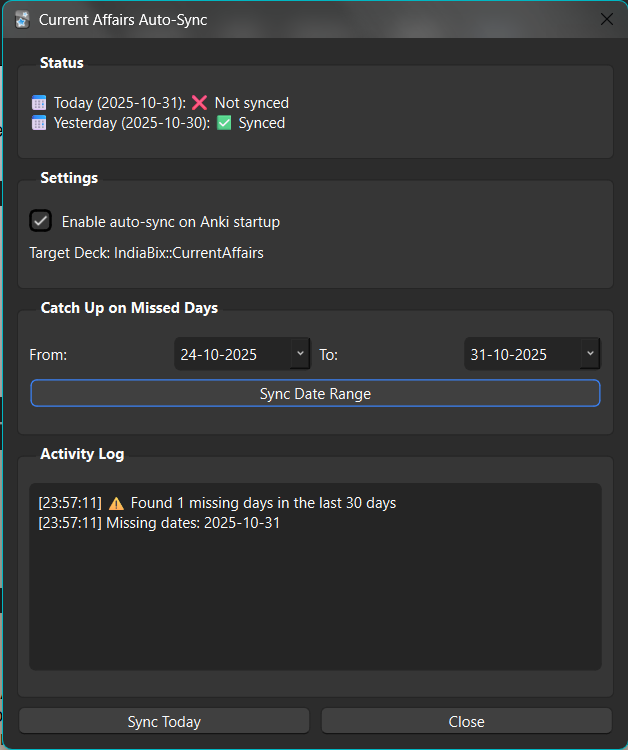 Manage daily Current Affairs auto-sync with one click
 Professionally formatted flashcards with clear explanations