(Not Free)⌛️Chunk ProgressBar - Chunking Anki Cards (Created by Shigeඞ)

AnkiWeb addon 1594977234

Adds two customizable chunked progress bars to Anki, with settings for target card counts, deck calculation methods, bar size, and displayed numbers.
AI-generated summary; may contain mistakes.

review-flowprogress-trackingappearancepaid

Open on AnkiWeb Find alternatives

AnkiWeb

Votes
10 (👍 7 · 👎 3)
Updated
2024-05-30
Anki versions
24.10~
License
Not found (this does not mean that the addon has no license)
Virus scan
No ClamAV match A match does not prove malware. No match does not prove that the code is safe.
Languages
Python, JSON
Description language
en

Maintenance

abandoned

  • Last update or commit: 2024-05-30 (885 days before the snapshot).

GitHub

No GitHub repository linked.

Will it work on my Anki?

Version branches
Min AnkiMax AnkiUpdated
2.1.124.10+2024-05-30
History across monthly snapshots

Loading…

Similar addons

OG ProgressBar

Displays a progress bar that works across all versions.

progress-tracking

3 votes 21% approval 👍 2 · 👎 1 Anki 25.07.2~ Updated 2025-07-10

Description

Progress_bar_for_Anki
Youtube : Progress Bar For Anki

patreon

-----------------------

⚠️This is an add-on for patrons who supported my volunteer Anki add-on development and it is not available for free. Please wait.

Q. How can I get this add-on right now?

  1. Donate to me on Patreon to support my volunteer development : Patreon : Shigeyuki ( $5/month )
  2. All my add-ons will be unlocked, you can download the add-on here : ⌛️Progress Bar For Anki

Q. How can I wait until this become free?

  1. Download this empty add-on and when it becomes free I will notify you and you can install it.

Q. When will this become free?

  1. I don't know when. It will be possible when I have done a lot of development, please wait.

-----------------------


[ 📖 How To Use ]

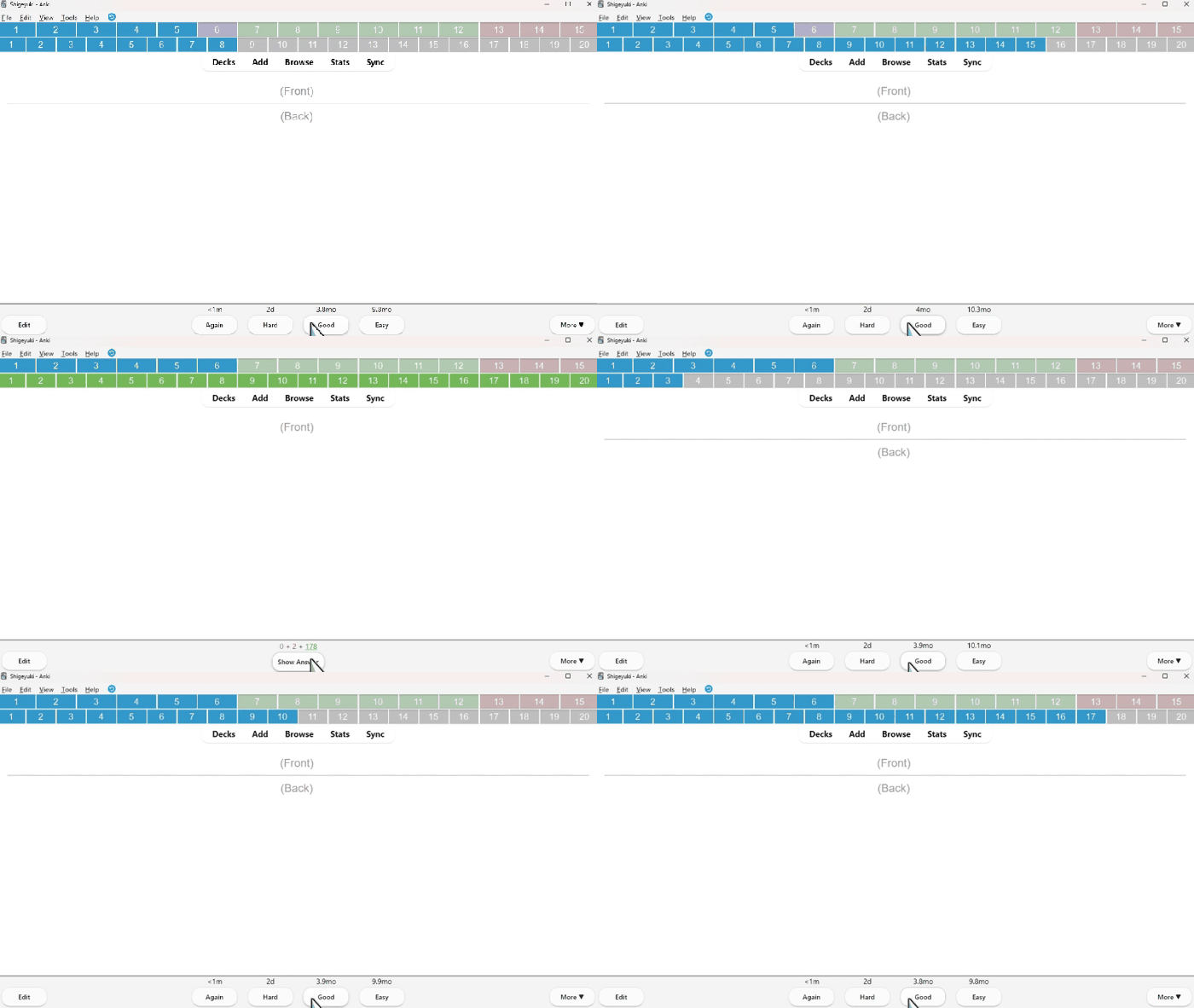
This add-on is an enhanced version of Progress bar, for chunking Anki cards. Add two progress bars to the top of Anki.

Open the Add-on settings in Tools or right-click on the bar to show the settings.

  • image

[ Option 01 : BarType tab ]
The settings window looks like this.

  • image

[ Target card values 1 - 100 ]

Adjusting the target card values will change the bar chunks. It can be used to review 5 cards at a time or 20 cards at a time. The minimum is 1 and the maximum is 100.

  • [ 1 ] Value 5

    • image
  • [ 2 ] Value 20

    • image
  • [ 3 ] Value 100

    • image

[ Calculation Method ]

You can change the calculation method of the cards for the progress bar. There are three types.

  • [ 1 ] Count Each Deck (default)

    • Calculates the progress bar for each deck. It retrieves card data, so cards reviewed on mobile are also calculated. So even after restarting Anki, the reviewed cards' values are retained. The progress bar will advance when a card is answered correctly and the due date is after the next day.
  • [ 2 ] Count All Decks

    • Cards from all decks are totaled and calculated. Otherwise it is the same as the progress bar [1].
  • [ 3 ] For Filtered Decks

    • This is automatically used when reviewing with filter decks. It is calculated for each deck, but does not collect data on previous cards. So when you restart Anki, the card data is reset and mobile reviews are not used. This can be used instead of [1] and [2] progress bar when there is a problem.

[ Show/hide progress bar ]

You can hide the progress bar.

  • [ 1 ] Hide Large count progress bar

    • image
  • [ 2 ] Hide Small count progress bar

    • image

[ Option 02 : Design tab]

  • image

[ Bar Size ] 0.5 - 3.0

Change the size of the progress bars.

  • [ 1 ] Size 0.5

    • image
  • [ 2 ] Size 1.0 (default)

    • image
  • [ 3 ] Size 1.5

    • image

[ Display Numbers ]

Change the numbers displayed on the progress bars.

  • [ 1 ] Number of chunks

    • image
  • [ 2 ] Number of all cards (default)

    • image
  • [ 3 ] No text

    • image

[ Download ]

  1. [ Download Page (For Patrons Only) ] Progress_bar_for_Anki.1.0.ankiaddon 240 KB
  2. Download the .ankiaddon file and open it with a double-click, or install it from the "Install from file" menu in the Anki add-ons management screen. (Please note that you cannot install the file by dragging and dropping it into Anki) If you encounter any errors, please contact me.

[ Please Support Shige's Anki add-ons development! ]
Patreon_banner_3_mini
Hello, thank you for reading this, I'm Shige!😆
I development of Anki add-ons for gamification learning (youtube),
and so far I fixed 40+ broken add-ons (Free) .

  • [ 💖Donation (Patreon) ]
    If you support my volunteer development, you will get add-ons for patrons.
    ( about 28 items, $5/month )
    Patreon_banner_3_mini

    [ Special Thanks ]
    Without the support of my Patrons I would never have been able to develop this.
    Thank you very much!🙏
    [ Patrons ] Arthur Bookstein, Haruka, Luis Alberto, Letona Quispe, Haley Schwarz, GP O'Byrne, Alba Grecia Suárez Recuay, Douglas Beeman, Renoaldo Costa Silva Junior, Felipe Dias, Tobias Klös, 07951350313540, Oleksandr Pashchenko, Corentin, Yitzhak Bar Geva, 龍星 武田, Muneeb Khan, Kurt Grabow, Gabriel Vinicio Guedes, Ansel Ng, Maik C., Ernest Chan, Ricardo Escobar, Daniel Valcárcel Málaga, Lerner Alcala, Daniel Kohl-Fink, Alex D, Blake, Hikori, Ketan Pal, Natalia Ostaszewska, Lily, Wa sup, Victor Evangelista, Tim, Knightwalker, as cam, Richard Fernandez, K Chuong Dang, Jason Liu, Hashem Hanaktah, Justin Skariah, Marli, Ella Schultz, Ali Abid, Siva Garapati, Nitin Chetla, hubert tuyishime, Kyle Mondlak, J, Dan S, Salman Majid, C, Maduka Gunasinghe, Marcin Skic, Andreas China, Lê Hoàng Phúc, anonymous, Jesse Asiedu, Chanho Youne, Dhenis Ferisco