WaniKani Hints

AnkiWeb addon 1622071232

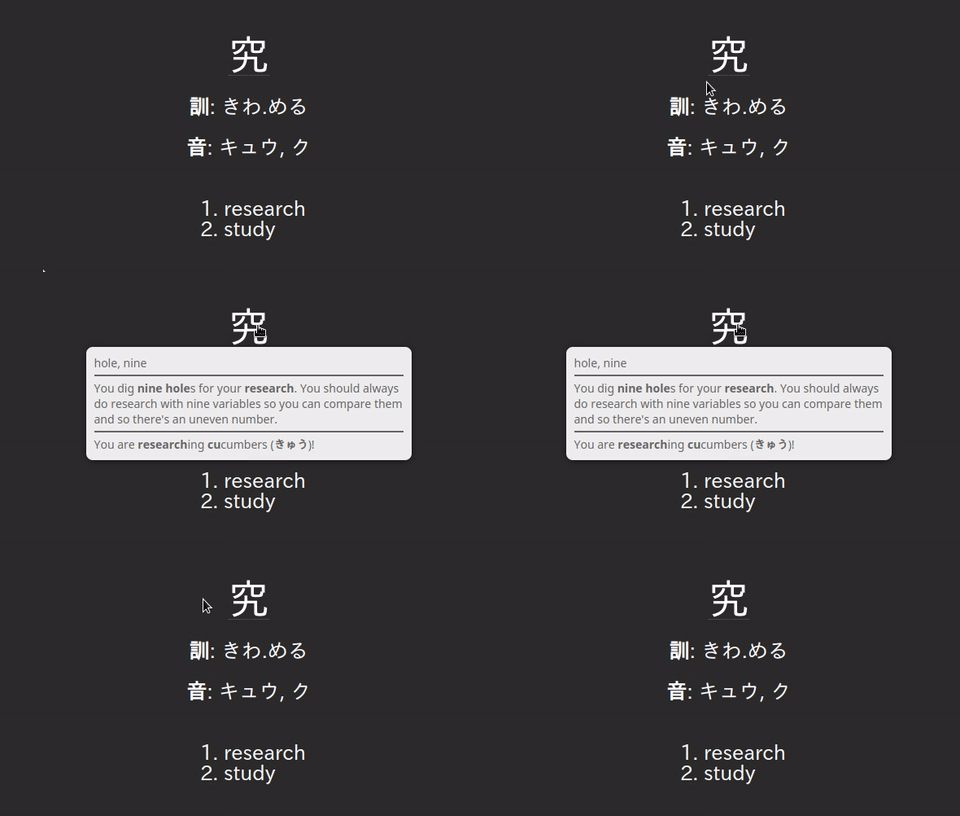
Adds on-hover tips showing the radicals composing a kanji plus kanji and vocabulary meaning and reading mnemonics, pulling data from the WaniKani API and caching it locally.
AI-generated summary; may contain mistakes.

sync-integrationcard-templatesdictionaryservice-client

Open on AnkiWeb GitHub Find alternatives

AnkiWeb

Votes
3 (πŸ‘ 3 Β· πŸ‘Ž 0)
Updated
2023-04-07
Anki versions
2.1.61~
License
Not found (this does not mean that the addon has no license)
Virus scan
No ClamAV match A match does not prove malware. No match does not prove that the code is safe.
Languages
Python, JSON
Description language
en

Maintenance

abandoned

  • Last update or commit: 2023-04-07 (1304 days before the snapshot).
  • Commits in the last year: 0.
  • Issues: 0 open, 0 closed.
  • Pull requests: 0 open, 0 merged.

Will it work on my Anki?

Version branches
Min AnkiMax AnkiUpdated
2.1.602.1.61+2023-04-07
History across monthly snapshots

Loading…

Similar addons

WaniKani Vocab Sync

Syncs started WaniKani vocabulary into configurable Anki decks, creating English-meaning-to-Japanese cards with optional pronunciation audio.

card-creationsync-integration

1 votes 21% approval πŸ‘ 1 Β· πŸ‘Ž 0 ⭐ 1 Updated 2023-05-17
Kanji Unlock Addon

Automatically unsuspends kanji cards whose kanji appear in already-learned vocabulary words, optionally including component radicals, helping align vocabulary and kanji study progress.

review-flownote-managementdeck-management

4 votes 51% approval πŸ‘ 4 Β· πŸ‘Ž 0 ⭐ 1 Anki 2.1.33~ Updated 2020-09-15

Description

Integrates with WaniKani API to add mouseover/on-hover "tips" for what radicals make up a kanji, as well as meaning/reading mnemonics for kanji and vocabulary. See https://github.com/MattWeinberg24/Anki-WaniKani-Hints for usage instructions, FAQ, and source. Example (Kanji Hint) (Apr. 7, 2023: fixed Python 3.9 compatibility issue affecting Windows/Mac)

README

Anki-WaniKani-Hints

Integrates with WaniKani API to add mouseover/on-hover "tips" for what radicals make up a kanji, as well as meaning/reading mnemonics for kanji and vocabulary. Utilizes (generated) local json cache to avoid duplicate queries and drastically increase speed.

Example (Kanji Hint)

Installation

AnkiWeb (package)

  1. Go to https://ankiweb.net/shared/info/1622071232
  2. Follow the instructions in the "Download" section

Manual (from source)

  1. Clone/download this repository
  2. Copy this repository's root directory into your Anki add-ons directory
    • Directory can be located in Tools->Add-ons by clicking "View Files"

Usage

  1. Go into the configuration options
    • In Tools->Add-ons, select this add-on, then click "Config"
  2. Set the "token" option to a valid WaniKani API token (in double-quotes)
    • Can be generated with a free WaniKani account within Account->Settings->API Tokens on their website
    • Other config options detailed in config.md
  3. Add the filters corresponding to kanji_filter and/or vocab_filter to your card templates
    • For example, with the default value of kanji_filter, if you want to add a hint to a field named "Kanji", replace {{Kanji}} in your card template with {{wk-kanji-hint:Kanji}}
  4. Restart Anki and once you review a card containing the filter, hover your mouse over the relevant field to view the tip.
    • Non-fatal errors (such as querying a non-existant vocabulary) are printed to stdout if Anki is run via the command-line

FAQ

  • Why do I need to use my own API token?
    • "You may not share API tokens to exceed WaniKani’s rate limitations." - WaniKani Terms of Service.
    • Despite this, absolutely none of your personal WaniKani account information is utilized or gathered by this add-on.
  • Do I need a WaniKani subscription to fully use this add-on?
    • No. All data used by this add-on can be accessed as a free user (or even as a guest) through website endpoints (e.g. https://www.wanikani.com/kanji/%E8%8C%B6 , https://www.wanikani.com/vocabulary/%E3%81%8A%E8%8C%B6)
  • Why does rendering a new card take a long time?
    • Hint data is dynamically pulled from the WaniKani API the first time a relevant radical/kanji/vocabulary demands it.
    • Querying the API takes some time, usually a few seconds, but can vary depending on network factors.
    • Hint data is cached locally within user_files/cache.json (automatically generated on first run) such that the API does not need to be queried on subsequent uses of the same hint data, therefore saving time.
    • As you continue to use the add-on, the ratio of cache pulls to API pulls should gradually increase and eventually become a non-issue.
  • Why not store all the hint data locally initially?
    • This would require downloading the entire WaniKani API beforehand and then storing it in this repository. As I do not own that data, it feels wrong to do so (and is probably a violation of their terms).
    • By dynamically pulling from the API, the newest version of the data can be accessed.
  • How do I customize how the tips look?

References

  • Tooltip CSS and rendering-related Python code adapted from anki-kakijun
    • Due to overlap in rendering-methodology, using both addons simultaneously may result in undesirable behavior
    • Kanji Colorizer is recommended for stroke order diagrams instead