Japanese Automatic Word Definition + rt Reading Offline

AnkiWeb addon 1657733540

Automatically fills Anki fields with kanji readings, hiragana, word type, and limited JMdict definitions offline, plus example sentences, with configurable field mappings and bulk deck updates.
AI-generated summary; may contain mistakes.

card-creationnote-managementdictionary

Open on AnkiWeb GitHub Find alternatives

AnkiWeb

Votes
7 (πŸ‘ 7 Β· πŸ‘Ž 0)
Updated
2025-01-06
Anki versions
24.06.3~
License
GPL-3.0 (from the license file in the package)
Virus scan
No ClamAV match A match does not prove malware. No match does not prove that the code is safe.
Languages
Python, JSON
Description language
en

Maintenance

stale

  • Last update or commit: 2025-01-08 (662 days before the snapshot).
  • Commits in the last year: 0.
  • Issues: 0 open, 4 closed.
  • Pull requests: 0 open, 0 merged.
  • Median first response: 77 hours (4 answered issues and pull requests).

Will it work on my Anki?

Version branches
Min AnkiMax AnkiUpdated
23.12.124.06.3+2025-01-06
History across monthly snapshots

Loading…

Similar addons

Japanese Note Auto-Generator

Auto-generates Japanese vocabulary notecards from a word list via the Jisho.org API, including definitions, readings, JLPT level, kanji explanations, furigana and example sentences, placed in a custom deck.

card-creationdictionary

2 votes 0% approval πŸ‘ 0 Β· πŸ‘Ž 2 Anki 2.1.16~ Updated 2021-05-23
Japanese Support - Auto Fill cards

Automatically fills Japanese vocabulary and sentence flashcards from a typed word or sentence, adding translations, kana readings, kanji readings, transitivity, part-of-speech, offline dictionary lookups, and Google TTS audio.

card-creationcard-templatesdictionary

1 votes 21% approval πŸ‘ 1 Β· πŸ‘Ž 0 Anki 2.1.1~ Updated 2026-07-28
Japanese Bulk Card Creator

Creates bulk Japanese vocabulary and phrase flashcards from kanji or words using a bundled dictionary, with field mapping, configurable Hepburn romanization, and optional Jisho audio downloads.

card-creationdictionary

1 votes 21% approval πŸ‘ 1 Β· πŸ‘Ž 0 ⭐ 0 Anki 25.09.2~ Updated 2025-11-06
Generate Batch Audio

Downloads and attaches audio in bulk from prioritized URL sources to selected Anki cards, with field mapping, kana filtering, request delays, and duplicate-to-empty-field options.

card-creation

8 votes 68% approval πŸ‘ 8 Β· πŸ‘Ž 0 ⭐ 34 Anki 23.10.1~ Updated 2024-03-07

Description

Anki Automatic Kanji Readings and Definitions Add-on

Welcome to my Anki add-on! This add-on provides the ability to automatically populate fields in Anki flashcards with kanji readings and definitions. The add-on utilizes JMdict (Japanese-Multilingual Dictionary) for the definition lookups. It was created primarily because I was a little annoyed that the rubytext never seemed to line up with characters properly with any of the existing addons I could find.

Plus, I didn't really get why I needed to use the internet when there's already readily available dictionaries to be downloaded.

Features

With this add-on, you can:

  • Automatically populate Anki flashcards with kanji readings and definitions.
  • Limit the number of definitions to top X number
  • Work entirely offline.
  • Updated: Now includes example sentences from the tatoeba project
  • Updated 25/01: Bulk update option now available!

References

I have used JMdict for fetching kanji readings and definitions. More information about JMdict can be found here: JMdict

Screenshots

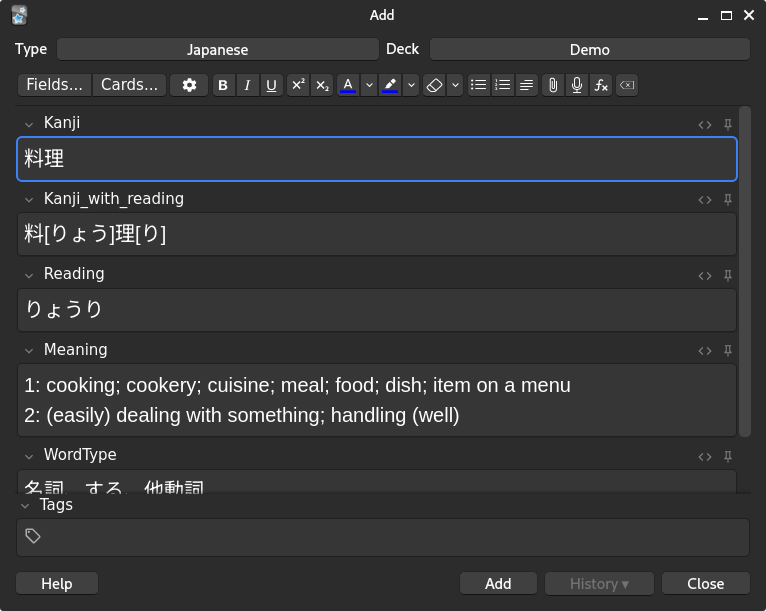
Here's an example of what this addon does for a note, please note that there are no note types provided with the addon so you'll need to make your own.

From this
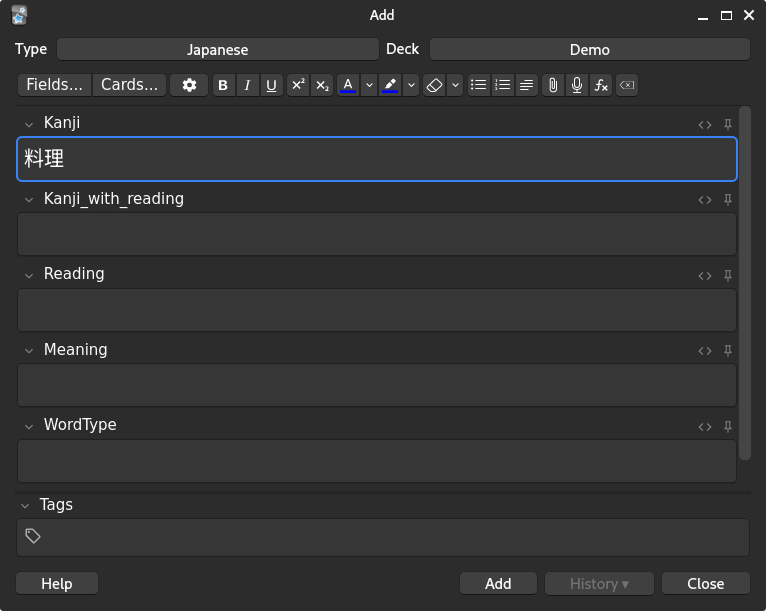
Input

To this

Output

Usage

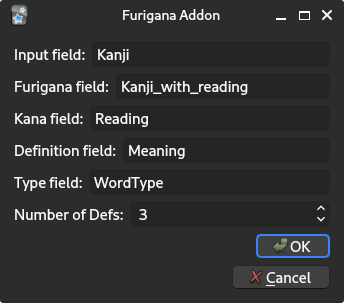
After installation, please update the following settings found here:
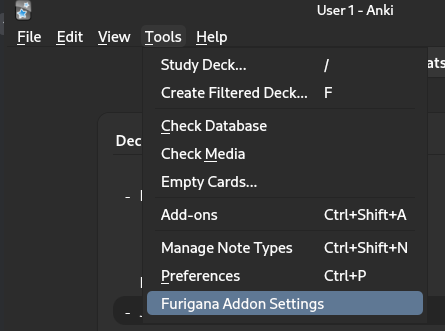
Settings

The following settings are provided

SettingsOptions

  • Input field: This is the field in which Kanji is entered
  • Furigana field: This is where rubytext will be generated for the Kanji input
  • Kana field: This is the hiragana reading from the input field
  • Definition field: This gives you the top X definitions as defined in "Number of Defs"
  • Type field: Gives you the type of word, keiyoushi, meishi etc
  • Number of Defs: Limits the number of definitions in the Definition field

To use simply type in the word like so

Input

Hit tab or move off the field and the rest of the fields will be populated.

Output

To remove the outputs, for example if the card is a duplicate then use the following to clear all fields.
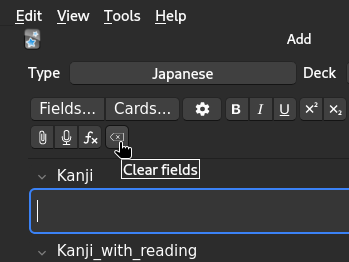
Clear Fields Button

To perform a bulk update, use the following option from the main dropdown
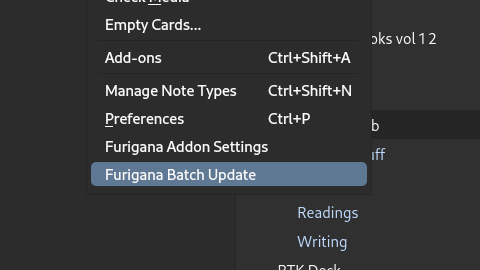
Bulk Update Option

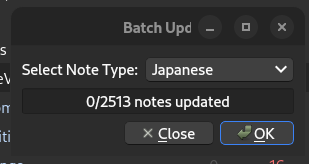
Bulk Update Dialogue

Select the deck you wish to update from the dropdown and then click OK. Please note that it may take a moment for all cards to update. No data will be overwritten during this process. This is functionally identical to updating cards in a manual manner.

Contribution

Your contributions are welcome! If you have any ideas or suggestions, please feel free to Submit an issue.

License

Please see the LICENSE file for details.

README

Anki Automatic Kanji Readings and Definitions Add-on

Welcome to my Anki add-on! This add-on provides the ability to automatically populate fields in Anki flashcards with kanji readings and definitions. The add-on utilizes JMdict (Japanese-Multilingual Dictionary) for the definition lookups. It was created primarily because I was a little annoyed that the rubytext never seemed to line up with characters properly with any of the existing addons I could find.

Plus, I didn't really get why I needed to use the internet when there's already readily available dictionaries to be downloaded.

Features

With this add-on, you can:

  • Automatically populate Anki flashcards with kanji readings and definitions.
  • Limit the number of definitions to top X number
  • Work entirely offline.
  • Updated: Now includes example sentences from the tatoeba project
  • Updated 25/01: Bulk update option now available!

References

I have used JMdict for fetching kanji readings and definitions. More information about JMdict can be found here: JMdict

Screenshots

Here's an example of what this addon does for a note, please note that there are no note types provided with the addon so you'll need to make your own.

From this

Input

To this

Output

Usage

After installation, please update the following settings found here:

Settings

The following settings are provided

SettingsOptions

  • Input field: This is the field in which Kanji is entered
  • Furigana field: This is where rubytext will be generated for the Kanji input
  • Kana field: This is the hiragana reading from the input field
  • Definition field: This gives you the top X definitions as defined in "Number of Defs"
  • Type field: Gives you the type of word, keiyoushi, meishi etc
  • Number of Defs: Limits the number of definitions in the Definition field

To use simply type in the word like so

Input

Hit tab or move off the field and the rest of the fields will be populated.

Output

To remove the outputs, for example if the card is a duplicate then use the following to clear all fields.

Clear Fields Button

To perform a bulk update, use the following option from the main dropdown
Bulk Update Option

Bulk Update Dialogue

Select the deck you wish to update from the dropdown and then click OK. Please note that it may take a moment for all cards to update. No data will be overwritten during this process. This is functionally identical to updating cards in a manual manner.

Contribution

Your contributions are welcome! If you have any ideas or suggestions, please feel free to Submit an issue.

License

Please see the LICENSE file for details.