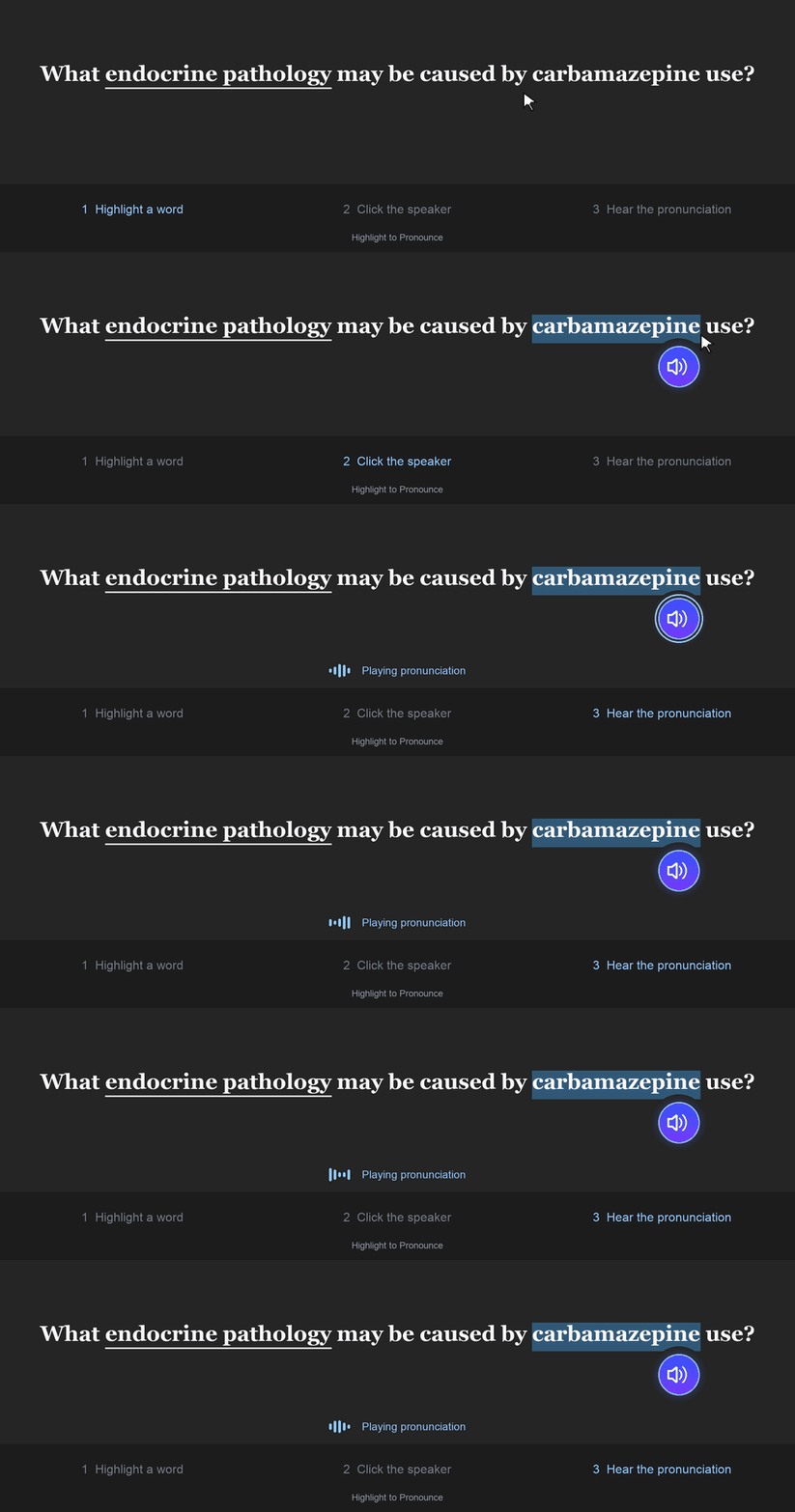
🔊 Highlight. Click. Pronounce.
Fast pronunciation for medical terminology and highlighted text in 27 languages.
🌍 Multilingual Pronunciation
Choose from 27 languages, including English, Spanish, French, German,
Italian, Portuguese, Chinese, Japanese, Korean, Hindi, Arabic, Russian,
Greek, Hebrew, Vietnamese, Thai, Ukrainian, Bengali, Urdu, and more.
English: Merriam-Webster pronunciation with Google TTS fallback.
Other languages: Google TTS only.
⚡ Simple to Use
Highlight a word or short phrase while reviewing, then:
- Click the floating speaker button
- Press your customizable hotkey — q by default
- Or enable automatic playback after highlighting
🩺 Built for Medical Vocabulary
When English is selected, the add-on searches Merriam-Webster’s general
and medical entries for recorded pronunciations. If a suitable recording
cannot be retrieved, it automatically uses Google Text-to-Speech.
When another language is selected, the add-on uses Google TTS in that language.
🔊 Single Words or Whole Phrases? You Choose.
1. Highlight a single word
Highlight a word such as hemorrhage or
thrombocytopenic. The add-on first tries to find a
Merriam-Webster recording for that exact word.
If it cannot retrieve one, Google TTS pronounces the word.
Best for: focusing on the pronunciation of one unfamiliar term.
2. Highlight a whole phrase — the default behavior
The add-on first checks whether Merriam-Webster has a recording
of the entire phrase. If it does, it plays that recording.
Otherwise, Google TTS reads the phrase as a whole for smoother,
more natural sentence rhythm.
No setting change is needed. Complete Merriam-Webster phrase
recordings are checked in both playback modes.
3. Optional: play a phrase using individual word recordings
Enable “Play phrases using individual word recordings”
in Config.
If Merriam-Webster has no recording of the whole phrase,
the add-on tries to find a recording for each word and
plays them one after another.
For example, thrombotic thrombocytopenic purpura
can be played as three separate dictionary recordings:
thrombotic → thrombocytopenic → purpura
The benefit: individual dictionary recordings may give
better pronunciation of unfamiliar or specialized medical terms
than text-to-speech.
The tradeoff: the recordings may use different voices,
and the pauses and sentence rhythm may sound less natural
than a phrase spoken all at once.
This option is off by default and supports phrases of
2–8 words. If any word lacks a usable recording,
Google TTS reads the whole phrase.
No extra pause is added between ordinary words.
Commas do not interfere with individual word lookups and add
a slightly longer pause. Silence already present in the
original recordings may still be audible.
💡 English Accuracy Tip
Highlighting one word at a time is useful when you want to focus
on a specific pronunciation. If an inflected word falls back to
Google TTS, try its singular or base form — for example,
murmur instead of murmurs.
This is a helpful tip, not a requirement: some plural forms,
related words, and complete phrases also have Merriam-Webster recordings.
✨ Make It Yours
- Choose from 27 pronunciation languages
- Optional word-by-word phrase recordings
- Show or hide the floating speaker button
- Modern or Legacy button styles
- Adjustable button size and position
- Customizable keyboard hotkey
- Optional automatic playback
- Optional loading and audio-source notifications
- Built-in pronunciation test
🧠 Smart and Reliable
- Keeps cached audio separate for each language
- Removes surrounding punctuation and cleans up nonbreaking spaces
- Matches recordings to the selected dictionary word or related entry
- Reuses downloaded audio for faster replay during your study session
- Automatically cleans temporary audio when an Anki profile opens
- Prevents outdated pronunciation results from interrupting newer requests
- Stops playback when you leave the review screen
- Uses Anki’s built-in browser playback without requiring MPV or MPlayer
⚙️ Configuration
Open Tools → Add-ons, select Highlight to Pronounce,
then click Config.
To enable individual recordings for phrases, check
“Play phrases using individual word recordings”
under Pronunciation behavior.
Use the Test pronunciation tab to compare the modes.
Enable audio-source notifications to see whether a pronunciation
came from Merriam-Webster or Google TTS.
What’s New in This Update
- Improved matching for related words listed within another dictionary entry, such as thrombocytopenic.
- Exact Merriam-Webster phrase recordings are checked before Google TTS in both playback modes.
- Added optional word-by-word phrase playback, off by default.
- Added comma-aware pauses for individual word recordings.
- Removed the added delay between ordinary recorded words.
- Improved handling of HTML entities and nonbreaking spaces.
- Fixed overlapping pronunciation tests caused by repeated Enter presses.
- Stopped pending review pronunciations from playing after leaving the review screen.
Requirements: Internet access is needed to retrieve pronunciations.
No account or API key is required. Selections are limited to
150 characters.
Merriam-Webster availability and request limits can sometimes cause
Google TTS to be used even when a dictionary recording exists.
Compatibility: Anki 23.10 and newer on macOS and Windows.
Highlighted text is sent to Merriam-Webster or Google to retrieve pronunciation audio.
Merriam-Webster is used only when English is selected.
This independent add-on is not affiliated with or endorsed by Merriam-Webster or Google.
If you ever have a bug/issue/idea, please let me know! I will try to fix every bug and add as many features as I can. I want to make this a helpful tool for everyone! Just if you do have a bug and leave a thumbs down (understandable) just please change to thumbs up after I fix (hopefully) :)
Check out my other add-on:
Pace Graph — Review Speed Tracker
A small floating graph that tracks your recent review speed against a customizable time-per-card goal.