Dependency Booster for Anki

AnkiWeb addon 1764696591

Automatically reschedules mature vocabulary cards sooner when related sentence cards are failed, using tag-based dependency links, with configurable thresholds and AnkiDroid review syncing.
AI-generated summary; may contain mistakes.

schedulingreview-flow

Open on AnkiWeb GitHub Find alternatives

AnkiWeb

Votes
1 (πŸ‘ 1 Β· πŸ‘Ž 0)
Updated
2025-03-29
Anki versions
25.02~
License
MIT (from the GitHub repository)
Virus scan
No ClamAV match A match does not prove malware. No match does not prove that the code is safe.
Languages
Python, JSON
Description language
en

Maintenance

stale

  • Last update or commit: 2025-03-29 (582 days before the snapshot).
  • Commits in the last year: 0.
  • Issues: 0 open, 0 closed.
  • Pull requests: 0 open, 0 merged.

Will it work on my Anki?

Version branches
Min AnkiMax AnkiUpdated
25.02+2025-03-29
History across monthly snapshots

Loading…

Similar addons

Known Kanji Manager

Scans tagged cards for kanji and suspends or unsuspends them based on whether all contained kanji are known, updating manually.

review-flownote-management

9 votes 56% approval πŸ‘ 8 Β· πŸ‘Ž 1 Updated 2020-05-24
Vocab.Ai / Baserow Import

Imports vocabulary or sentences from Vocab.Ai or other Baserow instances into Anki using configurable credentials, database, table, view, deck and note type, with settings remembered for repeat imports.

importsync-integrationservice-client

3 votes 44% approval πŸ‘ 3 Β· πŸ‘Ž 0 ⭐ 0 Anki 23.10.1~ Updated 2026-10-12

Description

Dependency Booster

Version License Buy Me A Coffee

Boost your language learning efficiency by automatically rescheduling forgotten vocabulary when you struggle with sentences.

Banner

Overview

Dependency Booster improves language learning by automatically identifying and rescheduling vocabulary cards that you've forgotten when reviewing sentence cards. When you fail to remember a sentence, the add-on reschedules the related vocabulary to appear sooner, ensuring you strengthen your foundations.

Key Features

  • Tag-based Dependency Detection - Links vocabulary to sentences using a simple tagging system
  • Automatic Boosting - Reschedules vocabulary cards after you fail related sentences
  • AnkiDroid Support - Process your mobile reviews when you return to desktop
  • Fully Configurable - Set maturity thresholds, review history periods, and more

How It Works

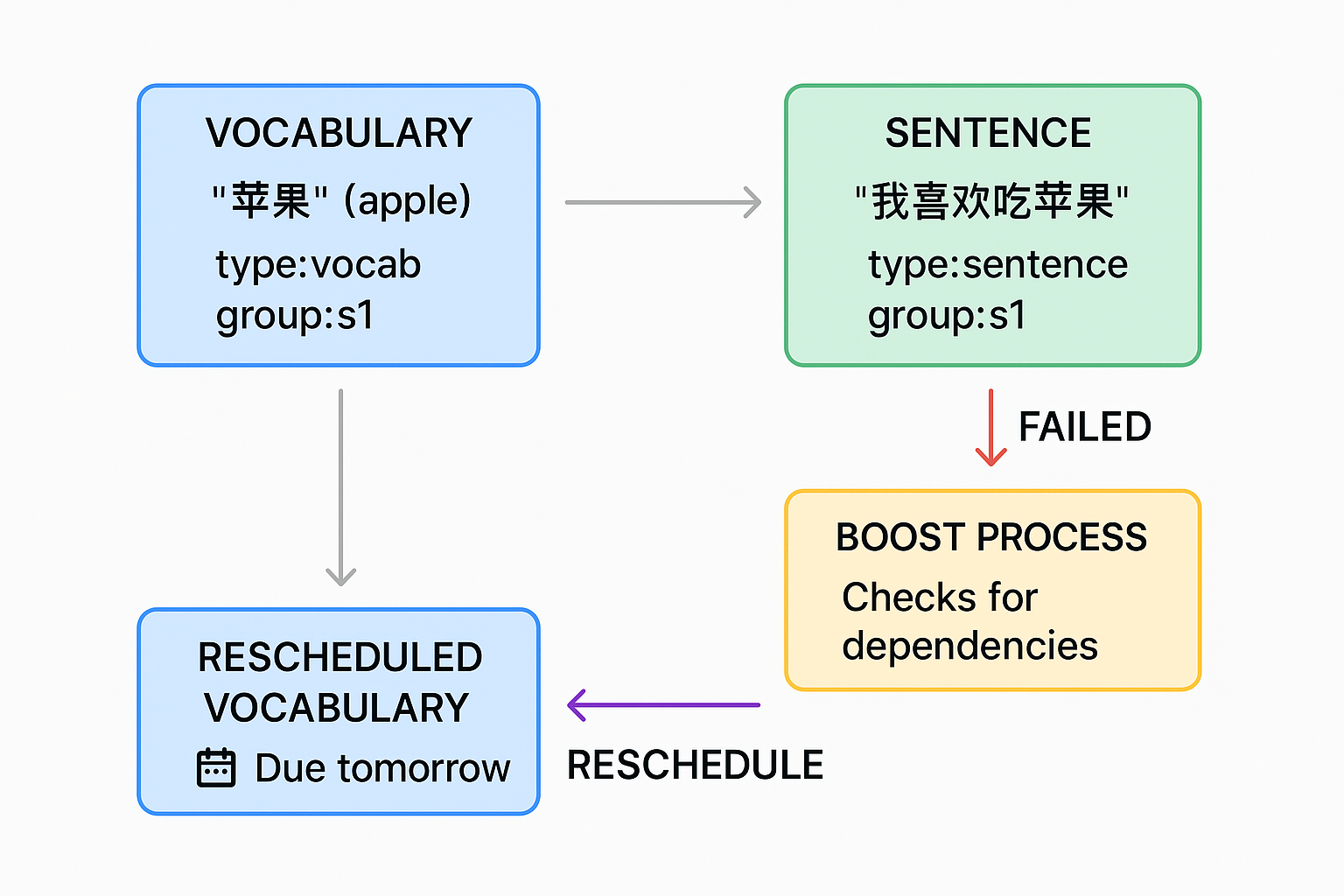
Workflow Diagram
  1. When you fail a sentence card during review, the add-on checks for vocabulary cards that are dependencies of that sentence.
  2. If any dependent vocabulary cards are found and considered "mature" (default: 21+ days old), they will be rescheduled to appear in tomorrow's review.
  3. This ensures that you review the foundation vocabulary before seeing the sentence again.

Card Tagging System

For the add-on to work properly, tag your cards in a specific way:

  1. Tag vocabulary cards with type:vocab and group:sX (where X is a number)
  2. Tag sentence cards with type:sentence and group:sX (with matching group numbers)
Tagging Example

Example:

  • Vocabulary card for "θ‹Ήζžœ" (apple): type:vocab + group:s1
  • Sentence using that word "ζˆ‘ε–œζ¬’εƒθ‹Ήζžœ" (I like to eat apples): type:sentence + group:s1

When you fail the sentence card, the vocabulary card will be rescheduled if it's mature.

Before-After Comparison

Using the Add-on

Manual Boosting

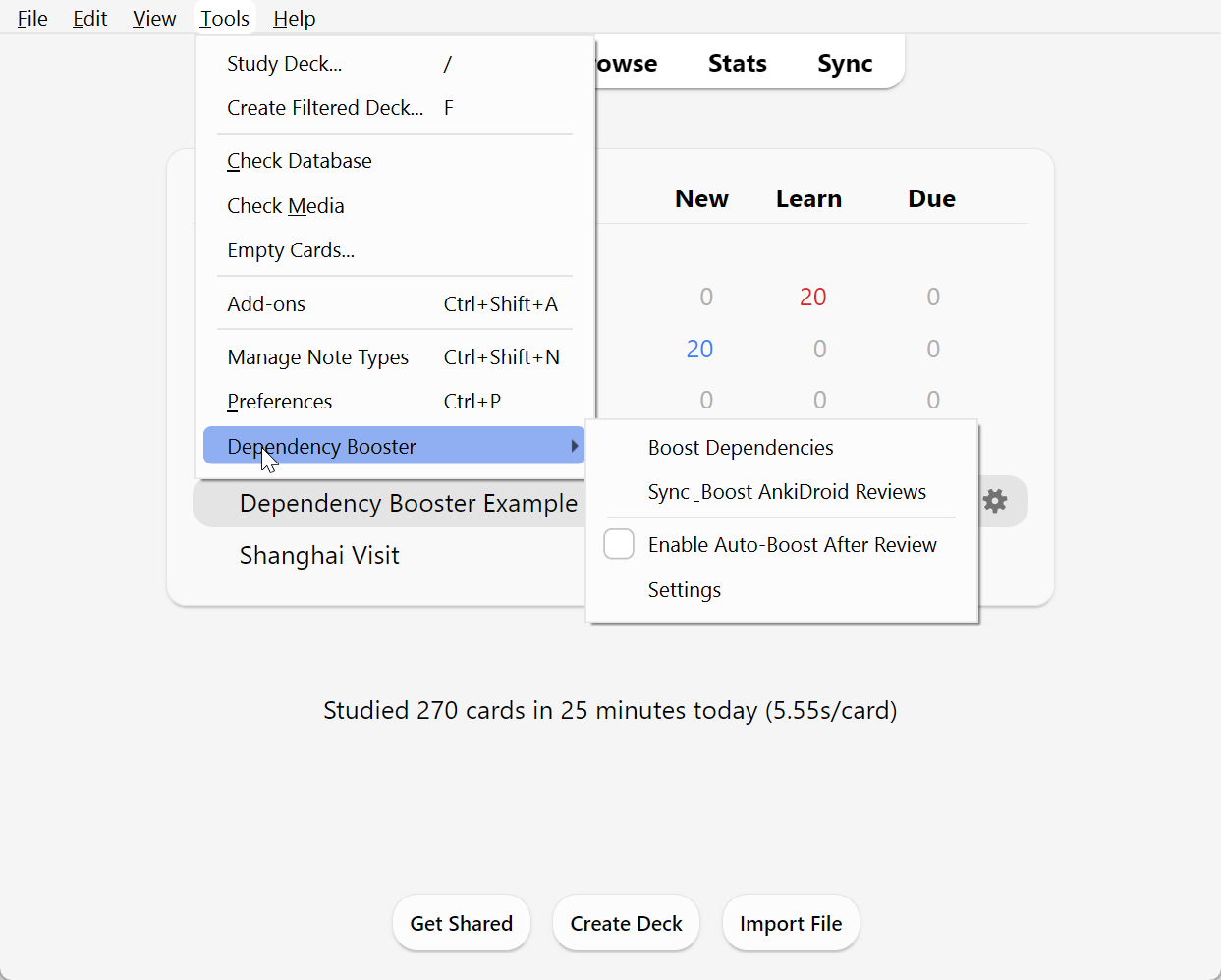
Go to Tools β†’ Dependency Booster β†’ Boost Dependencies to manually trigger the dependency boosting process.

Menu Screenshot

Automatic Boosting

The add-on can automatically boost dependencies when you complete a review session:

  1. Enable the feature via Tools β†’ Dependency Booster β†’ Enable Auto-Boost After Review (or through the Settings dialog)
  2. After you exit a review session, any failed sentence cards will have their vocabulary dependencies rescheduled
  3. You'll see a notification when this process completes

AnkiDroid Compatibility

While this add-on only runs on desktop Anki, we've included a special feature for AnkiDroid users:

  1. Review your cards on AnkiDroid as usual
  2. When you're back at your desktop, open Anki
  3. Go to Tools β†’ Dependency Booster β†’ Sync & Boost AnkiDroid Reviews
  4. This will sync with AnkiWeb, process failed cards, reschedule dependencies, and sync back

Configuration

Access the settings via Tools β†’ Dependency Booster β†’ Settings. The dialog allows you to:

Settings Dialog
  • Minimum card age: How old a vocabulary card must be before it's eligible for boosting (default: 21 days)
  • Days to check: How far back to look for failed sentence cards (default: 7 days)
  • Auto-boost: Enable/disable automatic boosting after review sessions
  • Clear processed reviews: Reset the history of processed review logs

Creative Use Cases

While designed for language learning, our tagging system can be adapted for many learning domains:

Medical Education

  • Foundational cards (type:vocab + group:m1): Anatomy terms, pathophysiology concepts
  • Clinical cases (type:sentence + group:m1): Patient presentations, diagnostic scenarios

Mathematics

  • Concept cards (type:vocab + group:math3): Formulas, theorems, definitions
  • Problem cards (type:sentence + group:math3): Complex problem-solving examples

Compatibility

  • Compatibility note: This add-on is tested with Anki 25.x and may not be compatible with older versions
  • AnkiDroid compatibility: Works with AnkiDroid reviews when synced back to desktop

Support

If you encounter any issues or have suggestions, please visit the GitHub repository: https://github.com/beniscoding/anki-dependency-booster

License

This add-on is released under the MIT License.

If you find this add-on useful, consider supporting its development: Buy Me A Coffee

README

Dependency Booster for Anki

A sleek banner for Dependency Booster showing an elegant connection between vocabulary and sentence cards. The banner has a blue gradient background, with "Dependency Booster" in prominent white text. Small card icons are connected by arrows, suggesting the linking of dependencies. The Anki logo appears subtly in the corner. Boost your language learning efficiency by automatically rescheduling forgotten vocabulary when you struggle with sentences.

GitHub release License Anki 25 compatible Buy Me a Coffee


Overview

Dependency Booster improves language learning by automatically identifying and rescheduling vocabulary cards that you've forgotten when reviewing sentence cards. When you fail to remember a sentence, the add-on reschedules the related vocabulary to appear sooner, ensuring you strengthen your foundations.

Example Deck: Download our example Chinese deck to quickly see how the add-on works with properly tagged vocabulary and sentence cards.

Workflow diagram showing the complete dependency boosting process. A flowchart with colored boxes and arrows: Blue boxes represent vocabulary cards tagged with "type:vocab" and "group:s1", green boxes represent sentence cards tagged with "type:sentence" and "group:s1". Red arrows show the flow when a sentence card is failed, triggering the dependency boosting process (orange box). Purple arrows show vocabulary cards being rescheduled to appear in tomorrow's reviews. Chinese example characters "θ‹Ήζžœ" (apple) and "ζˆ‘ε–œζ¬’εƒθ‹Ήζžœ" (I like to eat apples) are used to illustrate the relationship.

Key Features

  • Tag-based Dependency Detection - Links vocabulary to sentences using a simple tagging system
  • Automatic Boosting - Reschedules vocabulary cards after you fail related sentences
  • AnkiDroid Support - Process your mobile reviews when you return to desktop
  • Fully Configurable - Set maturity thresholds, review history periods, and more

How It Works

  1. When you fail a sentence card during review, the add-on checks for vocabulary cards that are dependencies of that sentence.
  2. If any dependent vocabulary cards are found and considered "mature" (default: 21+ days old), they will be rescheduled to appear in tomorrow's review.
  3. This ensures that you review the foundation vocabulary before seeing the sentence again.

A side-by-side comparison showing the before and after effects of dependency boosting. On the left ("Before"): A vocabulary card for "θ‹Ήζžœ" (apple) is scheduled for review in 30 days, while a sentence card "ζˆ‘ε–œζ¬’εƒθ‹Ήζžœ" is marked as failed. On the right ("After"): The dependency booster has identified the connection, and the vocabulary card has been rescheduled to appear tomorrow, with a notification highlighting the change. The scheduler view shows the moved card highlighted.


Installation

From AnkiWeb (Coming Soon)

  1. In Anki, go to Tools β†’ Add-ons β†’ Get Add-ons...
  2. Paste the code: [AnkiWeb code will be added when assigned]
  3. Restart Anki

Note: This add-on is only compatible with Anki 25.x versions and is not tested with older versions.

Manual Installation

  1. Download the latest release zip file from GitHub Releases
  2. In Anki, go to Tools β†’ Add-ons β†’ Install from file...
  3. Select the downloaded file
  4. Restart Anki

Card Tagging System

For the add-on to work properly, you need to tag your cards in a specific way:

  1. Tag vocabulary cards with type:vocab and group:sX (where X is a number)
  2. Tag sentence cards with type:sentence and group:sX (with matching group numbers)

Vocabulary Card Tags                              Sentence Card Tags

Vocabulary card for θ‹Ήζžœ (apple) with tags type:vocab and group:s1 Sentence card for ζˆ‘ε–œζ¬’εƒθ‹Ήζžœ (I like to eat apples) with tags type:sentence and group:s1

Example:

  • Vocabulary card for "θ‹Ήζžœ" (apple): type:vocab + group:s1
  • Sentence using that word "ζˆ‘ε–œζ¬’εƒθ‹Ήζžœ" (I like to eat apples): type:sentence + group:s1

When you fail the sentence card, the vocabulary card will be rescheduled if it's mature.


Using the Add-on

Manual Boosting

Go to Tools β†’ Dependency Booster β†’ Boost Dependencies to manually trigger the dependency boosting process.

Screenshot of Anki's menu bar showing the Dependency Booster dropdown menu expanded. The menu shows all available options: "Boost Dependencies" (highlighted), "Enable Auto-Boost After Review" (with a checkmark), "Sync & Boost AnkiDroid Reviews", and "Settings". The menu is captured from the actual Anki interface with the Tools menu open, showing where users can find these options.

Automatic Boosting

The add-on can automatically boost dependencies when you complete a review session:

  1. Enable the feature via Tools β†’ Dependency Booster β†’ Enable Auto-Boost After Review (or through the Settings dialog)
  2. After you exit a review session, any failed sentence cards will have their vocabulary dependencies rescheduled
  3. You'll see a notification when this process completes

AnkiDroid Compatibility

While this add-on only runs on desktop Anki, we've included a special feature for AnkiDroid users:

  1. Review your cards on AnkiDroid as usual
  2. When you're back at your desktop, open Anki
  3. Go to Tools β†’ Dependency Booster β†’ Sync & Boost AnkiDroid Reviews
  4. This will:
    • Sync with AnkiWeb to get your latest AnkiDroid reviews
    • Process any failed sentence cards
    • Reschedule the vocabulary dependencies
    • Sync back to AnkiWeb so your changes appear on AnkiDroid

Configuration

Settings Dialog

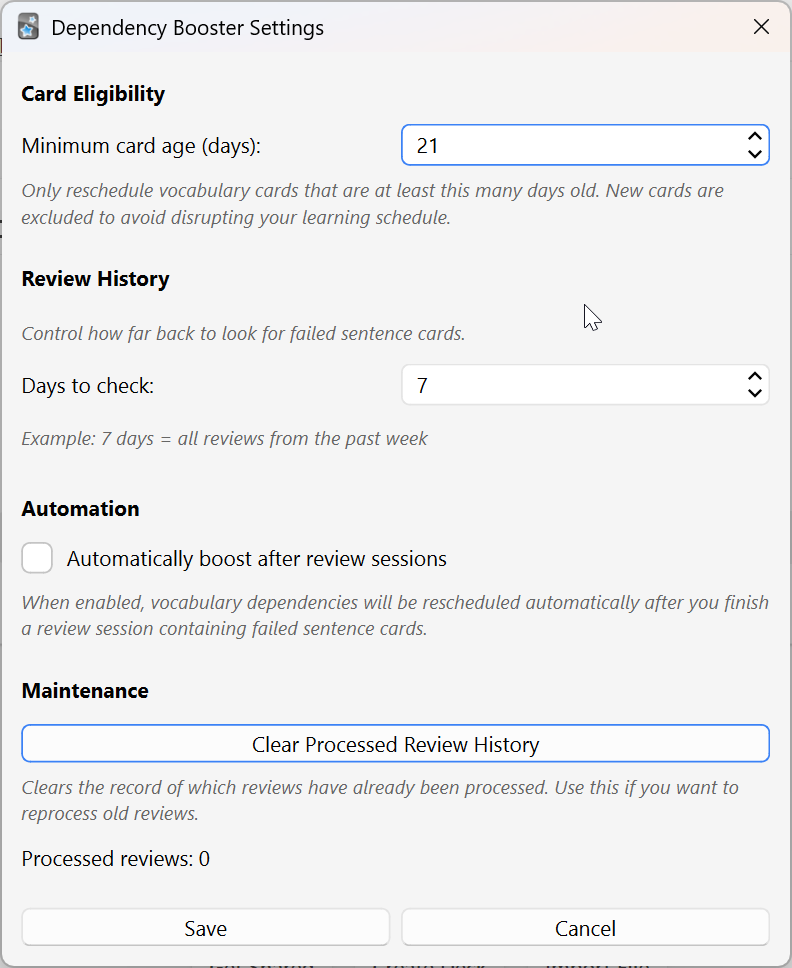
Access the settings by going to Tools β†’ Dependency Booster β†’ Settings. The dialog allows you to:

Screenshot of the Dependency Booster settings dialog with annotations. The dialog shows all configurable options: A slider for "Minimum card age (days)" set to 21, with a note explaining this is the maturity threshold. A field for "Days to check for failed sentences" set to 7. A checkbox for "Enable automatic boosting after review sessions" that is checked. A button labeled "Clear processed review history" at the bottom. Each setting has a brief annotation explaining its purpose. The dialog uses Anki's standard UI style with a clean layout.

  • Minimum card age: How old a vocabulary card must be before it's eligible for boosting (default: 21 days)
  • Days to check: How far back to look for failed sentence cards (default: 7 days)
  • Auto-boost: Enable/disable automatic boosting after review sessions
  • Clear processed reviews: Reset the history of processed review logs

Advanced Configuration

The add-on's configuration can also be modified directly through Anki's add-on configuration screen:

  1. Go to Tools β†’ Add-ons
  2. Select "Dependency Booster"
  3. Click "Config"

Available settings include:

  • maturity_threshold: Days before a card is considered "mature" (default: 21)
  • detection_method: How dependencies are identified (currently only tag-based)
  • days_to_check: Number of days to look back for failed cards (default: 7)
  • auto_boost_enabled: Whether to automatically boost after exiting review

Creative Use Cases

While designed for language learning, our tagging system can be adapted for many learning domains:

Medical Education

  • Foundational cards (type:vocab + group:m1): Anatomy terms, pathophysiology concepts
  • Clinical cases (type:sentence + group:m1): Patient presentations, diagnostic scenarios

Mathematics

  • Concept cards (type:vocab + group:math3): Formulas, theorems, definitions
  • Problem cards (type:sentence + group:math3): Complex problem-solving examples

Compatibility

  • Tested with: Anki 25.02 (Qt 6.6.2)
  • Important note: This version is not tested with older Anki 2.1.x versions and may not be compatible
  • AnkiDroid compatibility: Works with AnkiDroid reviews when synced back to desktop

Support & Bug Reporting

If you encounter any issues or have suggestions, please visit:

If you find this add-on useful and would like to support its development: Buy Me A Coffee


License

This add-on is released under the MIT License.