Quick Restart Anki. This is an improved beta version of the old AnkiRestart, it use only the add-on to restart, not external files.
This V2 is a new prototype developed for some users who are not able to restart, so if old V1 is already working fine on your device you can use either add-on.
How to use
These features are available:
- Added Restart button and Menu (Shortcut:
Ctrl+Shift+R)
- Pop up restart dialog when updating add-ons
Installing the add-on will add an icon to the Anki menu bar. Clicking on this icon will quickly restart Anki. MacOS cannot display the icon here, so it will be displayed in the system tray instead. Blue is a normal restart, and red is an optional safe mode restart (default disabled).
- Anki Home -> Restart icon (Blue)
- Anki Home -> tools -> AnkiRestartV2 -> Restart Anki now

Settings
Settings can be accessed from the Add-on menu or the add-ons dialog.
- Anki Home -> tools -> AnkiRestartV2 -> Swttings
- Anki Home -> tools -> Add-ons -> AnkiRestartV2 -> Confing
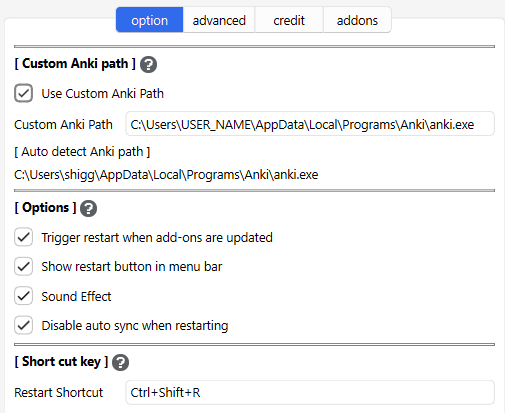
Custom Anki Path
If the restart has already succeeded there is no need to change this option. To restart Anki the path to the Anki executable file is required (win:anki.exe, Mac:anki.app, Linux:anki). If the auto detected Anki path is incorrect you will need to set it manually.
Options
Trigger restart when add-ons are updated
When add-ons are updated Anki needs to be restarted. This option displays a pop-up window to restart Anki when add-ons are updated (it is enabled by default). e.g.
- When Anki is launched and add-ons are updated.
- When add-ons are updated from the Add-ons dialog.
Show restart button in menu bar
Show or hide the buttons displayed on Anki's Home menu bar.
Sound Effect
Enable or disable a sound when restarting.
Disable auto sync when restarting
Anki's auto sync takes a little time. When restarting frequently sync is not needed, so this add-on disabled and restore Anki's auto sync option only when restarting. This option disabled this feature.
- ON: Save auto sync option -> Disabled auto sync -> Restart Anki -> Restore auto sync otion
- OFF: Nothing
Short cut key
You can change the shortcut key for restarting Anki. The shortcut key will not work if it conflicts with other add-ons or Anki shortcut keys, so if the key does not work try changing it. default short cut key: Ctrl+Shift+R.
Advanced tab
These are options for advanced users, there is no need to change them unless you need to.
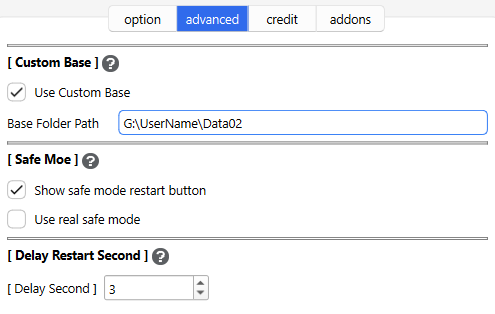
Custom Base
Anki allows you to specify the path to the file containing the user profile when it starts up. If you restart Anki as is, this path will not be used. If you set a path for this option, you can use that path to start up when you restart.
For more info please read the Anki Manual:
Safe mode
This new safe mode disables all add-ons except AnkiRestart and then restart. Disabled add-ons will be enabled after restarting, so restarting again will restore the original state. This option is disabled by default.
- Action: Trigger Safe Mode Restart -> Save All addons data -> disables all add-ons except AnkiRestart -> Run Restart (Close Anki) -> Open new Anki -> Enable all save add-ons
Show safe mode restart button
Enabling this will display a menu and button to restart in safe mode. (Red icon)
Use real safe mode
This mode manually disables add-ons, so it is not Anki's default safe mode. Enabling this option will restart Anki in its native safe mode. In this case, AnkiRestart will also be disabled.
- Action: Trigger Real Safe Mode Restart -> Run Restart (Close Anki) -> Open new Anki + safe mode (as holding down the Shift key while starting Anki)
Delay Restart Second
-
This add-on waits a few seconds when restarting Anki. It probably works even with 0 seconds, but I set it to 3 seconds just to be safe.
-
🚨NOTE: This timer uses subprocess.Popen's shell=True (Win: timeout /T, MacOS/Linux: sleep). If you are concerned about security setting it to 0 seconds will disable it.
- time 1+ sec :
subprocess.Popen(cmd, shell=True)
- time 0 sec :
subprocess.Popen(popen_args)
- If there are unknown characters in the path used in cmd, or if the path does not exist, the timer and shell will be automatically disabled.
V3 tab
Anki Restart V3
This is a new restart option for the prototype. AnkiRestart V2 sometimes fails, this V3 restarts Anki more reliably. To use this feature you need Anki's new launcher (Anki 25.07+). If V2 is already working fine on your device this option is not needed.
Mechanism
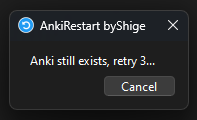
Launch Python using the Anki launcher then start the mini app (window). This mini app communicates with Anki and waits until Anki closes, once Anki has completely closed launch a new instance of Anki then the mini app will auto close. (this mechanism is an improved version of AnkiRestart V1.)
Note
It may not launch properly on some devices, if so please contact me.
FAQ
Q. Why use such an add-on just to restart?
-
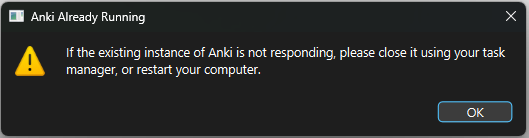
Anki will forcefully terminate the new Anki for data safety when it tries to start up duplicately, so if you have a lot of add-ons or large decks it may take time for Anki to terminate and may loop. This add-on restarts after Anki terminates so you can restart in once.
-
-
e.g.: Close Anki01 and Open Anki02 -> Anki02:"Ank01 is still open please try again" -> Close Anki02 and open Anki03 -> Anki03: "Anki02 is still open please try again" -> Close Anki03 and open Anki04 -> Anki04: "Anki03 is still open please try again" -> ...
Q. What is the difference between V1 and V2?
- This version restarts Anki using only the add-on without using external files, so there is no problem with misdetection by antivirus software. I also fixed some bugs, enhanced features, and optimized the code.
Q. What is Safe Mode used for?
- When a bug occurs checking whether the cause is an add-on or native Anki.
- Sometimes you want to use native Anki.
Q. Why is an add-on needed to restart?
- Some add-ons require a restart after changing the config.
- In my add-on development Anki is restarted frequently.
Q. Why does the timer use “shell=True”?
- The timer to delay restarting needs to be executed after Anki closes. But if we use a timer within Anki’s program, Anki won’t close until the timer ends. Shell timers can be executed after Anki closes.
- The latest Anki launcher may have another workaround, but it’s still under development.
🚨Report
If you have any problems or requests feel free to send them to me.
- 👍️Rate Comment : You can contact me anonymously, and AnkiWeb will send you an email when I reply, a high rating increases priority of development.
- 👩🚀Reddit : You can request me to repair broken Add-ons.
- 🌟AnkiForums : You can request me to repair broken Add-ons, and it is ideal for open discussions.
- 🐙Github : Makes it easier to track problems.
- 💖Patreon DM : Response will be prioritized.
Hi thank you for using this add-on I'm Shigeඞ!
- [ 🛠️Fix add-ons ] So far I fixed and customized 80+ broken add-ons for free and developed over 30 add-ons as a hobby (all add-ons). If you have requests to fix broken add-ons feel free to contact me. Fix broken addons (Free)
- [ 💖Donation ] I'm looking for supporters for my add-ons development because I like Anki!👍️ If you support my volunteer development you will get 14 add-ons for patrons only and 15 game themes included in AnkiArcade ($5/month).

Get Patrons only addons | Patrons Q and A | Contact
[ Special Thanks ]
So far I received donations from 711 patrons and without their support I never could develop this, thank you very much!🙏
Patrons:  Arthur Bookstein
 Haruka
 07951350313540
 Luis Alberto, Letona Quispe
 Tim
 NamelessGO
 Kyle Mondlak
 Daniel Kohl-Fink
 ElAnki
 findus161
 Lily
 Abhi S
 K
 Peasant of Anki
 Juan Salgado
 Jesse Asiedu
 Matthew Hartford
 Xiuxuan Wang
 David C
 Yaeerrrrrr
 Christopher Lam
 Steven Banner
 gus forester
 Heidi
 Aydin Herik
 Iggi
 Austin Regal
 Hoang Hung
 Terence Bartenbach
 Take Root
 Jonathan Contreras
 Carly Burdorf
 Vivian Cao
 Pansanity
 Will S.
 Anh-Tai Nguyen
 Elisabeth Barber
 Zarina Balde
 Devon Williams
 Leonora Lomoki Akporyoe
 Ernest Chan
 Kmyungc
 Meeyah Davis
 Eric Allen
 Andrew Yick
 Robert Remedios
 GP O'Byrne
 Joseph Howell
 Orlando Frey
 Kevin M
 Ujwal Chadha
 Kolorophyll
 Jake Stucki
 Kaitlyn Bowler
 Seth Stidham
 Isabel Guan
 Miguel Dittrich
 Mia
 Ali Abid
 Kyle Anthony
 ellie
 Tobias Klös
 mootcourt
 Marlee Davis
 Looptime IsAble
 iuventius
 Patrick ellis
 Katherine Geromini
 Nabeel Elhaj
 tarek
 Efrain Garcia Fonseca
 ivy tian
 qiting zeng
 Muneeb Khan
 Yashar Hadi
 Justin Magda
 Hussain Almoumen
 Subhash Gutti
 lionheart3003
 Sameer Al
 Matheus Chagas
 Niiick
 Bryn Price
 尘 北冥
 pie_is_good
 Svel1989
 Jack
 Zuhair
 alpha male, shredded af
 Brandon Anamah
 Keeler Kime
 Kurt Grabow
 alex han
 Celeste Achatz
 Gabriel Farrugia
 Lelia Belle Houbé
 R Rebecca
 Lisa Kirby
 Audreylyn Shannon
 Pneumaniac 1
 Lis Y. ...full list
📥 How do I install this add-on?
- This add-on works with Anki for desktop (it does not work on mobile). Download Anki from the official website if you haven't already.
- Copy and paste the add-on code (
1766024579 ) into Anki and you can install it. ( Menu -> Tools -> Add-ons -> Get Add-ons -> Code [ add-on code ] )
- When I develop bug fixes, create new features, or compatibility for New Anki, I will notify you and you can install it.
- Add-ons will be broken when the official Anki gets a major update, so if you like this add-on please support my volunteer development by rating, sharing, and donating. Thank you!
Click here and please Rate this add-on, Thank you! :-)