Anki Time Warp

AnkiWeb addon 1779617428

Rewrites card due dates via shifting, stretching, or daily caps, with filtered deck/tag selection, simulation previews, timeline charts, and single-step undo.
AI-generated summary; may contain mistakes.

scheduling

Open on AnkiWeb GitHub Forum topic Find alternatives

AnkiWeb

Votes
2 (πŸ‘ 2 Β· πŸ‘Ž 0)
Updated
2026-09-16
Anki versions
25.02.1~
License
MIT (from the README)
Virus scan
No ClamAV match A match does not prove malware. No match does not prove that the code is safe.
Languages
JavaScript, Python, JSON
Description language
en

Maintenance

active

  • Last update or commit: 2026-09-16 (46 days before the snapshot).
  • Test files: 1.
  • Commits in the last year: 3.
  • Issues: 0 open, 0 closed.
  • Pull requests: 0 open, 1 merged.
  • Outside pull requests: 100% of 1 merged.

Will it work on my Anki?

Version branches
Min AnkiMax AnkiUpdated
24.0625.02.1+2026-09-16
History across monthly snapshots

Loading…

Similar addons

Pause Deck β€” Freeze Scheduling Per-Deck

Pauses individual decksβ€”including sub-decksβ€”by shifting review and learning card due dates while leaving new cards untouched, adding an orange badge, preventing parent/child conflicts, and providing a management dialog.

schedulingdeck-management

8 votes 31% approval πŸ‘ 5 Β· πŸ‘Ž 3 Anki 25.02~ Updated 2026-02-05
AnkiMaxer

Acts as the local Anki-side helper for a browser extension, finding and unsuspending cards and building filtered Incorrects and Marked review decks while keeping all data local.

sync-integrationschedulingtaggingfiltered-decks

3 votes 21% approval πŸ‘ 2 Β· πŸ‘Ž 1 Anki 2.1.66~ Updated 2026-09-12
All your due cards in one deck

Gathers due review cards from chosen decks into one daily-rebuilt filtered deck with configurable order and card limit, preserving normal scheduling.

filtered-decksdeck-management

1 votes 21% approval πŸ‘ 1 Β· πŸ‘Ž 0 ⭐ 0 Anki 26.08~ Updated 2026-08-06

Description

Anki Time Warp

Logo

Overview

Anki Time Warp is a review timeline manipulation tool designed for serious Anki users who need greater control over their study schedules. This add-on enables simulation and rewriting of card due dates with full preview capabilities. It was created to help learners:

  • Tackle intensive exam preparation periods by prioritizing specific thematic areas.
  • Avoid review backlogs caused by holidays, breaks, or burnout.
  • Strategically adjust future review loads without manual rescheduling.

By visualizing and reshaping your review timeline, Anki Time Warp empowers you to take control of your spaced repetition workflow without compromising long-term retention.

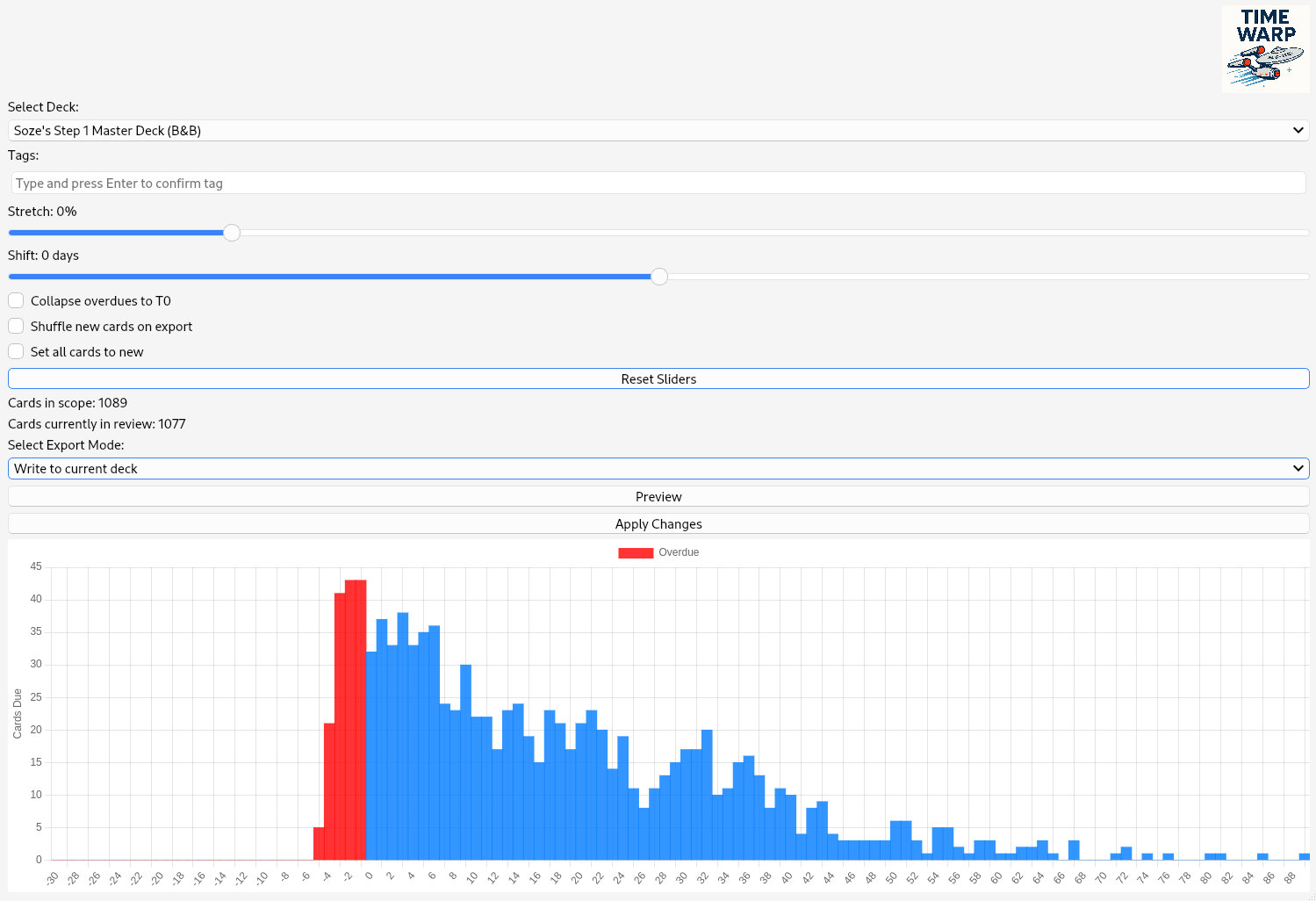
-- Screenshot

Key Features

Time Shifting

Shift all scheduled reviews forward or backward by up to 365 days. Every card keeps its position relative to the others, so a deck you paused for months comes back exactly as it was. Cards that are months overdue are picked up as well.

Time Stretching

Positive values flatten the next 90 days toward an even daily load; negative values compress the schedule toward today. Works on the whole load at once, so the result is smooth rather than sawtoothed.

Daily Cap

Put a ceiling on any single day; overflow spills forward instead of being dropped.

Simulation Mode

Preview transformed review schedules over a 90-day horizon before committing any changes.

Deck & Tag Filtering

Select specific decks or filter by tags to isolate exactly the cards you want to manipulate.

Single Undo Step

Changes are written as one undo entry (Edit β†’ Undo Time Warp). Only due dates change; intervals, ease and review history stay as they are.

Visual Timeline Chart

Interactive timeline visualizes the effect of stretching/shifting so you can fine-tune parameters before committing.

Motivation

Anki’s built-in scheduler excels at optimizing long-term memory retention, but it lacks tools for flexible timeline planning. Whether you're preparing for medical boards, semester finals, or language proficiency exams, there are times when you need to bend the schedule to your needs.

This add-on was created to:

  • Facilitate short-term prioritization of important material.
  • Avoid review accumulation after downtime.
  • Provide a visual overview of the review load.
  • Experiment with different scheduling strategies without risk.

Source Code

The full source code and development repository can be found on GitHub.

License

MIT License – free for personal and academic use.

Contact

deep_intervention@posteo.de

README

Anki Time Warp

Anki Time Warp

Reshape your Anki review schedule β€” see exactly what changes before it happens.

Anki Time Warp

Same snow, better spread.


What it does

Anki's scheduler optimises for retention, not for your calendar. Time Warp lets you reshape the review load itself: spread a pile-up over more days, push everything past a holiday, or cap how many cards a single day is allowed to hold β€” with a live chart of the result before anything touches your collection.

Every transformation is card-preserving: no card is ever dropped or duplicated, only moved.


Features

Shift β€” pause a deck, pick it up where you left off

Move the whole schedule by up to Β±365 days. Every card keeps its position relative to the others, so a deck you paused for five months comes back exactly as it was, just five months later. This is the difference to Anki's built-in Set Due Date, which scatters cards randomly and destroys their order.

Cards that are months overdue are picked up as well β€” the past horizon grows to fit the oldest card in scope.

Stretch β€” flatten or compress

The Stretch slider works on the whole review load at once rather than scaling each card's interval individually, so the result is smooth instead of the sawtooth pattern per-card scaling produces.

  • Positive values blend the next 90 days toward an even daily load. Peaks are levelled, valleys filled; nothing moves beyond the 90-day window.
  • Negative values compress the schedule toward today.

Cap the daily load

Max cards/day puts a ceiling on any single day; the overflow spills forward into the following days rather than being discarded.

  • -1 β€” off, the stretch slider controls the distribution
  • 0 β€” auto, levels to the average over the horizon
  • >0 β€” a manual ceiling

Sweep up the backlog

Collapse overdues to T0 takes everything that is already overdue and folds it into today instead of leaving it stranded in the past.

Target exactly the cards you mean

Pick a single deck or all of them, then narrow further by tags. Suspended cards are always excluded. Counters show how many cards are in scope and how many of them are actually in review.

See it before you commit

The chart shows the whole simulated timeline β€” red bars for overdue, blue for scheduled, plus a dashed line when a daily cap is active. The preview updates as you drag, and nothing is written until you press Apply Changes. Apply always re-simulates from the current settings, so what you confirm is what gets written.

One undo step

Due dates are rewritten in place in a single undo entry (Edit β†’ Undo Time Warp). Only the due date changes; intervals, ease and review history stay as they are.


Use cases

  • Pausing a deck β€” note the date you stop; when you return, shift by the number of days you were away and carry on as if nothing happened
  • Holiday β€” shift the load past the days you will not be studying
  • Backlog recovery β€” collapse the overdue pile into today and cap the daily hit
  • Sustainable pace β€” flatten a lumpy month into an even one

Screenshot

Anki Time Warp interface


Installation

From AnkiWeb β€” search the add-on catalogue for Anki Time Warp.

Manually

  1. Download or clone this repository
  2. Copy the files into a folder named anki_time_warp inside your Anki addons21 directory
  3. Restart Anki

The add-on appears under Tools β†’ Anki Time Warp.


Compatibility

  • Anki 2.1.55 or newer
  • Qt6 / PyQt6 (bundled with recent Anki builds)
  • Developed and tested on Linux; Windows and macOS are expected to work

Chart.js ships with the add-on and is inlined at runtime β€” Time Warp makes no network requests.


Safety

Changes are written inside a single custom undo entry, so Edit β†’ Undo Time Warp reverts the whole operation. As with any add-on that edits scheduling data, take a backup before a large transformation, and note that an undo is only available until you sync.

Suspended and buried cards, cards in filtered decks, new cards and cards in intraday learning are never touched.

A note on schedulers: with FSRS, moving a due date has no effect on the next interval (FSRS measures elapsed time from the last actual review). With the SM-2 scheduler, Anki grants an "overdue bonus" based on how late a card is answered; shifting a card later forfeits that bonus (conservative), pulling it earlier makes the next interval slightly larger than the elapsed time would justify. Use positive stretch with that in mind if you are not on FSRS.

There is a standalone test suite (python3 tests/test_core.py) that checks card conservation across a grid of stretch / shift / cap combinations.


License

MIT β€” free for personal and academic use.

Contact

deep_intervention@posteo.de