Interactive Heatmap

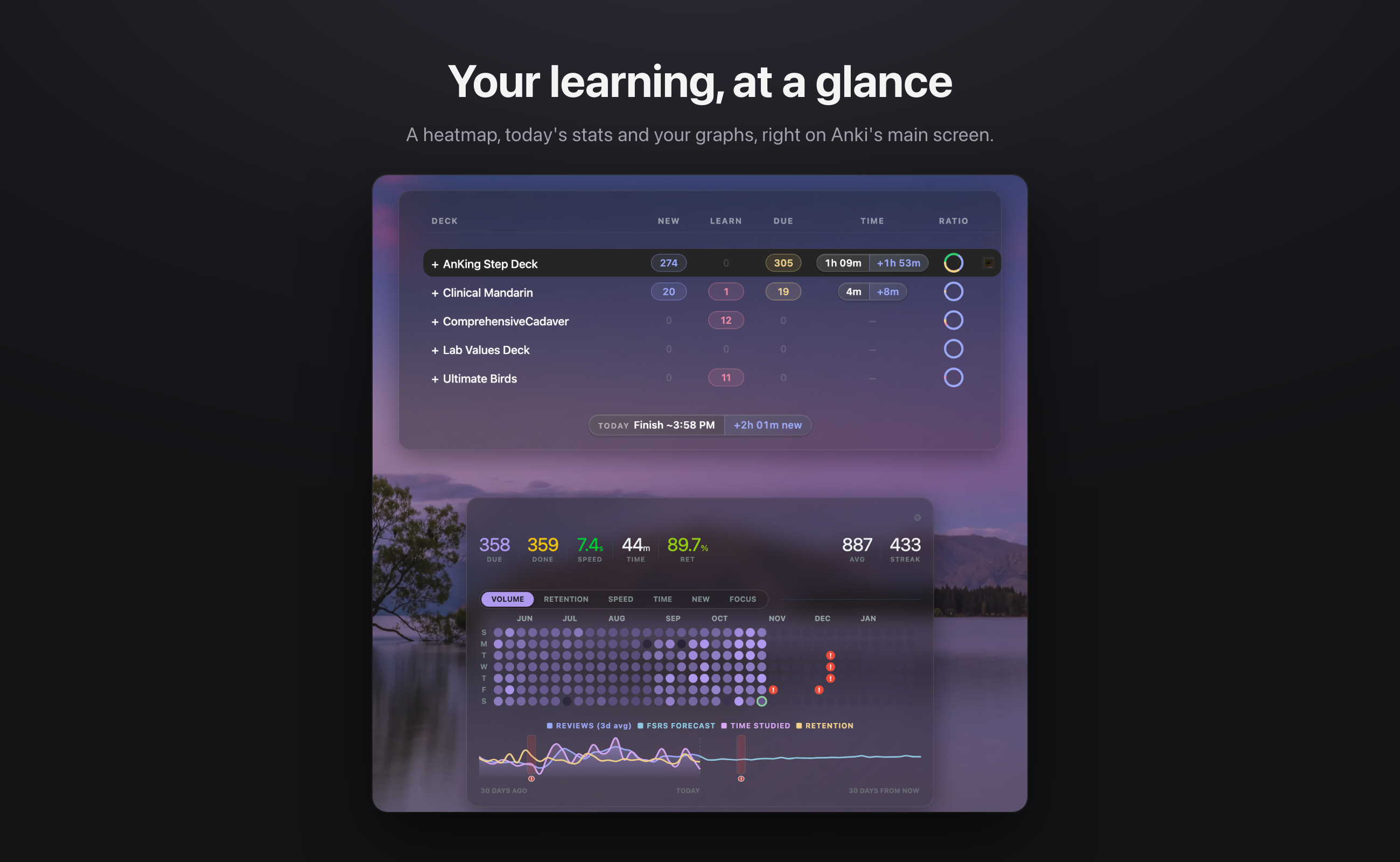
Interactive Heatmap turns Anki's main screen into a clear picture of your learning. You see how today is going, how you've been doing over the past months, and whether you're keeping up, without leaving the deck list or opening a separate Stats window.
It keeps the Anki you already know. Your decks stay where they are, the buttons stay where they are, and nothing about how you study changes. Anki just tells you a lot more about it.
Get started
- Open Anki and go to Tools → Add-ons → Get Add-ons…
- Enter the code
1782362167.
- Restart Anki.
Everything is set up in Tools → Interactive Heatmap Settings. The extras (Time Left, the review pill, themes and background photos) start switched off, so you can turn on only what you want.
Why it exists
Anki is great at deciding what you should review. It's less helpful at quickly showing you how you're doing. The numbers that matter sit in a separate Stats window that's easy to forget in the middle of a busy day. It's hard to tell at a glance whether today is going well, whether your retention is slipping, or how long your reviews will take. Sometimes you only notice you've fallen behind once the reviews have piled up.
Anki could also be nicer to open. Redesign add-ons like Onigiri fix that, but rebuilds the entire interface. It looks great, but the focus on reviewing cards is often secondary.
I built Interactive Heatmap as a medical student at Stanford, after running into both of these with daily Anki use. It keeps the simple layout you know and lays your learning performance on the main screen. It also adds the measures Anki doesn't give you: how steady your focus is, when you'll actually finish, and how far you are from your retention goal.
Philosophy
- Your learning comes first. Every number on screen should tell you something about how you're learning. If it doesn't help you study better, it doesn't belong.
- Insight at a glance. You shouldn't have to dig for your stats. Open Anki and you should know how today is going within a few seconds.
- Catch problems early. Falling behind is easy to fix when you see it coming and hard to fix once it's piled up. The add-on points out slipping retention, a heavy week ahead, and when you start losing focus within a study session while there's still time to adjust.
- Familiar and minimal. Anki's layout works. This add-on adds information and polish without moving things around or asking you to relearn anything.
What it shows you
How today is going
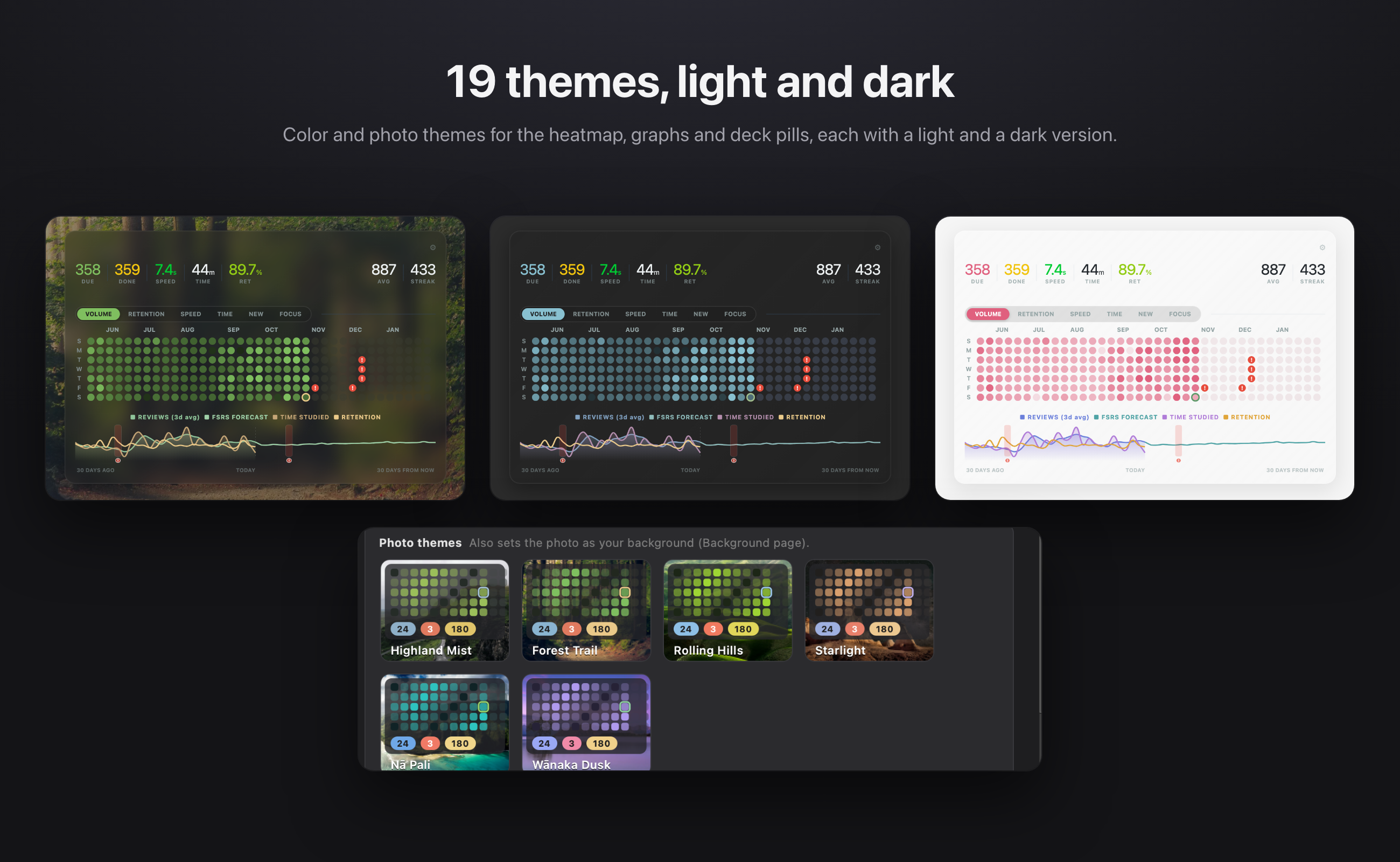
- A stats bar above the heatmap with cards due, cards done, your speed, time studied, today's retention, your daily average and your streak.
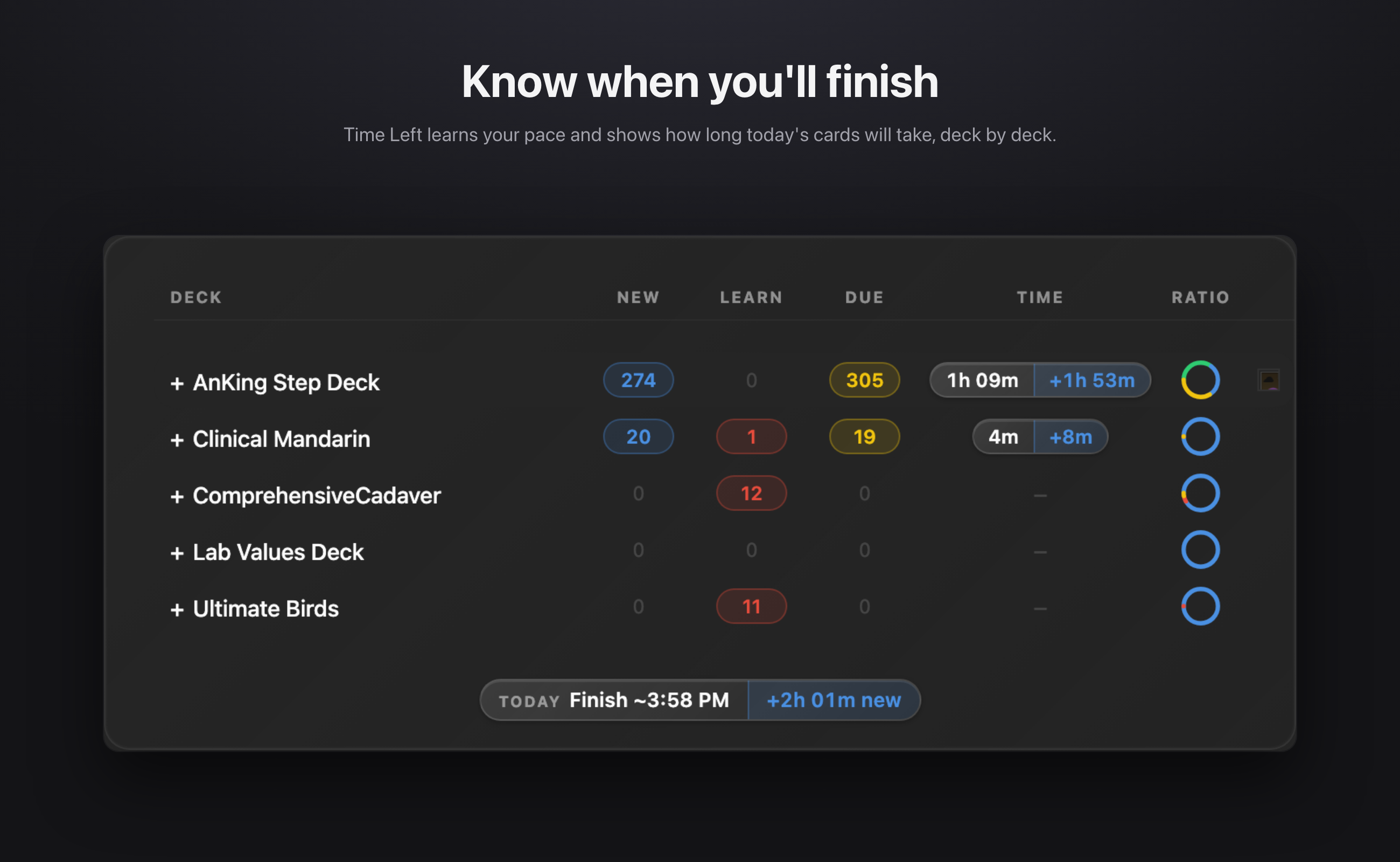
- Time Left (optional): how long today's remaining cards will take, as a finish time or time left. It's shown in a Time column in your deck list and on each deck's overview. It learns from your own review history and gets more accurate every day.
How you've been doing
- A heatmap calendar of the past months, one square per day, on your deck list and on each deck's overview. Hover over a day to see its numbers.
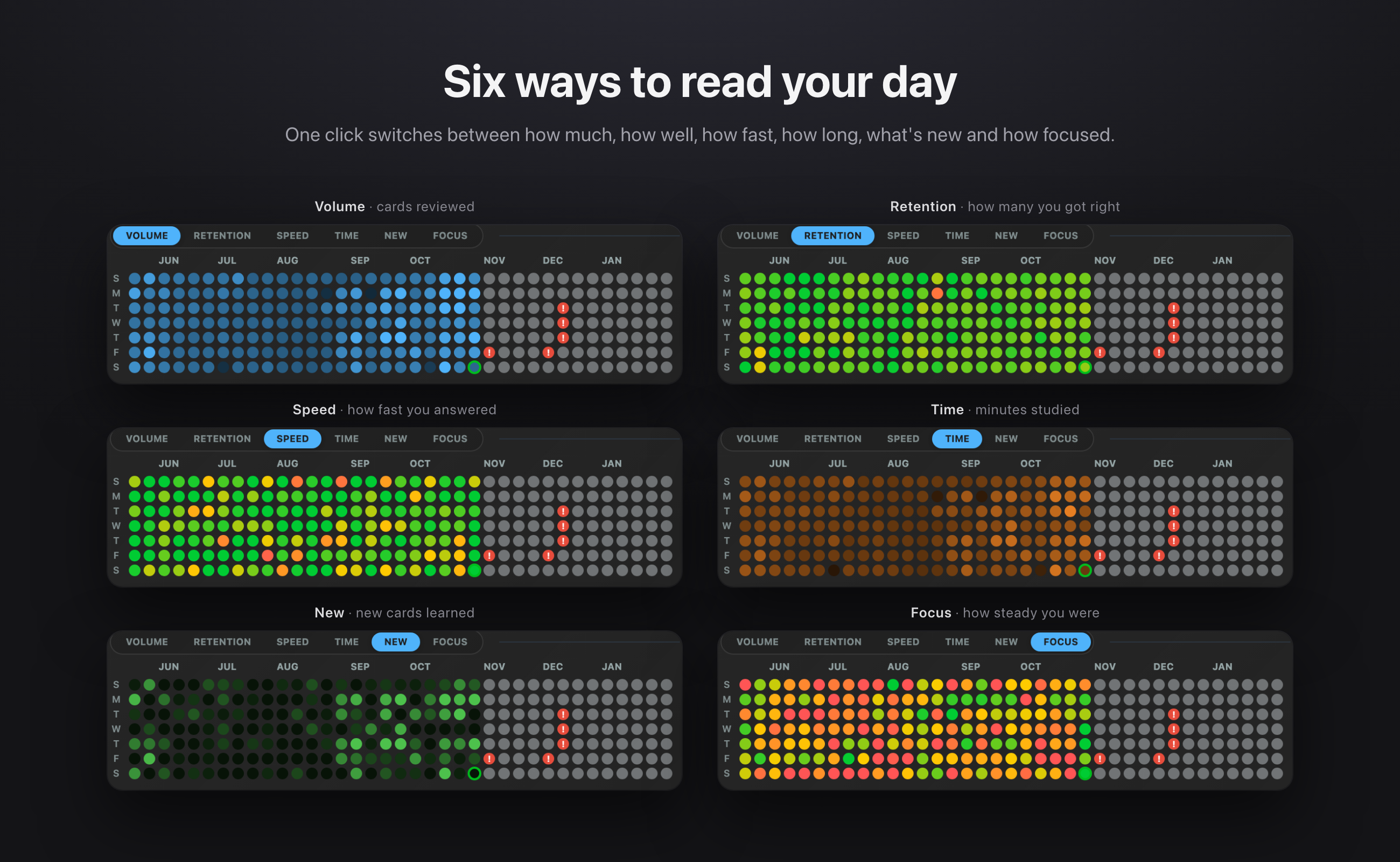
- Switch the heatmap between Volume, Retention, Speed, Time, New cards and Focus to see each side of your studying.
- Graphs of reviews, time per card, time studied and retention over the last 30 days, with optional rolling averages to smooth out noisy days.
- Click any day to add a note or mark an exam, so your history has context.
When you're falling behind
- The calendar's forecast shows the days ahead, and an optional FSRS simulation projects your workload for the coming weeks.
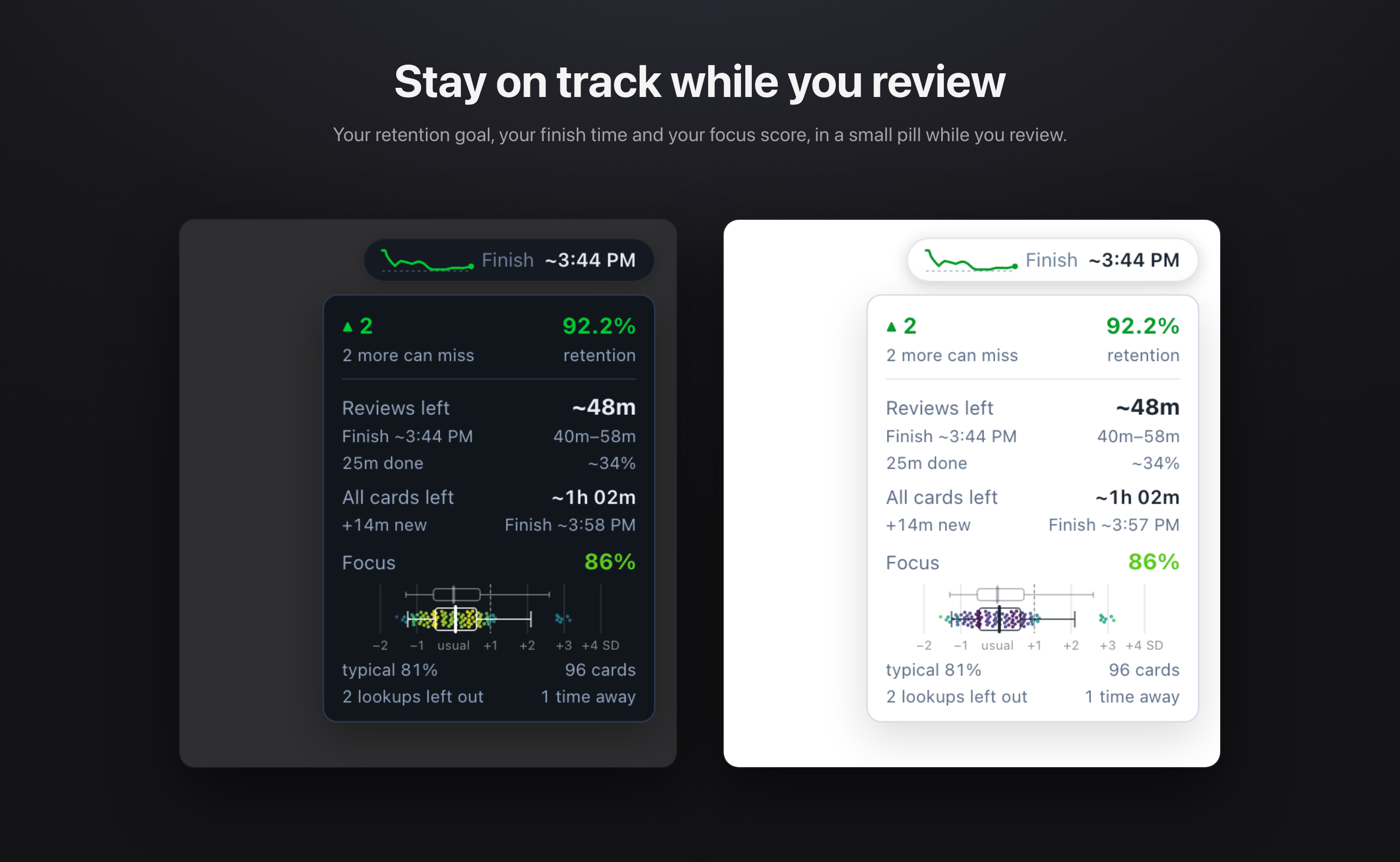
- The review pill shows how far you are from your retention target ("2 more can miss", or "40 to reach 90%") while you review.
- If several cards in a row take much longer than usual, the pill shows a cue that you seem to be drifting.
How focused you are
- The focus score measures how many cards you answered in about your usual time for that card. Each card is compared with its own history, and new cards get extra room since you're reading them for the first time.
- Cards where you stopped to look something up in the editor or browser are left out, so a lookup doesn't count against you.
- A soft ring around the pill after each answer shows whether it was a focused one. Your daily focus score also has its own heatmap view, so you can see which days you were sharpest.
A nicer place to study
- Themes: 19 color themes for the heatmap, graphs and deck pills, each with a light and a dark version. Six photo themes come with a matching background photo.
- Background photos: pick a built-in photo, or use your own and get a new one every day.
- A cleaner deck list with count pills and an activity ring. Filtered decks get their own color.
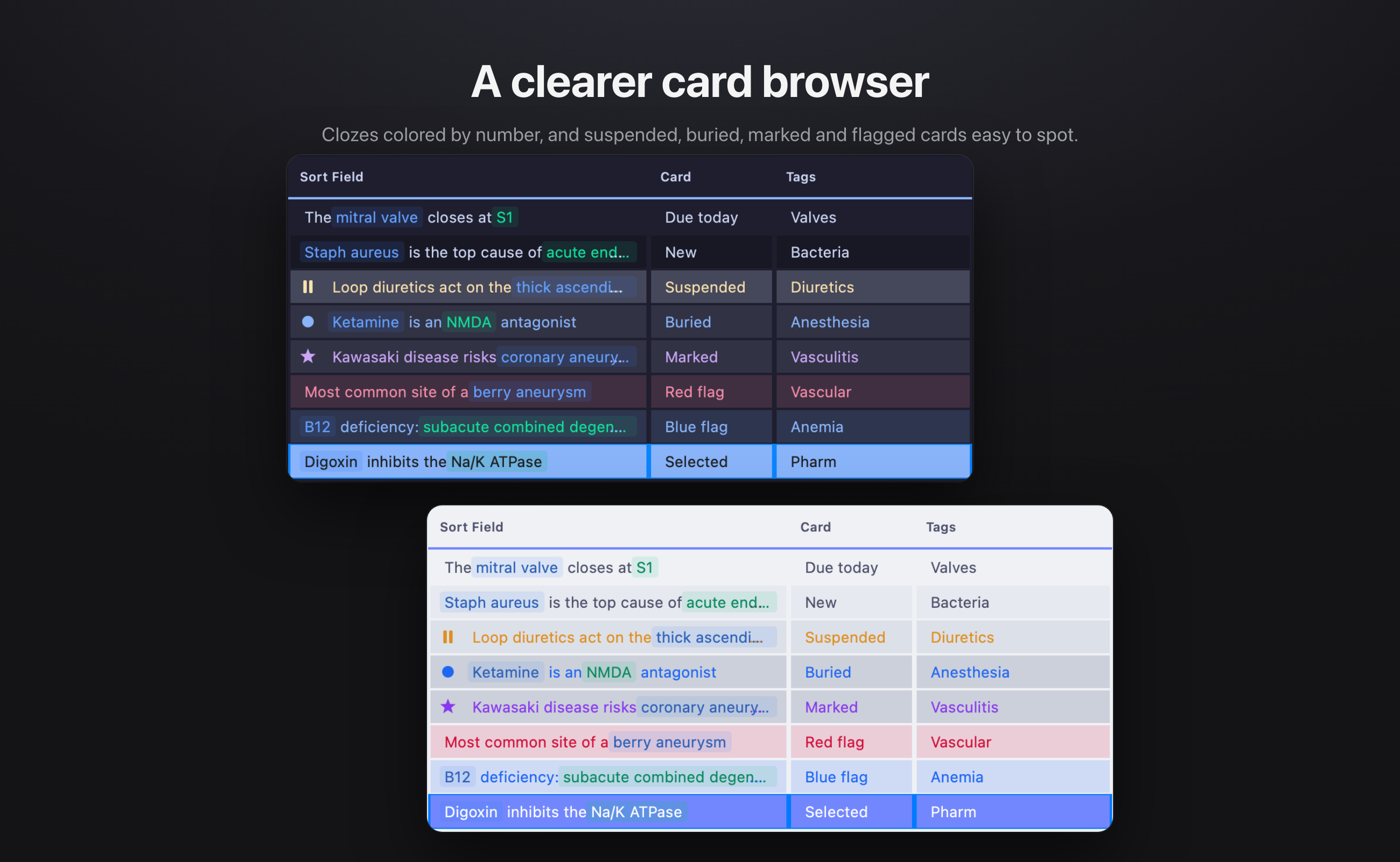
- A clearer card browser: clozes colored by number, tints and symbols for suspended, buried, marked and flagged cards, shorter tags, and tag colors in the sidebar.
Why Interactive Heatmap?
Anki already handles the hard part: it schedules your reviews so you remember. What it's missing is the feedback loop, a quick, honest look at how your learning is going. Interactive Heatmap adds that loop to the screen you already open every day.
Privacy
Everything runs on your own computer. The add-on reads your review history to draw the heatmap and work out your stats. It never changes your cards and never sends your data anywhere.
The only exception is feedback you choose to send from Settings → Feedback. You can see exactly what's included before you send: your message, and if you leave the box ticked, your Anki and add-on versions and your list of add-ons. Never your cards or reviews.
Feedback
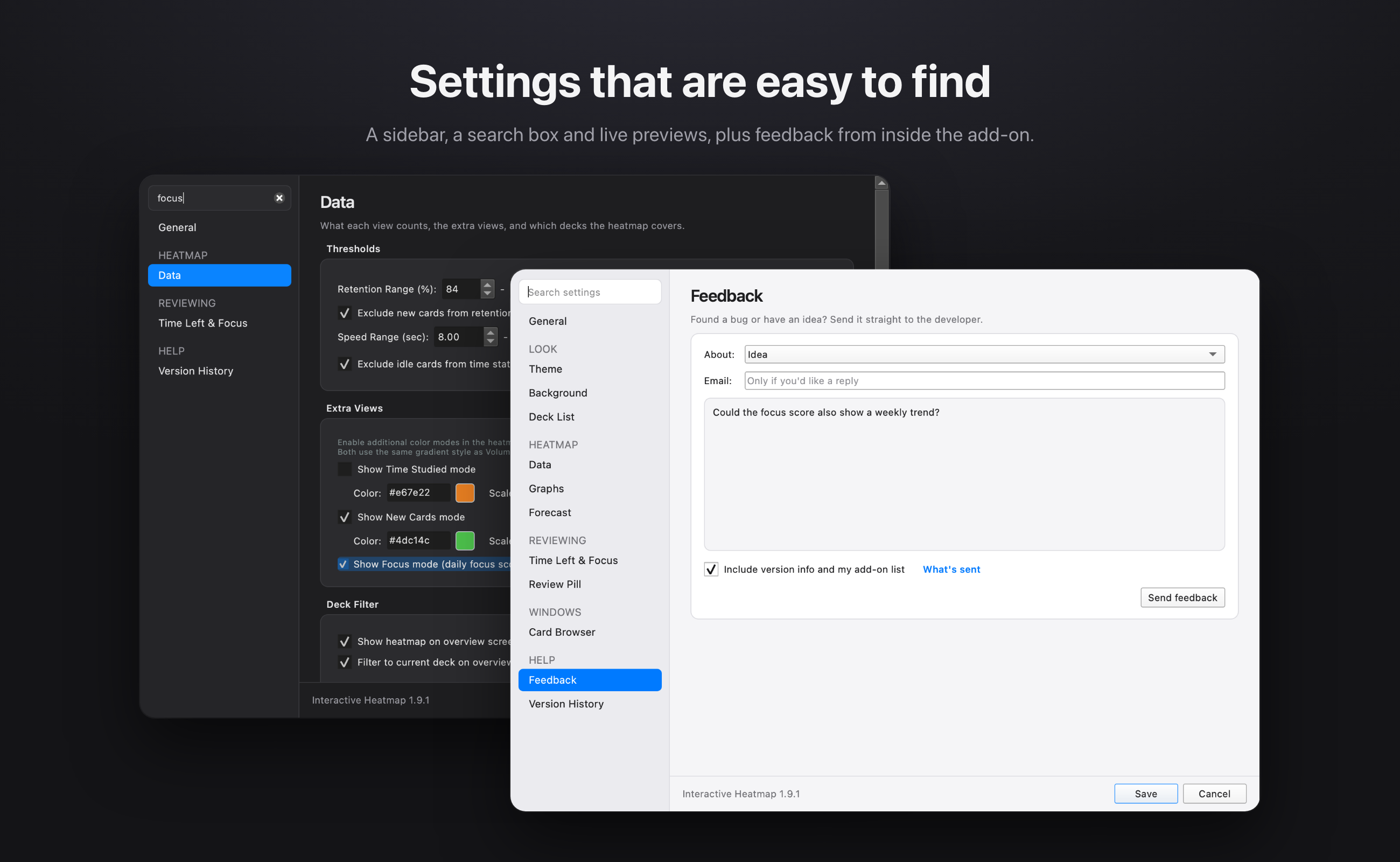
The best ideas for this add-on come from the problems people hit while studying. Found a bug, or have an idea for a measure that would help you learn? Send it from Settings → Feedback inside the add-on, no account needed.
What's new in 1.9.1
- Focus score: in the review pill and as its own heatmap view
- Themes: 19 themes, including six photo themes
- Redesigned settings: a sidebar, a search box and live previews
- Send feedback straight from the add-on
- Background photos: built-in photos, or your own with a new one each day
- Faster: views switch instantly, and Anki no longer freezes after starting up
- Fixes: browser tree arrows on Windows, filtered deck colors, and clozes that were hard to read in light mode
Every past update is listed in Settings → Version History.
Credits
- Color themes are based on the palettes of Catppuccin, Nord, Dracula, Tokyo Night, Gruvbox, Rosé Pine, Everforest and Solarized.
- Background photos are from Unsplash (Unsplash License), by Andrew Ridley, Lukasz Szmigiel, Qingbao Meng, John Fowler, Braden Jarvis, Ken Cheung, David Becker, Federica Galli, Leo_Visions, Luca Micheli and Taylor Leopold.
Thank you
To everyone who studies with Interactive Heatmap: thank you for making it part of your day. I hope it helps you see your progress clearly, and catch the slow days before they turn into a backlog.