
Card Coach: an AI tutor inside every card, free to use
Card Coach adds an AI tutor to your reviews. When you don't understand a card, ask about it on the spot. You get an explanation, a mnemonic or a translation without leaving Anki.
Free to use
- The add-on is free. No subscription needed to use it, no trial period, no feature locked behind a paywall.
- Free AI models work. Pick the OpenRouter provider and choose any model ending in
:free (Gemini Flash, Qwen and others). You need a free OpenRouter account. You don't need a credit card , (it's slow , and sometimes not reliable , if you need something fast use Card coach AI)
- Card Coach AI comes with free starter credits. Sign in from the add-on and start asking right away, with no API key to copy and paste.
- You can use your own key. Kimi (Moonshot), OpenRouter, or any OpenAI-compatible endpoint (OpenAI, a local server and so on).
Paid Card Coach AI plans are optional. They're for people who want something fast and reliable
Watch it in action

▶ Watch the demo on YouTube

🩺 For medical students
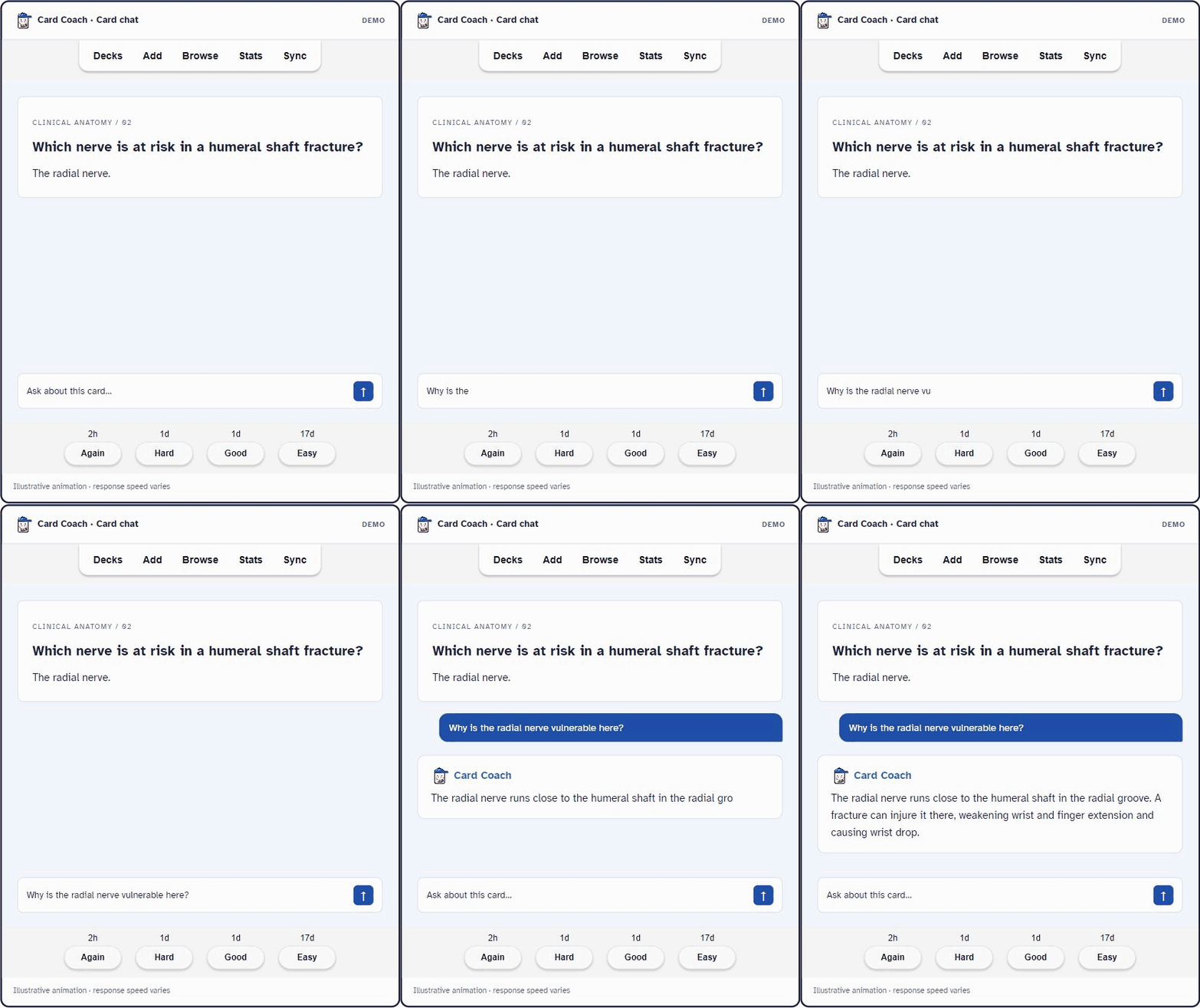
- Understand the card before you memorize it. "Why is the radial nerve at risk in a humeral shaft fracture?" The AI answers using the card's own content.
- Deck-aware answers. The AI sees your deck path (for example
Medicine::Immunology::Transplant) and pitches its answer at the right level.
- Image cards. With a vision-capable model, the AI can read the images on your card: anatomy diagrams, ECGs, histology slides, image-occlusion cards.
- "Why am I failing this?" This preset sends the card's review history (lapses, ease, interval) to the AI. It then suggests a memory strategy for that particular leech.
- Bulk Explain in the Browser. Select 50 cards from a premade deck and generate an explanation for each, saved into a field of your choice.
- Formulas render properly. Math and chemistry in answers are displayed, not shown as raw code.
🌍 For language learners
- Select any word and pick Define, Explain or Translate. A small popup answers next to the text (beta feature, turn it on in Settings → Experimental).
- Ask for more examples. Conjugations, example sentences, nuances between synonyms, grammar points behind a sentence.
- Choose the reply language. The AI can match your card's language, or always answer in English, French, Arabic, Spanish, Japanese, Chinese, Korean and many more.
- Right-to-left text works. Arabic, Hebrew, Persian and Urdu display correctly, including mixed with Latin text.
- Practice active recall. With Give Your Answer, type your answer from memory and the AI grades it.
✨ All features
- Card chat. Ask questions about the current card during review, below the card or in a resizable side panel.
- Give Your Answer (GUA). Type your answer on the front of the card. The AI compares it to the back and recommends Again / Hard / Good / Easy, with a short reason. Strictness is adjustable. Auto-grading is optional. You decide by default.
- Quick prompts. One-click questions you can customize: Explain, Examples, Mnemonic, Test me, Simplify and more.
- Brief answers. Toggle between full explanations and short or one-line answers.
- Save to card. Add the AI's answer to any field of the note, so it's there the next time the card comes up.
- Highlights. Highlight important parts of the card or of the AI's reply. Highlights stay on the card.
- Browser panel. Chat about any card from the Card Browser (
Ctrl+Shift+A).
- Model browser. Search the live model list from your provider (300+ on OpenRouter) and see prices, free models and image support.
- Answer cache. Asking the same question again returns the saved answer instantly, without another API call.
- Light and dark mode both look right.
🚀 Getting started (2 minutes)
- Install the add-on with the code below and restart Anki.
- Open the new Card Coach menu in Anki's top menu bar.
- Choose one option:
- Card Coach AI: click Free, sign in in your browser, and you're connected.
- OpenRouter (free): in Connection, paste your free OpenRouter key and pick a
:free model.
- Your own provider: in Connection, paste your API key and pick a model.
- Review as usual. Flip a card and ask your question.

🔒 Privacy
- Card content goes only to the AI provider you choose, and only when you ask a question or press Evaluate.
- Review statistics are sent only with the "Why failing?" preset.
- Anki stores API keys in plain text in your profile folder (standard for add-ons), so don't share your
meta.json. Card Coach AI sign-in happens in your browser: you never type a password into Anki.
Compatibility
Anki 2.1.45 and newer. Windows, macOS and Linux.
Feedback and bugs
Card Coach is made by a doctor who uses Anki every day. If something breaks or you have an idea, please leave a comment under the YouTube video. A short bug report is more useful than a 👎, because I can fix it.
If Card Coach helps you, a 👍 on this page helps other students find it. Thank you!