Notion Toggles Loader

AnkiWeb addon 1940767534

1 other version of this addon exists. Compare versions ↓

Loads Notion toggle-list blocks as flashcards into a chosen Anki deck, converting titles to fronts and content to backs, with tag parsing, cloze support, and manual or background synchronization.
AI-generated summary; may contain mistakes.

card-creationimportsync-integrationcloze

Open on AnkiWeb GitHub Find alternatives

AnkiWeb

Votes
26 (πŸ‘ 22 Β· πŸ‘Ž 4)
Updated
2023-04-26
Anki versions
2.1.61~
License
GPL-3.0 (from the GitHub repository)
Virus scan
No ClamAV match A match does not prove malware. No match does not prove that the code is safe.
Languages
Python, CSS, JSON
Description language
en

Maintenance

abandoned

  • Last update or commit: 2024-06-11 (873 days before the snapshot).
  • Test files: 1.
  • GitHub Actions workflows: 2.
  • Commits in the last year: 0.
  • Issues: 10 open, 13 closed.
  • Pull requests: 2 open, 3 merged.
  • Median first response: 35 hours (16 answered issues and pull requests).
  • Outside pull requests: 0% of 1 merged.
  • Forks that may still be maintained: "Notion2Anki" (644963660).

GitHub

Repository
9dogs/notion-anki-sync Β· more by 9dogs
Stars
⭐ 65 · forks 7 · open issues 12
Last commit
2023-04-26
License
GPL-3.0
Languages
Python, CSS, HTML, Dockerfile, Makefile
Tests
1

Will it work on my Anki?

Version branches
Min AnkiMax AnkiUpdated
2.1.432.1.61+2023-04-26
History across monthly snapshots

Loading…

Compare versions

The original addon and its forks. The best value in each column is in bold.

VersionWorks on Anki 26.09.3MaintenanceLast activity VotesApprovalGitHub starsNotes
Notion Toggles Loader this addon original likely abandoned 11 Jun 2024 πŸ‘ 22 Β· πŸ‘Ž 4 66% 65
↳ Notion2Anki supported active 8 Sep 2026 πŸ‘ 4 Β· πŸ‘Ž 3 25% 2 obsolete

Forks can add features or work in a different way. Read the description before you change to another version. Fork detection is incomplete, so other versions can exist.

Similar addons

Notion2Anki fork

Loads Notion toggle lists as Anki notes into different decks, converting toggle titles and content into cards, with tags, clozes, and background or manual sync.

importsync-integrationobsoletefork-or-reupload

7 votes 25% approval πŸ‘ 4 Β· πŸ‘Ž 3 ⭐ 2 Anki 2.1.1~ Updated 2026-09-08
Notion Toggles to Anki

Converts Notion toggle blocks into Anki questions, importing multiple pages into separate decks via the official Notion API, with recursion, rich content support, and GUI configuration.

card-creationimportsync-integration

16 votes 81% approval πŸ‘ 16 Β· πŸ‘Ž 0 Anki 25.02~ Updated 2025-03-13

Description

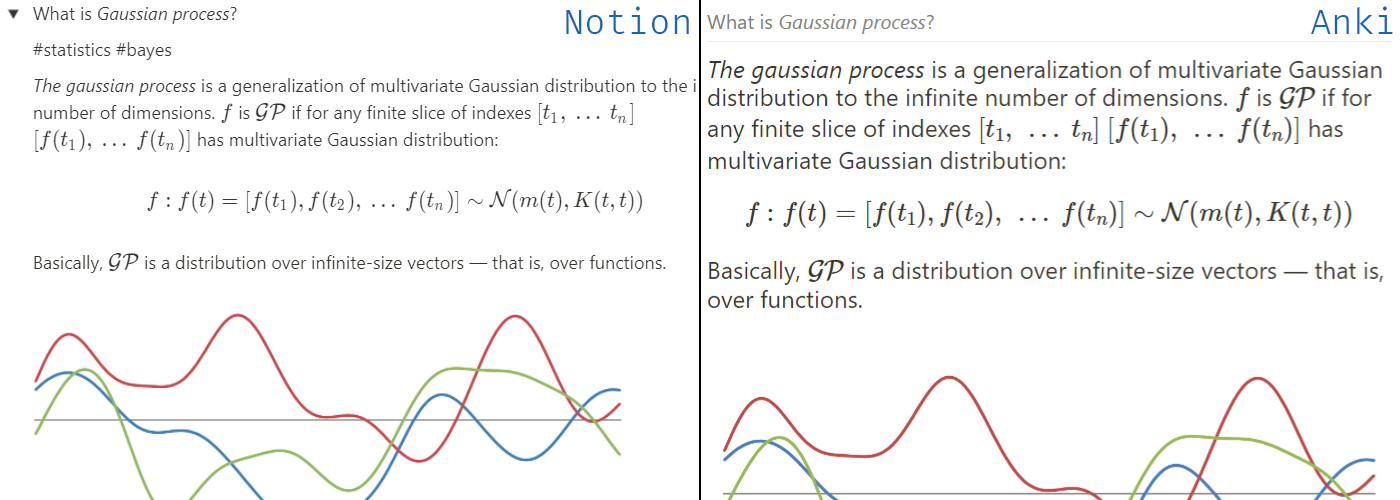
It's an addon that loads toggle lists from Notion as notes to a specified deck. Short demo and configuration how-to: YouTube - You provide a set of Notion page ids to export - Every "toggle list" block from Notion will be converted to an Anki note - Title of the toggle block will become the front side and its content β€” the backside - The line starting with #tags will be parsed as tags - Ignore toggles by putting symbol ❕ in front of a toggle title (type ":!" in Notion and select the white one) Clozes can be added via code blocks in toggle titles. Backside will be ignored (apart from tags). Synchronization can work in the background or can be triggered manually from the Notion submenu in the Tools section. Note that background sync does not remove any notes; if you want to remove the obsolete notes, then trigger Load and remove obsolete from the submenu. Requirements 1. Notion API token To get Notion API token log in to Notion via a browser (assuming Chrome here), then press Ctrl+Shift+I to open Developer Tools, go to the "Application" tab and find token_v2 under Cookie on the left. 2. Notion page ids To get Notion page id open up the page in a browser and look at the address bar. 32 chars of gibberish after a page title is the page id: https://www.notion.so/notion_user/My-Learning-Book-8a775ee482ab43732abc9319add819c5 ➑ 8a775ee482ab43732abc9319add819c5 Edit plugin config file from Anki Tools ➑ Add-ons ➑ NotionAnki ➑ Config and paste Notion token in notion_token config parameter, your Notion username as notion_namespace and fill in `notion_pages` section. Known issues & limitations Behind the scenes, the addon initiates Notion pages export to HTML, then parses the HTML into notes. Since non-public Notion API is used, the addon may break without a warning. 1. As for now, LaTeX and plain text cannot be used in the same cloze: Notion puts them in separate code tags which leads to the creation of two cloze blocks. 2. Some toggle blocks are empty on export which leads to empty Anki notes. The issue is on the Notion side (and they're aware of it). Configuration parameters - debug: bool [default: false] β€” enable debug logging to file. - sync_every_minutes: int [default: 30] β€” auto sync interval in minutes. Set to 0 to disable auto sync. - anki_target_deck: str [default: "Notion Sync"] β€” the deck loaded notes will be added to. - notion_token: str [default: None] β€” Notion APIv2 token. - notion_namespace: str [default: None] β€” Notion namespace (your username) to form source URLs. - notion_pages: array [default: [] ] β€” List of Notion pages to export notes from. Inspiration This project is inspired by a great notion2anki.

README

AnkiπŸ’—Notion addon

It's an Anki addon that loads toggle lists from Notion as notes to a specified deck.

Supported versions License: GPL v3 Codestyle: Black

How it works

Short demo and configuration how-to: YouTube link

TLDR

  • You provide a set of Notion page ids to export
  • Every "toggle list" block from Notion will be converted to an Anki note
  • Title of the toggle block will become the front side and its content β€” the backside
  • The line starting with #tags will be parsed as tags
  • Ignore toggles by putting symbol ❕ in front of a toggle title (type ":!" in Notion and select the white one)

Clozes can be added via code blocks in toggle titles. Backside will be ignored (apart from tags).

Synchronization can work in the background or can be triggered manually from the Notion submenu in the Tools section. Note that background sync does not remove any notes; if you want to remove the obsolete notes, then trigger Load and remove obsolete from the submenu.

Requirements

Notion API token

To get Notion API token log in to Notion via a browser (assuming Chrome here), then press Ctrl+Shift+I to open Developer Tools, go to the "Application" tab and find token_v2 under Cookie on the left.

Notion page ids

To get Notion page id open up the page in a browser and look at the address bar. 32 chars of gibberish after a page title is the page id: https://www.notion.so/notion_user/My-Learning-Book-8a775ee482ab43732abc9319add819c5 ➑ 8a775ee482ab43732abc9319add819c5

Edit plugin config file from Anki: Tools ➑ Add-ons ➑ Notion Toggles Loader ➑ Config

{
  "debug": false,
  "sync_every_minutes": 30,
  "anki_target_deck": "Notion Sync",
  "notion_token": "<your_notion_token_here>",
  "notion_namespace": "<your_notion_username_here",
  "notion_pages": [
    {
      "page_id": "<page_id1>",
      "recursive": false
    },
    {
      "page_id": "<page_id2>",
      "recursive": true
    }
  ]
}

Known issues & limitations

Behind the scenes, the addon initiates Notion pages export to HTML, then parses the HTML into notes. Since non-public Notion API is used, the addon may break without a warning.

  • As for now, LaTeX and plain text cannot be used in the same cloze: Notion puts them in separate code tags which leads to the creation of two cloze blocks.

  • Some toggle blocks are empty on export which leads to empty Anki notes. The issue is on the Notion side (and they're aware of it).

Configuration parameters

  • debug: bool [default: false] β€” enable debug logging to file.
  • sync_every_minutes: int [default: 30] β€” auto sync interval in minutes. Set to 0 to disable auto sync.
  • anki_target_deck: str [default: "Notion Sync"] β€” the deck loaded notes will be added to.
  • notion_token: str [default: None] β€” Notion APIv2 token.
  • notion_namespace: str [default: None] β€” Notion namespace (your username) to form source URLs.
  • notion_pages: array [default: [] ] β€” List of Notion pages to export notes from.

Inspiration

This project is inspired by a great Notion to Anki.