Kanji Colorizer (stroke order diagrams)

AnkiWeb addon 1964372878

1 other version of this addon exists. Compare versions ↓

Automatically adds colored stroke order diagrams to kanji card fields, storing them as media so they display on AnkiWeb even without the addon installed.
AI-generated summary; may contain mistakes.

card-creation

Open on AnkiWeb GitHub Forum topic Find alternatives

AnkiWeb

Votes
110 (πŸ‘ 100 Β· πŸ‘Ž 10)
Updated
2026-07-31
Anki versions
23.12.1~
License
AGPL-3.0 (from the headers of the Python files)
Virus scan
No ClamAV match A match does not prove malware. No match does not prove that the code is safe.
Languages
Python, JSON
Description language
en

Maintenance

active

  • Last update or commit: 2026-07-31 (93 days before the snapshot).
  • Test files: 1.
  • GitHub Actions workflows: 1.
  • Commits in the last year: 11.
  • Issues: 21 open, 39 closed.
  • Pull requests: 1 open, 15 merged.
  • Median first response: 171 hours (46 answered issues and pull requests).
  • Outside pull requests: 63% of 19 merged.

Will it work on my Anki?

Version branches
Min AnkiMax AnkiUpdated
2.1.023.12.1+2026-07-31
History across monthly snapshots

Loading…

Compare versions

The original addon and its forks. The best value in each column is in bold.

VersionWorks on Anki 26.09.3MaintenanceLast activity VotesApprovalGitHub starsNotes
Kanji Colorizer (stroke order diagrams) this addon original likely active 31 Jul 2026 πŸ‘ 100 Β· πŸ‘Ž 10 84% 133
↳ Kanji Colorizer for RTK (AI-detected; may be wrong) likely abandoned 10 Nov 2023 πŸ‘ 0 Β· πŸ‘Ž 2 0% 20

Forks can add features or work in a different way. Read the description before you change to another version. Fork detection is incomplete, so other versions can exist.

Similar addons

Kanji Writing Practice

Opens a Pygame window after card reveal so users can draw supported Japanese kanji, view stroke-order hints, receive accuracy grades, retry, and save scores.

review-flowquiz

2 votes 34% approval πŸ‘ 2 Β· πŸ‘Ž 0 ⭐ 2 Anki 25.07.5~ Updated 2025-08-18
Jisho Kanji Stroke Order

Displays kanji stroke order in Jisho's visual style when hovering Japanese characters, for configured note types, with customizable styling.

appearancedictionary

12 votes 76% approval πŸ‘ 12 Β· πŸ‘Ž 0 ⭐ 2 Anki 2.1.65~ Updated 2026-07-29
Kakijun - Kanji stroke order

Displays animated kanji stroke order in Anki cards by adding a template filter that renders SVG data from the KanjiVG and Kanimaji projects.

card-templatesbeta

17 votes 82% approval πŸ‘ 17 Β· πŸ‘Ž 0 ⭐ 5 Anki 2.1.43~ Updated 2020-05-15

Description

The download will appear to freeze. Just wait, it will eventually download.
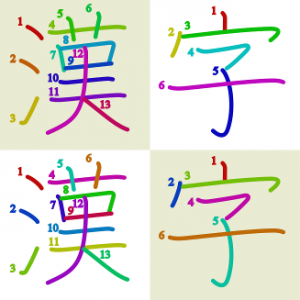
The Kanji Colorizer addon automatically adds colored stroke order diagrams to your kanji cards. They are stored as media, so they continue to work even when you're reviewing on a platform such as ankiweb where you don't have the addon installed.

Usage: Add a "Diagram" field to a model with "Japanese" in the name and a field named "Kanji" - or other model and fields of your choice; this is customizable the config found in "Tools > add-ons". When you finish editing the kanji field, a colored stroke order diagram will be added to the Diagram field in the same way that the Japanese support plugin adds readings. If the Kanji field contains multiple characters, the add-on will only generate diagrams for the kanji; if it does not contain kanji it will generate diagrams for all characters

"Tools > Kanji Colorizer > generate all new" will add diagrams to all such fields that don't already have diagrams. Or the "(re)generate all" option can be used to generate them all with new settings.

The development site for this addon is at https://github.com/cayennes/kanji-colorize . If you have any bug reports or feature requests, use the issue tracker there or email me at cayenne@hey.com. I do not get a notification when you post a comment on this page.

UPDATES:

7/31/26: Upload correct addon file

7/30/26: Support multiple note types, thanks to tim0est

7/3/24:

  • Add option to draw grid under character, thanks to teozec
  • Add option to write characters to multiple destination fields, thanks to byohay

1/8/24: Update to use latest KanjiVG diagrams.

11/3/20: Option to not overwrite destination field if it already has something in it (thanks Andrew Reitz!). Helpful message instead of unhelpful error pane when you try to generate all new and there are no models matching your config.

8/2/20: Fixed a bug that broke generating cards with empty destination field on anki 2.1.28+ (thanks eternal-flame-AD!)

7/26/20: Fixed a bug on anki 2.1.28 and added setting to control whether to generate diagrams for non-kanji characters

7/20/20: Will now properly generate kana combination cards

5/31/20: Option to generate diagrams only for cards with an empty destination field (thanks ThundX!)

11/2/19: Hopefully fixed an error prevented it from loading it properly.

11/1/19: Configurable fields (thanks AyanamiSan!)

10/28/18: Support anki 2.1 (thanks j-kramer!) and use new config system

12/23/17: Update KanjiVG data

12/22/17: Fix bug that would lock up anki when editing kanji cards in some conditions. Thanks to Quinnlet for reporting and alexpizarroj for finding the problematic code.

10/11/14: Kana support added

10/11/14: Newer kanjivg version, fix from LucasEasedUp for an exception when closing an empty add card form

4/15/14: Latest kanjivg version

12/7/13: Ignore invalid characters (such as Chinese characters that don't exist in Japanese) instead of throwing error.

10/27/13: Fix for issue where diagrams were no longer generated after upgrading anki

5/9/13: Contribution from shufps: option to create colored groups instead of colored/numbered strokes (that was a while ago but I broke it before uploading it; now I've fixed it)

4/9/13: updated stroke order information from kanjivg

3/31/13: Fix for the "No module named colorsys" errors that some people were seeing; also ospalh's fix for number coloring (no longer inappropriately bolded)

README

.. image:: https://circleci.com/gh/cayennes/kanji-colorize.svg?style=svg :target: https://circleci.com/gh/cayennes/kanji-colorize

============== KanjiColorizer

.. image:: kanji-colorize-examples.png

About

kanji_colorize.py is a script for coloring, resizing, and renaming the stroke order diagrams from the KanjiVG <http://kanjivg.tagaini.net/>_ project. I wrote it to create sets that make it possibe to easily add stroke order diagrams to an anki <http://ankisrs.net/>_ kanji deck, but they can be used for anything you want some nicely colored stroke order diagrams for.

If you'd prefer not to bother running a python script, there are some sets of stroke order diagrams generated with it available for download.

Getting diagrams

If you just want some colorted diagrams, you can get them on the github releases page <https://github.com/cayennes/kanji-colorize/releases>_.

I've packaged up a spectrum set and a contrast set. The spectrum set colors the strokes in rainbow order and is nice because the you can see at a glance how the kanji is put together, but has the disadvantage that stokes next to each other are similar colors, and color is sometimes necessary to tell which number goes with which stroke. The contrast set maximizes the contrast between any set of consecutive strokes. (This uses the golden ratio. Math is nifty.)

Using with Anki

There is an addon for Anki2 <https://ankiweb.net/shared/info/1964372878>_ that generates colored diagrams for all of your kanji cards. You can install it with code 1964372878.

Downloading and Running the Software

The kanji_colorize.py script makes it possible to generate diagrams to your own specifications. It may have issues with a python not built with wide-character support

Feedback

If there's anything you think would improve these, you can use the issue tracker <https://github.com/cayennes/kanji-colorize/issues>_ or email me at cayennes@gmail.com.

If you find any errors in image files generated by the most recent version of kanji colorizer, check to see whether they have been fixed in the KanjiVG data by looking at their online kanji viewer <http://kanjivg.tagaini.net/viewer.html>. If it is correct there, it means that I didn't notice that there was an update; let me know and I'll fix it. If the error exists there, let the KanjiVG project know using their issue tracker <https://github.com/KanjiVG/kanjivg/issues>.

Development

Have you created an improvement to KanjiColorizer that you think other people would also like to have? If so, please submit a patch or a pull request! I'm not always very prompt but I do get to them eventually.

Please make sure existing tests pass. Even better, add new tests for anything you add. Either doctest or unittest is fine, though ideally the doctests would contain executable examples that fully illustrate the function and the unittest tests would contain further worthwhile checks.

The first time you clone the project, you need to get the submodule with the uncolored diagrams:

.. code:: bash

$ git submodule init
$ git submodule update

Activate the virtual environment and install requirements:

.. code:: bash

$ python3 -m venv venv
$ source venv/bin/activate
(venv) $ pip install -r requirements.txt

To run the existing tests:

.. code:: bash

(venv) $ py.test

To create a new release:

.. code :: bash

(venv) $ paver dist_anki_addon

Test by unzipping the zip file in dist into a new directory in ~/.local/share/Anki2/addons21 (or the equivalent for the OS being tested).

License

The code is available under the Affero GPL version 3 or later and the SVG images are available under Creative Commons Attribution-Share Alike 3.0. See file headers and files in licenses/ for more information.