Chinese-Text-Scanner

AnkiWeb addon 2121493325

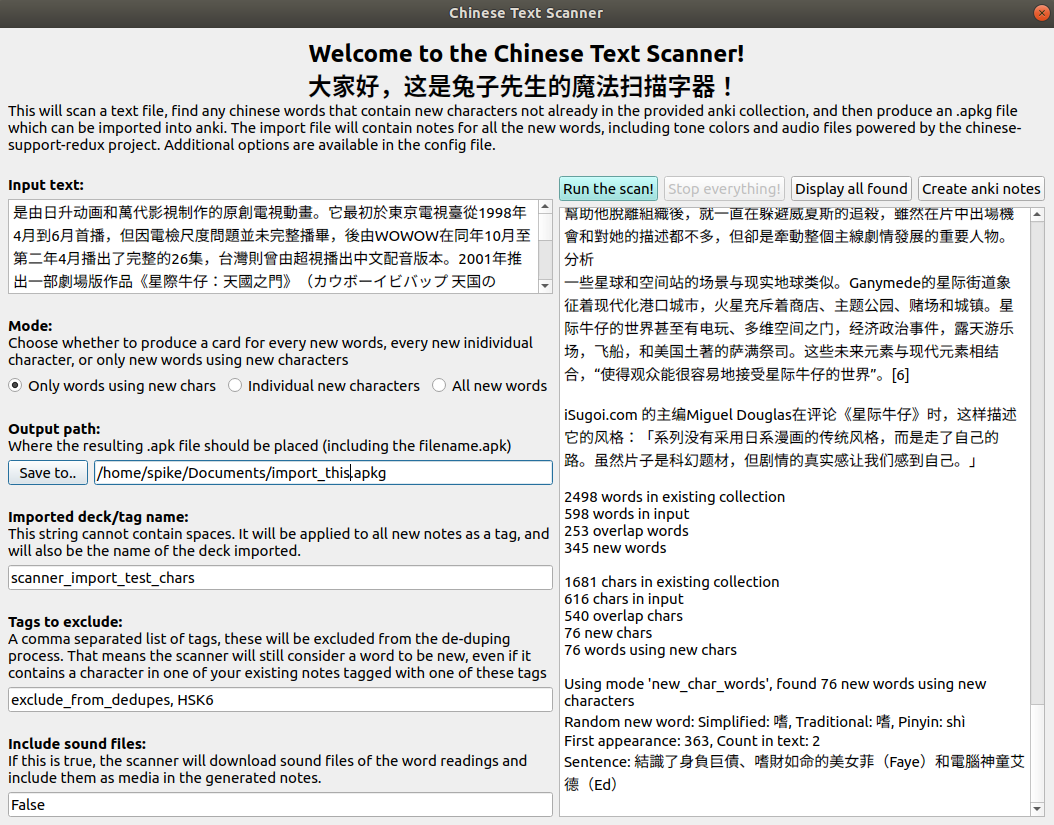
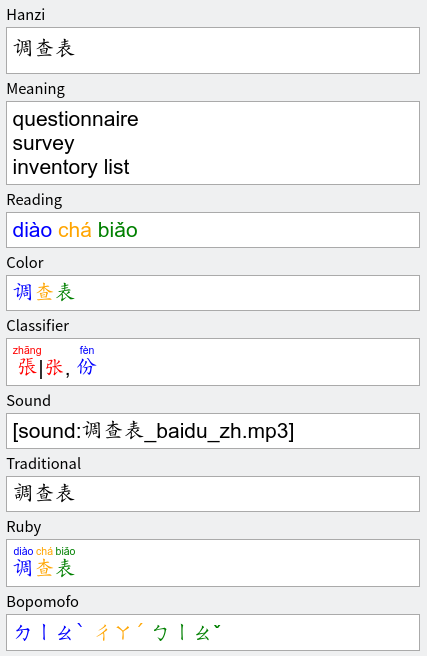
Scans text files or pasted text for Chinese words missing from your Anki collection and adds them as notes with tone colors, audio, and configurable note-type mapping.
AI-generated summary; may contain mistakes.

card-creationcard-templates

Open on AnkiWeb GitHub Find alternatives

AnkiWeb

Votes
1 (👍 1 · 👎 0)
Updated
2020-06-28
Anki versions
2.1.26~
License
GPL-3.0 (from the license file in the package)
Virus scan
No ClamAV match A match does not prove malware. No match does not prove that the code is safe.
Languages
Python, C++, Swift, Groovy, CSV, C, JavaScript, TSV, Kotlin, Protocol Buffer Text Format, Assembly, Java, Gradle, Prolog, JSON, Scala, SCSS, TypeScript, C#, Jinja, Common Lisp, CSS, Ignore List, SQL, Haskell, Handlebars, YAML, Ruby, Verilog, Batchfile, Go
Description language
en

Maintenance

abandoned

  • Last update or commit: 2022-12-08 (1424 days before the snapshot).
  • Test files: 11.
  • Commits in the last year: 0.
  • Issues: 6 open, 2 closed.
  • Pull requests: 6 open, 5 merged.
  • Median first response: 6 hours (8 answered issues and pull requests).
  • Outside pull requests: 75% of 4 merged.

Will it work on my Anki?

Version branches
Min AnkiMax AnkiUpdated
2.1.02.1.26+2020-06-28
History across monthly snapshots

Loading…

Similar addons

Find Missing Words

Searches your Anki collection to highlight unknown words in pasted text, then creates notes for them with surrounding sentence context, ignoring unwanted words.

card-creationsearchcloze

4 votes 30% approval 👍 3 · 👎 1 ⭐ 15 Updated 2019-11-17

Description

This will scan a text file, find any chinese words not already in the provided anki collection, and then add them as notes to your Anki collection. The notes include tone colors and audio files powered by the chinese-support-redux project. You can configure which note type to use if you want to use your existing card templates, or you can take the default note type provided. You can also choose whether to add all words found, or only words containing new characters. Usage: 1. Install the addon and restart anki 2. TextScan will be added to the anki menu. Go there to open the configure or scan dialog 3. You may want to configure how the scanned words will map to your chosen note type first. If you skip this step, it will use an included default note type. 4. choose "scan file" or "scan pasted text" from the menu bar to use the scanner. 2020-06-27: updated to better support mac os, and to auto-import notes. It no longer requires saving an apkg file and then importing it. You can now configure how generated notes will map onto your existing note type. 2020-02-17: added paste-text mode, better config management, new UI layout and options 2020-02-10: updated to support windows platform More info can be found at https://github.com/mentheosis/anki-scanner-chinese-redux

README

Chinese Text Scanner

This will scan a text file, find any chinese words that contain new characters not already in the provided anki collection, and then produce an .apkg file which can be imported into anki. The import file will contain notes for all the new words, including tone colors and audio files powered by the chinese-support-redux project.

Usage:

  1. Install the addon and restart anki (refer to https://ankiweb.net/shared/info/2121493325)
  2. TextScan will be added to the anki menu. Go there to open the scan dialog
  3. The scan will produce a .apkg file which includes fully detailed notes, but it does not contain detailed card templates
  4. In anki, select the imported notes and choose "change note type" to the port the new notes into your existing note types to utilize your existing card templates.

Dev Mode:

Here's an easy way to get started deving:

  1. Clone this, then create a symlink from anki's addon folder to the /chinese directory here
  2. Set dev_mode to true in the textScanner config section
  3. You'll need to restart Anki for the setting to take effect. You should notice the menu header gets a "_dev" appelation and a new menu item to probe the sqlite db. Tip: 'master' is a shortcut for 'select * from sqlite_master'

Testing:

  1. make test

Building:

  1. (optional) Add any new packages you want to use into requirements-minimal.txt
  2. make build - creates temporary virtualenv and grabs any dependencies we need

Package up a new zip file to publish:

  1. Put the version you want in chinese/_version.py
  2. make package - cleans, builds, creates a new zip file in build/ dir

Based on Chinese-Support-Redux by Joseph Lorimer which is based on the Chinese Support add-on by Thomas TEMPÉ and many others.

Screenshot #1

Screenshot #2