Adjust Sound Volume

AnkiWeb addon 2123044452

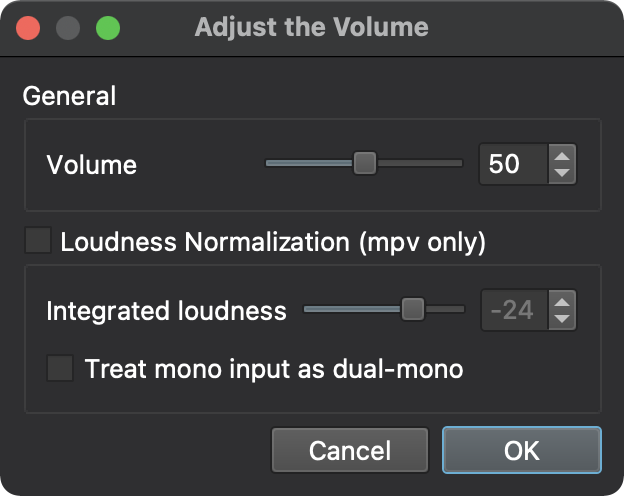
Adds a Tools menu item with a slider or numeric input for adjusting Anki's sound volume, plus loudness normalization when mpv is used.
AI-generated summary; may contain mistakes.

Open on AnkiWeb GitHub Find alternatives

AnkiWeb

Votes
49 (πŸ‘ 47 Β· πŸ‘Ž 2)
Updated
2023-12-25
Anki versions
23.10~
License
AGPL-3.0 (from the GitHub repository)
Virus scan
No ClamAV match A match does not prove malware. No match does not prove that the code is safe.
Languages
Python, JSON
Description language
en

Maintenance

abandoned

  • Last update or commit: 2024-01-03 (1033 days before the snapshot).
  • Test files: 1.
  • GitHub Actions workflows: 1.
  • Commits in the last year: 0.
  • Issues: 4 open, 4 closed.
  • Pull requests: 1 open, 1 merged.
  • Median first response: 161 hours (6 answered issues and pull requests).
  • Outside pull requests: 50% of 2 merged.

Will it work on my Anki?

Version branches
Min AnkiMax AnkiUpdated
2.1.202.1.662021-05-05
23.10+2023-12-25
History across monthly snapshots

Loading…

Similar addons

Ambient Soundscapes

Plays user-provided looping ambient background sounds during Anki study, with menu controls for enabling, selecting soundscapes, adjusting volume, and remembering settings.

motivation

2 votes 34% approval πŸ‘ 2 Β· πŸ‘Ž 0 ⭐ 0 Anki 2.1.36~ Updated 2025-05-28
1 in 10000 chance of Foxy jumpscare per second

Randomly triggers a Foxy jumpscare with a 1-in-10,000 chance per second while studying in the focused main Anki window, with configurable volume and chance.

gamification

42 votes 88% approval πŸ‘ 41 Β· πŸ‘Ž 1 ⭐ 7 Anki <=26.09.3 Updated 2026-10-21
Audio Normalizer

Measures card audio and creates verified, volume-adjusted copies for consistent loudness, with batch, preview, automatic, and original-restoring options.

note-managementbeta

1 votes 21% approval πŸ‘ 1 Β· πŸ‘Ž 0 ⭐ 0 Anki 26.05~ Updated 2026-08-12

Description

This add-on adds a new menu item for adjusting the sound volume.

  1. Go to the Tools > Adjust Sound Volume menu item
  2. Drag the slider to adjust the volume, or enter a volume number directly
  3. Click the OK button

If Anki is using mpv, you can enable loudness normalization.

README

adjust-sound-volume

This Anki 2.1.20+ add-on adds a new menu item for adjusting the sound volume.

How to Install

You can install this add-on through AnkiWeb.

How to Use

  1. Go to the Tools > Adjust Sound Volume menu item
  2. Drag the slider to adjust the volume, or enter a volume number directly
  3. Click the OK button

screenshot

If Anki is using mpv, you can enable loudness normalization.

How to Create

  1. Install make and zip
  2. Run make