HoldUp — Build your own extra review queue in one click
English · Русский
I've found HoldUp indispensable in my own Anki routine. If you enjoy simple, minimalist tools, I think you might really like it too.
You know the kanji and its meaning. A normal review in two days is fine — but
you still want another look tonight, maybe to check one of its components.
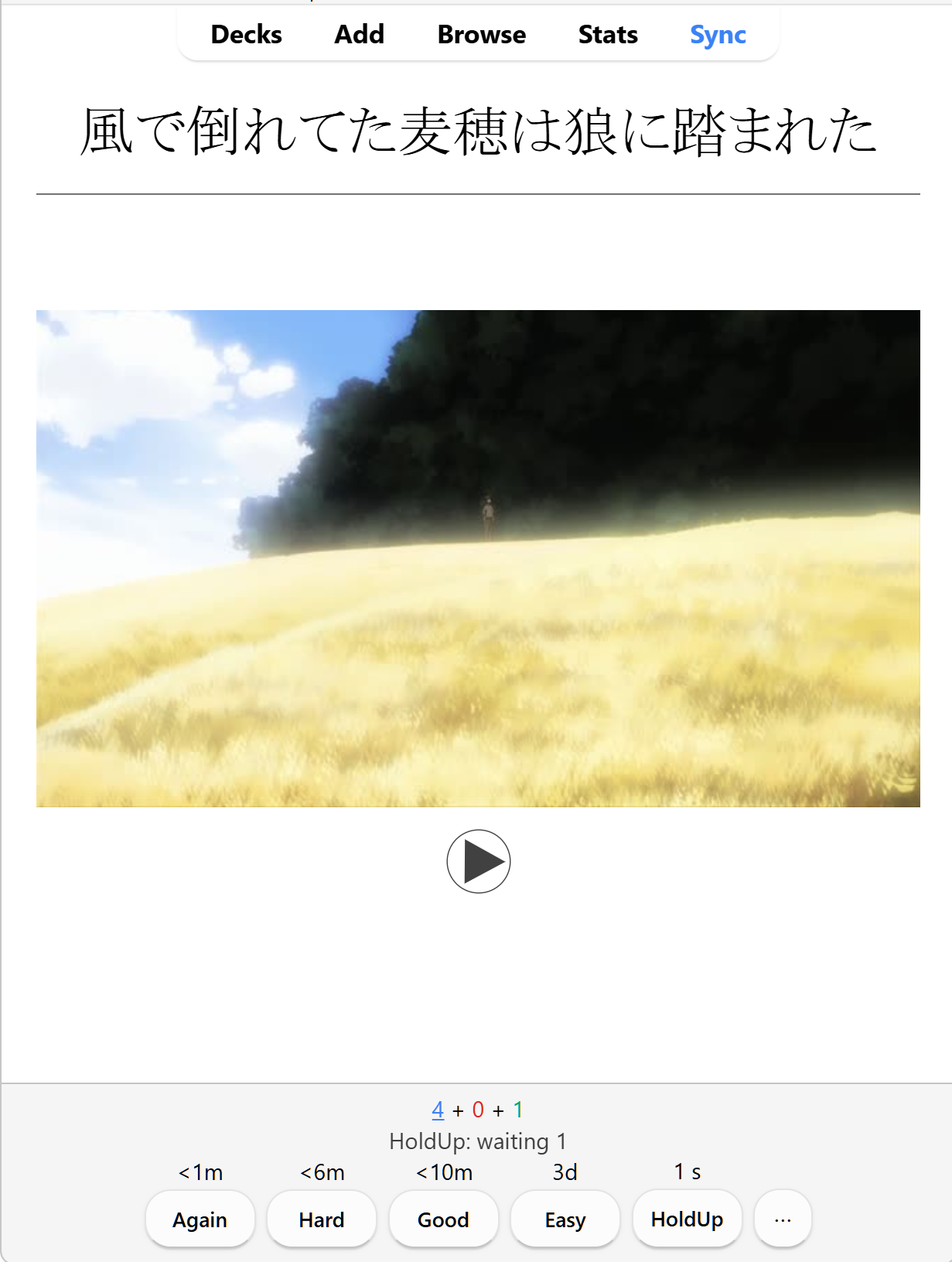
That's what I made HoldUp for. Choose your interval once, then press HoldUp
while reviewing to add an extra appearance to its own queue. Rate the original
as usual and carry on. Ready appearances join the green review count and show
up when you study that deck.
You can put together something similar with flags or filtered decks. I wanted to
build that parallel queue on the fly, without stopping to organise it manually.
Pressing HoldUp doesn't answer or reschedule the original; your normal rating
still does that. Extra practice doesn't submit FSRS ratings, so FSRS doesn't
know about those extra looks. They can still affect later recall.
Download 1.0.0
User guide · Руководство пользователя
Stable release 1.0.0. The owner reported completing the manual checks after
approximately a week of use on 30 October 2026.
Validation record ·
GitHub checks.
Install
If another copy of this add-on is installed, disable it in Tools → Add-ons
and restart Anki first. Then install the downloaded archive through
Tools → Add-ons → Install from file and restart Anki.
Existing cards and practice appointments remain in the collection. Choose your
preferred interval again if needed; local add-on preferences are not automatically
copied from another installation. Keep only one copy enabled.
Python does not need to be installed separately. Start with a separate test profile.
How it works
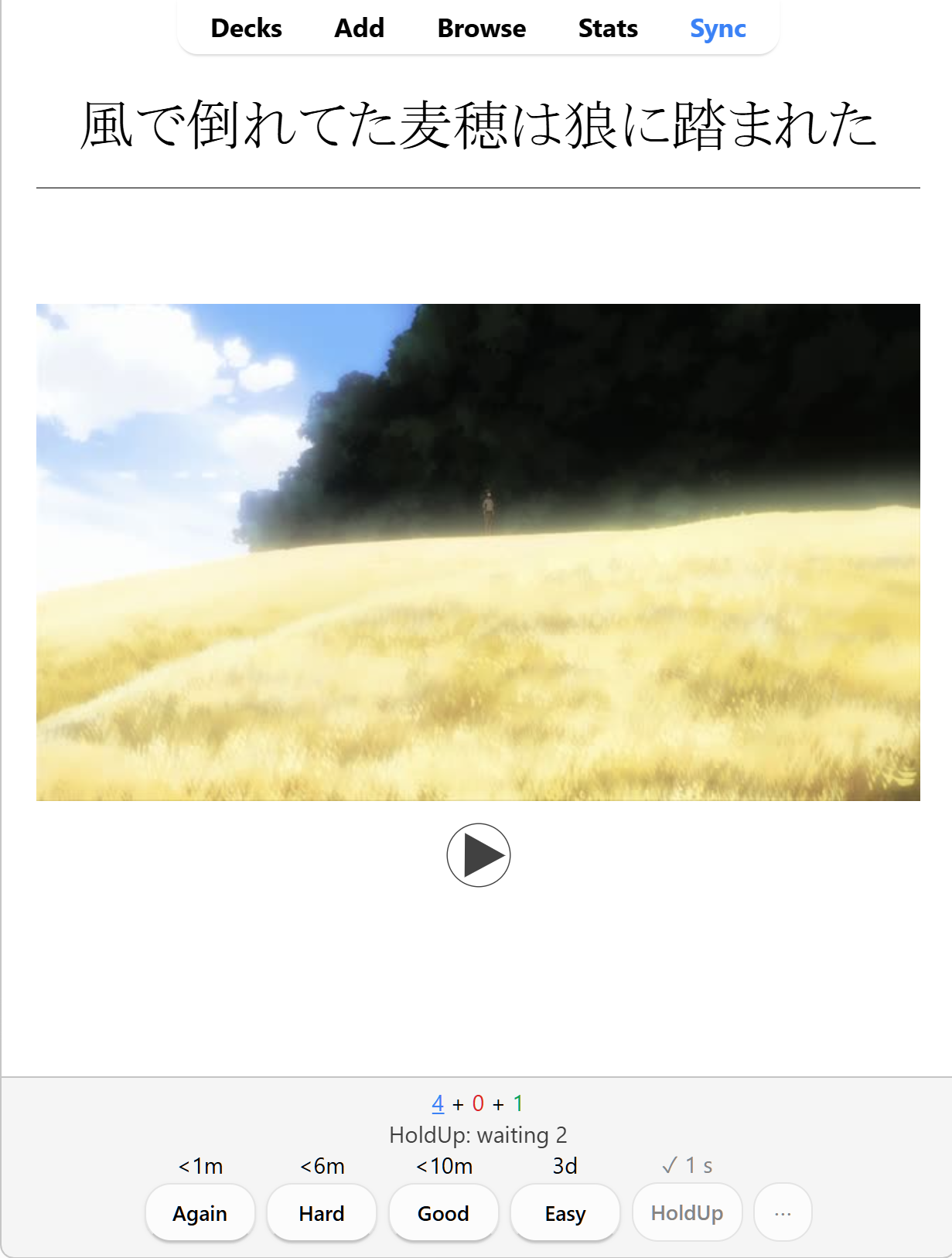
- Show the answer and press HoldUp. A checkmark confirms an extra practice
appointment. The original answer stays open.
- Choose Again, Hard, Good, or Easy for the original. This normal
Anki answer updates its schedule and counts towards the daily new-card limit.
- Extra practice keeps its own deadline independently of that rating. Good may
schedule the original for eight days while practice becomes ready in two minutes.
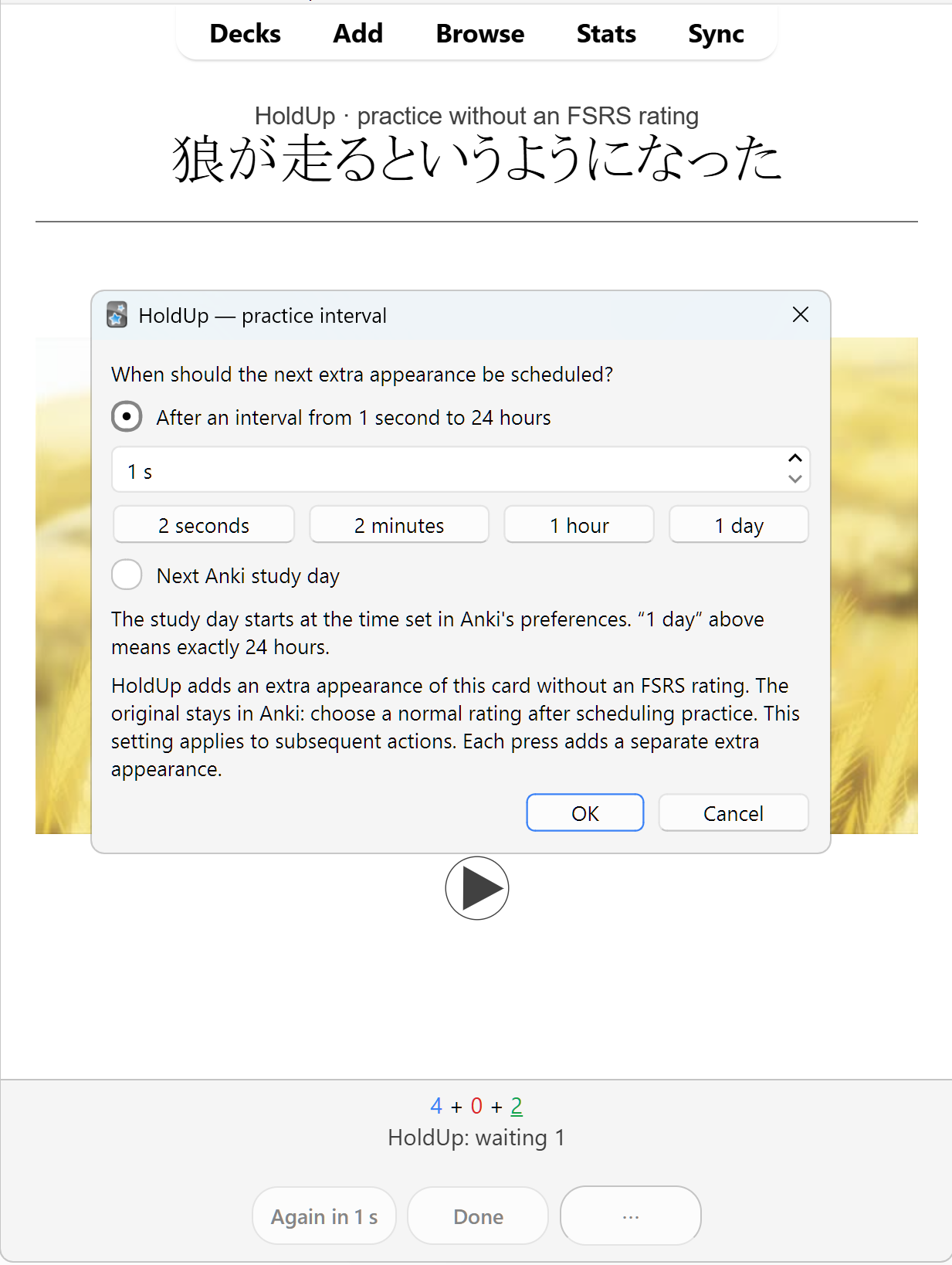
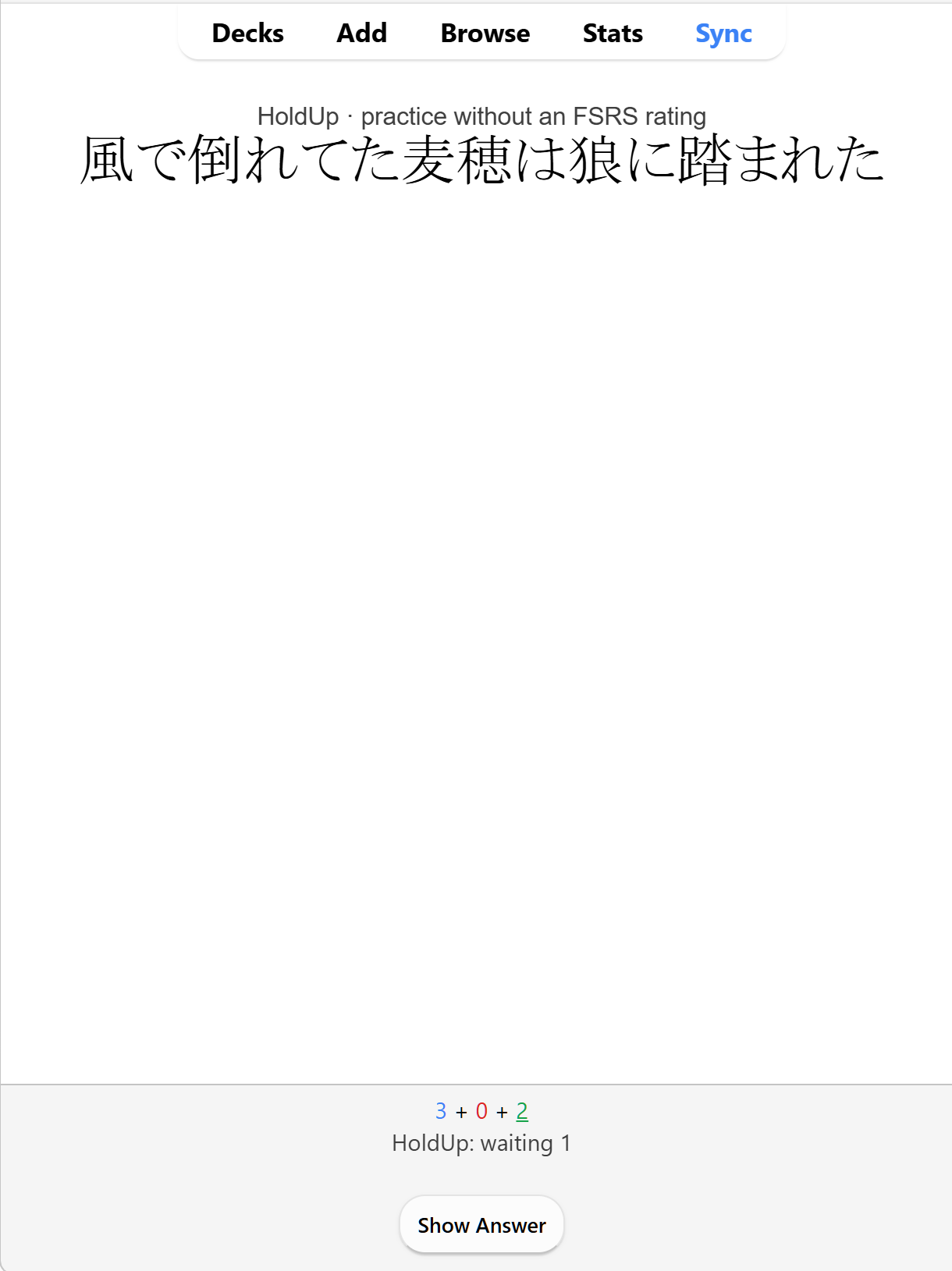
- Ready practice appears between cards in the same reviewer, labelled
HoldUp · practice without an FSRS rating.
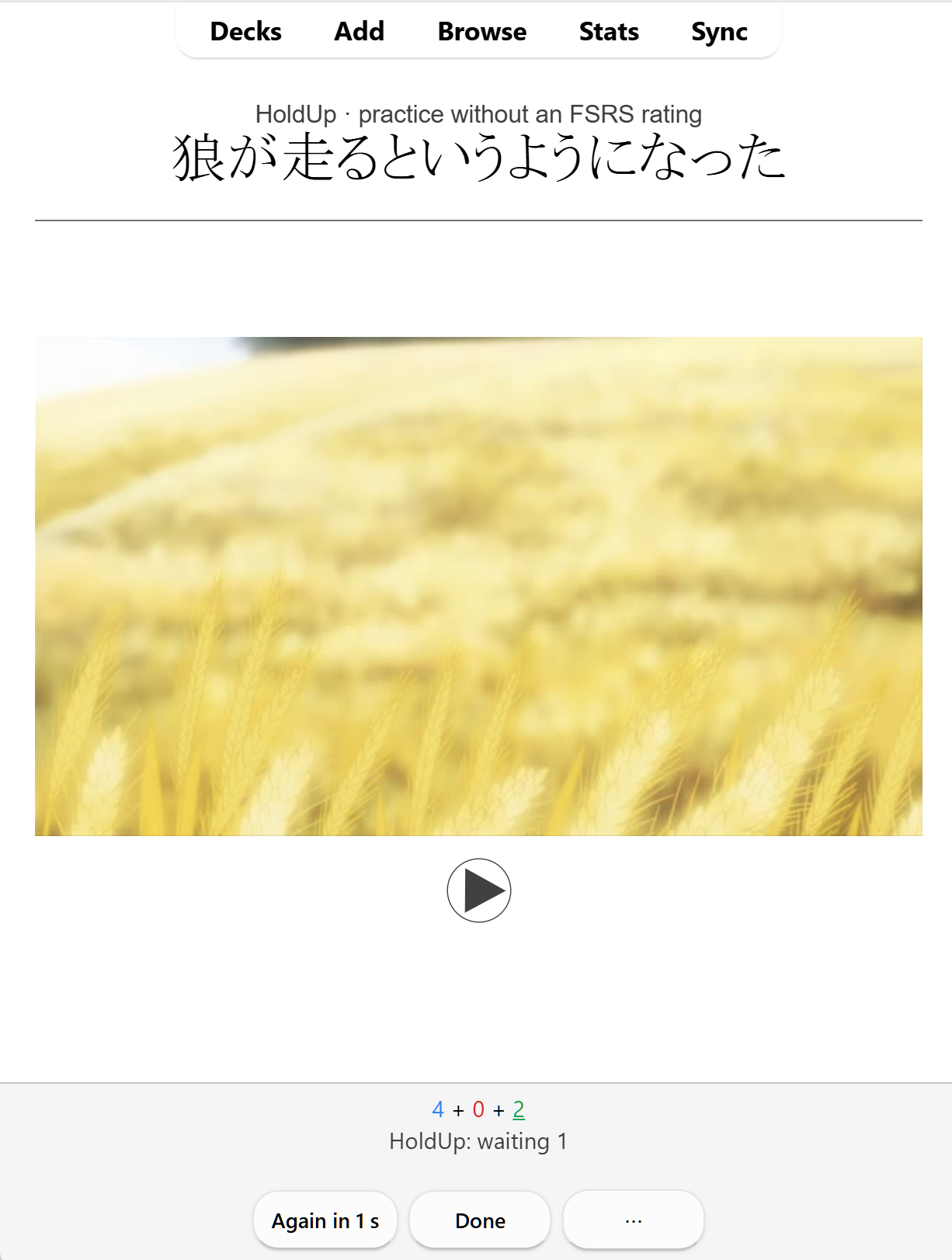
- Again in … reschedules the current extra appearance; Done finishes only
that appearance. These actions do not submit FSRS ratings.
Each HoldUp press adds an independent extra appearance. Earlier appointments keep
their deadlines; the waiting count includes every appearance, even of the same card.
No card or note is duplicated. Scheduling practice alone does not answer
Good or consume the daily new-card allowance; the normal rating does.

After pressing HoldUp, the checkmark confirms the extra appearance. The original stays open so you can choose a normal Anki rating.

Language and time
The interface follows Anki's language: Russian for Russian, English for other
languages. Both translations are included. Restart Anki after changing its language.
Choose time through ⋯ or Tools → HoldUp: interval…. Presets include
2 seconds, 2 minutes, 1 hour and 1 day; custom intervals range from 1 to 86400 seconds.
- 1 day means exactly 24 hours after the action.
- Next Anki study day uses the next day-start boundary from Anki's preferences.
With a 04:00 start, scheduling at 23:00 or 02:00 makes practice ready at the next
04:00. Anki supplies the boundary, including local time and daylight saving.
Settings apply to subsequent actions. Existing appointments keep their stored
absolute deadlines, including after a change to Anki's day-start setting.
Queue and indicators
During study, the green count includes ready practice. Its tooltip shows the Anki
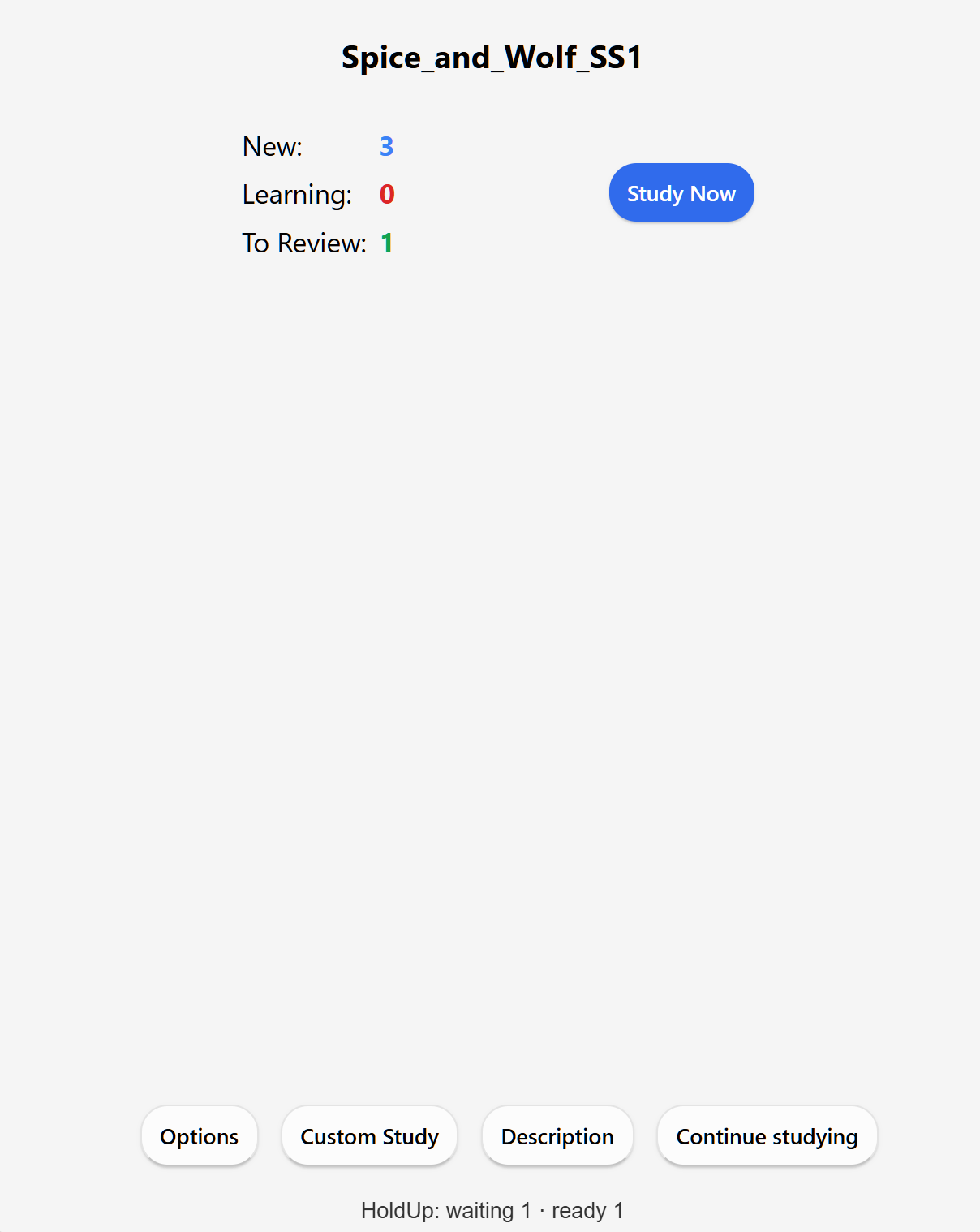
and HoldUp portions. Blue and red remain Anki's counts. HoldUp: waiting N
shows future appointments as passive text.
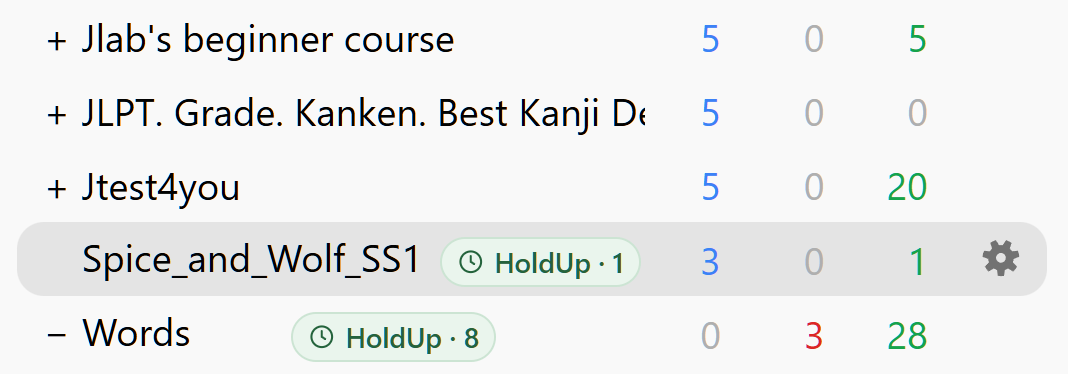
On Decks, a small green clock badge HoldUp · N shows ready practice,
even when the three native deck counts are zero. Open the deck by its normal name.
Parents include their subdecks, including collapsed ones; parent and child counts
overlap. Future and unavailable appointments do not show ready badges.

Practice uses the selected deck and subdecks. A deadline is the earliest time it
can appear: the current answer and earlier native deadlines can delay it. When
Anki is closed, appointments wait for your next session. Continue studying on
the deck overview returns to the same reviewer when extra practice is ready.
Appointments, repeats, completion and clearing support Undo/Redo.
After HoldUp → a normal rating → Undo, only that normal rating is cancelled:
the original returns, and the HoldUp deadline remains. A second Undo cancels the
earlier HoldUp appointment if no other collection action intervened. Undoing a
practice repeat or Done affects only the practice appointment.
Tools → HoldUp: clear all practice removes extra appointments across the open
collection, including future ones. Cards and normal ratings remain.
Version 1.0.0 is the first stable release: faster large-queue clearing,
AGPL-3.0-or-later licensing, reproducible packages and Windows/Linux CI. It retains
independent appearances of the same card, their existing deadlines and native Undo/Redo.
Data and license
First-release support is one desktop installation per collection. Full collection
exports (.colpkg) and Anki backups preserve appointments; deck .apkg exports do
not carry the complete queue. Live multi-device sync/conflict resolution remains
unverified. See the data contract.
HoldUp is free software under AGPL-3.0-or-later. The installer includes
the runtime source, full license and project notice.
Release notes ·
GitHub releases.
Development
Runtime has no dependencies beyond Anki. Source is in holdup/, and
i18n.py holds the English source strings and Russian translations.
python3 -m venv .venv
source .venv/bin/activate
python -m pip install -r requirements-dev.txt
mkdir -p .dev
python -m pytest -m "not anki_contract and not anki_gui" --basetemp=.dev/pytest-unit
For backend tests, install requirements-anki.txt. For desktop checks, use separate
environments with requirements-gui-26.09.txt or requirements-gui.txt.
Do not install both Anki versions into one environment. Run GUI suites sequentially
because Anki uses a single-instance mechanism.
python -m pytest --basetemp=.dev/pytest-full
python tools/package_addon.py
python tools/build_release.py --tag v1.0.0
The build is .dev/dist/holdup.ankiaddon. Published archives and checksums are in
dist. Tests use disposable collections and profiles without
AnkiWeb; pytest clears --basetemp. Skipped backend or GUI checks do not establish
integration support.
Architecture and manual checks are maintained in Russian.
The owner completed the requested manual checks. Other Windows configurations, audio and complex templates can still vary;
live cross-device sync remains outside the supported scope. AnkiDroid does not run desktop Python add-ons. Extra practice does not
submit FSRS ratings, although it can affect what a person remembers on their next
normal review.
The release workflow runs 236 tests in each of four jobs — Windows/Python 3.13
and Linux/Python 3.12, with Anki 26.09 and 26.09.3. Each job includes four
English/Russian GUI scenarios with and without minute learning steps and clean
native shutdown. Publication requires all four jobs to pass. See the
validation record and attributed manual report.
Support and future decks
Boosty · DonatePay
If HoldUp helps you, you can buy me a snack. I like food. Thank you ❤️
The add-on is completely free. Support is optional.
I also plan to make Anki decks based on web novels, regardless of donations.
You can leave a web novel title or an idea for a future deck in your DonatePay
message. Your suggestions may help me choose which novel to work on next.