Reset Card Scheduling

AnkiWeb addon 300884351

1 other version of this addon exists. Compare versions ↓

Resets selected cards’ scheduling and progress—including lapse and repetition counts—and lets users reset decks or browser-selected cards, with Anki 2.1 support and safeguards.
AI-generated summary; may contain mistakes.

schedulingfork-or-reupload

Open on AnkiWeb GitHub Find alternatives

AnkiWeb

Votes
57 (👍 51 · 👎 6)
Updated
2018-09-18
Anki versions
unknown
License
AGPL-3.0 (from the license file in the package)
Virus scan
No ClamAV match A match does not prove malware. No match does not prove that the code is safe.
Languages
Python
Description language
en

Maintenance

abandoned

  • Last update or commit: 2023-12-29 (1038 days before the snapshot).
  • Commits in the last year: 0.
  • Issues: 1 open, 1 closed.
  • Pull requests: 2 open, 0 merged.
  • Median first response: 1254 hours (1 answered issues and pull requests).
  • Forks that may still be maintained: "🗑️Reset Card Scheduling (Fixed by Shigeඞ)" (83793850).

Will it work on my Anki?

Version branches
Min AnkiMax AnkiUpdated
2.1.0–2018-09-18
History across monthly snapshots

Loading…

Compare versions

The original addon and its forks. The best value in each column is in bold.

VersionWorks on Anki 26.09.3MaintenanceLast activity VotesApprovalGitHub starsNotes
Reset Card Scheduling this addon original unknown abandoned 29 Dec 2023 👍 51 · 👎 6 79% 13
↳ 🗑️Reset Card Scheduling (Fixed by Shigeඞ) (AI-detected; may be wrong) likely abandoned 17 Jan 2024 👍 10 · 👎 0 72% –

Forks can add features or work in a different way. Read the description before you change to another version. Fork detection is incomplete, so other versions can exist.

Similar addons

Leech Balancer has 1 fork →

Reduces a card's lapse count—or resets it to zero—after configurable consecutive correct answers, helping rehabilitate potential leech cards, with an optional notification.

schedulingleechfork-or-reupload

3 votes 44% approval 👍 3 · 👎 0 ⭐ 1 Anki 26.08.1~ Updated 2026-08-26
Mini Format Pack

Adds editor buttons for highlighting, code blocks, horizontal lines, lists, indentation, and alignment, with configurable hotkeys, tooltips, and button order.

formattingshortcutsfork-or-reupload

224 votes 93% approval 👍 216 · 👎 8 ⭐ 54 Anki 23.10~ Updated 2023-11-02
scheduler: Dynamic Lapse Interval (alpha)

Adjusts a failed card's interval by applying a percentage that scales linearly from 100% for short prior intervals down to 25% for long ones, with user-adjustable values.

schedulingbeta
7 votes 49% approval 👍 6 · 👎 1 Anki <=2.1.33 Updated 2020-08-14

Description

This is a fork of Reset card(s) scheduling information / progress with support for Anki 2.1 and other smaller tweaks. All credits for the original add-on go to Jeff Baitis. DIFFERENCES FROM BUILT-IN 'RESCHEDULE' FUNCTION For most use cases, using Anki's built-in card rescheduling utility should be sufficient. Where this add-on comes in handy, mostly, is in handling accidentally imported scheduling data from other users. That is because in contrast to Anki's rescheduling feature it also does away with any recorded lapse and repetition counts. Please note, however, that neither Anki's rescheduling feature nor this add-on are capable of removing card review history entries. It is likely that a feature for this will be added to the add-on in the future. For now you might want to check out Remove card history, instead Reset Card Scheduling also implements a number of smaller convenience features that could make your life easier if you find yourself resetting cards frequently (e.g. resetting entire decks right from Anki's main screen). NEW FEATURES IN THIS VERSION
  • Anki 2.1 compatibility
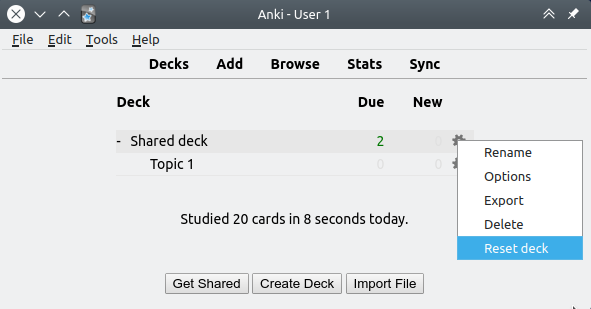
  • Ability to reset decks right from the deck screen (2.1 exclusive)
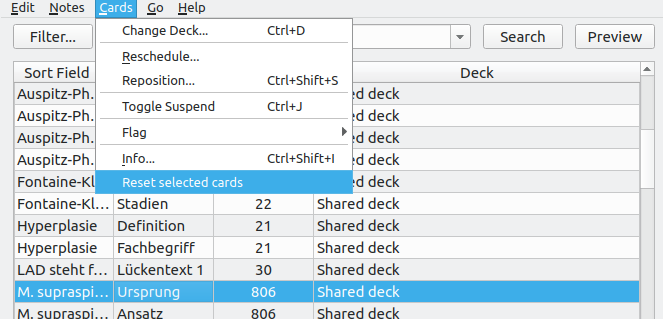
  • Ability to reset cards by right-clicking on them in the browser (2.1 exclusive)
  • More checks and safeguards
  • Improved handling of filtered decks (thanks to Dmitry Mikheev)
SCREENSHOTS CHANGELOG 2018-09-18: v1.1.1 – Added support for V2 scheduler (experimental!) 2018-07-25: v1.1.0 – Initial release of this updated fork 2015-06-18: v1.0.0 – Original release for Anki 2.0 SUPPORT Please do not report issues or bugs in the review section below. I can only reply to your reviews in a limited fashion, so this is not a good way to strike up a dialog and track issues down. Instead, please report all issues you encounter either by creating a bug report on GitHub, or by posting a new thread on the Anki add-on support forums. Please make sure to include the name of the affected add-on in your report title when you do so. CREDITS AND LICENSE Copyright (c) 2015-2016 Jeff Baitis Copyright (c) 2018 Dmitry Mikheev Copyright (c) 2018 Glutanimate Licensed under the GNU AGPLv3. The code for this add-on is available on GitHub. MORE RESOURCES A lot of my add-ons were commissioned by other Anki users. Please feel free to reach out to me if you would like to hire my services for any Anki-related development work (writing an add-on for you, converting existing ones to Anki 2.1, implementing a specific feature): ankiglutanimate [αt] gmail .com. Want to stay up-to-date with my latest add-on releases and updates? Make sure to follow me on Twitter: @Glutanimate New to Anki? Feel free to check out my YouTube channel where I post weekly tutorials on Anki add-ons and related topics: / Glutanimate SUPPORT MY WORK Writing, supporting, and maintaining Anki add-ons like this takes a lot of time and effort. If Reset Card Scheduling or any of my other add-ons has been a valuable asset in your studies, please consider buying me a coffee. Each and every contribution is greatly appreciated and will help me maintain and improve my add-ons as time goes by!

README

Reset Card Scheduling Add-on for Anki

Anki add-on that allows you to reset the scheduling information / progress on select cards. Fork of Jeff Baitis' anki-reset-card-scheduling with support for Anki 2.1 and other smaller tweaks.

Table of Contents

Screenshots

Installation

AnkiWeb

Link to the add-on on AnkiWeb

Manual installation

Anki 2.0

  1. Go to Tools → Add-ons → Open add-ons folder
  2. Find and delete Reset Card Scheduling.py and reset_card_scheduling if they already exist
  3. Download and extract the latest Anki 2.0 add-on release from the releases tab
  4. Move Reset Card Scheduling.py and reset_card_scheduling into the add-ons folder
  5. Restart Anki

Anki 2.1

  1. Go to Tools → Add-ons → Open add-ons folder
  2. See if the reset_card_scheduling folder already exists
  3. If you would like to keep your settings thus far: Find the meta.json file contained within and copy it to a safe location.
  4. Proceed to delete the reset_card_scheduling folder
  5. Download and extract the latest Anki 2.1 add-on release from the releases tab
  6. Rename the extracted folder to reset_card_scheduling and move it into the add-ons directory
  7. Optional: Place the meta.json file back in the directory if you created a copy beforehand.
  8. Restart Anki

Documentation

For further information on the use of this add-on please check out the original add-on description.

License and Credits

Reset Card Scheduling is

Copyright © 2015-2016 Jeff Baitis

Copyright (c) 2018 Dmitry Mikheev

Copyright © 2018 Aristotelis P.

Licensed under the GNU AGPLv3.