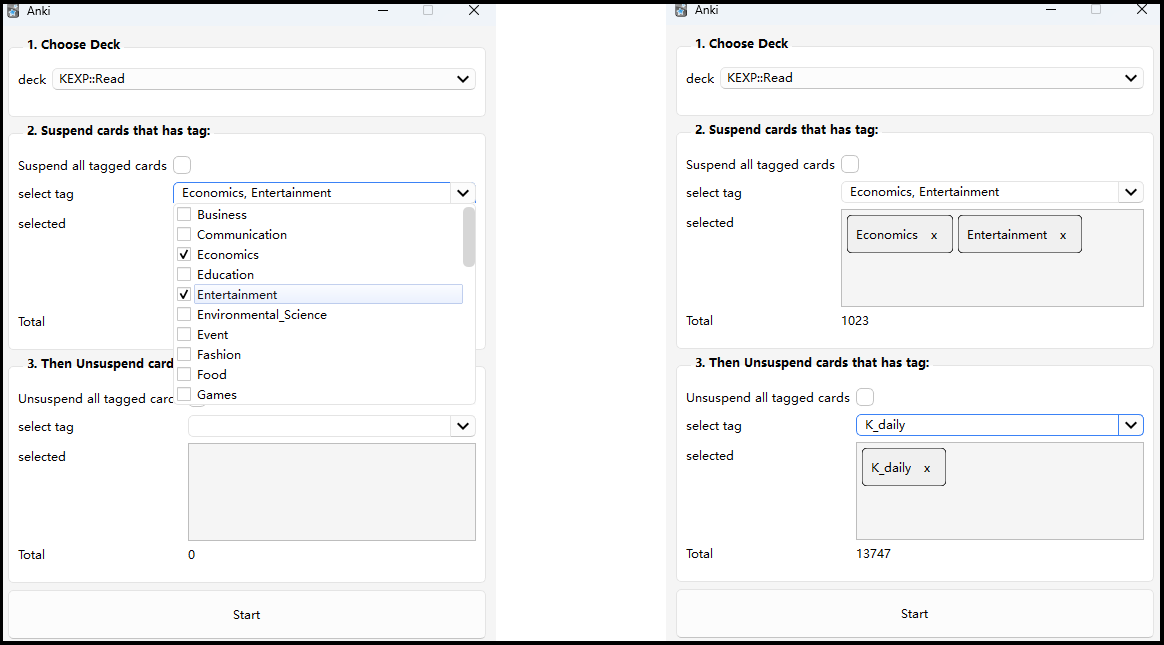
Suspend Cards by Tags
an anki addon to suspend/unsuspend cards by tags in batch.
Demo

Download
Supported Anki Versions
2.1.54 - 24.04.1+
To download this add-on, please copy and paste the following code into Anki:
342205704
If you were linked to this page from the internet, please open Anki on your computer, go to the Tools->Add-ons menu item, then click on Get Add-ons and paste in the code.
Usage
1. Open this tool from Anki dropdown menu. Tools - Batch suspend card by tags
2. Choose Deck
choose the deck containing the cards to be suspended/unsuspended
3. (optional) select suspend tags
Cards has those tags would be suspended.
Or check "Suspend all tagged cards", then all cards has a tag in the deck would be suspended
4. (optional) select unsuspend tags
Cards has those tags would be suspended.
Or check "Unsuspend all tagged cards", then all cards has a tag in the deck would be unsuspended
5. click Start button
wait until a "Done" dialog pop up.
Note
- if you have tags selected in both step 3 and step 4. A card would finally be unsuspended if it contains both tags selected in step 3 and 4.
- It's normal that you find an unsuspended card, while having a memory of having suspended it through this add-on. That's because a card could have multiple tags, it contains the tag you specified unsuspend.