Capitalize (uppercase/lowercase/titlecase)

AnkiWeb addon 350788163

Bulk-capitalizes, title-cases, or uncapitalizes text across selected note fields through the Browser's Edit menu, with per-field mode selection.
AI-generated summary; may contain mistakes.

note-managementformatting

Open on AnkiWeb GitHub Find alternatives

AnkiWeb

Votes
1 (πŸ‘ 1 Β· πŸ‘Ž 0)
Updated
2026-07-06
Anki versions
2.1.1~
License
Not found (this does not mean that the addon has no license)
Virus scan
No ClamAV match A match does not prove malware. No match does not prove that the code is safe.
Languages
Python, Ignore List, JSON
Description language
en

Maintenance

active

  • Last update or commit: 2026-07-06 (118 days before the snapshot).
  • Commits in the last year: 8.
  • Issues: 0 open, 0 closed.
  • Pull requests: 0 open, 0 merged.

Will it work on my Anki?

Version branches
Min AnkiMax AnkiUpdated
2.1.1+2026-07-06
History across monthly snapshots

Loading…

Similar addons

Text Lowercase/Uppercase Converter

Adds Uppercase and Lowercase buttons to the card editor that convert selected text to the corresponding case.

formatting

2 votes 34% approval πŸ‘ 2 Β· πŸ‘Ž 0 ⭐ 0 Anki 2.1.1~ Updated 2026-07-21
Text Field Transformer

Transforms selected or all note fields in Anki via the browser context menu using case changes, replacement, sequential IDs, or custom Python lambdas.

note-management

1 votes 21% approval πŸ‘ 1 Β· πŸ‘Ž 0 ⭐ 0 Anki 25.09.2~ Updated 2025-12-13
anki-automatic-case

Automatically capitalizes the first letter, lowercases the rest, and uppercases "i" in type answers to avoid case-related highlighting, with deck selection via config.

quiz

3 votes 44% approval πŸ‘ 3 Β· πŸ‘Ž 0 Anki 2.1.16~ Updated 2021-10-25

Description

The github for source code and issues is the following: https://github.com/dragosbuhnila/Anki-Capitalize

This add-on enhances Anki's Browser by allowing you to bulk-capitalize or uncapitalize text in note fields with ease. For each of the two functionalities (capitalizing and uncapitalizing), there's two options, namely capitalizing every word in a field or just the first letter overall.

Usage

  • Open Browser: Anki β†’ Browse.
  • Select Notes: Select one or more notes in the Browser list.
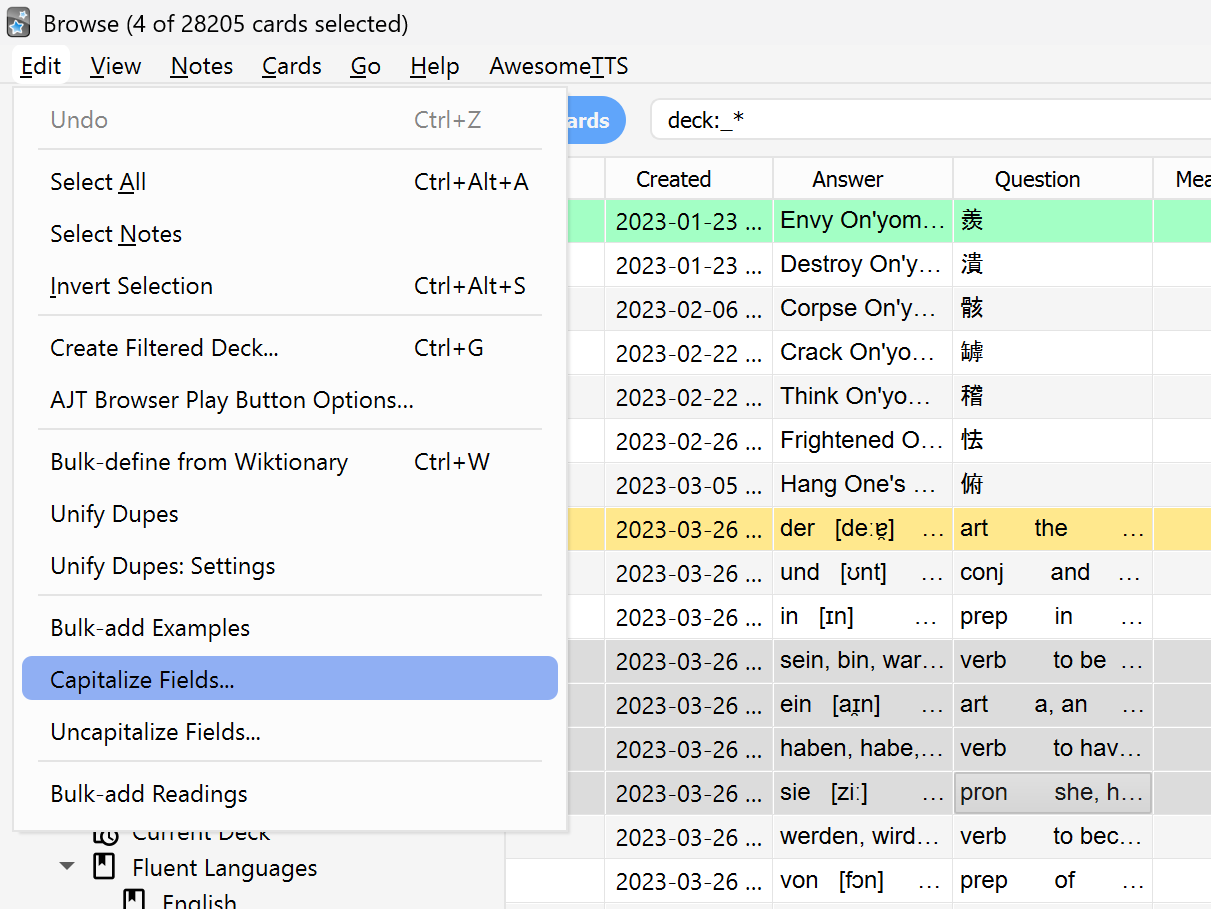
  • Run Command: In the Browser window open the Edit menu and choose Capitalize Fields....
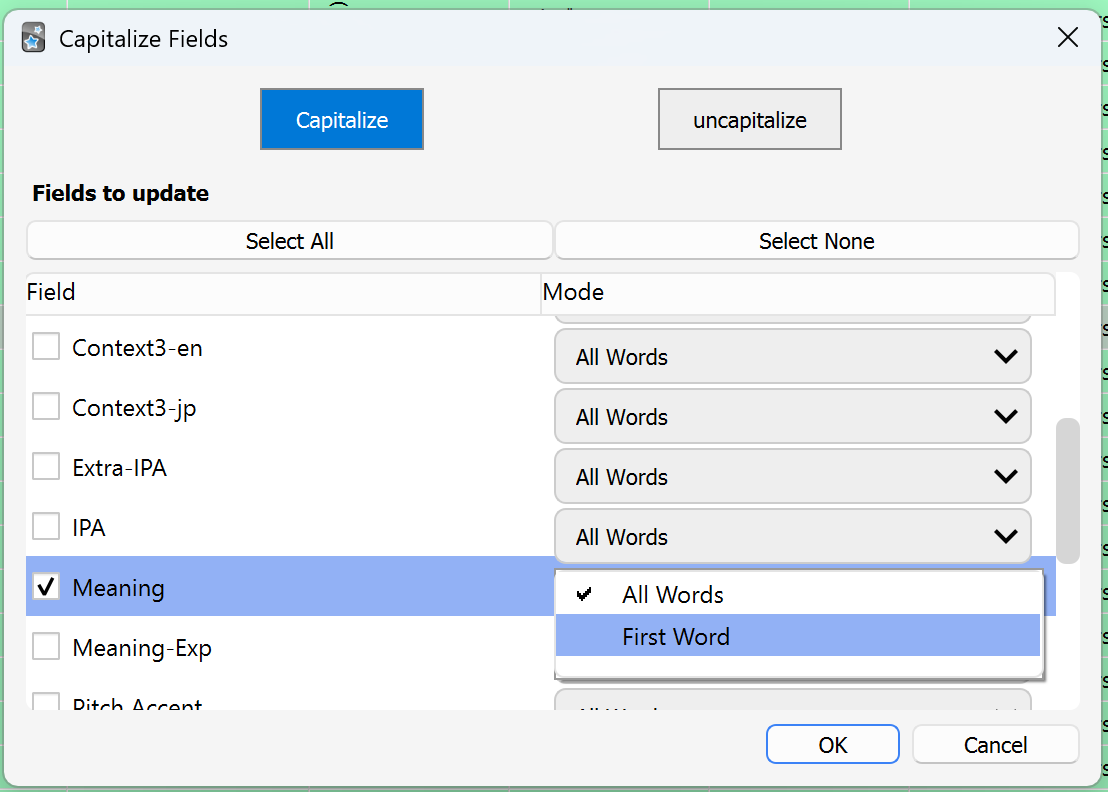
  • Dialog: Check the fields you want to change and select a mode for each, then click OK.

Example Usage

Browser Options: The Capitalize Fields... option in the Browser's Edit menu.
Field Selection Dialog: The window where you select fields and capitalization modes.
README

This add-on enhances Anki's Browser by allowing you to bulk-capitalize or uncapitalize text in note fields with ease. For each of the two functionalities (capitalizing and uncapitalizing), there's two options, namely capitalizing every word in a field or just the first letter overall.

Installation

  • Option 1: Place the add-on folder into your Anki addons21 directory, then restart Anki to load the add-on. (this is the only viable option until I load it to Anki). The aforementioned directory can be found under Roaming, which again can be easily found by typing %appdata% in the Windows search bar, and then under Anki2, so the final path would look like C:\Users\user\AppData\Roaming\Anki2\addons21.
  • Option 2: Download it from ankiweb using the following add-on code: 350788163.

Usage

  • Open Browser: Anki β†’ Browse.
  • Select Notes: Select one or more notes in the Browser list.
  • Run Command: In the Browser window open the Edit menu and choose Capitalize Fields....
  • Dialog: Check the fields you want to change and select a mode for each, then click OK.

Example Usage

  • Browser Options: The Capitalize Fields... option in the Browser's Edit menu.
    Browser Options

  • Field Selection Dialog: The window where you select fields and capitalization modes.
    Field Selection Dialog