LLM Answer Grader — Anki add-on
NOTE: THIS WAS ALL FABLE. :)
Type your answer, get it graded by AI, right inside the Anki reviewer. Built for language learning in mind, but supports any Anki flow that benefits from an LLM judge.
Why / Background
I have an Anki deck dedicated to learning French. Specifically, for translating English sentences into French. My original workflow would be: open the card in Anki, type the sentence into a website that supports a French keyboard, paste the card + my answer to Claude for review, then swtich back to Anki to finally rate the card. This add-on collapses that tab switching and makes it so I never have to leave Anki.
Example flow
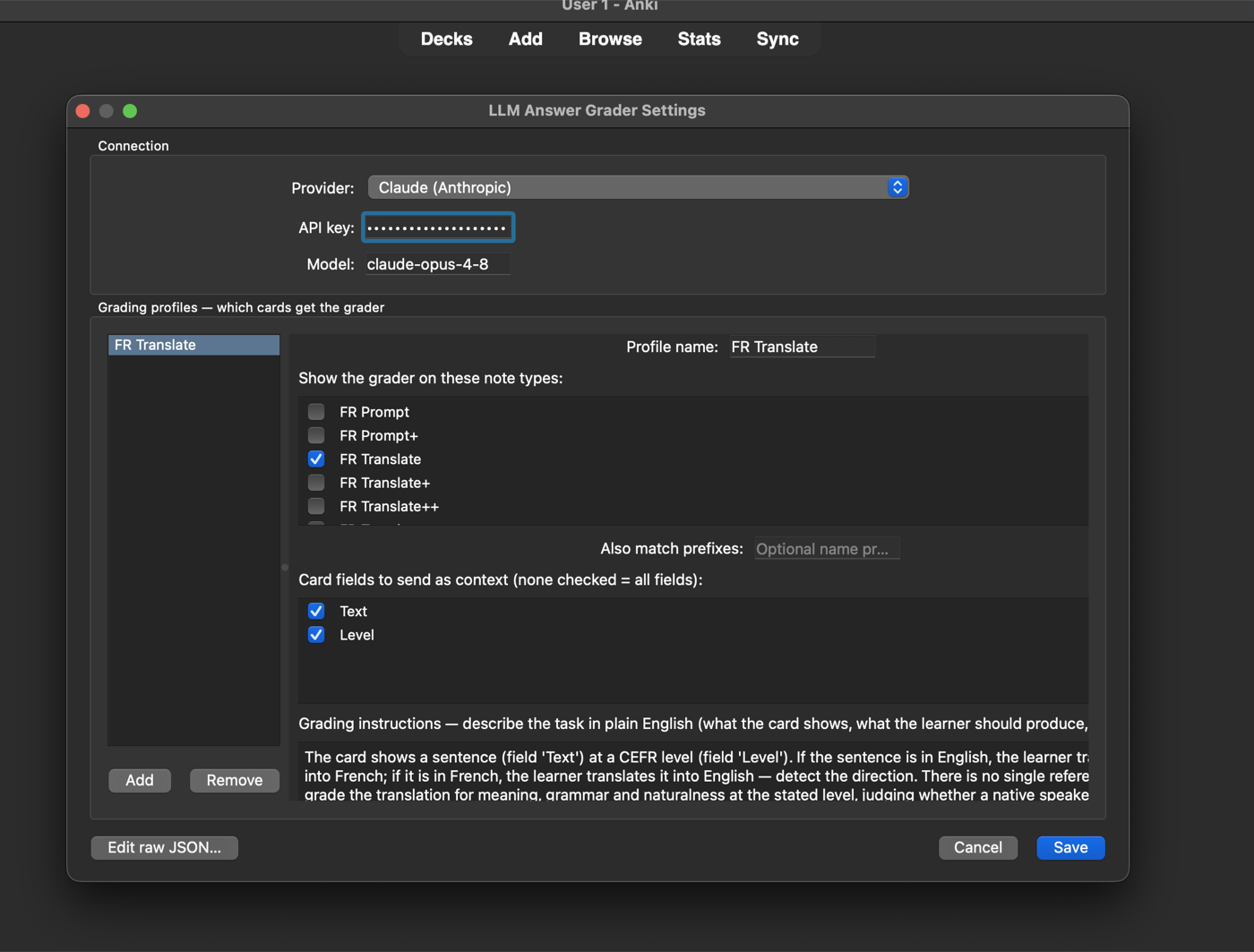
Set up once — pick a provider, paste a key, point a profile at your note
types:

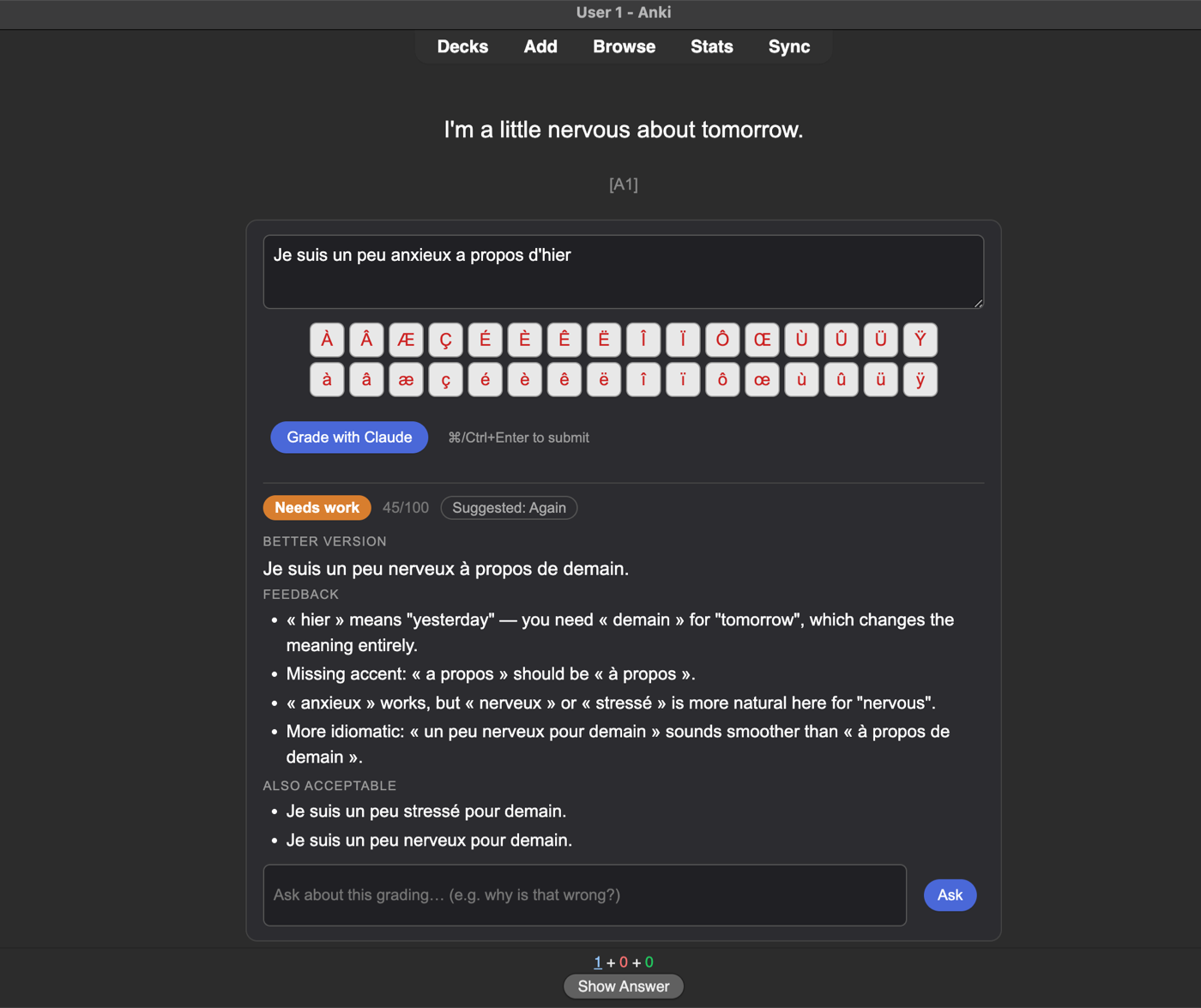
Matched cards get an answer box (here with the optional French accent
keyboard enabled for the profile):

Type your attempt, hit ⌘/Ctrl+Enter. Mixing up « hier » and « demain »
flips the meaning — caught, scored, corrected:

Not convinced? Ask about the grading…

…and get a grounded answer, inline, before you rate the card:

Install
From AnkiWeb (easiest): in Anki, Tools → Add-ons → Get Add-ons… and
paste the code 365951175
(listing).
From file: download llm_answer_grader.ankiaddon from the
latest release, then in
Anki: Tools → Add-ons → Install from file.
Requires Anki 23.10+ on desktop (developed and tested on 25.09). Add-ons
don't run on AnkiDroid/AnkiMobile; cards behave normally there.
Setup
Open Tools → LLM Answer Grader Settings… — a visual editor with note-type
and field pickers (a first-run dialog offers this automatically). Pick your
provider, paste your key, add a profile, done. The equivalent raw-JSON config
is documented below and remains fully supported:
-
Tools → Add-ons → LLM Answer Grader → Config.
-
Pick a provider and set your api_key:
| Provider |
Config |
Notes |
| Claude (default, best grading) |
"provider": "anthropic" + Anthropic key |
Structured outputs + adaptive thinking |
| OpenAI |
"provider": "openai_compatible" + OpenAI key |
default openai_base_url |
| OpenRouter / Groq / Gemini-compat |
"provider": "openai_compatible" + their key |
set openai_base_url accordingly |
| Ollama / LM Studio (local, private) |
"provider": "openai_compatible", no key |
openai_base_url: http://localhost:11434/v1 (Ollama) — card content never leaves your machine |
Set model to match (e.g. claude-opus-4-8, gpt-5, llama3.1).
-
Edit the example profile to target your cards:
"profiles": [
  {
    "name": "ES Translate",
    "note_type_prefixes": ["Spanish Translate"],   // matches note type names
    "card_fields": ["Front", "Level"],             // context sent to the grader ([] = all)
    "grading_instructions": "The card shows an English sentence (field 'Front') that the learner translates into Spanish. Grade meaning, grammar and naturalness at the level in the 'Level' field."
  }
]
The input box appears only on cards matching a profile. First matching
profile wins; "*" matches every note type. Grading style is tunable via
system_prompt_extra (e.g. "Ignore missing accents") — see the config
screen for the full reference.
Profiles can also override the provider/model individually — e.g. a free
local model for easy decks, Claude for hard ones. And after any grading you
can ask a follow-up question ("why is that wrong?") answered in the
context of your attempt and the feedback.
Typing on a bare QWERTY? Each profile can enable an optional accent
keyboard (default off), picked from preset layouts — currently French:
clickable keycaps under the answer box, styled after
Lexilogos — an uppercase row
(À Â Æ Ç É È Ê Ë Î Ï Ô Œ Ù Û Ü Ÿ) above the matching lowercase row; a click
inserts the letter at the cursor.
How it works
Card JS can't call external APIs (the webview blocks cross-origin requests),
so the add-on bridges through Python:
- A
card_will_show hook appends the input widget to matching cards.
- On submit, the widget calls
pycmd(...) → the add-on's Python handler
collects your answer + the card's fields.
- A background thread (Anki's
taskman) POSTs to your provider. On Claude,
structured outputs guarantee parseable grading JSON and adaptive thinking
lets the model reason harder on hard answers. On OpenAI-compatible
servers the add-on negotiates capabilities automatically (strict
json_schema → json_object → prompt-enforced JSON with tolerant
parsing), so it works from GPT-5 down to a small local model. The UI
never blocks.
- The result is pushed back with
web.eval(...) and rendered. Widget state
lives in a persistent JS object, so your text and feedback survive the
question→answer flip.
Attempts are archived locally (user_files/history.json, capped per note);
previously-attempted cards show a "last attempt" line. Nothing is written to
your notes and the API key is only ever sent to Anthropic.
Uses Anki's bundled requests — no vendored SDK, nothing to break when
Anki's launcher swaps its Python.
Development
llm_answer_grader/
├── __init__.py   # hooks, pycmd bridge, threading
├── grader.py     # pure: profile matching, prompt build, API call (testable outside Anki)
├── history.py    # local attempt history
├── webui.py      # inline HTML/CSS/JS widget
├── config.json   # defaults
└── config.md     # config reference (shown in Anki)
To hack on it: copy llm_answer_grader/ into your Anki addons21/ directory
(real copy — on macOS, symlinks into TCC-protected folders like Desktop fail
silently) and restart Anki. grader.py and history.py import cleanly
outside Anki for unit testing.
This repo also contains the original project brief, working notes
(anki-llm-grader-implementation-notes.md), and the deck-generation scripts
it was built alongside.
License
AGPL-3.0 — same license family as Anki itself (aqt, which this
add-on imports, is AGPL).