Anki Quiz — Turn Your Decks into AI Quizzes (MCQ, Fill-in-Blank & More)

AnkiWeb addon 466373479

Generates AI practice quizzes—multiple-choice, fill-in-the-blank, and true/false—from selected Anki decks, with scoring, answer explanations, card filtering, difficulty settings, and multilingual support.
AI-generated summary; may contain mistakes.

aiquizpaidservice-client

Open on AnkiWeb Find alternatives

AnkiWeb

Votes
1 (👍 1 · 👎 0)
Updated
2026-08-14
Anki versions
25.09.4~
License
Not found (this does not mean that the addon has no license)
Virus scan
No ClamAV match A match does not prove malware. No match does not prove that the code is safe.
Languages
Python, JSON
Description language
en

Maintenance

active

  • Last update or commit: 2026-08-14 (79 days before the snapshot).

GitHub

No GitHub repository linked.

Will it work on my Anki?

Version branches
Min AnkiMax AnkiUpdated
23.1025.09.4+2026-08-14
History across monthly snapshots

Loading…

Similar addons

Simple Multiple Choice by Denis

Converts Anki cards into interactive multiple-choice quizzes with up to five options, optional shuffling and explanations, colour-coded selected-answer feedback, image support, and customizable settings.

card-templatesquizmobile-compatible

31 votes 71% approval 👍 27 · 👎 4 Anki 25.02.4~ Updated 2026-09-29
Anki Automated Quizzes

Generates randomized multiple-choice quizzes from Anki decks, with configurable question and choice counts, tag exclusion, scoring, feedback, history tracking, and optional HTML export.

exportquiz

6 votes 61% approval 👍 6 · 👎 0 ⭐ 1 Anki 25.07.6~ Updated 2025-08-10
MCQ Generator

Creates and reviews single- and multiple-choice questions in Anki with an exam-style interface showing your selections, correct answers, color-coded feedback, and optional explanations.

card-creationreview-flowcard-templatesquiz

7 votes 25% approval 👍 4 · 👎 3 ⭐ 3 Anki 23.10~ Updated 2026-01-07
AI_LEARNING_HUB

Turns Anki vocabulary decks into nine AI-generated language games with multilingual exam-level practice, hints, offline word matching, and customizable fast or detailed question generation.

aigamificationclozequiz

3 votes 44% approval 👍 3 · 👎 0 Anki 26.09~ Updated 2026-10-20
Multiple Choice Question with Deck Selected

Generates four-option multiple-choice quizzes from a chosen deck and note fields, offering forward or reverse vocabulary questions, instant feedback, paginated quizzes and accuracy statistics.

quiz

2 votes 34% approval 👍 2 · 👎 0 ⭐ 2 Anki 23.09~ Updated 2025-06-29

Description

Anki Quiz — AI practice questions from your own decks

For USMLE Step 1 / Step 2, med school, language and law exams

Turn the decks you already have — AnKing, your class deck, or your own notes — into fresh practice questions. Test yourself on what you've been memorising, in a format that isn't the card you've already seen 40 times.

14-day free trial — up to 10 quizzes a day, no credit card.

Popular with medical students, language learners, law students, and anyone prepping for an exam.

Web site

Anki Quiz: https://www.ankiquiz.com

How to use it
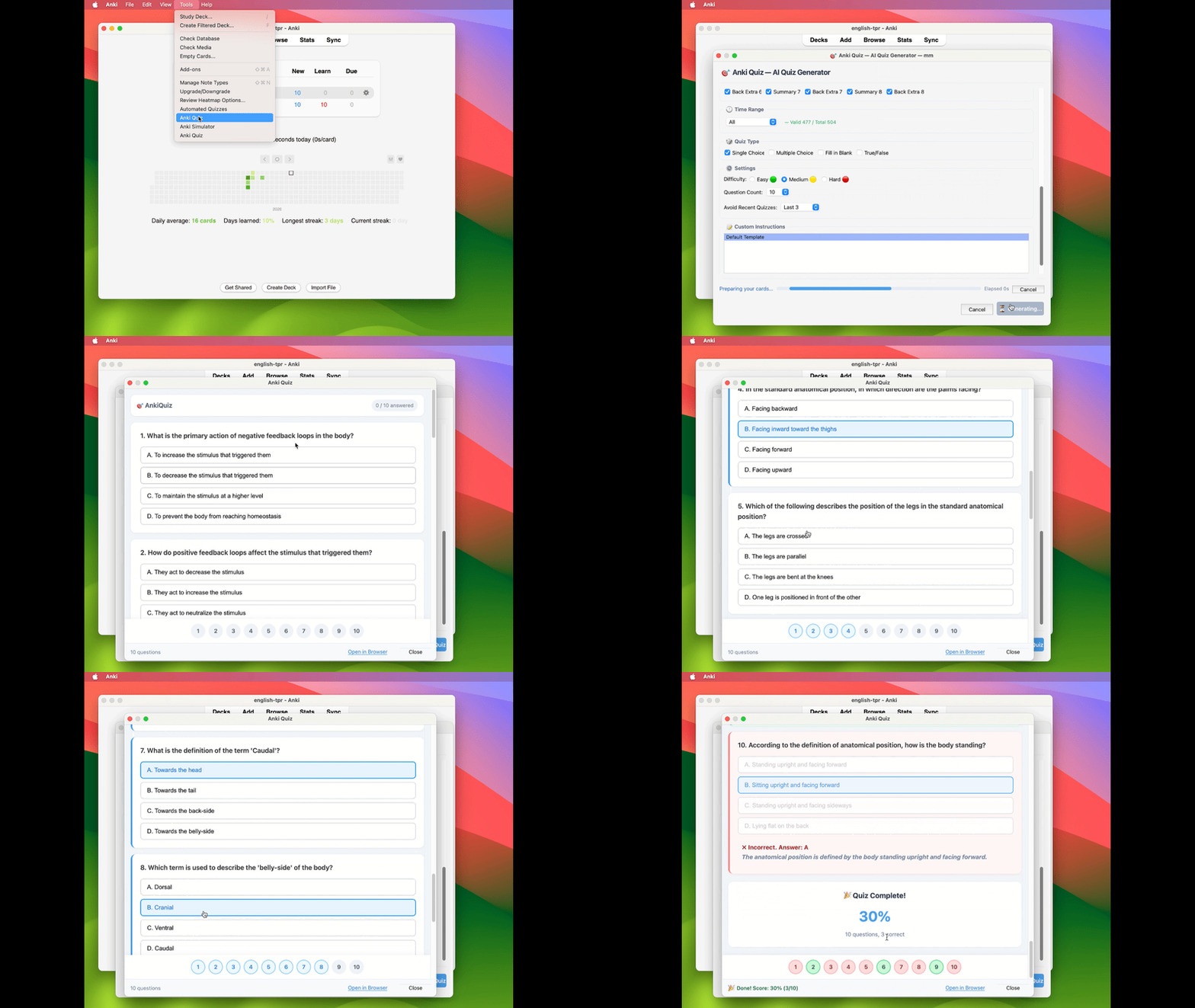
From deck to quiz in seconds — select a deck, generate, and start practicing

Why use it

Your cards teach you the facts. This checks whether you can still pick them out when the wording changes — with instant scoring and an explanation after every answer, so you find the gaps before the exam does.
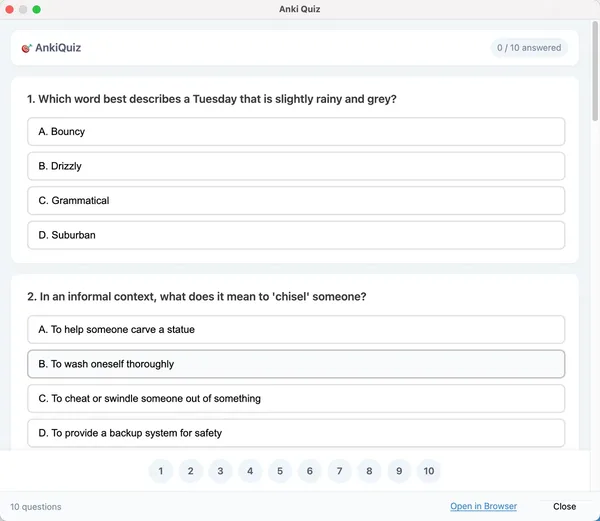
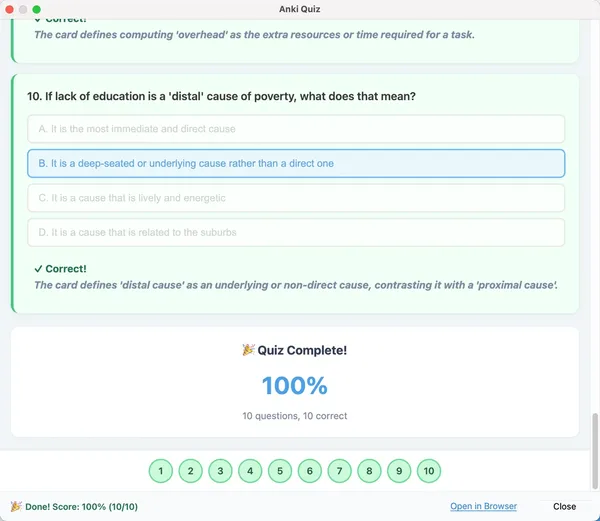
Take AI-generated quizzes right inside Anki

Instant scoring, with every answer explained

Features

  • Generate quizzes from any selected Anki deck
  • Quiz types: single-choice and multiple-choice on the free trial; fill-in-the-blank and true/false with Pro
  • Choose which card fields are sent for generation
  • Filter cards by time range: today, last 3 / 7 / 30 days, all cards, or a custom range
  • Difficulty control: Easy, Medium, Hard
  • Avoid reusing cards from your recent quizzes
  • Save per-deck settings and prompt templates
  • Open quizzes inside Anki or in your browser
  • Multilingual interface and quizzes: English / 简体中文 / 繁體中文 / 日本語 / Deutsch / Español / Français / Polski
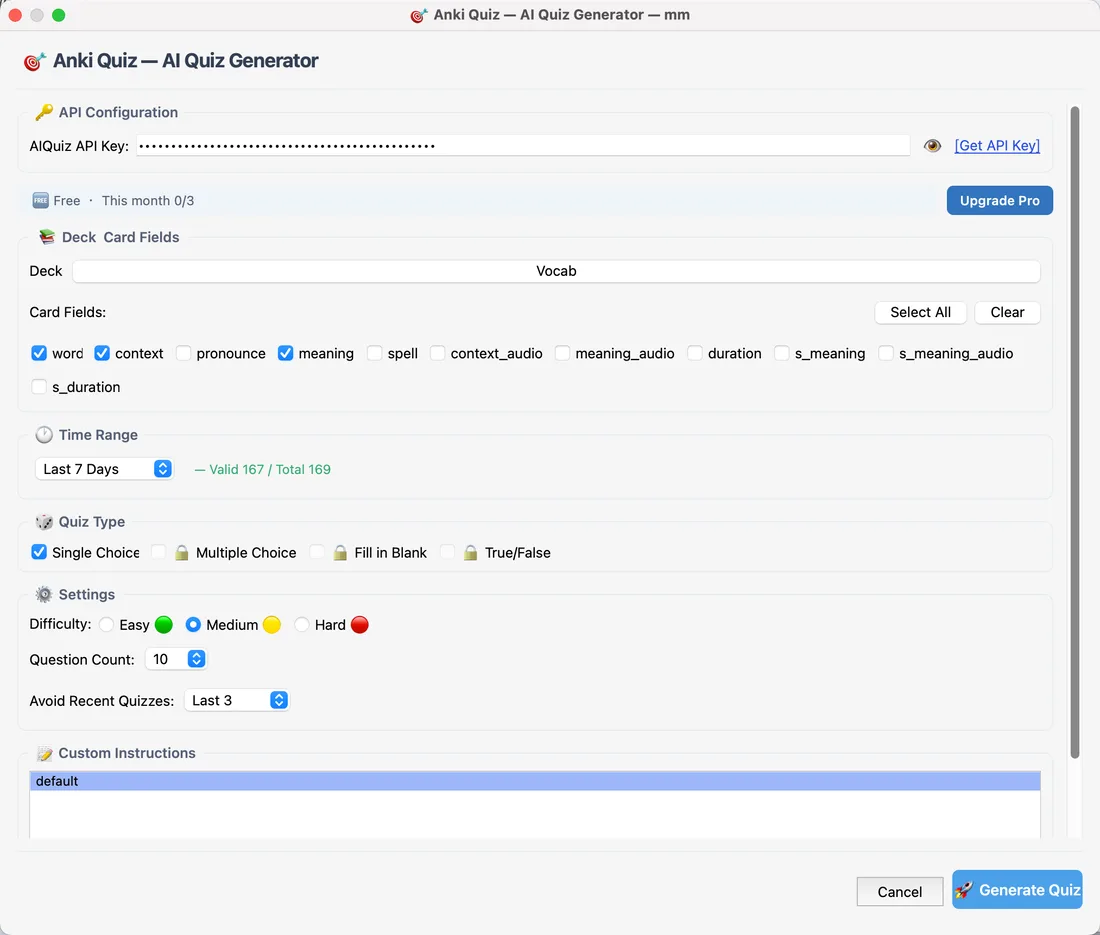
Choose deck, fields, quiz type and difficulty

Requirements

  • Anki 23.10 or newer

Setup

  1. Install the add-on, then restart Anki.
  2. In Anki, open Tools → Anki Quiz.
  3. Get a free API key at ankiquiz.com (14-day trial, no credit card) and paste it into the AIQuiz API Key field at the top of the window. It saves automatically as soon as you press Enter or click elsewhere — there is no separate save button.
  4. Tick the deck you want to study and click Generate Quiz. You can also right-click any deck and choose Anki Quiz….

Privacy

This add-on sends only the card fields, quiz settings, and language preference you select to the AnkiQuiz server to generate questions. It does not upload your entire collection automatically — only the cards and fields you choose are sent. It never modifies, rewrites, or deletes anything in your collection; your cards are only ever read. Avoid selecting private or sensitive fields you don't want used.

Notes

AI-generated questions are built from your own cards and may occasionally be inaccurate. Please review generated quizzes critically, especially for medical, legal, financial, or exam-critical material.

👉 Start your free trial: https://www.ankiquiz.com