DrugTabs — Swipe through your pharmacology, one tab at a time.
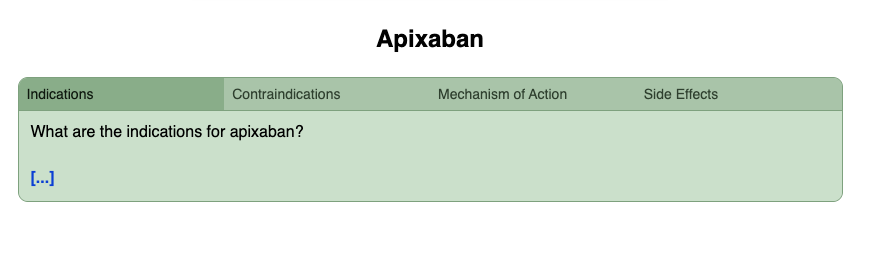
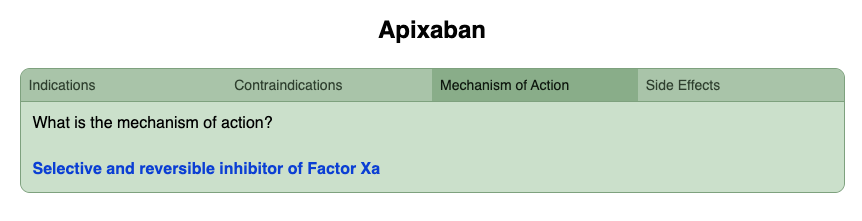
Flip between multiple content tabs right inside your Anki cards. No more cramming everything onto one side — organize any drug into clean, focused tabs like Indication, Contraindication, Side Effects, and Mechanism of Action. Each tab holds its own content, its own cloze, and its own space to think.
DrugTabs groups all the information about a drug into separate clickable tabs, like Indication, Contraindication, Side Effects, and Mechanism of Action, all within a single Anki card. Each tab has its own cloze deletion, so every time you review a card, Anki shows only the tab with the specific cloze you need to study. From there you can freely click into other tabs to read more about the drug, making it feel like a mini pharmacology textbook right inside your flashcard.
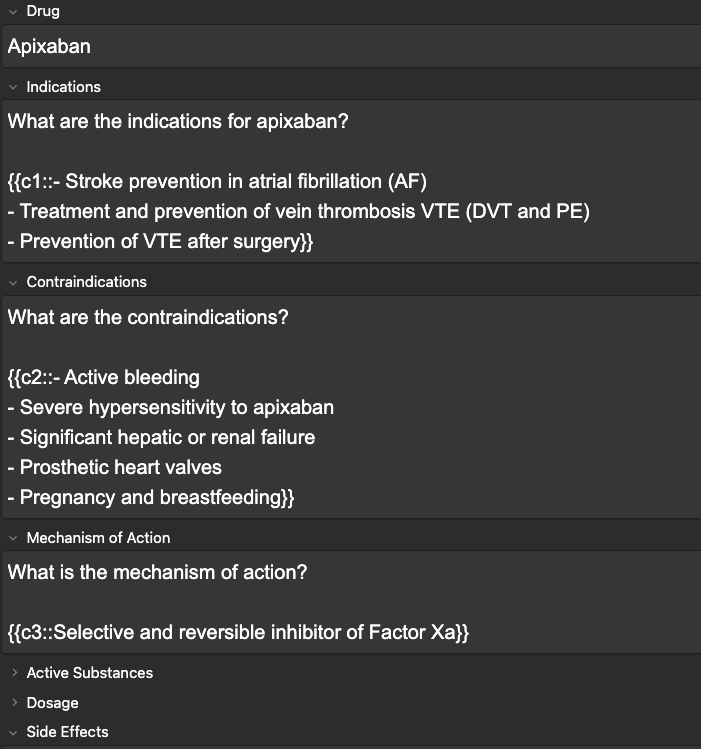
Following tabs are available to use: Drug, Indications, Contraindications, Mechanism of Action, Active Substances, Dosage, Side Effects
📖 How to use:
1. Download the add-on, install via Tools → Add-ons → write in the code, and restart Anki
2. Click Add to create a new card
3. At the top, click the note type dropdown
4. Select DrugTabs from the list
5. Enter the name of the drug in the Title field, then fill in each tab with your content — for example Indication, Contraindication, Side Effects, and Mechanism of Action
6. Use cloze deletions freely within each tab, but make sure each cloze number is unique across all tabs — don't reuse the same number in different tabs
7. Any tab left empty will automatically be hidden during studying — no clutter, just the content you need
The add-on also works seamlessly on mobile, allowing you to swipe or tap between the different tabs with ease. The interface is designed to stay simple and intuitive across devices. For the best experience on phones, I recommend disabling “Taps” for the top left, top center, and top right areas in the settings.
If you enjoy the add-on, please consider giving it a 👍 on AnkiWeb to support development and help others discover it.
📚 Full documentation & screenshots:
https://github.com/AymanAlkassem/DrugTabs
💬 Feedback & contact: Constructive feedback and suggestions are always welcome. Whether you have ideas for new tabs, improvements to existing ones, or even suggestions for different color schemes, I'd love to hear them. Feel free to reach out at aymanaalkassem@gmail.com
☕ Buy Me a Coffee — Support DrugTabs
If DrugTabs has made your studying a little easier, a small donation goes a long way. It helps me dedicate time to improving the add-on, fixing bugs, and building new features for the pharmacy and medical student community.
☕ Support DrugTabs on Ko-fi →
⚖️ License & Copyright
DrugTabs is protected under the Creative Commons Attribution-NonCommercial-NoDerivatives 4.0 International License (CC BY-NC-ND 4.0).
This means you are free to share the add-on, but you may not:
- Use it for commercial purposes
- Modify or build upon it without permission
- Redistribute it under a different license
© 2026 Ayman Alkassem. All rights reserved.
For permissions beyond the scope of this license, contact: aymanaalkassem@gmail.com
🔗 Also check out our sister add-on:
AnkiTabs — Swipe through your medical knowledge, one tab at a time.
Organize any disease into focused tabs like Symptoms, Pathophysiology, and Treatment.
Download AnkiTabs on AnkiWeb: https://ankiweb.net/shared/info/722715474