
Frozen Fields for Anki


Review more, type less
Frozen Fields is an add-on for the spaced-repetition flashcard app Anki. It allows you to conveniently sticky and unsticky a field right from within the note editor, saving you precious keystrokes when processing repetitive information.
Table of Contents
Installation
AnkiWeb
The easiest way to install Frozen Fields is through AnkiWeb.
Manual installation
Please click on the entry corresponding to your Anki version:
Anki 2.1
- Make sure you have the latest version of Anki 2.1 installed. Earlier releases (e.g. found in various Linux distros) do not support
.ankiaddon packages.
- Download the latest
.ankiaddon package from the releases tab (you might need to click on Assets below the description to reveal the download links)
- From Anki's main window, head to Tools → Add-ons
- Drag-and-drop the
.ankiaddon package onto the add-ons list
- Restart Anki
Anki 2.0
- Go to Tools → Add-ons → Open add-ons folder
- Find and delete the
Frozen Fields.py file if it already exists.
- See if you can find a
frozen_fields folder. If so:
- If the folder contains a
meta.json file, copy the file to a safe location. This will allow you to preserve your current settings.
- Proceed to delete the
frozen_fields folder
- Download and extract the latest Anki 2.0 add-on release from the releases tab (you might need to click on Assets below the description to reveal the download links)
- Move the extracted
Frozen Fields.py and frozen_fields into the add-ons folder
- Optional: Place the
meta.json file back into the directory if you created a copy beforehand.
- Restart Anki
Documentation
For further information on the use of this add-on please check out the description text for AnkiWeb.
Building
With Anki add-on builder installed:
git clone https://github.com/glutanimate/frozen-fields.git
cd frozen-fields
aab build
For more information on the build process please refer to aab's documentation.
Contributing
Contributions are welcome! Please review the contribution guidelines on how to:
- Report issues
- File pull requests
- Support the project as a non-developer
License and Credits
Frozen Fields is
Copyright © 2012-2015 Tiago Barroso
Copyright © 2015-2019 Aristotelis P. (Glutanimate)
With code contributions by: ankitest, Arthur Milchior, BlueGreenMagick (thanks!)
The present fork is based on Frozen Fields by Tiago Barroso. All credit for the original idea and implementation goes to him. Initial work on this fork and the port to Anki 2.1 was made possible thanks to the generous support of a fellow Anki user who would like to remain anonymous.
Frozen Fields is free and open-source software. The add-on code that runs within Anki is released under the GNU AGPLv3 license, extended by a number of additional terms. For more information please see the LICENSE file that accompanied this program.
This program is distributed in the hope that it will be useful, but WITHOUT ANY WARRANTY.
The continued development of this add-on is made possible
thanks to my
Patreon and
Ko-Fi supporters.
You guys rock ❤️ !


 !!!!!!!!!!!!!!!!!!!
IMPORTANT (2021-03-09): Anki 2.1.41 was just released, and while it comes with some cool changes, it does break a lot of add-ons, Frozen Fields included. I am working on a fix as we speak. If your workflow depends on Frozen Fields or any of the other affected add-ons, please hold off on upgrading and/or install Anki 2.1.40 for now.
!!!!!!!!!!!!!!!!!!!
OVERVIEW
Anki supports sticky fields. A sticky field is a field whose value is not deleted when you switch to a different note. This can be very useful if you are making many notes in which a field either has the same value or changes very little.
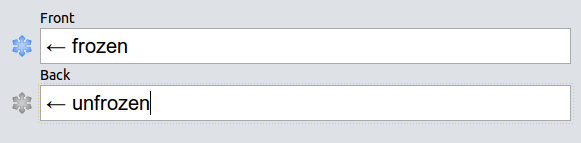
Unfortunaly, marking a field as sticky is quite complex and breaks your workflow. Frozen Fields allows you to conveniently mark a field as sticky (freeze) or not sticky (unfreeze) right from the note editor. It’s much more convenient than the default way.
To freeze/unfreeze a field, just click the adjacent snowflake or use the corresponding hotkey (
 ankiglutanimate@gmail.com. Constructive feedback and suggestions are always welcome!
CREDITS AND LICENSE
Copyright © 2012-2015 Tiago Barroso
Copyright © 2015-2019 Aristotelis P. (Glutanimate)
This add-on is based on Frozen Fields by Tiago Barroso. All credit for the original idea and implementation goes to him. The present fork and update to Anki 2.1 was made possible thanks to the generous support of a fellow Anki user who would like to remain anonymous.
Licensed under the GNU AGPLv3, extended by a number of additional terms. This program is distributed in the hope that it will be useful, but WITHOUT ANY WARRANTY. For more information on the license please see the LICENSE file accompanying this add-on. The source code is available on
 GitHub. Pull requests and other contributions are welcome!
MORE RESOURCES
Make sure to check out my socials for the latest add-on updates and news:
 @Glutanimate |
 / Glutanimate
New: Receive notifications about new add-on releases via
 thumbs up and share it with your friends, so that more people can enjoy it!
A kind request: Writing, supporting, and maintaining Anki add-ons like these takes a lot of time and effort. If Frozen Fields has been a valuable asset in your studies, please consider using one of the buttons below to support my efforts by pledging your support on Patreon, or by buying me a coffee. Each and every contribution is greatly appreciated and will help me maintain and improve Frozen Fields as time goes by!


 Pro-tip: Lots of exclusive add-ons and other goodies await on my Patreon page. Make sure to check them out!
!!!!!!!!!!!!!!!!!!!
IMPORTANT (2021-03-09): Anki 2.1.41 was just released, and while it comes with some cool changes, it does break a lot of add-ons, Frozen Fields included. I am working on a fix as we speak. If your workflow depends on Frozen Fields or any of the other affected add-ons, please hold off on upgrading and/or install Anki 2.1.40 for now.
!!!!!!!!!!!!!!!!!!!