JapaneseMining

AnkiWeb addon 523870826

Mines Japanese sentences into Anki cards with Jisho field filling, RTK/Heisig kanji tracking and heatmaps, optional DeepL translation and HyperTTS audio, plus progress and backups.
AI-generated summary; may contain mistakes.

card-creationstatisticsprogress-trackingdictionarybackup-maintenance

Open on AnkiWeb GitHub Find alternatives

AnkiWeb

Votes
0 (👍 0 · 👎 0)
Updated
2026-08-30
Anki versions
25.09~
License
Not found (this does not mean that the addon has no license)
Virus scan
No ClamAV match A match does not prove malware. No match does not prove that the code is safe.
Languages
XML, Python, CSV, JavaScript, Assembly, TSV, JSON, CSS, Ignore List
Description language
en

Maintenance

active

  • Last update or commit: 2026-10-20 (12 days before the snapshot).
  • Commits in the last year: 321.
  • Issues: 0 open, 0 closed.
  • Pull requests: 0 open, 0 merged.

Will it work on my Anki?

Version branches
Min AnkiMax AnkiUpdated
25.09+2026-08-30
History across monthly snapshots

Loading…

Similar addons

JPDB Mining Progress

Scans configured Anki fields to match mined Japanese words against the JPDB top 10k by word and reading, showing coverage, rank-band progress, searchable list, and manual known/mined marks.

statisticsprogress-trackingdictionary

1 votes 21% approval 👍 1 · 👎 0 Anki 25.06~ Updated 2026-06-20
Japanese Support - Auto Fill cards

Automatically fills Japanese vocabulary and sentence flashcards from a typed word or sentence, adding translations, kana readings, kanji readings, transitivity, part-of-speech, offline dictionary lookups, and Google TTS audio.

card-creationcard-templatesdictionary

1 votes 21% approval 👍 1 · 👎 0 Anki 2.1.1~ Updated 2026-07-28
Japanese Note Auto-Generator

Auto-generates Japanese vocabulary notecards from a word list via the Jisho.org API, including definitions, readings, JLPT level, kanji explanations, furigana and example sentences, placed in a custom deck.

card-creationdictionary

2 votes 0% approval 👍 0 · 👎 2 Anki 2.1.16~ Updated 2021-05-23
Jisho Kanji Stroke Order

Displays kanji stroke order in Jisho's visual style when hovering Japanese characters, for configured note types, with customizable styling.

appearancedictionary

12 votes 76% approval 👍 12 · 👎 0 ⭐ 2 Anki 2.1.65~ Updated 2026-07-29

Description

Version 1.0.2

JapaneseMining

JapaneseMining helps you turn Japanese sentences into clear Anki cards, while keeping your RTK (Heisig) progress in view.

Paste or type an example sentence, translate it if you like, click a word token into the Word field, and fill the rest with Jisho. The add-on tracks which kanji you already know from your RTK deck, shows a heat map of your strength, and can optionally add audio through HyperTTS.

Your mining cards stay personal: Heisig keywords are written onto the note, extra dictionary meanings appear when you hover a kanji, and the dots in the top-right corner show whether the word is usually written in kanji or kana, and whether you already know every kanji in it. As you study RTK, those cards grow with you. After a session, the add-on can also show which mined cards became fully known.

What’s new in 1.0.2

  • Fixed a compatibility issue with Windows and Linux platforms

What’s new in 1.0.1

  • Fixed an issue where adding cards did not resolve the selected note type correctly
  • Fixed an issue where Today’s Progress could skip one entry
  • Added an empty option to optional RTK mapping fields

What you get

  • Mining note type — sentence, translation, dictionary data, and kanji knowledge in one place
  • RTK / Heisig — create or map an existing deck; keywords and learned status feed your vocab cards
  • Heat map & difficult kanji — see strength at a glance and focus on what needs work
  • Jisho lookup — per–note-type field mapping for a fast fill workflow
  • DeepL & HyperTTS — optional translation and audio when you add a card
  • Progress & backups — today’s words and kanji, plus automatic RTK deck backups

Getting started

Open Settings → Help for the full workflow, field overview, and troubleshooting.

Screenshots

Mining note
Keywords from your RTK deck appear on the card. If you change a keyword, that is reflected in your cards. Hover a kanji for extra dictionary meanings. The dots in the top-right corner show whether the word is usually written with kanji or kana, and whether you know all of its kanji. Cards stay aligned with your progress as you study.
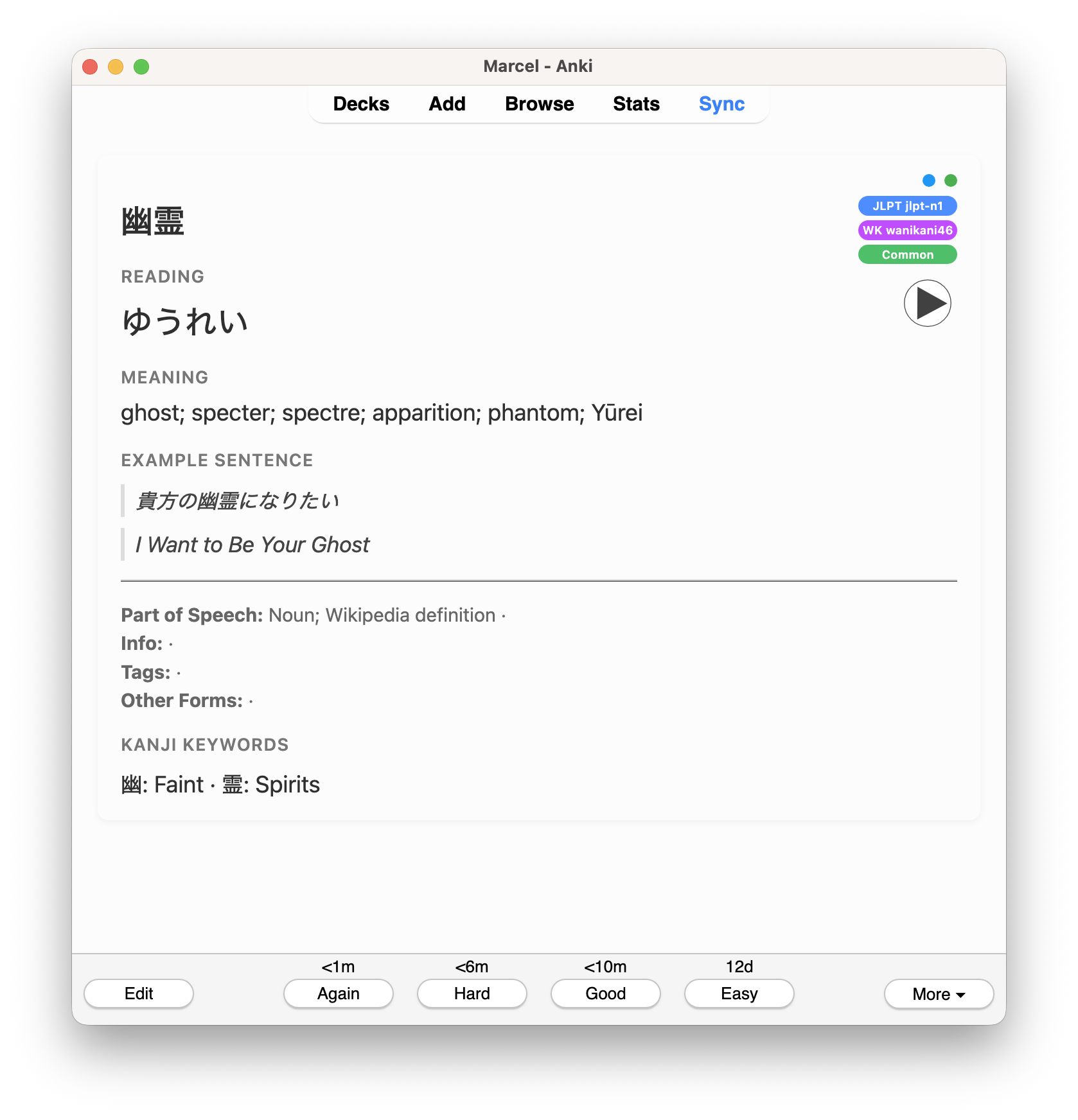
Mining note

RTK note
Each RTK card centers on the Heisig keyword. Beyond that keyword, the note can also show additional kanji meanings of the kind you would find on Jisho.
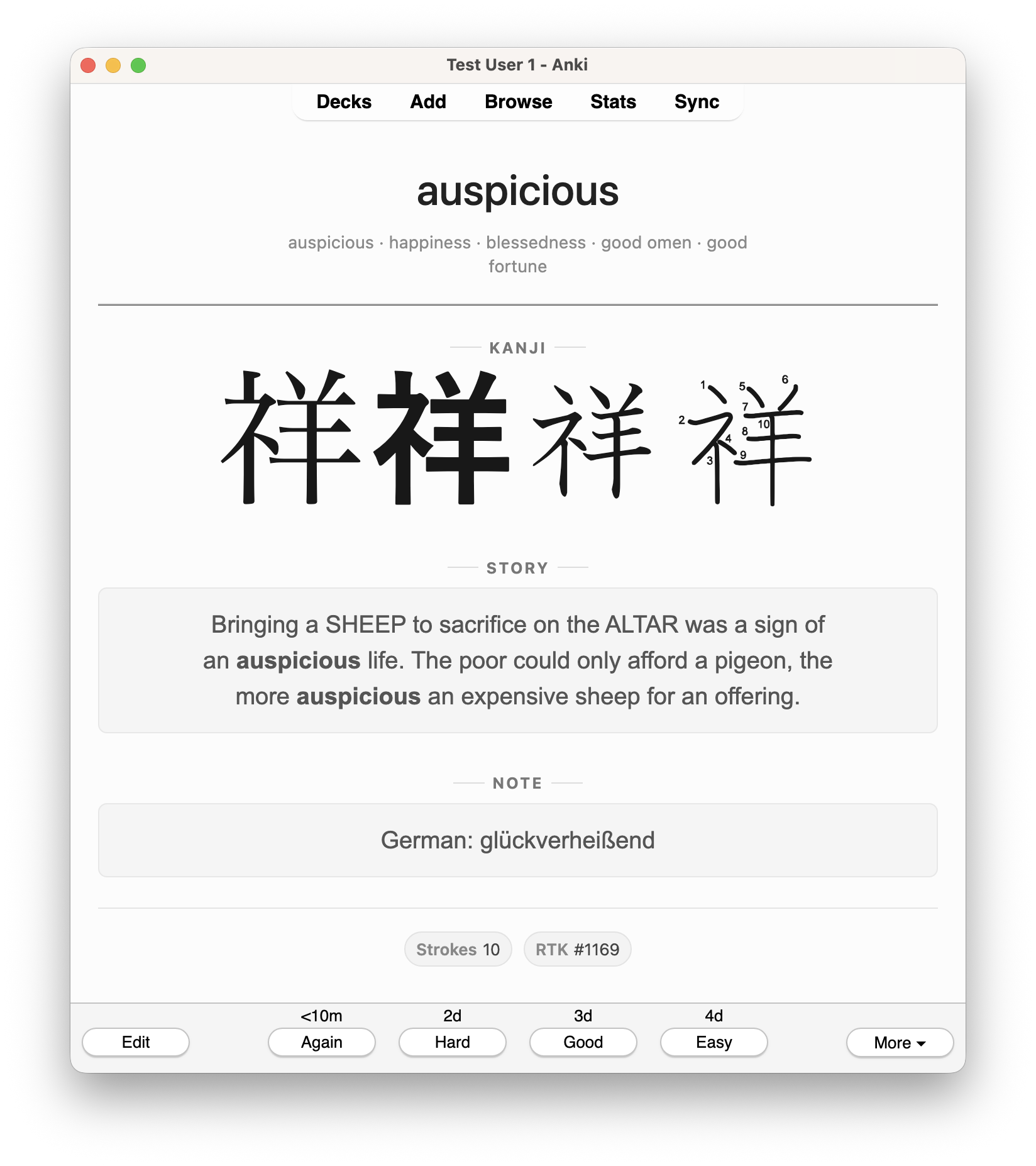
RTK note

Kanji heat map
When you mine a word that contains kanji missing from your RTK deck, those kanji are added automatically. The mapped RTK deck is the source of truth for learned status, which is why backups matter: the add-on can keep automatic snapshots of that deck.
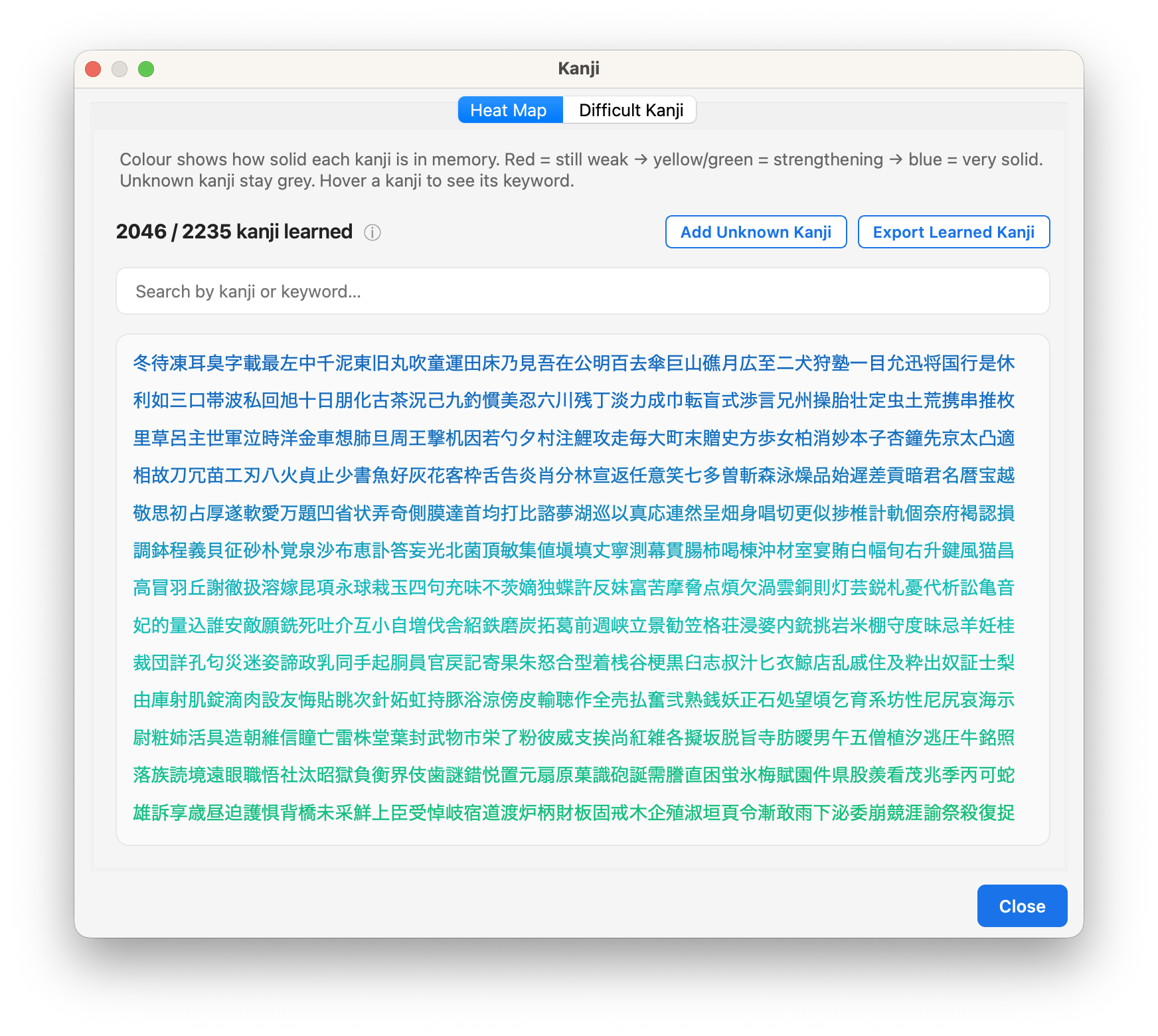
Heatmap

Today’s Progress
See the words you mined today, the kanji that moved out of “new,” and the mining cards whose kanji all became known after you studied.
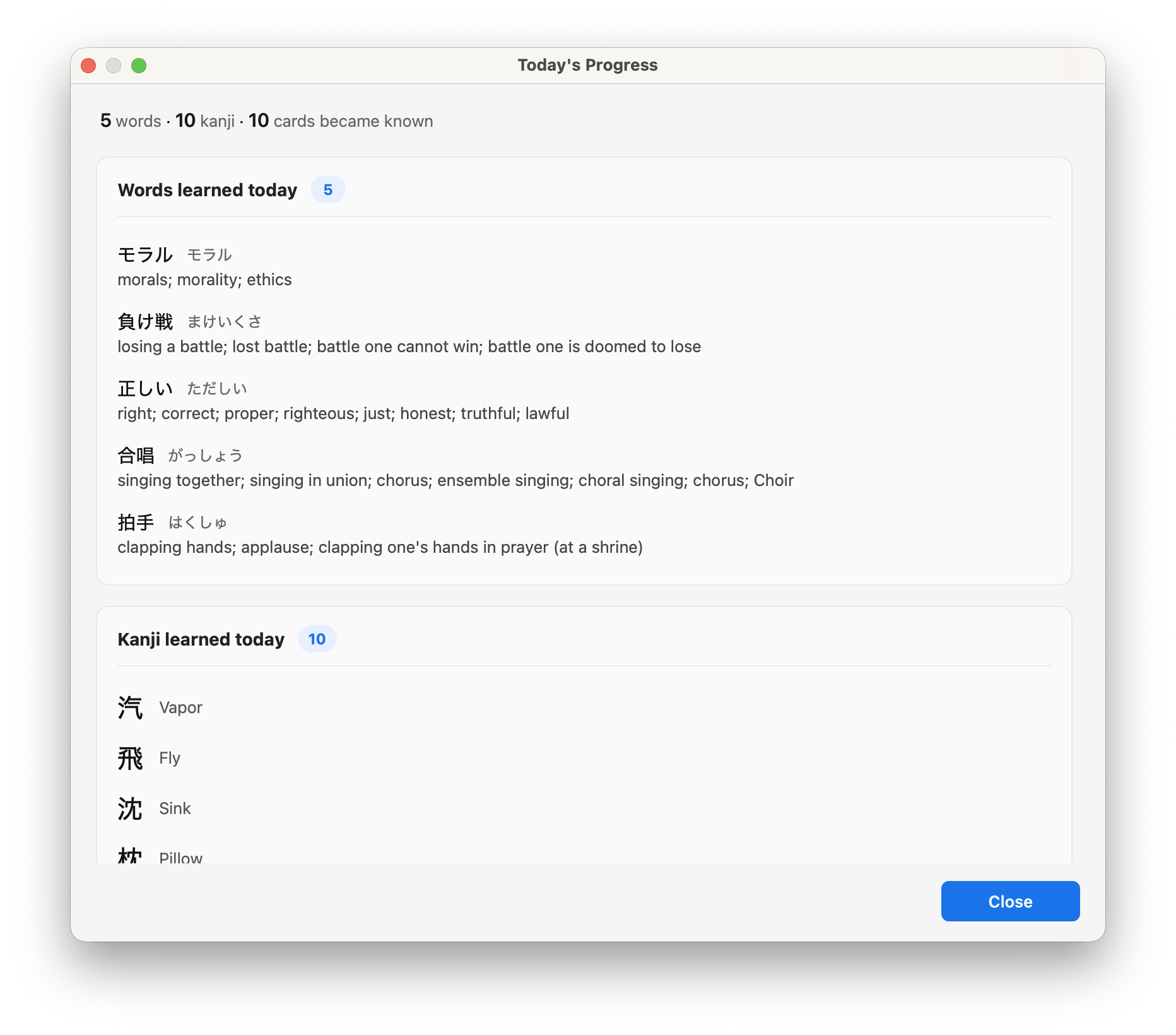
Today's Progress

Jisho
Search word definitions on Jisho
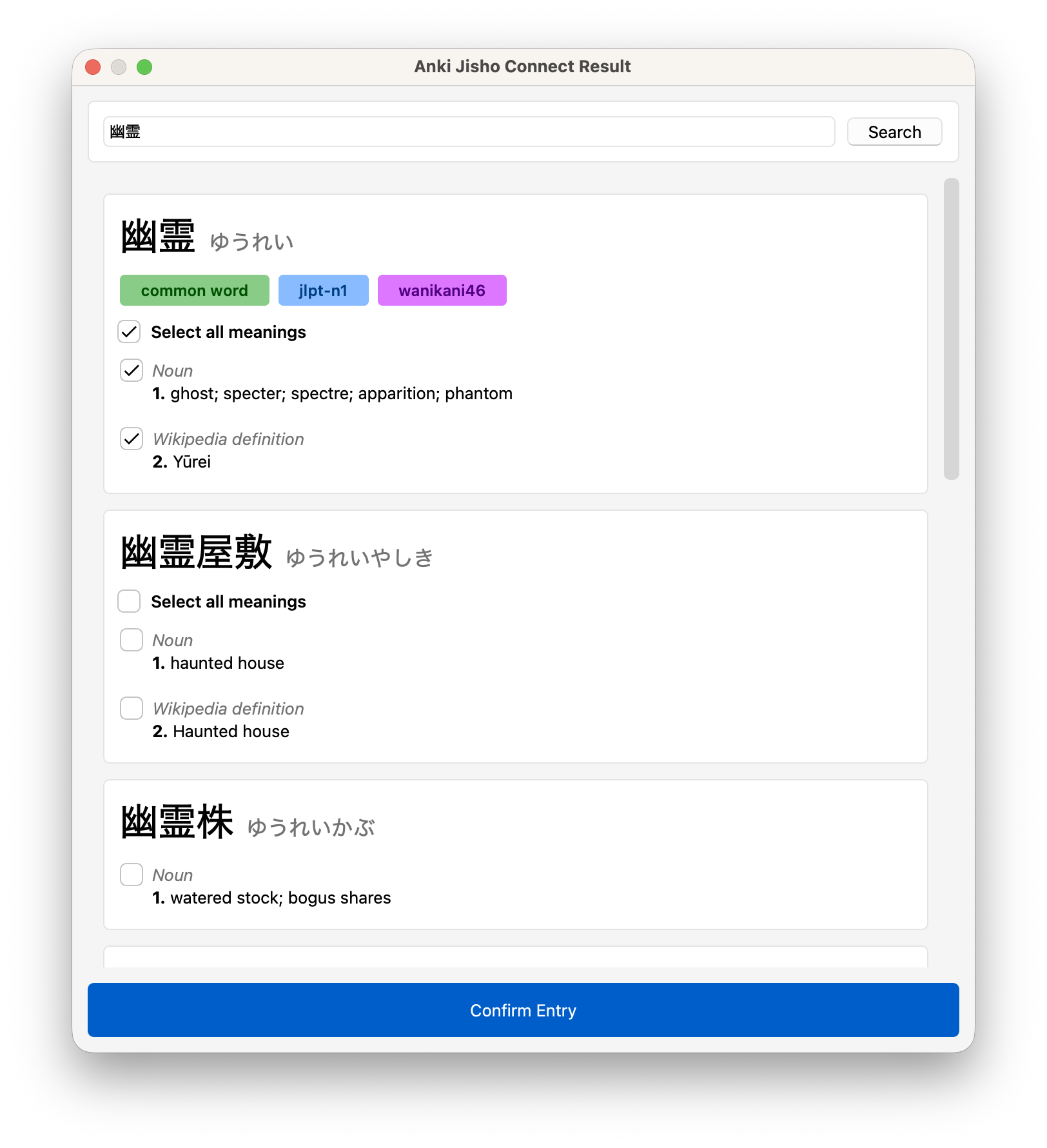
Jisho

Requirements

Desktop Anki (tested on 25.09). DeepL needs an API key. Audio needs the separate HyperTTS add-on and an Advanced-mode preset.

Good to know

Jisho support is based on code from Anki Jisho Connect (MIT). If you already use that add-on on its own, disable Jisho here to avoid conflicts.

Support

Issues and feature requests on GitHub
Send Email
I actively work on bugs and feedback — please reach out.

Planned next

  • Chrome helper to mine sentences from the web
  • Another Translation service
  • Migrate cards to JapaneseMining and RTK (note types)
  • Create reverted RTK deck
  • Word heatmap
  • Show/Flag difficult words
  • Prepare cards for upload to AnkiWeb (Remove personal fields)
  • Features you ask for

Note: Before implementing new features, I will redesign the codebase, which will take some time. However, reported bugs will be addressed promptly.

Always back up your Anki collection before installing or updating any add-on.

README

JapaneseMining

Anki add-on for Japanese sentence mining.

Mine words from real sentences, keep track of which kanji you already know (via Remembering the Kanji / Heisig), fill dictionary data from Jisho, translate example sentences with DeepL, and optionally generate audio with HyperTTS — all from inside Anki.


Features

  • Sentence mining workflow

    • Type or paste a Japanese example sentence.
    • Token chips appear above the field (Sudachi). Click a token → it goes into the Word field.
    • One-click DeepL translation into the Translation field.
    • Jisho lookup / quick-fill for reading, meaning, POS, tags, etc.
  • Kanji knowledge tracking (RTK / Heisig)

    • Works with a Remembering the Kanji deck.
    • Automatically marks whether every kanji in a mined word is already known.
    • Fills Kanji Keywords and Kanji Meanings.
    • “Add Unknown Kanji” and export of learned kanji.
    • Heatmap + difficult-kanji views.
  • Profiles by note type

    • Jisho and Translate settings are keyed by note type.
    • You can use different field mappings for different mining note types.
  • Backup

    • Snapshot of the live RTK deck.
    • Restore creates a new deck (safe).
  • HyperTTS integration (optional)

    • Configure once; use from the mining workflow.
  • Help inside the add-on

    • Quick Start + detailed pages for every major feature.

Requirements

  • Anki: Tested on 25.09.4. Should work on recent Anki versions (25.x / 26.x). Older versions are untested.
  • Internet connection for Jisho, DeepL, and HyperTTS (if used).
  • A DeepL API key if you want automatic translation (the free tier works).

Optional but recommended:

  • A Remembering the Kanji (Heisig) deck for kanji tracking
  • HyperTTS if you want automatic audio

Quick Start

  1. Install the add-on and restart Anki.
  2. JapaneseMining → Settings → General
    Create the JapaneseMining note type (keep the default field names).
  3. Settings → RTK
    • New to RTK → create the deck + note type.
    • Already have an RTK deck → map it in Deck Mapping, then run Export Learned Kanji.
  4. (Optional) Settings → Jisho and Settings → Translate
    Enable and map fields for your note type. Save.
  5. Open the Add window, choose the mining note type, and start mining:
    • Write an example sentence → tokens appear → click a token into Word.
    • Translate, look up on Jisho, add the card.
    • Kanji knowledge is updated automatically.

Full walkthrough lives in Settings → Help → Quick Start.


Configuration

All settings live under JapaneseMining → Settings.

Tab Purpose
General Note type, field completeness, basic options
RTK Deck mapping, import, learned-kanji cache
Jisho Per-note-type profiles and field mappings
Translate DeepL key/URL + per-note-type source/target fields
HyperTTS Optional automatic audio
Backup Snapshot / restore of the RTK deck
Help Documentation inside Anki

Config is stored per Anki profile. The add-on is careful about surviving note-type renames where possible.


Menu actions (JapaneseMining)

  • Show Today’s Progress
  • Show Kanji (heatmap + difficult kanji)
  • Settings
  • Soft / Force Update (keywords, meanings, everything)

Privacy & data

  • DeepL and Jisho calls go over the network (your API key for DeepL).
  • Learned-kanji cache and today’s-progress files live within the add-on.
  • No analytics, no telemetry, no “buy me a coffee” prompts.

Known limitations / first release

This is the first public version. Expect rough edges.

  • Some edge cases around note-type changes, suspended cards, and multi-profile setups may still surface.
  • HyperTTS and certain Jisho fill modes benefit from a bit of manual tuning per note type.

Always back up your Anki collection before installing or updating any add-on.


Bug reports & contact

Found a bug or have feedback? Please get in touch.

When reporting a problem, include:

  • Anki version (Help → About)
  • JapaneseMining version
  • Steps to reproduce
  • What you expected vs what actually happened
  • Any error message or screenshot if available

Contact options:

  • GitHub Issues: https://github.com/programmerare/JapaneseMining/issues
  • AnkiWeb support URL (set when you upload the add-on)

I read every report. Even short ones help.


Versioning

This project follows Semantic Versioning (MAJOR.MINOR.PATCH).

  • MAJOR – breaking changes
  • MINOR – new features (backward-compatible)
  • PATCH – bug fixes only

First public release is 1.0.0.


Credits

Built for people who actually mine sentences and use Heisig.

Special thanks to the Anki, Sudachi, Jisho, DeepL, and HyperTTS ecosystems.