A slim progress bar below Anki’s toolbar, with a transparent background. See today’s answers, remaining cards and estimated progress at a glance.
Progress bar
Solid colour

Gradient

Appearance settings
Open Tools → Proper Progress Bar settings…, or Tools → Add-ons → Proper Progress Bar → Config.
Choose a solid colour or gradient, pick colours visually, and see a live preview. Gradient presets include Ocean, Aurora, Sunset, Forest and Rose. You can also choose your own start and end colours and change the direction. Save applies changes immediately; Cancel discards them. Restore defaults resets the choices in the window.
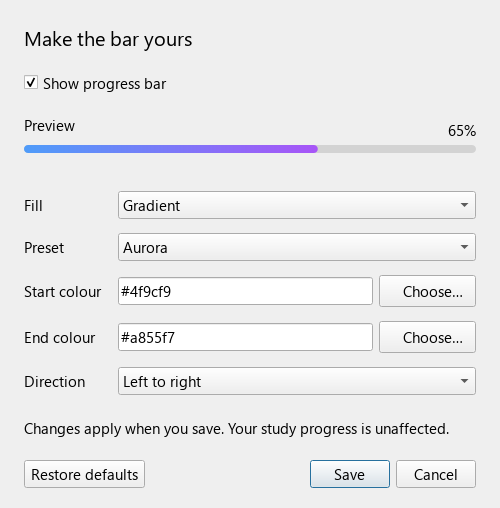
What’s new in 1.2
- New appearance settings window with colour pickers and live preview.
- Solid colours, five gradient presets and custom gradients.
- Updated screenshots focused on the bar.
Features
- Sits below the toolbar, without a solid background panel.
- Includes the selected deck and its subdecks.
- Includes learning cards waiting for later today.
- Updates after answers and Undo.
- Reads today’s review history, so restarting does not reset progress.
- Show or hide it using Tools → Show study progress bar.
- No network requests or changes to your cards or scheduling.
What the percentage means
Answers today ÷ (answers today + remaining cards). Repeated answers count each time. Daily limits, burying and new learning steps can change the workload; the percentage is an estimate, not a measure of memorisation.
Moving or deleting cards can change totals. Filtered-deck cards use their current/original deck membership. Day boundaries follow Anki’s rollover in your computer’s local timezone.
Compatibility and release
Version 1.2.0 · Anki desktop 25.09.5 · MIT licence.
Verified using a temporary collection, Anki’s Chromium display, review updates, Undo, gradient rendering and settings Save/Cancel checks. Desktop only.