Asset Manager

AnkiWeb addon 656021484

Centralizes JavaScript and HTML template management, letting you insert reusable scripts into note templates, apply conditions, and update code across all card types from one place.
AI-generated summary; may contain mistakes.

card-templatesdeveloper-tools

Open on AnkiWeb GitHub Forum topic Find alternatives

AnkiWeb

Votes
11 (๐Ÿ‘ 9 ยท ๐Ÿ‘Ž 2)
Updated
2021-08-29
Anki versions
2.1.47~
License
MIT (from the GitHub repository)
Virus scan
No ClamAV match A match does not prove malware. No match does not prove that the code is safe.
Languages
JavaScript, Python, JSON
Description language
en

Maintenance

abandoned

  • Last update or commit: 2024-08-30 (793 days before the snapshot).
  • Commits in the last year: 0.
  • Issues: 13 open, 19 closed.
  • Pull requests: 3 open, 0 merged.
  • Median first response: 7 hours (15 answered issues and pull requests).

GitHub

Repository
hgiesel/anki_asset_manager ยท more by hgiesel
Stars
โญ 6 ยท forks 3 ยท open issues 16
Last commit
2021-08-29
License
MIT
Languages
Python, HTML, Shell, JavaScript, Svelte
Tests
0

Will it work on my Anki?

Version branches
Min AnkiMax AnkiUpdated
2.1.262.1.282020-06-29
2.1.292.1.332020-09-27
2.1.342.1.352020-10-25
2.1.362.1.412020-12-22
2.1.422.1.462021-04-05
2.1.47+2021-08-29
History across monthly snapshots

Loadingโ€ฆ

Similar addons

Export preview to HTML

Adds a Save HTML menu to the preview view, saving the whole pageโ€”CSS, JavaScript, and imagesโ€”to a local file for debugging complex templates.

exportcard-templatesdeveloper-tools

3 votes 44% approval ๐Ÿ‘ 3 ยท ๐Ÿ‘Ž 0 Updated 2019-05-31
Content Injector

Injects global HTML, CSS, and JavaScript files into Anki cards at render time, with configurable files, placement, and toggles, without altering card content.

appearancecard-templates

2 votes 34% approval ๐Ÿ‘ 2 ยท ๐Ÿ‘Ž 0 โญ 3 Anki 2.1.33~ Updated 2020-09-03
Custom editor keymap

Customizes editor keyboard shortcuts to insert characters, HTML, JavaScript, or file contents based on configured key-and-modifier mappings, including Arrow+Alt symbols.

shortcutsobsolete

1 votes 21% approval ๐Ÿ‘ 1 ยท ๐Ÿ‘Ž 0 Anki 2.1.46~ Updated 2021-10-13

Description

Asset Manager makes it easier for you to manage scripts on your note templates. Features
  • Easily insert JavaScript snippets into your note templates.
  • Change the code in one place and Asset Manager will change the code on all templates for you.
  • Restrict scripts to only be inserted for specific cases. For example only on the frontside of your templates, or only for specific card types.
You can use Asset Manager in two different ways:
  1. Manage JavaScript associated with a note type, and easily insert it into card types, or link against it. This will be the case if you do not enable the HTML Template functionality, but you do enable the JavaScript insertion. This will only add a segment to your card types, but not delete / remove anything. By disabling the Script Insertion, you can easily remove this segment again.
  2. Manage the complete card templates with it. This allows you to define HTML elements in your card templates in a component-wise structure. This will be the case if you do enable the HTML Template, in this case you should also enable the JavaScript Insertion. This will overwrite your templates, if carelessly executed, so be cautious when enabling it for the first time. It is very helpful, if you have many card types which are written in a formulaic way, and a change in one card type means you must also edit another card type.
Functionalites Script Tab Script Config Insert Stub: Exchanges the Div Element with an HTML stub. This makes it is easier to edit the card types, without having to scroll through all the JavaScript, but Asset Manager will still the remember the position in the document for the scripts to insert. Label (not depicted): Used to merge multiple code snippets into one script "unit", this takes effect for insertion positions "Into template", and "As External Script". The resulting script will adopt the name, version, and conditions from the uppermost snippet in the list. Insertion Positions:
  • As External Document: Will copy the script to media folder and paste a script element referencing this external script. Note, that this means that scripts may execute asynchronously and out-of-order!
  • Document Head: Uses an Anki webhook to inject the script into the document header. Will not work on mobile!
  • Document Body: Uses an Anki webhook to inject the script into the document body. Will not work on mobile!
  • Into Template: Will inject the complete script into the template body. This will ensure that scripts are executed immediately and in order.
Insertion Conditions:
  • Restrict to a specific side: ["side", "=", "front"] or ["side", "=", "back"]
  • Restrict to a specific card: ["card", "=", "NameOfTheCard"]
  • Combine conditions: "&" stands for conjunctions (and), "|" stands for disjunction (or): ["&", ["card", "=", "Card 1"], ["side", "=", "front"]]
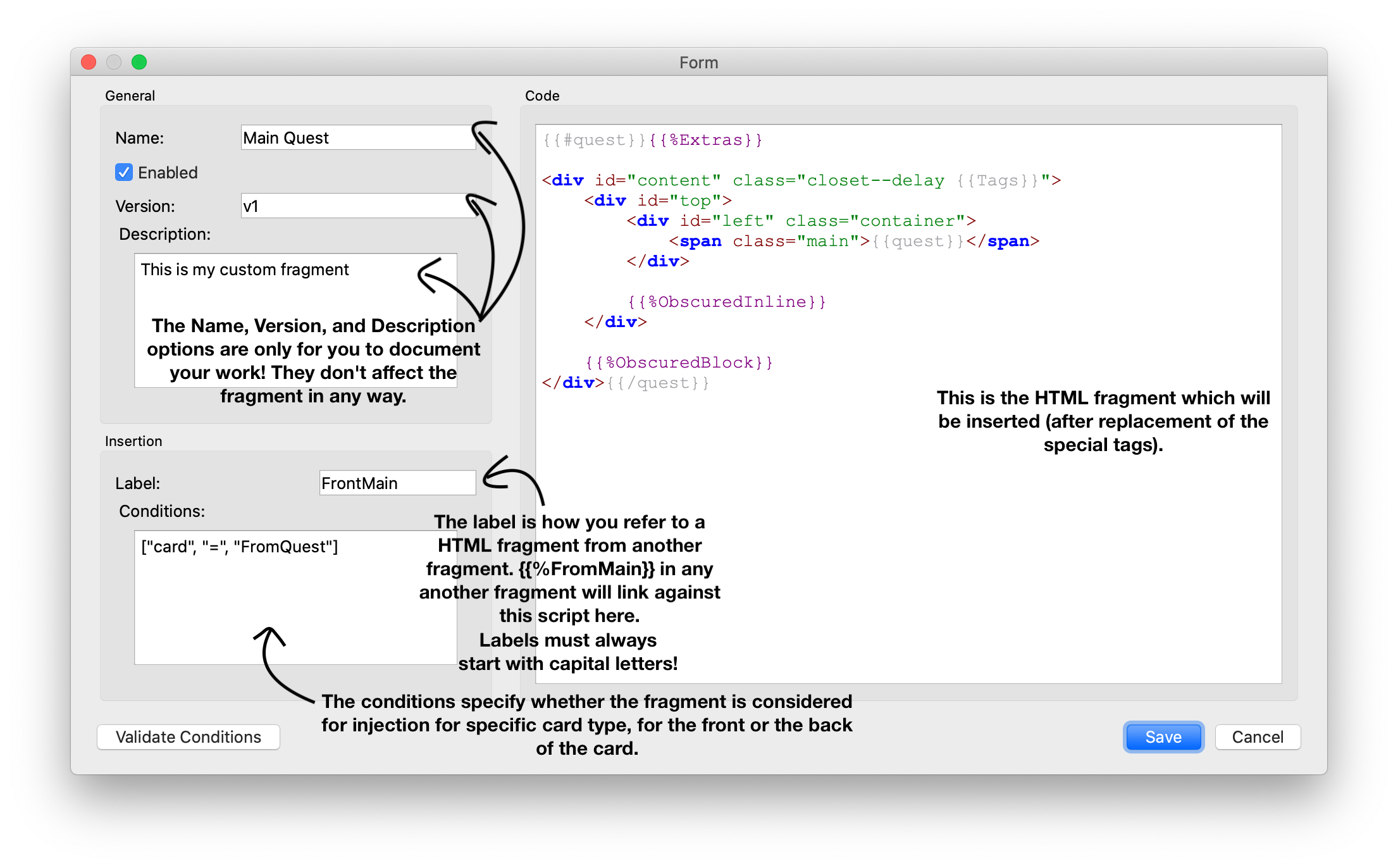
HTML Tab HTML Config Labels: Labels identify your HTML "snippets", or "fragments". Insertion begins with the "Front" label for the frontside of the card, and "Back" for the backside of the card. When using a label like {{%MyLabel}} in the template, it will be replaced with a fragment with a label "MyLabel". Special Labels: There are multiple special labels defined, which you can use. These always start with a small letter:
  • {{%idx: will be replaced with the numerical ID of the card
  • {{%cardidx}}: will be replaced with an ID that is found on the tail of the card name. If the card is named "Card 25", this value will evaluate to 25, even if it is in first position.
  • {{%scripts}}: This will evaluate to the output of the JavaScript functionality of the add-on
Insertion Conditions: Same as above. This way you can make a label {{%MyLabel}} be replaced with a different code snippet depending on the side of the card, or the card type name. For Developers Asset Manager offers a hook for you to insert your own JavaScript snippet via your own add-on. That way you can easily offer your script, give it a name, version it, and update it through the AnkiWeb platform, without making users have to care about pasting the JavaScript to their templates, copy the code to the media folder, etc. Examples include: Updates 2020-12-22: * Fix insertion as external file * Add support for syntax check * Add support for minified insertion * Add support for extra button "Assets..." in editor (can be turned on in the add-on settings) 2021-03-11: * Fix minification on Anki 2.1.41+ 2021-08-29: * Fix error when writing to templates * Fix Assets button not showing and not being able to remove Cards button Support If you like my add-ons, you can consider supporting me. My add-ons will always be freely available for everybody, but what I can offer you is my sincere thanks, and first-hand technical support, if you have any questions/issues with my add-ons. At the same time it allows me to put more time and focus into developing these and making them as powerful and user-friendly as they are. Thanks for considering! ko-fi.com/hgiesel patreon.com/hgiesel

README

= Anki Asset Manager

Asset Manager simplifies managing your card templates.

== Versions

==== DEPRECATED

  • 2.1.26-2.1.28: Uses old insertion mechanism

==== SUPPORTED

  • 2.1.29-33: New insertion mechanism
  • 2.1.34-35: Uses gui_hooks in Models dialog
  • 2.1.36+: Adds minification, syntax check for scripts, optional button in editor, hooks on field rename/delete