MangAnki (まんがんき)
MangAnki is a simple add-on for Anki, a popular SRS tool,
to create flash cards for Japanese words and sentences from online media.
It has been written for making vocabulary mining easier when reading mangas online.
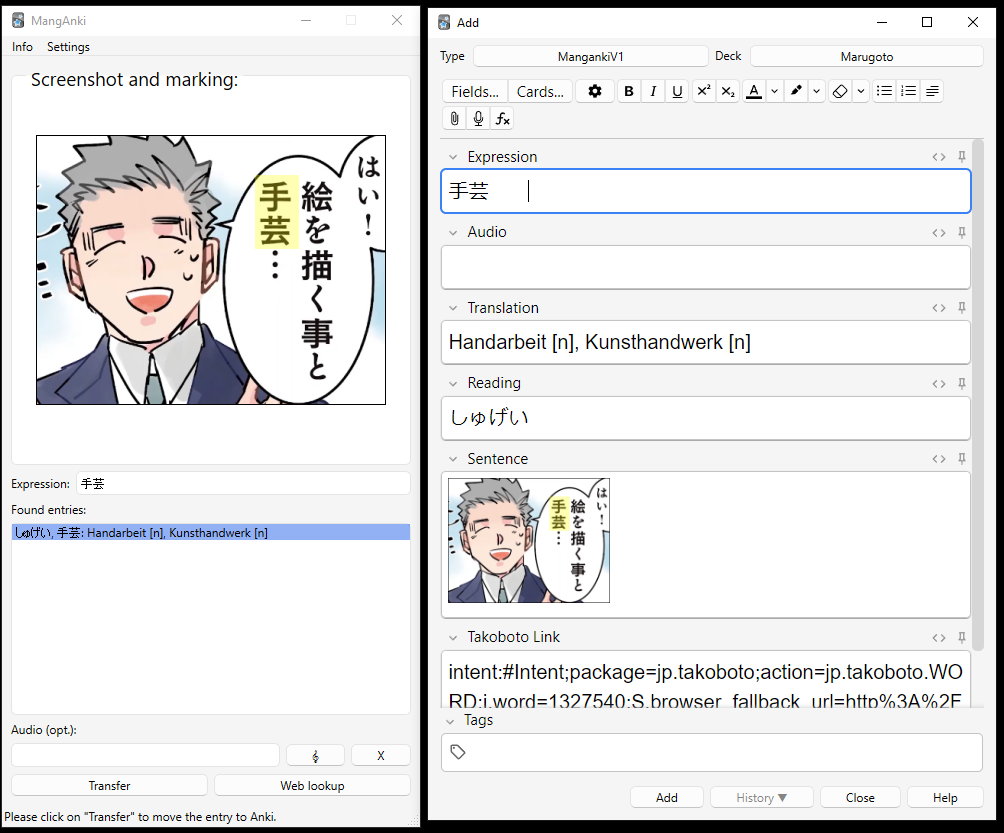
It allows to process screenshots of manga excerpts and includes a dictionary lookup. It creates cards
from screenshot excerpts and dictionary entries; the cards contain a link to the word entry in takoboto,
a popular Japanese dictionary, providing more information and phrases.

The generated cards have an image containing a Japanese sentence on the front page,
and the meaning of one of the words in the sentence on the back side.
Images copied into the system clipboard (e.g. using the Windows Snipping tool) are automatically
imported into the tool, an unknown word in the image can be marked, and a dictionary
lookup can be performed to obtain meaning and writing.
Acknowledgments
- MangAnki uses the JMdict/EDICT and KANJIDIC dictionary files. These files are the property of the Electronic Dictionary Research and Development Group, and are used in conformance with the Group's licence. See also JMDICT
- MangAnki uses the handy JSON export files from jmdict-simplified.
- MangAnki uses the wonderful Takoboto dictionary, by providing weblinks to Takoboto entries on the cards and within the plugin itself.
- MangAnki uses TaylorSMarks playound module
for playing audio.
Beware
This program modifies your Anki data. No responsibility is given for potential damages and problems due to software bugs etc. See also license.
Using the Add-On
Installation
You can download the add-on from the Anki website (look for the
code in the entry for MangAnki there).
Using MangAnki
Once installed, you can access it via the tools menu in Anki:

How to use it
The example screenshots are taken using the online manga 実録 保育士でこ先生, provided on Youtube bei KADOKAWA/Kitora.
Manganki uses Anki notes of type MangAnkiV1. If no such note type is present yet, it is created automatically.
Here is how to add cards after starting the addon:
Copy a picture (screenshot)
Copy a picture containing a sentence with an unknown Japanese word to the clipboard.
This can be most easily done using the Snipping tools provided by e.g. Windows or most Linux versions (most of the time by pressing "Print"). The picture should
appear in the field "Screenshot and Marking".

Mark the word you like to create the card for
The picture should appear in MangAnki. Now mark the word you are interested in in the picture, by left-clicking in the picture and drawing a rectangle.

Enter the unknown word
Now enter the word you are looking for into the "Expression" field. Please use either purely Kana writing or correct Kanji writing.
Future versions will also consider e.g. different verb forms, and try to extract the word automatically via OCR techniques.
If the dictionary knows the word, one or more entries appear in the box under "Found entries". You can change the preferred language of the dictionary
using the combo box on top of MangAnki,
Choose a translation and transfer
Select one of the translations.
You can get more info about the translation entry by clicking on "Web lookup" (opens a browser window pointing to Takoboto's entry for this word).
Then click "Transfer". If not yet open, the "Add" dialogue of Anki should open and the infos of the card should be displayed. You can edit
the entry (e.g. remove unwanted readings / meanings) and then add the new card to your deck (make sure that it is added to the correct deck!
If you prefer another language than English for the translations, click on "Settings" and choose a preferred translation language.
Under "Settings" you can also specify a Tag for your Anki deck. This tag will be added to the created card (and subsequent added cards).
Optional: Add audio
You can also use an recording tool to add audio files, e.g. ShareX. If you record an audio snippet
using ShareX (mp3 or wav format), the audio file is copied to the clipboard, this is detected by Manganki and the audio file is automatically added as entry
(under "Audio (opt.)"). You can replace or remove the audio by pressing the "X"-button, and play it using the "𝄞"-button.
Settings
You can specify the preferre
TODOS:
- Dictionary loading at the beginning is slow - maybe use an SQLite database for that in future versions
- OCR for words
- Possibly tighter integration into Anki (originally, it was planned as a standalone tool)