
OmniDict - All Dictionaries in one add-on

AnkiWeb addon 702300994

Fetches definitions, translations, pronunciation audio, phonemic transcriptions, and examples from multiple dictionaries into customizable Anki cards that work across all platforms.
AI-generated summary; may contain mistakes.

card-creationdictionarymobile-compatible

Open on AnkiWeb GitHub Find alternatives

AnkiWeb

Votes
1 (👍 1 · 👎 0)
Updated
2026-08-28
Anki versions
26.08.1~
License
AGPL-3.0 (from the license file in the package)
Virus scan
No ClamAV match A match does not prove malware. No match does not prove that the code is safe.
Languages
Python, JSON, CSV, CSS
Description language
en

Maintenance

active

  • Last update or commit: 2026-10-06 (26 days before the snapshot).
  • Test files: 1.
  • GitHub Actions workflows: 5.
  • Commits in the last year: 142.
  • Issues: 3 open, 6 closed.
  • Pull requests: 1 open, 16 merged.
  • Median first response: 56 hours (4 answered issues and pull requests).

Will it work on my Anki?

Version branches
Min AnkiMax AnkiUpdated
25.0726.08.1+2026-08-28
History across monthly snapshots

Loading…

Similar addons

Cambridge Dictionary Parser has 2 forks →

Creates flashcards from Cambridge Dictionary entries, automatically fetching definitions, UK/US pronunciations, transcriptions, audio, example sentences, irregular verb forms, related phrases and idioms, primarily for English-Russian.

card-creationdictionary

15 votes 62% approval 👍 13 · 👎 2 Anki 2.1.2~ Updated 2024-12-03
DictOver Addon Anki: Popup Lookup

Provides instant popup dictionary lookup and translation on text selection or double-click in nine languages, with audio pronunciation, IPA, definitions, and Ctrl-click inline field editing.

note-managementdictionary

6 votes 61% approval 👍 6 · 👎 0 ⭐ 5 Anki 2.1.1~ Updated 2026-10-03

Description

Latest release Anki version

Omnidict is the only Anki dictionary add-on you'll ever need.

It seamlessly integrates multiple dictionaries, letting you create definition cards effortlessly. The definition field is fully customizable — choose whether to include pronunciation audio, phonemic transcriptions, translations, and examples. Cards created by this add-on work on all platforms.

The source code of this add-on is hosted on GitHub.
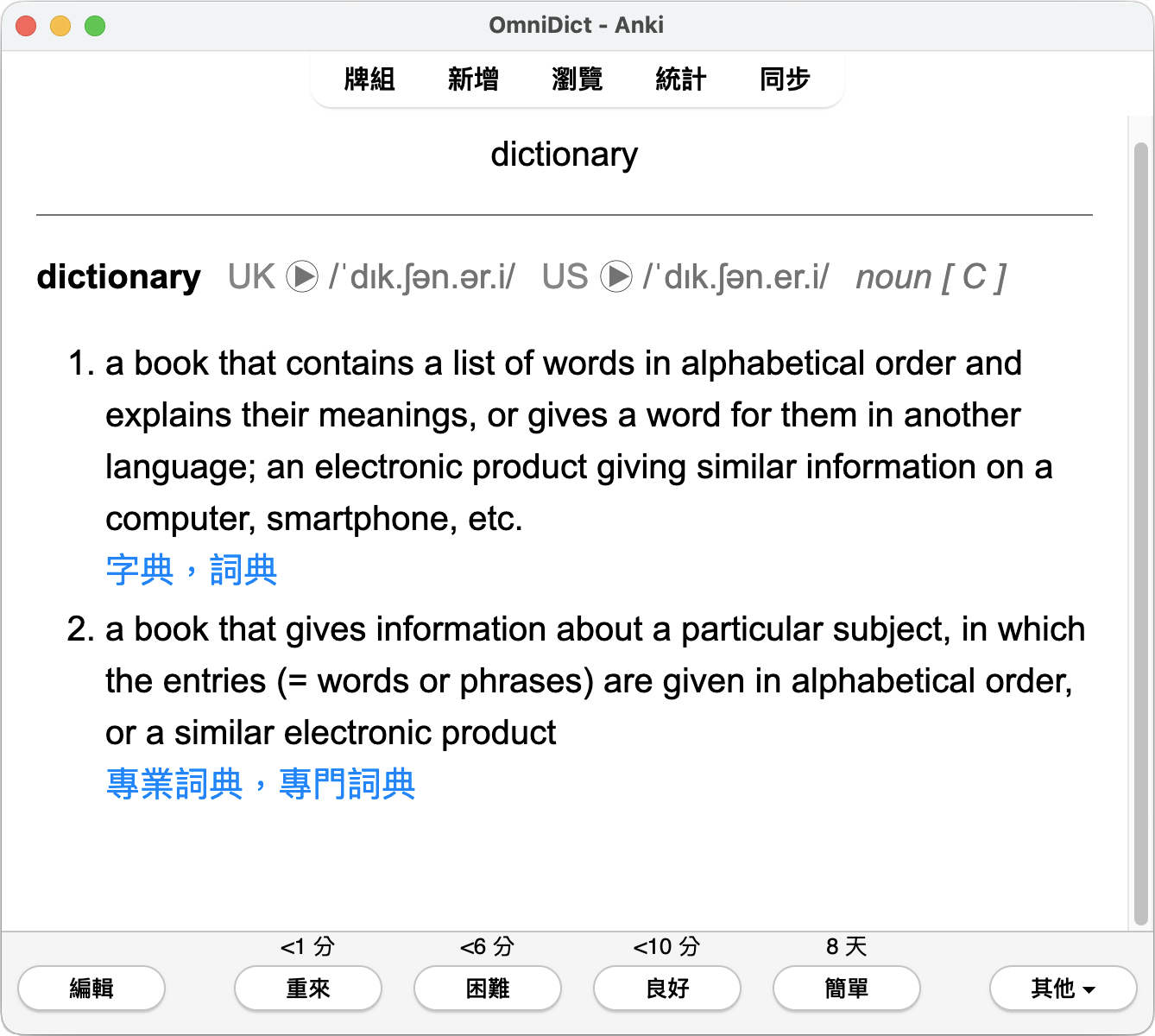
Review card on Anki

✨ Features

  • Add definitions, translations, pronunciation audio, phonemic transcriptions, and examples to your cards (fully customizable).
  • Multiple dialect support (e.g., British and American English).
  • Dark mode support.
  • Cards work on Anki, AnkiDroid, Anki Mobile, and AnkiWeb.
  • Dictionary support
    • Cambridge Dictionary
      • Cambridge English–Chinese (Simplified) Dictionary
      • Cambridge English-Chinese (Traditional) Dictionary
      • Cambridge Advanced Learner's Dictionary & Thesaurus
      • Cambridge Academic Content Dictionary
      • Cambridge Business English Dictionary
    • more to come, contributions welcomed!

📝 Usage

  • After installing the add-on, you will find a new button in the card editor.
  • Type the word you want to learn in the first field.
  • Click on the next field, then click the dictionary button to fetch the word's definition, pronunciation, and example sentences.
  • [Optional] Go to the add-on configuration window (Tools > Add-ons > OmniDict > Config) to customize what information you want to include in the card.

🐛 Help, support, and bug reports

Please do not use reviews for bug reports or support requests. I don't get notified of reviews, and troubleshooting issues through them is nearly impossible. Instead, please use GitHub issues to report bugs. Constructive feedback and suggestions are always welcome!

❤️ Contributing

Contributions are always welcome!

Whether you're adding new features, fixing bugs, or integrating new dictionaries via the Provider interface, feel free to open an issue or pull request to start a discussion.

README

OmniDict

Latest release CI/CD Anki version License

Omnidict is the only Anki dictionary add-on you'll ever need.

It seamlessly integrates multiple dictionaries, letting you create definition cards effortlessly. The definition field is fully customizable — choose whether to include pronunciation audio, phonemic transcriptions, translations and examples. Cards created by this add-on work on all platforms.

Review card on Anki

Features

  • Add definitions, translations, pronunciation audio, phonemic transcriptions, and examples to your cards (fully customizable).
  • Multiple dialect support (e.g., British and American English).
  • Dark mode support.
  • Cards work on Anki, AnkiDroid, Anki Mobile, and AnkiWeb.
  • Dictionary support
    • Cambridge Dictionary
      • Cambridge English–Chinese (Simplified) Dictionary
      • Cambridge English-Chinese (Traditional) Dictionary
      • Cambridge Advanced Learner's Dictionary & Thesaurus
      • Cambridge Academic Content Dictionary
      • Cambridge Business English Dictionary
    • more to come, contributions welcomed!

Installation

AnkiWeb

The easiest way to install OmniDict is through AnkiWeb.

Manual installation

  1. Download the latest .ankiaddon file from the release tab (you might need to click on Assets below the description to reveal the download links)
  2. Open the folder where your downloads are located and double-click on the downloaded .ankiaddon file.
  3. Follow the installation prompt and restart Anki if it asks you to

Contributing

Contributions are always welcome!

See CONTRIUBTING.md for ways to get started.