Cambridge/Wiktionary fetcher

AnkiWeb addon 908965351

Fills Anki notes with dictionary data—definitions, examples, synonyms, part of speech, IPA, audio, and images—from Cambridge and Wiktionary sources, using configurable field mapping and typo suggestions.
AI-generated summary; may contain mistakes.

card-creationdictionary

Open on AnkiWeb GitHub Find alternatives

AnkiWeb

Votes
2 (👍 2 · 👎 0)
Updated
2026-03-23
Anki versions
2.1.1~
License
MIT (from the license file in the package)
Virus scan
No ClamAV match A match does not prove malware. No match does not prove that the code is safe.
Languages
Handlebars, HTML, Python, CSV, JSON
Description language
en

Maintenance

active

  • Last update or commit: 2026-10-26 (6 days before the snapshot).
  • Test files: 19.
  • Commits in the last year: 79.
  • Issues: 0 open, 3 closed.
  • Pull requests: 0 open, 2 merged.
  • Median first response: 128 hours (3 answered issues and pull requests).

Will it work on my Anki?

Version branches
Min AnkiMax AnkiUpdated
2.1.02.1.1+2026-03-23
History across monthly snapshots

Loading…

Similar addons

Wiktionary

Fills Anki notes with Wiktionary definitions and example sentences via an editor button or browser bulk operation, after importing downloaded kaikki.org JSON dictionary data.

card-creationnote-managementshortcutsdictionary

18 votes 74% approval 👍 17 · 👎 1 ⭐ 28 Anki 26.09~ Updated 2026-10-04
Vocabulary En-Ar Flashcards Generator

Generates complete Anki flashcards from a single word, filling fields with dictionary definitions, pronunciation, synonyms, examples, English-Arabic translation, and images without AI.

card-creationdictionary

1 votes 21% approval 👍 1 · 👎 0 Anki 2.1.1~ Updated 2026-03-30
MnemoMaker: Language Learning Accelerator

Automatically creates formatted vocabulary flashcards with Cambridge Dictionary definitions, examples, translations, pronunciation, and AI-generated mnemonics in multiple language pairs.

card-creationaidictionary

6 votes 19% approval 👍 3 · 👎 3 ⭐ 2 Anki 25.02.5~ Updated 2025-08-15

Description

Cambridge / Wiktionary Fetcher

An Anki add-on that fills notes with data from Cambridge Dictionary, ru.wiktionary.org, and en.wiktionary.org.

Screenshots

Basic usage dialog
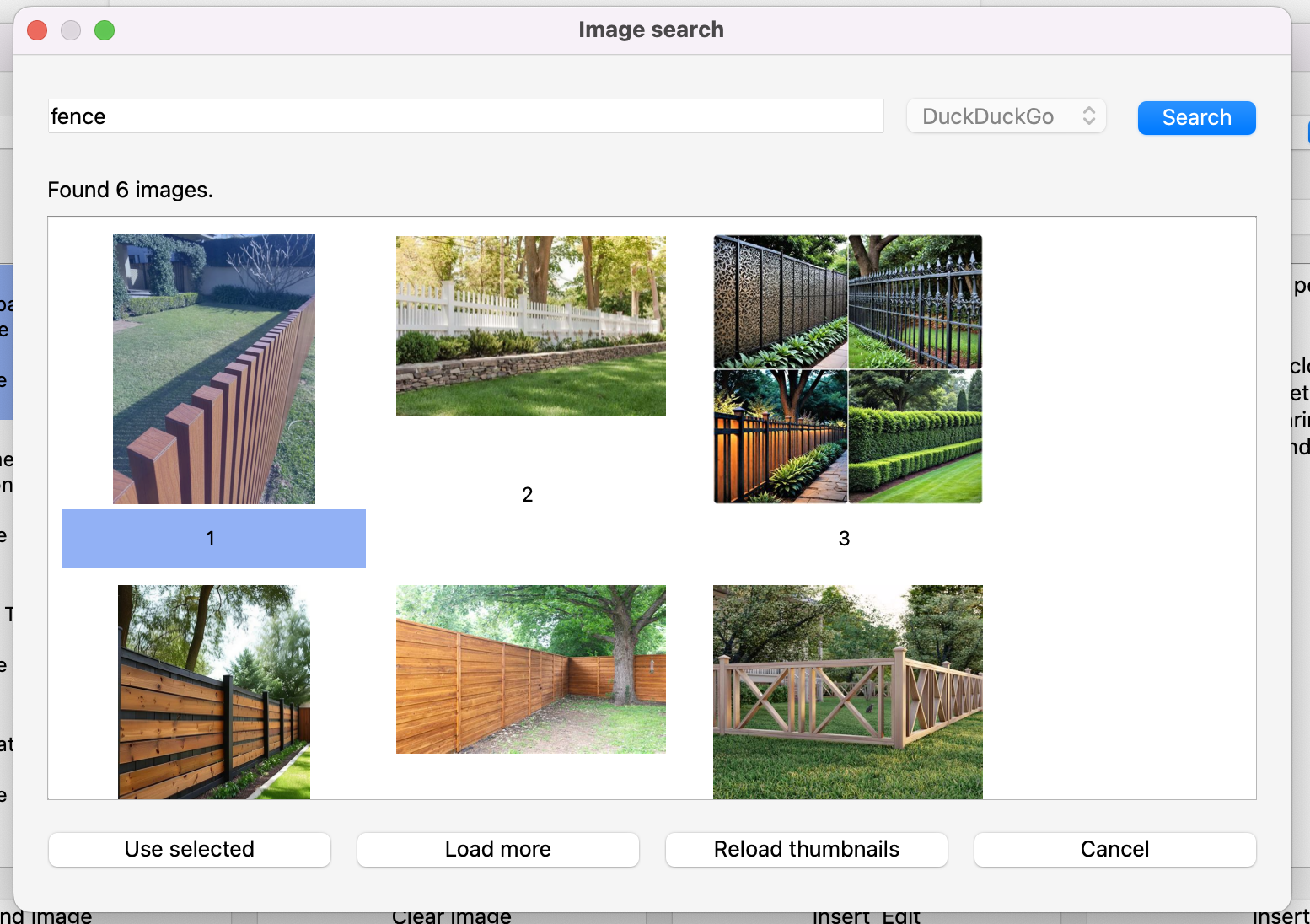
Image finder dialog

Features

  • Fetches word, definitions, examples, synonyms, and part of speech.
  • Extracts IPA and audio when available.
  • Fetches from multiple sources at once.
  • Adds an image to a note field via a dedicated image search dialog.
  • Suggests close word variants when no exact match is found (typo/fuzzy suggestions).
  • Validates typo suggestions against real dictionary entries.
  • Writes data into your fields through configurable field mapping.
  • Auto-selects a preset by detected word language (English/Russian) when configured in Settings.

Image Search

  • The current version uses only DuckDuckGo.
  • Provider selection remains in settings, but only one provider is currently available.
  • Image settings: image_search.provider, image_search.max_results, image_search.safe_search.

Usage

  1. Open Tools -> Dictionary Fetch (Cambridge/Wiktionary).
  2. Enter a word and choose one or more sources.
  3. Click Fetch and select a sense.
  4. Optionally click Find Image and choose an image.
  5. Click Insert or Insert & Edit.

Settings

Open Tools -> Dictionary Fetch - Settings.

Available options:

  • preset profiles for all fetch settings (note type, deck, sources, mappings, typo/image options, dialect, etc.);
  • language defaults for presets (English -> preset, Russian -> preset);
  • Cambridge dialect priority (UK/US);
  • image result count and safe_search;
  • typo suggestions on/off and max number of confirmed suggestions;
  • field mapping (word, definition, examples, synonyms, pos, ipa, audio, picture);
  • RU Wiktionary mapping (wiktionary.field_map.syllables).

README

Cambridge / Wiktionary Fetcher

An Anki add-on that fills notes with data from Cambridge Dictionary, ru.wiktionary.org, and en.wiktionary.org.

Screenshots

Basic usage dialog
Image finder dialog

Features

  • Fetches word, definitions, examples, synonyms, and part of speech.
  • Extracts IPA and audio when available.
  • Fetches from multiple sources at once.
  • Adds an image to a note field via a dedicated image search dialog.
  • Suggests close word variants when no exact match is found (typo/fuzzy suggestions).
  • Validates typo suggestions against real dictionary entries.
  • Writes data into your fields through configurable field mapping.
  • Auto-selects a preset by detected word language (English/Russian) when configured in Settings.

Image Search

  • The current version uses only DuckDuckGo.
  • Provider selection remains in settings, but only one provider is currently available.
  • Image settings: image_search.provider, image_search.max_results, image_search.safe_search.

Usage

  1. Open Tools -> Dictionary Fetch (Cambridge/Wiktionary).
  2. Enter a word and choose one or more sources.
  3. Click Fetch and select a sense.
  4. Optionally click Find Image and choose an image.
  5. Click Insert or Insert & Edit.

Settings

Open Tools -> Dictionary Fetch - Settings.

Available options:

  • preset profiles for all fetch settings (note type, deck, sources, mappings, typo/image options, dialect, etc.);
  • language defaults for presets (English -> preset, Russian -> preset);
  • Cambridge dialect priority (UK/US);
  • image result count and safe_search;
  • typo suggestions on/off and max number of confirmed suggestions;
  • field mapping (word, definition, examples, synonyms, pos, ipa, audio, picture);
  • RU Wiktionary mapping (wiktionary.field_map.syllables).