Straight Reward

AnkiWeb addon 957961234

Increases card ease after consecutive Good or Easy ratings, with configurable thresholds and rewards applied during reviews or syncing from other devices.
AI-generated summary; may contain mistakes.

schedulingfork-or-reupload

Open on AnkiWeb GitHub Forum topic Find alternatives

AnkiWeb

Votes
85 (πŸ‘ 75 Β· πŸ‘Ž 10)
Updated
2023-11-01
Anki versions
2.1.66~
License
AGPL-3.0 (from the headers of the Python files)
Virus scan
No ClamAV match A match does not prove malware. No match does not prove that the code is safe.
Languages
JavaScript, Python, JSON
Description language
en

Maintenance

abandoned

  • Last update or commit: 2023-11-01 (1096 days before the snapshot).
  • GitHub Actions workflows: 1.
  • Commits in the last year: 0.
  • Issues: 15 open, 19 closed.
  • Pull requests: 1 open, 4 merged.
  • Median first response: 83 hours (22 answered issues and pull requests).
  • Outside pull requests: 100% of 4 merged.

Will it work on my Anki?

Version branches
Min AnkiMax AnkiUpdated
2.1.202.1.232020-03-17
2.1.24–2020-03-26
2.1.252.1.302020-07-10
2.1.312.1.332020-09-16
2.1.342.1.492021-01-11
2.1.502.1.542022-03-31
2.1.55–2022-12-12
2.1.562.1.652023-11-01
2.1.66+2023-10-31
History across monthly snapshots

Loading…

Similar addons

ease modify extended

Modifies card scheduling by resetting ease values only below a configurable threshold, with an optional source-code-edited custom mode for cards last rated Good.

schedulingbeta

2 votes 34% approval πŸ‘ 2 Β· πŸ‘Ž 0 ⭐ 0 Updated 2019-11-19
reviewer apply different ease

Allows changing the default ease adjustments applied when rating Again, Hard, or Easy under the V1 scheduler by editing source code.

schedulingobsolete

2 votes 34% approval πŸ‘ 2 Β· πŸ‘Ž 0 ⭐ 0 Updated 2019-02-02

Description

This add-on increases the ease of Anki cards when you consecutively rate them "Good", or "Easy". Rating a card "Good", or "Easy" is considered a "success". Once you exceed a specific amount of successes, it is considered a "success straight". In such a case, Straight Reward will raise the ease of these cards. The default settings will mean that you need three consecutive successes to recover the ease loss after pressing "Hard", and four to recover from "Again".

Setting the Options After installing the addon you will another option tab under the deck options called "Rewards". Note that you need to open the old options menu by shift-clicking "Options":
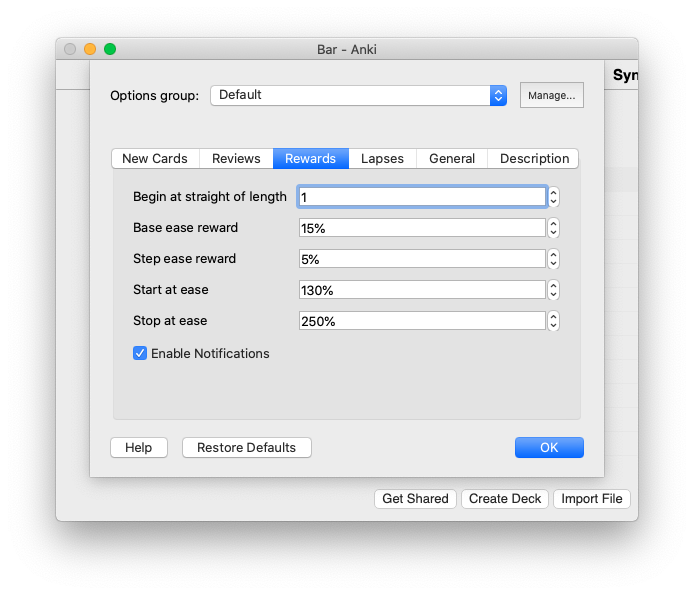
  • Begin at straight of length: Length of what is considered a straight success. At this length, ease rewards will be applied. The value 0 is the same as deactivating Straight Rewards. (default: 2)
  • Enable notifications: Enable or disable the notifications that arise during review. (default: on)
  • Base ease reward: One of the two values for calculating the ease reward. (default: 5)
  • Step ease reward: One of the two values for calculating the ease reward. (default: 5)
  • Start at ease: Only cards with an ease factor between (inclusive) "Start Ease" and "Stop Ease" are considered for ease rewards. (default: 130)
  • Stop at ease: Only cards with an ease factor between (inclusive) "Start Ease" and "Stop Ease" are considered for ease rewards. (default: 250)
The Algorithm Formula for calculating the ease reward: if straight_length >= required_straight_length: base_reward + step_reward β‹… (straight_length - required_straight_length) else: 0
    An Example
:
  1. You rated a card "Good" for the sixth time in a row.
  2. The card currently has an ease factor of 250%.
  3. You have a straigth length of 4
  4. You have a base reward of 15%
  5. You have a step reward of 5%
  6. You have a start ease of 130%
  7. You have a stop ease of 270%
So in this case we have a straight success (because 6 β‰₯ 4). The formula yields: 15% + 5% β‹… (6 - 4) = 15% + 10% = 25% So the answer is final ease is 250% + 25% = 275%. But Wait! 275% is more than the stop ease of +270%+: So the ease will be set to the maximum ease of 270%.

Detecting Straight Successes The addon knows two mechanisms to detect cards which apply for an ease reward:

The Review Hook The review hook increases the ease of cards during the review. You will get a notification whenever a success straight is detected:
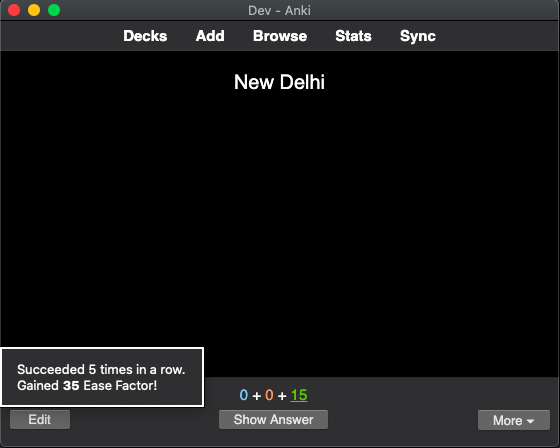
The Review hook respects the "Undo" feature. Undoing will also undo the additional straight reward.

The Sync Hook The sync hook increases the ease of cards during syncing. Applies when you do reviews on another platform (e.g. AnkiMobile, AnkiDroid or AnkiWeb) and sync those back to Desktop Anki.
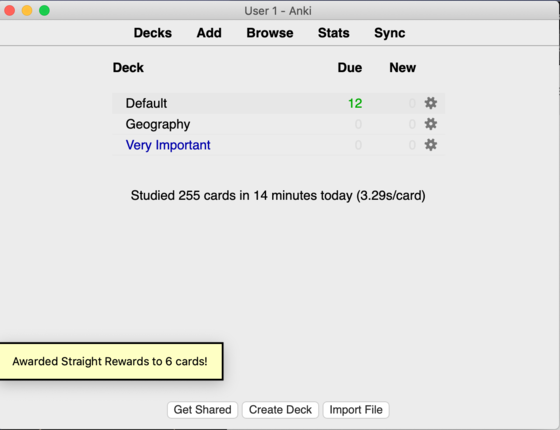
All ease changes applied through the sync hook are logged in the addon folder under user_files/sync_log.

Important for users with multiple computers If you use multiple computers with Desktop Anki, you should install Straight Reward only on one of these computers! Otherwise, reviews might get two, or even more rewards, because the sync hook is activated for each sync. If you need to work with multiple profiles on the same Anki installation, there is a checkbox to deactivate the sync hook that works per profile.

If you have any problems or questions, consider posting in the official support thread, writing an issue on GitHub, or sending me a plain old email.

Based on the add-on of the same name by luminousspice.

Updates

  • 2022-03-31: Support for v3 and 2.1.50. Support for the new deck options screen might follow.
  • 2020-01-11: The add-on from now on will default to activated. If you have decks, for which you don't want Straight Rewards, please deactivate it manually by setting the "Begin at straight of length" setting to 0.

Support If you like my add-ons, you can consider supporting me. My add-ons will always be freely available for everybody, but what I can offer you is my sincere thanks, and first-hand technical support, if you have any questions/issues with my add-ons. At the same time it allows me to put more time and focus into developing these and making them as powerful and user-friendly as they are. Thanks for considering!

ko-fi.com/hgiesel patreon.com/hgiesel

README

image:https://github.com/hgiesel/anki_straight_reward/workflows/Zip%20Anki%20add-ons/badge.svg[link="https://github.com/hgiesel/anki_straight_reward/actions?query=workflow%3A%22Zip+Anki+add-ons%22"]

= Straight Reward

Based on the link:https://github.com/luminousspice/anki-addons/tree/master/Straight_Reward[add-on of the same name] by link:https://github.com/luminousspice[luminousspice].

This add-on increases the ease of Anki cards when you consecutively rate them "Good", or "Easy". Rating a card "Good", or "Easy" is considered a "success". Once you exceed a specific amount of successes, it is considered a "straight success". In such a case, Straight Reward will raise the ease of the cards.

==== Setting the Options

After installing the addon you will another option tab under the deck options called "Straight Rewards":

image::./images/setting_menu.png[Setting Menu]

  • Begin at straight of length: Length of what is considered a straight success. At this length, ease rewards will be applied. The value is the same as deactivating Straight Rewards. (default: 0)
  • Enable notifications: Enable or disable the notifications that arise during review. (default: on)
  • Base ease reward: One of the two values for calculating the ease reward. (default: 15)
  • Step ease reward: One of the two values for calculating the ease reward. (default: 5)
  • Start at ease: Only cards with an ease factor between (inclusive) "Start Ease" and "Stop Ease" are considered for ease rewards. (default: 130)
  • Stop at ease: Only cards with an ease factor between (inclusive) "Start Ease" and "Stop Ease" are considered for ease rewards. (default: 250)

==== Calculating Ease Rewards

.Formula for calculating the Ease Reward

base_reward + step_reward β‹… (straight_length - required_straight_length)

An Example:

. You rated a card "Good" for the sixth time in a row. . The card currently has an ease factor of 250%. . You have a straight length of 4 . You have a base reward of 15% . You have a step reward of 5% . You have a start ease of 130% . You have a stop ease of 270%

So in this case we have a straight success (because 6 β‰₯ 4). + The formula yields: +15% + 5% β‹… (6 - 4) = 15% + 10% = 25%+ + So the answer is final ease is +250% + 25% = 275%+. But Wait! + +275%+ is more than the stop ease of +270%+: So the ease will be set to the maximum ease of +270%+.

'''

== Detecting Straight Successes

The addon knows two mechanisms to detect cards which apply for an ease reward:

=== The Review Hook

The review hook increases the ease of cards during the review. You will get a notification whenever a success straight is detected:

.Award notification image::./images/award_notification.png[align="center"]

The Review hook respects the "Undo" feature. Undoing will also undo the additional straight reward.

=== The Sync Hook

The sync hook increases the ease of cards during syncing. Applies when you do reviews on another platform (e.g. AnkiMobile or AnkiDroid) and sync those to Desktop Anki.

.Sync notification image::./images/sync_notification.png[align="center"]

All ease changes applied through the sync hook are logged in the addon folder under user_files/sync_log.

== Building

  1. Run yarn && yarn build in /web
  2. Run ./tools/compile.sh