Speed Focus Mode (auto-alert, auto-reveal, auto-answer)

AnkiWeb addon 1046608507

Automatically alerts, reveals answers, or fails cards when reviews take too long, with per-deck settings to encourage faster, more focused study.
AI-generated summary; may contain mistakes.

schedulingreview-flowtimershortcuts

Open on AnkiWeb GitHub Find alternatives

AnkiWeb

Votes
317 (πŸ‘ 298 Β· πŸ‘Ž 19)
Updated
2022-12-16
Anki versions
2.1.55~
License
AGPL-3.0 (from the license file in the package)
Virus scan
No ClamAV match A match does not prove malware. No match does not prove that the code is safe.
Languages
Python, JavaScript, JSON
Description language
en

Maintenance

abandoned

  • Last update or commit: 2023-08-01 (1188 days before the snapshot).
  • Commits in the last year: 0.
  • Issues: 52 open, 17 closed.
  • Pull requests: 3 open, 3 merged.
  • Median first response: 730 hours (31 answered issues and pull requests).
  • Outside pull requests: 50% of 2 merged.

Will it work on my Anki?

Version branches
Min AnkiMax AnkiUpdated
2.1.02.1.542019-06-02
2.1.55+2022-12-16
History across monthly snapshots

Loading…

Similar addons

Adaptive Speed Focus Mode

Auto-reveals each card's answer after a per-card delay computed from visible word count and difficulty, never grading, with pause and calibration options.

fsrsreview-flowtimerfork-or-reupload

4 votes 51% approval πŸ‘ 4 Β· πŸ‘Ž 0 ⭐ 1 Anki 2.1.1~ Updated 2026-10-15
Batch Editing has 1 fork β†’

Adds a card browser menu item for batch-adding information or media to a field and batch-replacing field contents across selected notes.

note-management

197 votes 95% approval πŸ‘ 193 Β· πŸ‘Ž 4 ⭐ 19 Anki 23.10~ Updated 2023-10-26
AnkiBlitz

Combines adaptive answer-reveal delays, progressive word reveal, timed Blitz sessions with time-left estimates, Pomodoro breaks, focus lock, music and profiles.

review-flowprogress-trackingtimer

1 votes 21% approval πŸ‘ 1 Β· πŸ‘Ž 0 Anki 2.1.1~ Updated 2026-10-15
auto rate typed answer has 1 fork β†’

Automatically rates typed answers as hard, good, or easy based on configurable response-time thresholds, with options for handling mismatches, multiple answer fields, and confirming ratings.

schedulingreview-flowquiz

16 votes 81% approval πŸ‘ 16 Β· πŸ‘Ž 0 Anki 2.1.50~ Updated 2021-12-06

Description

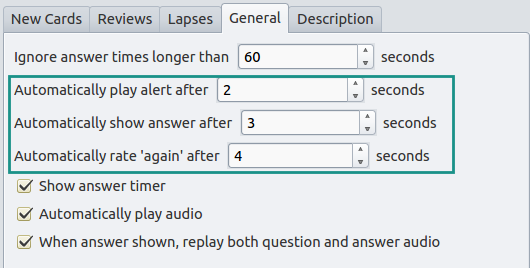
       Trains your attention and speed by performing automated actions if you take too long to go through your reviews. Three different levels of 'encouragements' are provided:
  • automatically play an alert
  • automatically reveal the answer
  • automatically fail the card
All of these can be configured individually for each deck options group. SCREENSHOTS CHANGELOG Version 1.0.0 – 2022-12-16 IMPORTANT: Releases of the add-on past v1.0.0 are only compatible with Anki 2.1.55 and up. If you are on an earlier Anki release there is no need to worry: Copying the AnkiWeb add-on code into Anki will automatically download a compatible version of the add-on for you. However, please be aware that it will not include the latest changes below. Added
  • Added a button that stops automated events from firing ("More Time!"). Can be disabled in the new config file.
  • Added a hotkey that that does the same (configurable, set to p by default, thanks to AnKing for the inspiration)
  • Added a simple countdown, indicating the time until the next automated card action
  • You can now bury cards (thanks to NicolasCuri for the inspiration)
  • You can now mark cards as "good" in addition to "again" (thanks to JulyMorning for the feature request)
  • Added ability to launch card actions from the question side, skipping the answer reveal (e.g. to bury cards immediately, thanks to Ba for the suggestion)
  • Timers are now suspended automatically when opening dialogs
  • Timers are now suspended automatically when typing answer
Changed
  • Raised minimum supported version to Anki 2.1.55 in order to conserve development time and prepare for upcoming refactor of Anki's main screen.
  • Please note that Anki versions 2.1.45 and above ship with a new deck options screen whose add-on APIs are still not fully set in stone and is thus not viable to support just yet. To access the old deck options and thus Speed Focus Mode's settings, please shift click on the "Options" entry after clicking on the gear icon next to a deck.
  • sound.mp3 files should now be placed in the user_files directory to preserve them across add-on updates.
  • Some further code refactoring and reorganization to improve maintainability and support with upcoming Anki updates
Fixed
  • Fixed an issue that would cause the add-on to produce an error message when opening the card browser in some scenarios (#38)
  • Fixed a compatibility issue with Clickable Tags, AnkiConnect, Review Heatmap, and other add-ons wrapping the dialog manager (#34, #28, #27, #23)
  • Dropped support for very old Anki versions. The minimum supported version is now 2.1.22.
  • Addressed an issue that would cause the alert not to play in some scenarios
  • Added a workaround to make Speed Focus Mode compatible with Advanced Review Bottom Bar
USAGE Note: In order to get to the add-on's settings, you'll need to draw up the classic deck options screen. Sadly this is a bit hidden, but here is how to get to the screen: 1. From Anki's main window (where your list of decks is shown), click on the gear icon of the deck you want to enable Speed Focus Mode for. This should draw up a small floating context menu with a few entries. 2. Click on the "Options" entry while holding down the Shift key on your keyboard. This will make Anki draw up the classic deck options view, where you'll find Speed Focus Mode's options under the "General" tab Adding support for the new deck options screen is on my todo-list, but it's difficult to implement at the moment because a lot of these newer parts of Anki's user interface are still undergoing changes which add-ons have to adjust to. ORIGINAL INSTRUCTIONS
  1. Open deck options
  2. Navigate to the 'General' tab
  3. Find the three new options as shown in the screenshot above and configure them to your liking
The alert and answer reveal timeout refer to seconds spent on the question side, while the auto-'again' timer starts counting after revealing the question. Setting any of the timers to 0 will disable them. CONFIGURATION You can customize the alert sound by replacing alert.mp3 in the add-on folder with a sound file of your choice. Just make sure that it's named the same and sporting the same file format. HELP AND SUPPORT Please do not use reviews for bug reports or support requests. I don't get notified of your reviews, and properly troubleshooting an issue through them is nearly impossible. Instead, please either use the issue tracker (preferred), add-on support forums, or just message me at ankiglutanimate@gmail.com. Constructive feedback and suggestions are always welcome! CREDITS AND LICENSE Copyright Β© 2017-2022 Aristotelis P. (Glutanimate) Copyright Β© 2015-2016 unknown author of Automatically show answer after X seconds Thanks a lot to Neri and Pablo for their support in commissioning this add-on and their fantastic new ideas! Licensed under the GNU AGPLv3, extended by a number of additional terms. This program is distributed in the hope that it will be useful, but WITHOUT ANY WARRANTY. For more information on the license please see the LICENSE file accompanying this add-on. The source code is available on GitHub. Pull requests and other contributions are welcome! MORE RESOURCES Make sure to check out my socials for the latest add-on updates and news: @Glutanimate | / Glutanimate New: Receive notifications about new add-on releases via @AnkiUpdates Want to hire me to work on add-on for you? Get in touch at ankiglutanimate@gmail.com SUPPORT MY WORK If you like Speed Focus Mode, please give it a thumbs up and share it with your friends, so that more people can enjoy it! A kind request: Writing, supporting, and maintaining Anki add-ons like these takes a lot of time and effort. If Speed Focus Mode has been a valuable asset in your studies, please consider using one of the buttons below to support my efforts by pledging your support on Patreon, or by buying me a coffee. Each and every contribution is greatly appreciated and will help me maintain and improve Speed Focus Mode as time goes by!              Pro-tip: Lots of exclusive add-ons and other goodies await on my Patreon page. Make sure to check them out!

README

Speed Focus Mode for Anki


Cut your review times into half

Extends the spaced-repetition flashcard app Anki with time-based reminders and other automated actions that encourage faster card reviews.

Table of Contents

Screenshots

Installation

AnkiWeb

The easiest way to install Speed Focus Mode is through AnkiWeb.

Manual installation

Please click on the entry corresponding to your Anki version:

Anki 2.1
  1. Make sure you have the latest version of Anki 2.1 installed. Earlier releases (e.g. found in various Linux distros) do not support .ankiaddon packages.
  2. Download the latest .ankiaddon package from the releases tab (you might need to click on Assets below the description to reveal the download links)
  3. From Anki's main window, head to Tools β†’ Add-ons
  4. Drag-and-drop the .ankiaddon package onto the add-ons list
  5. Restart Anki
Anki 2.0
  1. Go to Tools β†’ Add-ons β†’ Open add-ons folder
  2. Find and delete the Speed Focus Mode.py file if it already exists.
  3. See if you can find a speed_focus_mode folder. If so:
    1. If the folder contains a meta.json file, copy the file to a safe location. This will allow you to preserve your current settings.
    2. Proceed to delete the speed_focus_mode folder
  4. Download and extract the latest Anki 2.0 add-on release from the releases tab (you might need to click on Assets below the description to reveal the download links)
  5. Move the extracted Speed Focus Mode.py and speed_focus_mode into the add-ons folder
  6. Optional: Place the meta.json file back into the directory if you created a copy beforehand.
  7. Restart Anki

Documentation

For further information on the use of this add-on please check out the description text for AnkiWeb.

Building

With Anki add-on builder installed:

git clone https://github.com/glutanimate/speed-focus-mode.git
cd speed-focus-mode
aab build

For more information on the build process please refer to aab's documentation.

Contributing

Contributions are welcome! Please review the contribution guidelines on how to:

  • Report issues
  • File pull requests
  • Support the project as a non-developer

License and Credits

Speed Focus Mode is

Copyright Β© 2017-2019 Aristotelis P. (Glutanimate)

Copyright Β© 2015-2016 unknown author of Automatically show answer after X seconds

Thanks a lot to Neri and Pablo for their support in commissioning this add-on and their fantastic new ideas!

Speed Focus Mode is free and open-source software. The add-on code that runs within Anki is released under the GNU AGPLv3 license, extended by a number of additional terms. For more information please see the LICENSE file that accompanied this program.

This program is distributed in the hope that it will be useful, but WITHOUT ANY WARRANTY.


The continued development of this add-on is made possible
thanks to my Patreon and Ko-Fi supporters.
You guys rock ❀️ !