Highlight Search Results in the Browser

AnkiWeb addon 225180905

1 other version of this addon exists. Compare versions ↓

Highlights search terms in the Browser's Editor pane, adds two search modes and hotkeys for jumping to or selecting results, and lets you toggle highlighting.
AI-generated summary; may contain mistakes.

searchshortcuts

Open on AnkiWeb GitHub Find alternatives

AnkiWeb

Votes
88 (👍 85 · 👎 3)
Updated
2023-10-21
Anki versions
23.10~
License
AGPL-3.0 (from the license file in the package)
Virus scan
No ClamAV match A match does not prove malware. No match does not prove that the code is safe.
Languages
Python, JSON
Description language
en

Maintenance

abandoned

  • Last update or commit: 2024-08-07 (816 days before the snapshot).
  • Test files: 1.
  • Commits in the last year: 0.
  • Issues: 11 open, 11 closed.
  • Pull requests: 2 open, 2 merged.
  • Median first response: 39 hours (14 answered issues and pull requests).
  • Outside pull requests: 100% of 2 merged.
  • Forks that may still be maintained: "🖌️Auto Highlight Cloze in Browser (Fork by Shigeඞ)" (210078606).

Will it work on my Anki?

Version branches
Min AnkiMax AnkiUpdated
2.1.023.10+2023-10-21
History across monthly snapshots

Loading…

Compare versions

The original addon and its forks. The best value in each column is in bold.

VersionWorks on Anki 26.09.3MaintenanceLast activity VotesApprovalGitHub starsNotes
Highlight Search Results in the Browser this addon original likely abandoned 7 Aug 2024 👍 85 · 👎 3 90% 19
↳ 🖌️Auto Highlight Cloze in Browser (Fork by Shigeඞ) likely active 8 Jul 2026 👍 6 · 👎 0 61% 0

Forks can add features or work in a different way. Read the description before you change to another version. Fork detection is incomplete, so other versions can exist.

Similar addons

Hint Hotkeys

Adds customizable reviewer hotkeys where H reveals hints one by one and Shift+H reveals all at once.

review-flowshortcuts

50 votes 76% approval 👍 44 · 👎 6 ⭐ 7 Anki 2.1.62~ Updated 2023-04-14
Batch Editing has 1 fork →

Adds a card browser menu item for batch-adding information or media to a field and batch-replacing field contents across selected notes.

note-management

197 votes 95% approval 👍 193 · 👎 4 ⭐ 19 Anki 23.10~ Updated 2023-10-26
Browser search result highlighter

Highlights browser search matches within notes, including field code, tags, regex and overlapping matches, with auto-scroll, scrollbar indicators and customizable settings.

search

18 votes 82% approval 👍 18 · 👎 0 ⭐ 6 Anki 24.11~ Updated 2026-06-06

Description


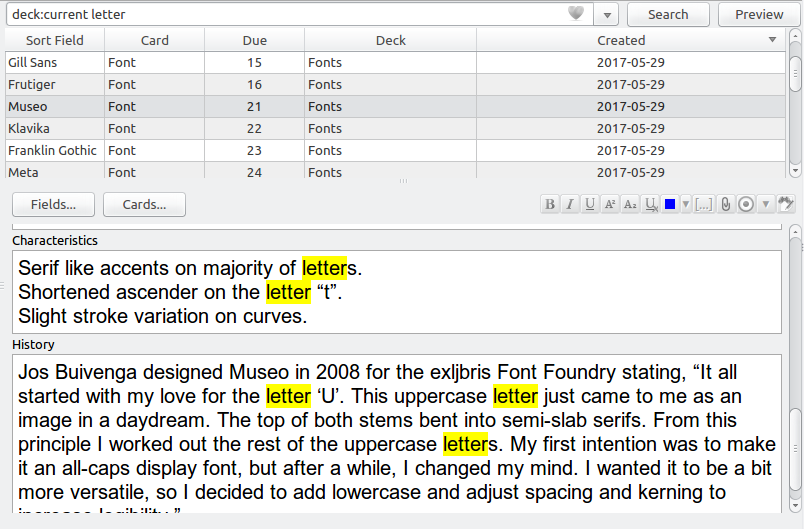
Highlights search results in the Editor pane of the Browser and extends the search bar with two new search modes.
USAGE

By default the add-on will highlight all search terms that aren't search operators. You can temporarily disable search highlighting by using the provided View menu entry, or its associated hotkey (Ctrl+T, H).

In addition to search highlights the following new hotkeys are provided in the search bar:

  • Shift-Return: Jump to next result in current card list
  • Ctrl-Shift-Return: Select all results in current card list

CONFIGURATION

You can configure hotkeys and other settings by heading to Tools → Add-ons, selecting Highlight Search Results in the Browser, and then clicking on Config.

CHANGELOG

Version 1.0.1 – 2023-10-21

Added

  • Added support for Anki 23.10 and up (thanks to @zjosua)

You can view all past releases here.

HELP AND SUPPORT

Please do not use reviews for bug reports or support requests. I don't get notified of your reviews, and properly troubleshooting an issue through them is nearly impossible. Instead, please either use the issue tracker (preferred), add-on support forums, or just message me at ankiglutanimate@gmail.com. Constructive feedback and suggestions are always welcome!

CREDITS AND LICENSE

Copyright © 2017-2023 Aristotelis P. (Glutanimate)

This add-on was commissioned by a fellow Anki user who would like to remain anonymous. All credit for the original idea goes to them.

Licensed under the GNU AGPLv3, extended by a number of additional terms. This program is distributed in the hope that it will be useful, but WITHOUT ANY WARRANTY. For more information on the license please see the LICENSE file accompanying this add-on. The source code is available on GitHub icon GitHub. Pull requests and other contributions are welcome!

Please note that this program also uses the Libaddon library which comes with its own additional terms extending the GNU AGPLv3 license

MORE RESOURCES

Make sure to check out my socials for the latest add-on updates and news: Twitter bird@Glutanimate | YouTube playbutton / Glutanimate

SUPPORT MY WORK

If you like Highlight Search Results in the Browser, please give it a thumbs up and share it with your friends, so that more people can enjoy it!

A kind request: Writing, supporting, and maintaining Anki add-ons like these takes a lot of time and effort. If Highlight Search Results in the Browser has been a valuable asset in your studies, please consider using the button below to support my efforts by pledging your support on Patreon. Each and every contribution is greatly appreciated and will help me maintain and improve Highlight Search Results in the Browser as time goes by!


Pro-tip: Lots of exclusive add-ons and other goodies await on my Patreon page. Make sure to check them out!

README

Highlight Search Results in the Browser for Anki


The quickest way to find information on your flashcards

This is an add-on for the spaced-repetition flashcard app Anki that extends Anki's card browser with the ability to highlight search terms found in notes.

Table of Contents

Installation

AnkiWeb

The easiest way to install Highlight Search Results in the Browser is through AnkiWeb.

Manual installation

Please click on the entry corresponding to your Anki version:

Recent Anki 2.1 versions

Note: These instructions only work on Anki 2.1.17 and up. For older Anki releases please see the next section.

  1. Download the latest .ankiaddon file from the releases tab (you might need to click on Assets below the description to reveal the download links)
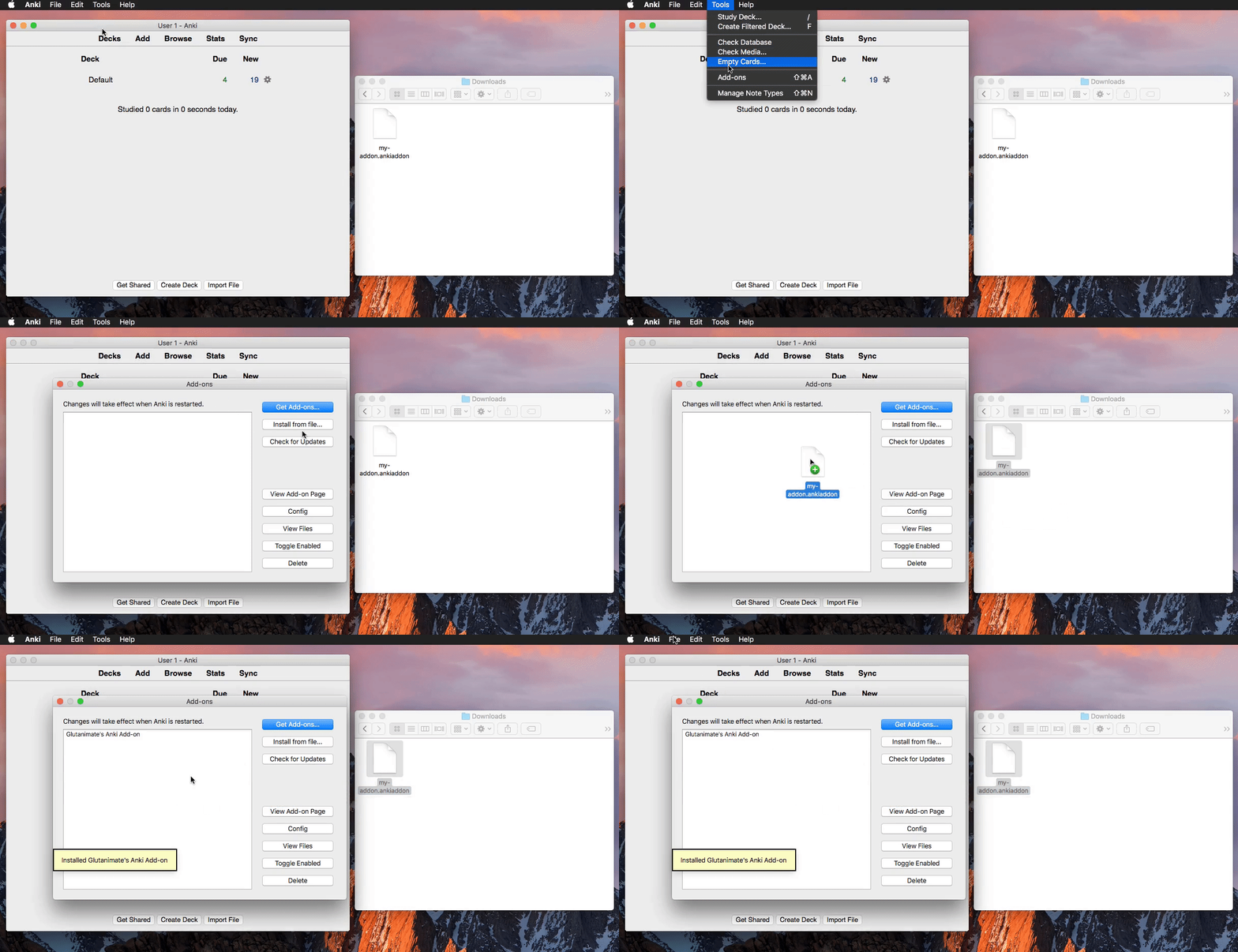
  2. Open the folder where your downloads are located and double-click on the downloaded .ankiaddon file.
  3. Follow the installation prompt and restart Anki if it asks you to
Older Anki 2.1 versions
  1. Make sure you are using at least Anki 2.1.10. Earlier releases (e.g. found in various Linux distros) do not support .ankiaddon packages.
  2. Download the latest .ankiaddon package from the releases tab (you might need to click on Assets below the description to reveal the download links)
  3. From Anki's main window, head to Tools → Add-ons
  4. Drag-and-drop the .ankiaddon package onto the add-ons list
  5. Restart Anki

Video summary:

Documentation

For further information on the use of this add-on please check out the description text for AnkiWeb.

Building

With Anki add-on builder installed:

git clone https://github.com/glutanimate/highlight-search-results.git
cd highlight-search-results
aab build

For more information on the build process please refer to aab's documentation.

Contributing

Contributions are welcome! Please review the contribution guidelines on how to:

  • Report issues
  • File pull requests
  • Support the project as a non-developer

License and Credits

Highlight Search Results in the Browser is Copyright © 2017-2020 Aristotelis P. (Glutanimate)

Highlight Search Results in the Browser is free and open-source software. The add-on code that runs within Anki is released under the GNU AGPLv3 license, extended by a number of additional terms. For more information please see the LICENSE file that accompanied this program.

Please note that this program uses the Libaddon library which comes with its own additional terms extending the GNU AGPLv3 license. You may only copy, distribute, or modify the present compilation of this program with Libaddon under the combined licensing terms specified by both licenses.

This program is distributed in the hope that it will be useful, but WITHOUT ANY WARRANTY.


The continued development of this add-on is made possible
thanks to my Patreon and Ko-Fi supporters.
You guys rock ❤️ !