This add-on highlights browser search matches inside your notes so you can easily find what you searched for or to show you why Anki has included that card/note in the search results. There is comprehensive support for the Anki search language and lots of handy features to help you see where the matches are.
GitHub link
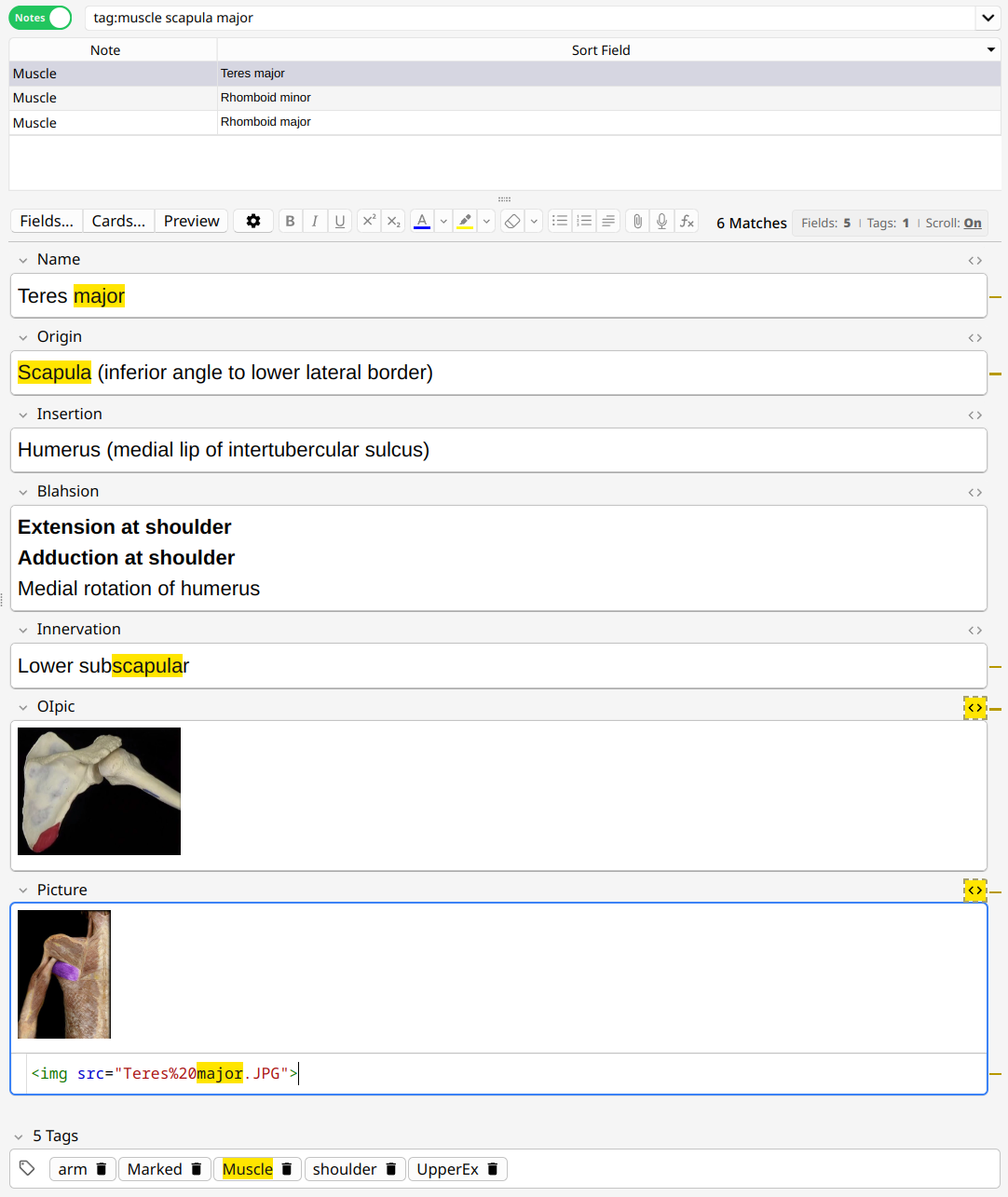
Features
Auto-Scroll [toggle on/off]
Automatically scroll to the first match when the note loads. Quickly turn it on or off when needed.

Scrollbar indicators [configurable on/off]
The position of each match is indicated in the scrollbar. Easily see where all the matches are located.
Highlighting within field code
If you have a field's code view expanded, the matched portion is also highlighted. In this case, matches inside the main view and the code view are considered as 1 match for the match counter.

Hidden matches within field code
Sometimes the matched portion is hidden from you inside the field's code, like a match in the filename of an image. When this happens, the code button is highlighted to show you that the match is in the code but not visible to you in the field. Click it to expand the code view and see the match!
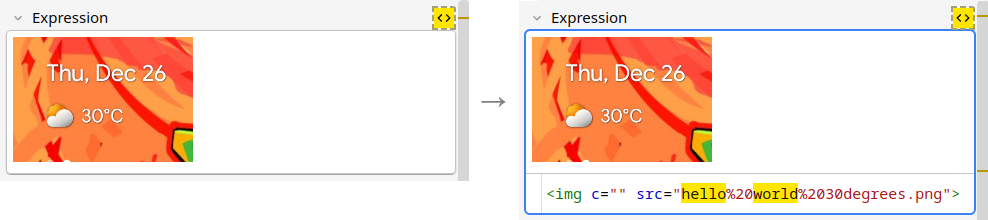 Matches within truncated tags also display in a similar way.

Field focus removes highlighting [configurable on/off]
Highlighting is hidden when the field is in focus. This lets you edit your notes, which may have their own colors, without the highlighter getting in the way.

Overlapping matches
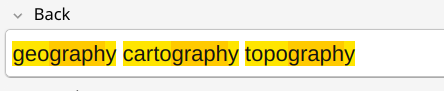
When matches overlap, the overlapping range is highlighted with a different color. Only 1 level of overlap is supported.
Anki search language
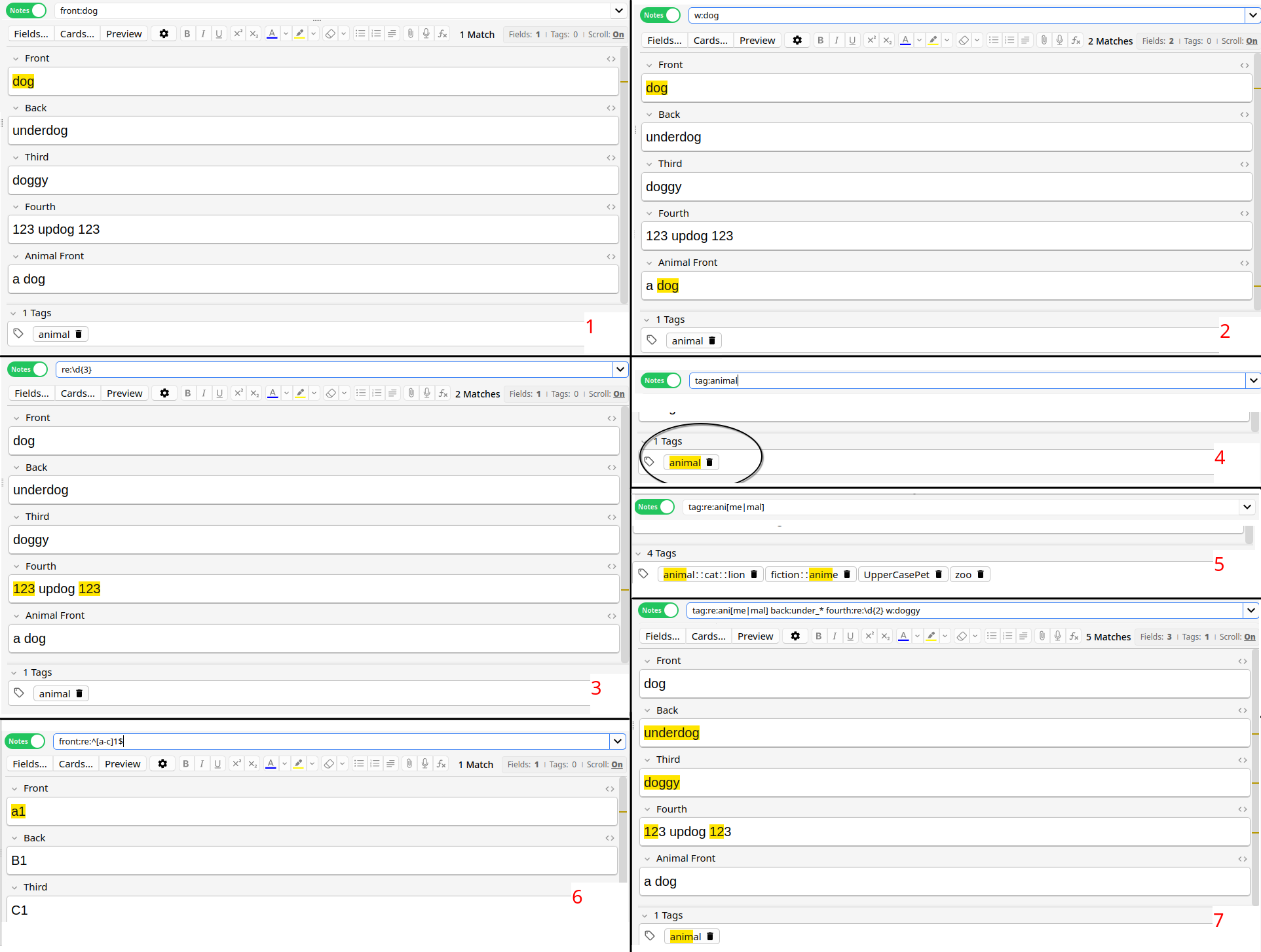
All advanced search features described in the Anki manual are supported. Some examples:
[1] front:dog - target a specific field
[2] w:dog - word boundaries
[3] re:\d{3} - regex
[4] tag:animal - tags
Regex inside tag or field:
[5] tag:re:ani[me|mal]
[6] front:re:^[a-c]1$
Why not combine them? If Anki lets you search it, this add-on will highlight it!
[7] tag:re:ani[me|mal] back:under_* fourth:re:\d{2} w:doggy
(click to enlarge)
Settings menu
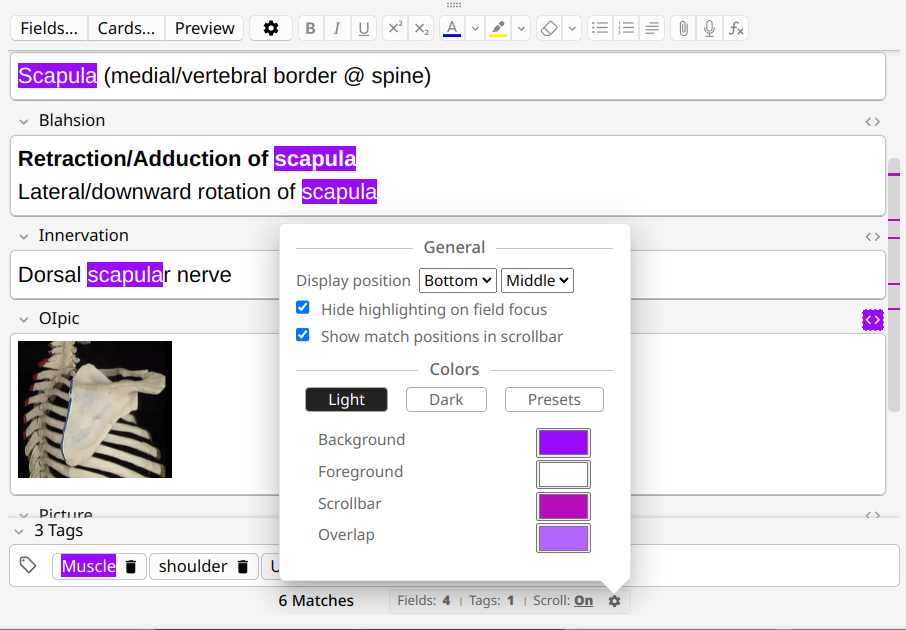
Customize the behavior and colors with the settings menu
----
Edge cases to consider
nc:
There is good support for most cases of nc: searches. Unfortunately I do not know every language in the world so there will undoubtedly be scripts where it may not work as expected. I rely on you to report those cases when you find them, and I will see what can be done.
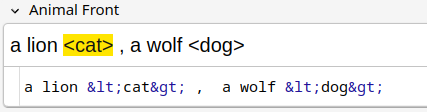
These HTML escape codes: < > &
Anki converts these into their visual forms for the main field and keeps the HTML escape codes for the code view. It is not possible to match these inside the code view (the "smart" code editor turns each into its own element instead of text), so only the visual form is matched.
Various match-all cases
There are likely many cases that result in a "find everything"-type of search where the entire field content is highlighted. I have made an effort to ignore the obvious ones (like searching for *) but there are an infinite variety of these (like searching for **). I may make an effort to silence the annoying cases as they pop up and people are bothered by them.
Searching for only underscores
For example, you may be tempted to search for "___" to find fields with exactly 3 characters. Anki itself is confused by this, and so is this add-on, so let's call it "undefined behavior" and avoid doing it. (You can still target a field like front:___)
----
Changelog
3.4.1 - (2026-06-07)
- Rework tag handling. Fixes positioning issues when using tag:re: and multi-level tags
- Tags now match even when truncated. If a match is within the hidden part, the leading ... is highlighted:
3.4 - (2026-03-31)
- A considerable amount of effort went into properly supporting nc: searches, especially around Arabic text.
- The global Anki setting "Ignore accents in search (slower)" is detected and the highlight behavior matches it
3.3.1 - (2025-05-11)
- Fixed menu buttons not working anymore in Anki 25.02.4
3.3 - (2025-03-26)
With this release, the add-on is now feature-complete. Further updates will be bugfixes only. Feel free to send me suggestions or even some nice color combinations to add to the presets list (mine are probably not that great).
- Fixed an issue that may cause the add-on to fail to load with large notes and/or slow computer (thanks @AndreyKaiu)
- Restored the custom color menu
- Added a collection of color presets in the presets tab
- Settings menu now closes when you click outside of it
- Turn off text selection in menu
3.2.1 - (2025-03-23)
- Fixed no highlighting on Windows
- Removed custom colors until I can find a solution that works everywhere
3.2 - (2025-03-20)
The add-on now has a settings menu!
- Add settings to choose your own highlighter colors
- Add settings to reposition the add-on's user interface
- Add setting to toggle highlighting removal on field focus
- Add setting to toggle the scrollbar indicators
- Fixed tag searches that used _
- Fixed tag searches that used ::
- Improved match counters when searching tags with regex
- Turning auto-scroll on will do the scroll immediately
- Fixed subtle bug where match counters could double up when toggling auto-scroll
- Fixed js error when loading non-browser editors
- Loads of UI tweaks for a cleaner and more consistent look
3.1 - (2025-03-07)
- Matches that overlap are now highlighted with a different color for the overlapped portion (maximum depth of 1)
- Fix false positives matching on phantom <br>s at the end of code blocks
- Fix quoted nc: searches failing to highlight when there's a space in the term. E.g: "nc:hello world"
- Fix matching on image filenames that have spaces in them (spaces appear as %20 in the code view but internally they are still spaces which is what Anki is matching)
- Remove duplicate terms before highlighting to avoid multiplying match counters
3.0 - (2025-02-27)
This release makes the add-on about 90% faster!
- Major changes to the internal parser. This has resulted in:
- Better performance
- Ability to match overlapping terms (e.g. car and art has two matches in "cart". Previously it only matched one)
- Support for turning off case-insensitive regex searches with the (?-i) prefix
- Basic support for nc: search terms (it's not perfect - can be misaligned in languages like Arabic)
- Fixed the add-on loading with editors that were not inside the browser
- Add proper support for searching by field name with wildcards (previously only supported fro*:. Now supports *rom:, fr*m:, fr_m:, etc.)
- Fixed rare cases with multiple wildcards in the search term not being detected properly, or when wildcards were preceded by \\ (e.g. if you searched for back\\to\\___\\future the ___ would break)
- Fixed issues with scrollbar indicators disappearing when toggling code view
- Adjusted positioning of UI elements to better align with the field edges
2.5 - (2025-02-05)
- Added support for tags
- New UI
2.4 - (2025-02-01)
- Added scrollbar indicators to show where matches are (the "minimap")
- Reworked auto-scrolling. Now has reliable positioning that always puts the matched word in the center of the editor
2.3 - (2025-01-25)
- Support regex searches
- Handle special cases of &, <, > as described in the Anki manual
2.2 - (2025-01-21)
- Comprehensive support for Anki search language (no regex yet)
- More reliable auto-scroll (e.g. can be misaligned after images load)
- More reliable match counters
2.1 - (2025-01-17)
- Add highlighting to the code view (matches in both the visible field and code are considered as 1 match in the counter).
- Highlight the code view button when matches are found only in HTML code but not visible to the user
- Tweaked colors with light/dark mode differences
2.0 (2025-01-10)