Smart Search for Anki — Medical
Fast, forgiving medical search for Anki Desktop—with native filters, local
semantic search, and safe card actions.
Created by Saleh Mostafa with MedBrevia.
Distribution: the public beta is available from
AnkiWeb. Install it with add-on
code 677438639. The frozen release archive is also available through
GitHub Releases.

Find the card you meant
Open the palette with Command-K on macOS or Ctrl-K on Windows/Linux,
type naturally, and press Return to open the result in Anki's Browser.
In Anki's Browser, click the green magnifier-plus at the left edge of the main
search field to open that visible query in Smart Search.
In Smart Search, right-click the query field and choose Search in Anki
Browser to send the current query back to Anki's native Browser.
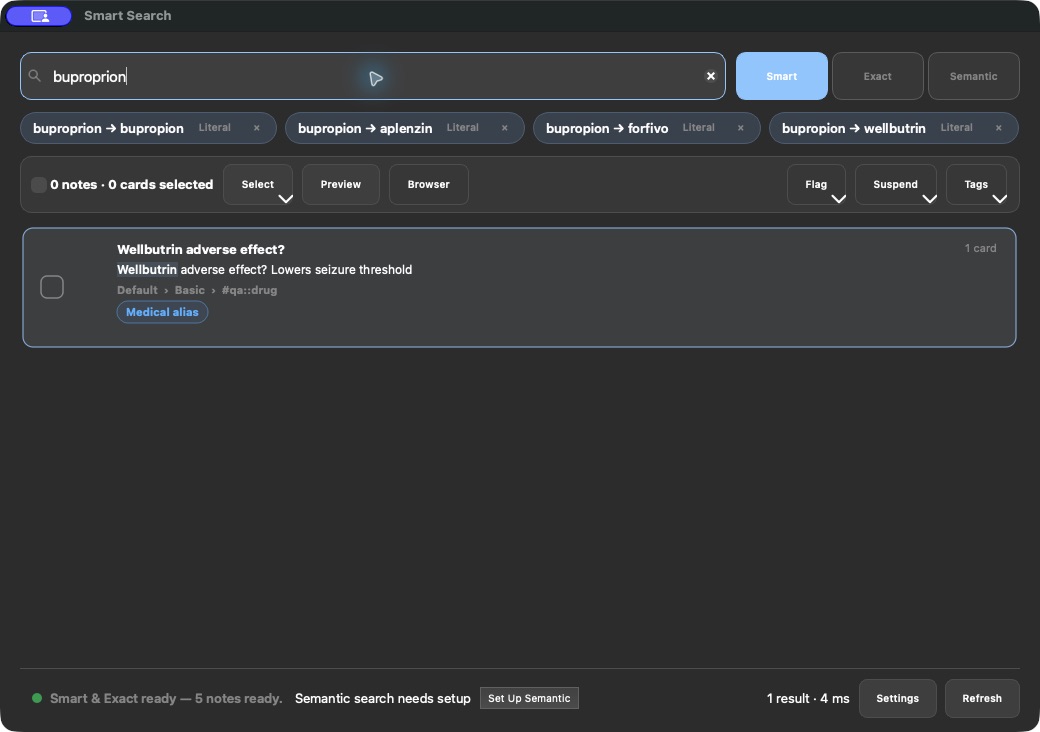
buproprion can find bupropion.- A supported brand name can find its generic medication.
- Search is case-insensitive by default.
- Native filters such as
deck:, tag:, note:, is:, flag:, prop:,
rated:, field searches, Boolean groups, and wildcards are delegated to
Anki.
- In Smart and Semantic modes, simple filters constrain the final eligible
cards without changing the free-text relevance calculation.
- Card-specific filters return only the sibling cards that actually match.
- Choose one or several nested decks from the searchable deck picker without
having to remember or type their full paths.
- Set one regular deck as the profile-specific default in that picker. A new,
blank Smart Search window starts in that deck; explicit Browser handoffs and
one-off deck choices remain unchanged.
- Adaptive relevance cutoffs remove weak trailing results instead of filling
the list to an arbitrary maximum.
Three useful modes
| Mode |
Best for |
Network/model required |
| Smart |
Typos, medical aliases, phrases, and everyday retrieval |
No |
| Exact |
Standard Anki Browser syntax: separate terms are ANDed; quotes preserve a phrase |
No |
| Semantic |
Finding cards by clinical meaning |
One explicit local setup |
Smart/Exact and Semantic use separate local indexes. Smart and Exact remain
usable while Semantic prepares.

Work with results without losing context
- Move into the result list and the rendered inline card preview opens
automatically; disable it or choose whether new previews start on the
question, answer, or editable fields in Search Settings.
- Press Space or Right Arrow to reveal the selected card's answer;
press Left Arrow to return to its front. These controls keep working
after you click inside the rendered card.
- Preview and edit the selected card in a resizable pane without leaving the
search window; close it temporarily or expand it when more room is useful.
- See compact suspension and flag indicators on each result.
- Flag, suspension, and tag changes keep the current list in place; press
Enter or search again whenever you want filters to be reapplied.
- Undo the latest Smart Search collection action directly from the result
toolbar; the button disables itself if another Anki change happens first.
- Check one result, Shift-click a range, or choose All shown, None, or
Invert.
- Choose Related for the highlighted or checked results to find notes that
share the same complete UWorld or AMBOSS source tag. Related matches can
come from any deck, show why they matched, and open as a temporary view;
Back to search restores the prior results and selection without rerunning
the query.
- Open exactly the checked cards in Anki's Browser.
- Flag, suspend, unsuspend, add tags, or remove tags from the toolbar or
right-click menu. The right-click menu can also bury/unbury cards or move the
exact selection with a searchable hierarchical destination picker.
- Right-click one note and choose Create Copy… to open Anki's native Add
Cards editor prefilled with its fields, tags, media references, and home
deck. The copy is created only after you click Add and starts with fresh
scheduling.
- Review the live selection summary before acting; tags apply to notes, while
flags, suspension, burial, and deck moves apply to cards.
Every collection change uses Anki's supported, undoable operations and creates
one clean Undo step per action. Smart Search never writes directly to
collection.anki2.


Privacy by design
Search, typo recovery, alias expansion, indexing, and semantic inference run on
the user's computer.
- No Smart Search account
- No analytics, advertising, telemetry, or crash reporting
- No upload of card text, queries, tags, deck names, profile names, or
embeddings
- No automatic model installation
Anki may check AnkiWeb for compatible add-on updates. Public installations also
offer Check & Update in the About tab; it uses Anki's native updater and
never sends card content or search queries.
When the user explicitly starts Semantic setup, the add-on downloads pinned
model/tokenizer files over HTTPS and verifies their SHA-256 digests. Ordinary
request metadata such as an IP address and user-agent can be visible to the
download host; no Anki content or query is included.
Semantic inference and vector-index arithmetic run in a local, short-lived
worker process. Card text, embeddings, and validated result records travel only
through local operating-system pipes; the worker does not open a network
service. Exiting it lets macOS reclaim NumPy, the model, and the native
inference libraries instead of retaining them inside Anki.
The local full-text index contains searchable copies of note/card content and
metadata. The vector index contains embeddings derived from note text. Treat
both with the same privacy as the Anki profile.
Read the complete privacy notice, data-source record,
and third-party notices. The intended hosted notice is
https://medbrevia.com/legal/smart-search-privacy.
Compatibility
- Host: Anki Desktop only. Desktop add-ons do not run inside AnkiMobile or
AnkiDroid.
- Anki: Anki Desktop 24.11 through 26.08, including the 25.02, 25.07,
25.09, 26.05, and 26.08 release families.
- Tested host: The supported-version matrix is exercised on macOS with
Apple silicon. Smart and Exact do not load the
optional platform-specific Semantic runtime, but Windows, Linux, and Intel
Mac integration testing is not part of this release's support claim.
- Semantic: macOS 14 or later on Apple-silicon Macs only for this release.
- On Windows, Linux, Intel Mac, or a Mac below macOS 14, Semantic is unavailable
gracefully while Smart and Exact remain usable.
See Known limitations for the practical
boundaries around indexes, sync, ranking, and collection operations.
Installation
AnkiWeb public beta
- In a supported Anki Desktop release, choose Tools → Add-ons → Get Add-ons….
- Enter code 677438639 and complete the installation.
- Restart Anki, then press Command/Ctrl-K.
The live listing is https://ankiweb.net/shared/info/677438639. Installation by
that numeric code was verified in a fresh disposable Anki base: the installed
folder was 677438639, Smart and Exact search worked, the inline preview
rendered both front and answer, and Semantic remained opt-in without downloading
a model.
Install from the frozen archive
The exact signed-off .ankiaddon remains available from
GitHub Releases.
In Anki, choose Tools → Add-ons → Install from file…, select the archive,
and restart.
If you previously installed a manually shared development build, remove or
disable that copy before installing the AnkiWeb version. Loading both the named
development folder and AnkiWeb's numeric folder would register the add-on
twice. Local indexes are disposable and may be rebuilt safely.
Development checkout
Clone the repository, then run the validation and package builder:
python3 -m pip install -r scripts/requirements-test.txt
python3 -m unittest discover -s tests -t . -p 'test_*.py' -v
python3 scripts/build_addon.py
The builder:
- starts from an explicit public-file allowlist;
- excludes local models, expanded runtimes, indexes, caches, logs, profiles,
collection databases, credentials, and historical builds;
- verifies every reviewed binary by SHA-256;
- compiles all packaged Python;
- validates resources, licenses, wheel CRCs, standalone-runtime size and
structure, archive paths and links, manifest parity, and a 64 MiB regression
ceiling; and
- writes a SHA-256 checksum beside the deterministic archive.
Keyboard reference
- Command/Ctrl-K: open or focus Smart Search
- Up/Down or Control-J/Control-K: move through results; the open preview follows
- Space/Right Arrow: show the highlighted card's answer, including when
the rendered card has focus
- Left Arrow: return to the highlighted card's front
- Return: open the highlighted result in Anki's Browser
- Control-Shift-P: open or close the inline card preview
- Command/Ctrl-Return: open checked results, or all shown when none are
checked
- Shift-Space: check or uncheck the focused result
- Shift-click: select a continuous range
- Command/Ctrl-1, 2, or 3: switch Smart, Exact, or Semantic
- Escape: clear the query or close the palette
- Escape in Related view: return to the original search results
Architecture and safety
The add-on reads exact changed notes and compact metadata manifests through
Anki while Anki owns the collection connection. External SQLite work, text
processing, spelling vocabulary construction, model and vector operations,
profile initialization, and cleanup run outside Anki's graphical interface
thread.
Collection and media sync establish a synchronous embargo before Anki queues
host work. Every queued Smart Search collection operation checks that embargo
again before it runs, and the gate opens only after all nested sync activity
and Anki's deferred reset finish. If Anki reports a PyO3-wrapped Rust backend
panic, Smart Search converts it to one normal restart message, cancels its
optional work, and makes no more collection calls in that Anki process.
Reviewing has an explicit background-work embargo: card answers schedule no
search maintenance, and pending edit/sync/index work resumes only after the
reviewer closes and the interface has settled. An explicitly submitted
Semantic query remains available in the foreground; it is bounded by an
end-to-end timeout and cannot silently leave the interface in Searching….
All native Semantic work is isolated in a pinned standalone Python 3.13 worker
with one ONNX thread, single-sequence inference, bounded authenticated messages,
and a 256 MiB macOS process-memory ceiling. The worker starts only for Semantic
work and exits afterward, allowing the operating system to reclaim NumPy, the
model, ONNX Runtime, and Tokenizers memory. While the visible palette remains
in Semantic mode, a 90-second idle lease avoids reloading the helper between
adjacent searches. Closing the palette reaps it immediately; switching modes
leaves the existing idle timer to unload it. Anki receives only validated plain
vectors and result records and imports none of those native packages.
Adds, edits, and deletes normally refresh only affected notes. Operations for
which Anki does not expose stable affected IDs—such as sync, imports, native
bulk edits, undo/redo, and structural deck/note-type changes—schedule a compact
manifest audit, then hydrate only the affected notes in bounded batches.
Indexes are disposable and profile-scoped under user_files/. They are not
added to collection.anki2 and are not synced by Smart Search.
Medical terminology and model provenance
- RxTerms 202607 alias snapshot, U.S. National Library of Medicine
- MedEmbed-small-v0.1 reproducible ONNX INT8 export,
based on BAAI BGE small English v1.5
- Reproducible CLS-pooled, L2-normalized INT8 ONNX export for local inference
- NumPy, ONNX Runtime, Hugging Face Tokenizers, and FlatBuffers
- Pinned python-build-standalone CPython 3.13 worker for reclaimable inference
These components improve retrieval; they do not verify that a card is current
or medically correct. Search results are not medical advice.
Exact versions, transforms, licenses, checksums, limitations, and required NLM
attribution are recorded in DATA_SOURCES.md and
THIRD_PARTY_NOTICES.md.
Support and contribution
Use synthetic or fully redacted examples. Never attach an Anki collection,
profile folder, search database, vector index, patient information, credentials,
or identifiable card content to a public issue.
License
Original add-on code and documentation are available under the
MIT License. Third-party components retain their own licenses and
notices.
Smart Search is an independent Anki add-on and is not affiliated with or
endorsed by Anki or AnkiWeb.