Chinese Character Relations
Anki desktop add-on for reviewing Chinese: related words from your own deck plus character decomposition on the answer side.
What you see during review
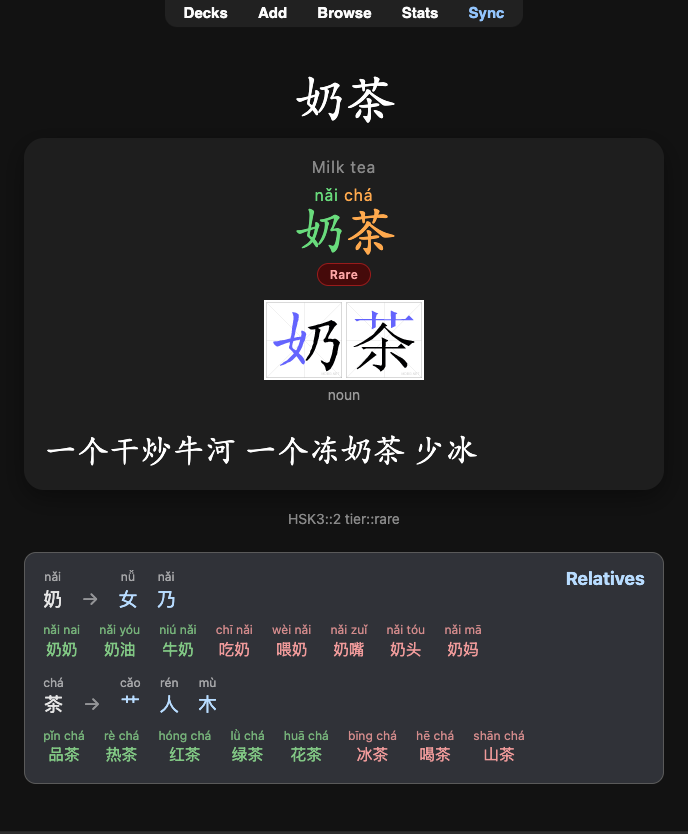
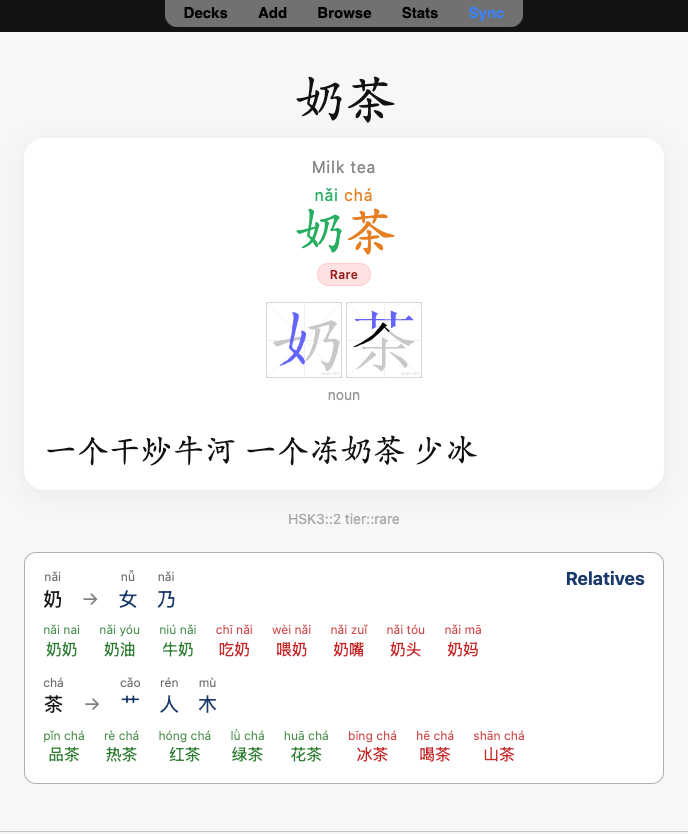
Flip to the answer. Below your card, a Relatives panel appears when there is something to show.
Related words (your collection)
Words from your indexed decks that share a character with the card you are reviewing. The current word is never listed.
- Single character (e.g. 好) → one group of relatives containing 好.
- Multi-character word (e.g. 奶茶) → one group per character (奶, 茶), each with its own horizontal list of related words.
- Pinyin appears above each related word when your note has a Pinyin field configured.
- Click a related word to open that note in the Browser.
- Green = mature cards, default color = learning, red = suspended (when included in settings).
Character components (bundled data)
For each character in the word, a decomposition row sits above that character’s relatives:
奶 → 女 乃 with pinyin above each piece (head character and components).
- Hover (desktop) a character or component to see a short English gloss from bundled make-me-a-hanzi data (MIT). Nothing is shown at rest, so the row stays compact.
- Works offline; no website calls.
- If a character has no decomposition in the data, you still get relatives when your deck has matches.
- If a character has only decomposition and no relatives in your deck, you still get that character’s row (components only).
Example from the screenshots: 奶茶 shows 奶 → 女 乃 and 茶 → 艹 人 木, each with deck relatives underneath.
Screenshots
|
Dark mode

|
Light mode

|
Requirements
- Anki Desktop 23.10+ (Qt6 preferred)
- macOS, Windows, or Linux
Install
From AnkiWeb (recommended)
- In Anki: Tools → Add-ons → Get Add-ons…
- Enter add-on code
1076075855 → OK, then restart when prompted.
- Or open the AnkiWeb listing and download from there.
- Open Tools → Chinese Character Relations… → General → set fields → Rebuild Index.
From GitHub
- Open the latest Release.
- Download the
.ankiaddon asset (e.g. chinese_char_relations-0.2.2.ankiaddon), not Source code.
- Double-click the file, or open it with Anki / drag it onto the Anki window.
- Restart Anki when prompted.
- Open Tools → Chinese Character Relations…
- On the General tab, set your Word / Hanzi (and optional Pinyin) fields, then click Rebuild Index.
Manual (developers)
Copy the chinese_char_relations folder into your Anki add-ons folder, then restart Anki:
- macOS:
~/Library/Application Support/Anki2/addons21/
- Windows:
%APPDATA%\Anki2\addons21\
- Linux:
~/.local/share/Anki2/addons21/
Settings
Tools → Chinese Character Relations… (or Tools → Add-ons → Config):
| Tab |
What it’s for |
| General |
Scan decks, show-in decks, fields, relatives limits, Show character components, Rebuild Index |
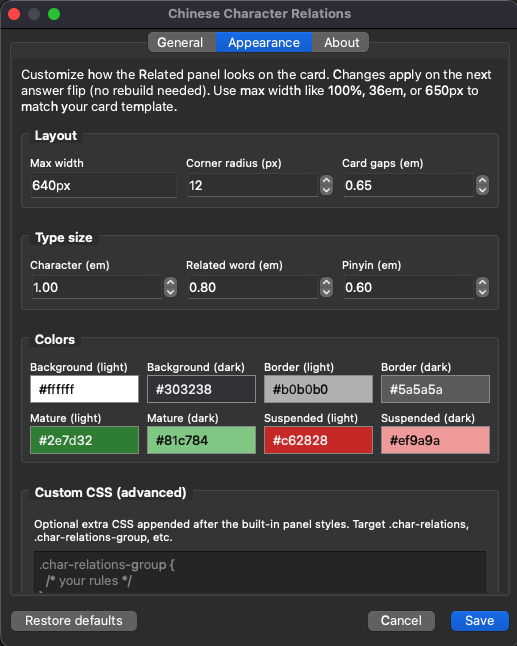
| Appearance |
Panel width, type sizes, colors, optional custom CSS |
| About |
Version, changelog, data credit, links |
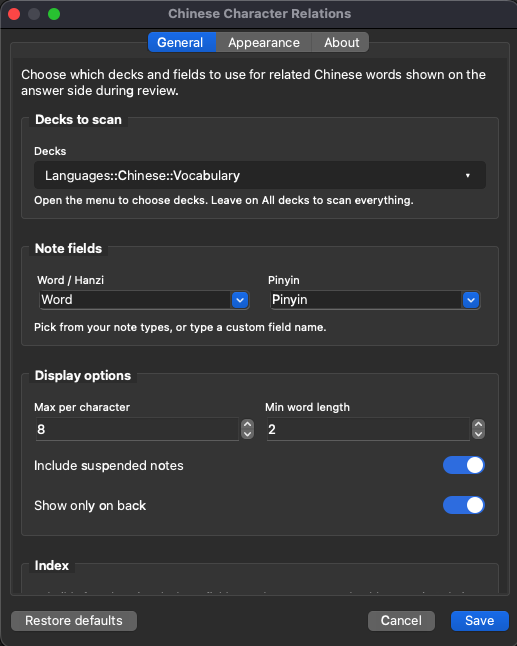
General tab (quick reference)
| Setting |
What it does |
| Decks to scan |
Which decks feed the related words index (empty = all decks) |
| Show panel in |
Which decks show the Relatives panel (default = same as scan) |
| Word / Hanzi, Pinyin |
Fields used for indexing and display |
| Max per character |
Cap on related words per character group |
| Min word length |
Skip very short related candidates |
| Include suspended |
Show relatives from fully suspended notes |
| Show only on back |
Relatives + components on answer only (default) |
| Show character components |
Turn decomposition row on or off (no rebuild) |
| Rebuild Index |
Required after changing decks or word field |
Rebuild after scan-deck or field changes. Show panel in, Appearance, and Show character components apply on the next card flip.
Defaults assume Word and Pinyin. If your deck uses Hanzi, Expression, etc., set those on the General tab.
Tips
- Hover component tiles on the answer side for English meanings (macOS: trackpad or mouse over the hanzi).
- Components use per-character dictionary entries, not whole-word definitions for compounds.
- If the panel never appears, check field names and Rebuild Index; if a character has no relatives and no decomposition data, that group is omitted.
- Customize colors and sizes under Appearance; target
.char-relations, .char-relations-decomp, etc. in custom CSS.
Support
Maintainer docs: docs/MAINTENANCE.md · QA: docs/TESTING.md · Config reference: chinese_char_relations/config.md
License
MIT — see LICENSE. Character decomposition data derived from make-me-a-hanzi (MIT).