Chinese Word Synonyms

AnkiWeb addon 1733540881

Shows offline synonyms from your own collection on Chinese review cards as known/total counts on the front and a clickable synonyms panel on the back.
AI-generated summary; may contain mistakes.

searchdictionary

Open on AnkiWeb GitHub Find alternatives

AnkiWeb

Votes
1 (👍 1 · 👎 0)
Updated
2026-09-07
Anki versions
25.09.2~
License
MIT (from the GitHub repository)
Virus scan
No ClamAV match A match does not prove malware. No match does not prove that the code is safe.
Languages
Python, JSON
Description language
en

Maintenance

active

  • Last update or commit: 2026-09-07 (55 days before the snapshot).
  • Test files: 2.
  • Commits in the last year: 10.
  • Issues: 0 open, 0 closed.
  • Pull requests: 0 open, 0 merged.

Will it work on my Anki?

Version branches
Min AnkiMax AnkiUpdated
23.1025.09.2+2026-09-07
History across monthly snapshots

Loading…

Similar addons

QuickDict English Pop-up Dictionary (EN→PT-BR)

Shows an instant popup dictionary when you select English words during Anki review, with Portuguese (BR) translation, definitions, phonetics, audio pronunciation, synonyms, and offline caching.

dictionary

1 votes 21% approval 👍 1 · 👎 0 ⭐ 0 Anki 25.09.2~ Updated 2026-03-31
anki-synonyms

Randomly selects among synonymous prompt alternatives using configurable '( | ) syntax, including nested choices, so one flashcard can display different equivalent terms each time.

formattingcard-templates

3 votes 44% approval 👍 3 · 👎 0 ⭐ 0 Anki 2.1.52~ Updated 2022-07-03
AI_LEARNING_HUB

Turns Anki vocabulary decks into nine AI-generated language games with multilingual exam-level practice, hints, offline word matching, and customizable fast or detailed question generation.

aigamificationclozequiz

3 votes 44% approval 👍 3 · 👎 0 Anki 26.09~ Updated 2026-10-20
Auto Translate Batch Creator

Automatically creates language-learning flashcards by translating bracketed words within sentences in batches across 14+ languages, following the i+1 context principle.

card-creationdictionary

2 votes 34% approval 👍 2 · 👎 0 ⭐ 0 Anki 2.1.1~ Updated 2025-11-28

Description

Shows synonyms from your own collection while you review Chinese cards: other notes that share a normalized Meaning / Definition / English sense.

Example: reviewing 快乐 (happy) → front shows 2 Known Synonyms / 6 Total Synonyms; back lists 高兴, 开心, 愉快 when those notes share a sense.

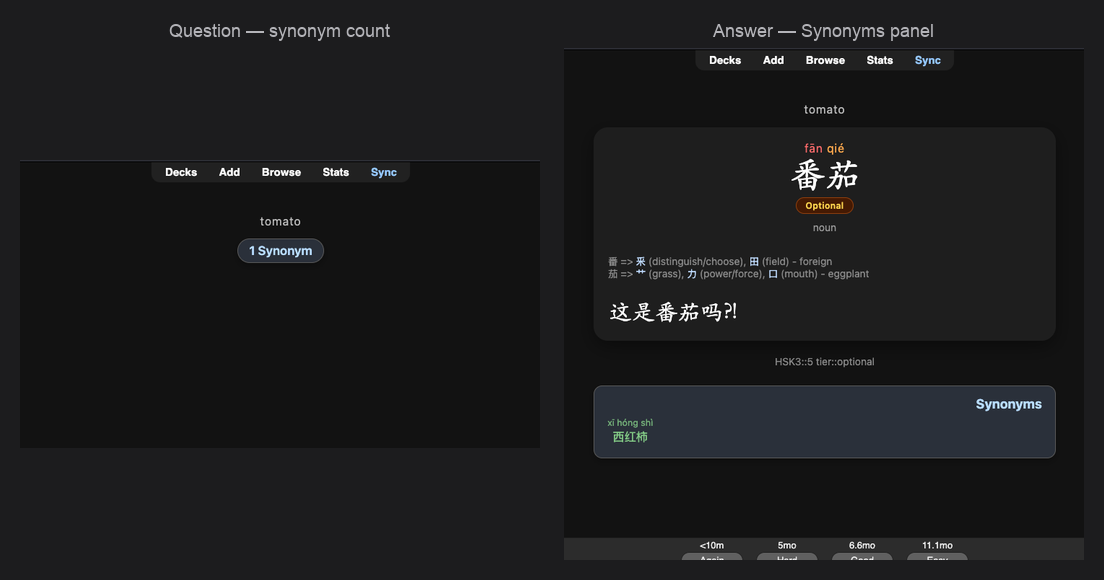
Question: Known/Total Synonyms card; Answer: Synonyms panel

Features

  • Offline — indexes your collection after Rebuild Index; no dictionary, CEDICT, or AnkiConnect
  • Back: Synonyms panel. Front (optional): Known (unsuspended) + Total counts
  • Configurable meaning delimiters (; , | / ; 、 + Extra) so happy, glad splits into separate senses
  • Click a synonym → open that note in the Browser
  • Tools → Chinese Word Synonyms… — decks, fields, delimiters, limits, colors, custom CSS
  • Works alongside Chinese Character Relations

Requirements

  • Anki Desktop 23.10+ (macOS, Windows, or Linux)
  • Notes with a Word/Hanzi field and a Meaning (or Definition / English) field

Setup

  1. Install and restart Anki
  2. Tools → Chinese Word Synonyms…
  3. General: set Word + Meaning fields, check Meaning delimiters → Rebuild Index
  4. Review a card whose meaning matches another note

Support: GitHub Issues · Source

MIT · Ozzeus

README

Chinese Word Synonyms

Anki desktop add-on that shows synonyms from your own deck that share the same normalized meaning with the card you’re reviewing.

Example: reviewing 快乐 (happy) → front shows 2 Known Synonyms / 6 Total Synonyms; back lists 高兴, 开心, 愉快… when those notes share a meaning sense.

Works offline — your collection only. No external dictionary, AnkiConnect, or CEDICT.

Pairs well with Chinese Character Relations (shared characters). Separate menus, indexes, and panels.

Screenshots

Question side: Synonyms card with Known and Total counts
Question — Known / Total
Answer side: Synonyms panel with related words from your deck
Answer — Synonyms panel

Requirements

  • Anki Desktop 23.10+ (Qt6 preferred)
  • macOS, Windows, or Linux
  • Notes with a Word/Hanzi field and a Meaning/Definition/English field

Install

From AnkiWeb (recommended)

  1. Tools → Add-ons → Get Add-ons…
  2. Paste download code: 1733540881
  3. Restart Anki when prompted.

Or open the AnkiWeb listing and click Download.

From GitHub Release

  1. Open the latest Release.
  2. Download the .ankiaddon asset (e.g. chinese_word_synonyms-0.1.6.ankiaddon), not Source code.
  3. Double-click the file, or open it with Anki / drag it onto the Anki window.
  4. Restart Anki when prompted.

After install

  1. Open Tools → Chinese Word Synonyms…
  2. General: set Word / Hanzi + Meaning fields, check Meaning delimiters, then Rebuild Index.

Manual (developers)

./scripts/link-anki-addon.sh

Or copy the chinese_word_synonyms folder into your Anki add-ons folder, then restart Anki (Cmd+Q, reopen):

  • macOS: ~/Library/Application Support/Anki2/addons21/
  • Windows: %APPDATA%\Anki2\addons21\
  • Linux: ~/.local/share/Anki2/addons21/

Settings

Tools → Chinese Word Synonyms… (or Tools → Add-ons → Config):

Tab What it’s for
General Scan decks, show-in decks, fields, meaning delimiters, display limits, Rebuild Index
Appearance Panel width, type sizes, colors, custom CSS
About Version, changelog, AnkiWeb / Rate links

Front card (default): With Show only on back + Show synonym counts, the question shows N Known Synonyms / N Total Synonyms (Known = unsuspended). The front card is hidden when Known is 0. Full list on the answer.

Rebuild after changing scan decks, fields, or delimiters. Show panel in and Appearance update on the next flip (no rebuild).

How matching works

  1. Read the Meaning field; strip HTML; lowercase; drop POS prefixes (adj., v., …).
  2. Split into senses on your chosen delimiters (default: ; , | / ; 、).
  3. Index each note under every sense key.
  4. At review, show other notes that share at least one key (same headword excluded).

happy, glad → keys happy and glad. A note with only happy matches. Without comma as a delimiter, the whole string stays one key and rarely matches.

Configure delimiters under General → Meaning delimiters (checkboxes + optional Extra). Empty meaning → no panel.

Tips

  • Click a synonym → opens that note in the Browser.
  • Scan one vocab deck, then set Show panel in if you want the panel on other decks too (or leave it on Same as scan decks).
  • Nothing showing? Check Word + Meaning fields, delimiters, then rebuild.
  • Unique meanings correctly show no panel.
  • Safe with Character Relations — both panels can appear under the answer.

Support

Maintainer docs: docs/MAINTENANCE.md · QA: docs/TESTING.md · Reddit: docs/REDDIT_RELEASE.md

License

MIT — see LICENSE.