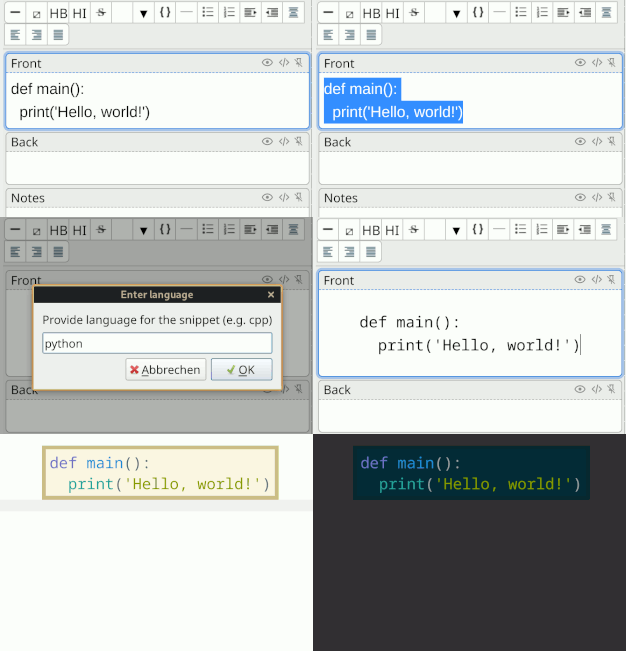
🌈 Anki Code Highlighter
An Anki plugin that adds syntax highlighting to code snippets.

Features
- A color scheme that works in day and night modes.
- Works on Anki for desktop and AnkiDroid.
- WYSIWYG highlighting.
- Block and inline highlighting
Installation
Fetching from AnkiWeb
The recommended way to install this plugin is directly from
AnkiWeb using Anki’s add-on
management.
Fetching from source
Alternatively, you can install this plugin from source.
- Run
dev/bin/package.
- Import
codehighlighter.ankiaddon in Anki.
Usage
You can either highlight code from your clipboard or highlight a snippet of code
already present in a card field.
Highlighting from clipboard
- Put the cursor in the place you want to place your code.
- Press
⌃+o (on macOS, ⌘+o) or click this add-on’s button in the
editor’s button bar.
Highlighting an already written code snippet
- Write a code snippet in a card editor.
- Select the code snippet.
- Press
⌃+o (on macOS, ⌘+o) or click this add-on’s button in the
editor’s button bar.
The plugin works on untagged code blocks.
Do not add your own HTML tags like <code> or <pre><code> to the snippet you
want to highlight.
If you have run into issues with preannotated code snippets, see
this comment for how to fix this.
Supported highlighters
This add-on uses Pygments.
It creates highlighting tags when you run this plugin.
This is useful for creating cloze cards.
It supports both inline code and code blocks.
Configuration
The plugin accepts the following configuration options:
block-style (default:
"display:flex; justify-content:center;") — The CSS style applied to the outer
most container of a block code snippet.
The default centers the block.auto-detect-display-style (default:
true) — Whether the add-on should auto-detect if the code snippet should be
formatted as a block or inline.shortcut (e.g. ctrl+o) — this sets the shortcut that triggers this plugin.auto-update-media (default:
true) — Whether the plugin updates the CSS stylesheet.dev-mode (default:
false) — Enables developer mode, which exposes the assets management options
(Refresh/Delete assets) under the Tools menu.
Custom styles
You can use other styles than the provided Solarized style.
This section explains how.
[!WARNING]
Customized styling option is supported as-is. I do not provide special
support for creating the stylesheet file nor guarantee forward compatibility.
- Set
auto-update-media to false.
- In your Anki profile's media directory
replace
_gch-pygments-solarized.css with your stylesheet.
[!TIP]
Check out tools/generatepygmentscss.py for how I generate the stylesheet
for Solarized. You can reuse it for your own stylesheet.
Known limitations
Can’t highlight split HTML nodes
If you see “The selection splits an HTML node, which prevents the highlighting
plugin from proceeding,” you are partially selecting an HTML element.
This plugin can not highlight a selection that partially selects an HTML
element.
To work around this, see these instructions.
🗑️ Uninstalling
This add-on installs its own CSS files into Anki’s media folder.
You need to run some manual steps if you want to fully delete the add-on.
[!WARNING]
Removing the CSS stylesheet file will remove highlighting from all notes
that use that stylesheet.
If you want to delete the add-on but keep already highlighted cards, then
skip the file removal steps (1, 2, and 3).
- Open the add-on’s config, and add or set
"dev-mode" to true.
- Restart Anki.
- Run
Extras/Tools > Delete Greg’s Code Highlighter Assets.
- Delete the add-on.
This manual step is necessary until Anki adds add-on lifecycle hooks.