Syntax Highlighting for Code

AnkiWeb addon 1463041493

3 other versions of this addon exist. Compare versions ↓

Inserts syntax-highlighted code snippets into Anki notes, letting users choose the programming language via toolbar button or hotkey, with configurable line numbers, centering, and CSS styling.
AI-generated summary; may contain mistakes.

card-creationformattingshortcutsfork-or-reupload

Open on AnkiWeb GitHub Find alternatives

AnkiWeb

Votes
257 (πŸ‘ 208 Β· πŸ‘Ž 49)
Updated
2018-10-07
Anki versions
unknown
License
AGPL-3.0 (from the headers of the Python files)
Virus scan
No ClamAV match A match does not prove malware. No match does not prove that the code is safe.
Languages
Python, JSON
Description language
en

Maintenance

abandoned

  • Last update or commit: 2024-01-23 (1013 days before the snapshot).
  • Commits in the last year: 0.
  • Issues: 32 open, 3 closed.
  • Pull requests: 8 open, 4 merged.
  • Median first response: 991 hours (20 answered issues and pull requests).
  • Outside pull requests: 50% of 8 merged.
  • Forks that may still be maintained: "Syntax Highlighting (NG)" (566351439), "syntax highlighting FORK (css only, night-mode)" (1100811177).

Will it work on my Anki?

Version branches
Min AnkiMax AnkiUpdated
2.1.0–2018-10-07
History across monthly snapshots

Loading…

Compare versions

The original addon and its forks. The best value in each column is in bold.

VersionWorks on Anki 26.09.3MaintenanceLast activity VotesApprovalGitHub starsNotes
Syntax Highlighting for Code this addon original unknown abandoned 23 Jan 2024 πŸ‘ 208 Β· πŸ‘Ž 49 76% 121
↳ Syntax Highlighting (NG) (AI-detected; may be wrong) likely abandoned 19 Jul 2024 πŸ‘ 41 Β· πŸ‘Ž 3 82% 34
↳ ⚑️Syntax Highlighter - Quick highlight Code for Editor (Customized by Shige࢞) (AI-detected; may be wrong) likely active 29 May 2026 πŸ‘ 30 Β· πŸ‘Ž 0 89% 12
↳ syntax highlighting FORK (css only, night-mode) (AI-detected; may be wrong) likely abandoned 19 Mar 2023 πŸ‘ 6 Β· πŸ‘Ž 2 41% – obsolete

Forks can add features or work in a different way. Read the description before you change to another version. Fork detection is incomplete, so other versions can exist.

Similar addons

FHighlight - Dynamic Code Highlighting

Dynamically syntax-highlights code in Anki card fields using Pygments filters, supporting specified, guessed, or field-based languages and triple-backtick snippets.

formattingcard-templates

4 votes 51% approval πŸ‘ 4 Β· πŸ‘Ž 0 ⭐ 0 Anki 2.1.66~ Updated 2023-10-08
Mini Format Pack

Adds editor buttons for highlighting, code blocks, horizontal lines, lists, indentation, and alignment, with configurable hotkeys, tooltips, and button order.

formattingshortcutsfork-or-reupload

224 votes 93% approval πŸ‘ 216 Β· πŸ‘Ž 8 ⭐ 54 Anki 23.10~ Updated 2023-11-02
Code Highlight

Adds non-invasive automatic syntax highlighting to code blocks in Anki's editor preview and reviewer, auto-detecting languages or accepting manual class specifications, with configurable font size and color scheme.

formattingappearance

18 votes 55% approval πŸ‘ 14 Β· πŸ‘Ž 4 ⭐ 2 Anki 23.12.1~ Updated 2024-02-20
Anki-Coder

Adds a CodeMirror code editor to Anki flashcards with syntax highlighting, themes, live preview, double-click editing, configurable languages and note types, and mobile and cloze-card support.

formattingappearancemobile-compatible

9 votes 45% approval πŸ‘ 7 Β· πŸ‘Ž 2 ⭐ 4 Anki 25.07.6~ Updated 2026-04-22

Description

       Allows you to insert syntax-highlighted code snippets into your notes: CHANGELOG Version 2.0.2 – 2018-10-07 Fixed
  • workaround for double-curly-bracket support (which otherwise conflict with Anki's card template system)
You can view all past releases here. USAGE
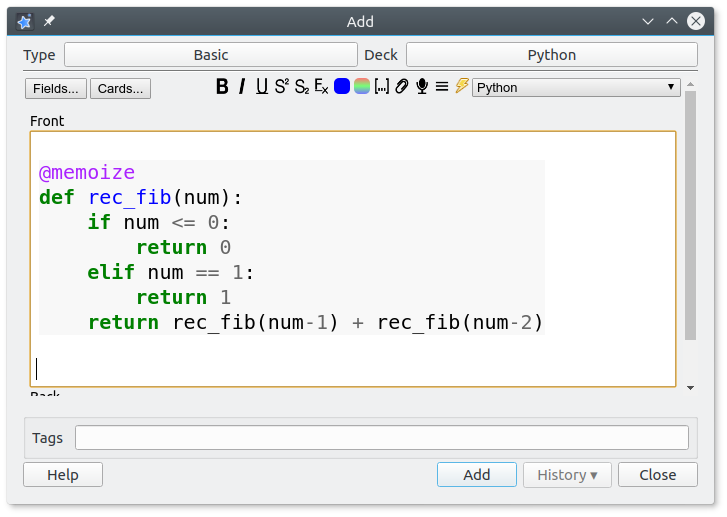
  1. Open the Add Note window in Anki.
  2. Compose your code snippet in your favorite text editor.
  3. Copy the code to the clipboard (e.g. Ctrl+C)
  4. Move the cursor to to the field you want to insert your code snippet into
  5. In the top right corner of the editing window there should be a new Thunderbolt icon with a dropdown.
  6. Choose the language your snippet is written in, and click the Thunderbolt / use it's associated hotkey (default: Alt+S).
  7. Anki will copy your syntax highlighted snippet to the field
Alternatively, you can compose your code directly in Anki, highlight it, and then click the lightning button. But generally it is much more convenient to use a dedicated code editor with monospaced fonts and proper syntax highlighting. The add-on will automatically remember the last programming language you chose, even after restarting Anki. CONFIGURATION Basic Currently there are four configuration options, available from Anki's main screen through Tools β†’ Syntax Highlighting Options:
  • Line numbers (default: true): Whether or not to include line numbers in the highlighted code
  • Center code fragments (default: true): Whether or not to automatically center the code in the field
  • Use CSS classes (default: false): Whether or not to use CSS classes instead of inline HTML styles for syntax highlighting.
    • Using css classes allows you more customization, and results in a smaller database size, but you'll need to manually adjust the styling, so it's only recommended for advanced users. You will find a selection of CSS styles that you can use in the documentation on GitHub.
    • For proper styling of reviews you need to include the relevant CSS styles in the Styling section of the card templates of every note type. At the time of the release of this add-on Anki can load css from an external file in your media folder if you use a line like @import url("_styles_for_syntax_highlighting.css");, for details see here. But loading css from an external file is not documented in the manual. It might break in the future.
    • For proper styling of the editor component in the Add window and at the bottom of the Browser window you need the add-on Customize Editor Stylesheet and copy the relevant styles to the file _editor.css file in your media collection. Add-ons don't work on AnkiMobile for iOS or Ankidroid for Android. If you use the css option you won't have syntax highlighting in the editor component.
  • Default to last language used per deck (default: true): Whether or not to remember the last programming language for each deck individually
Please note that changes in the configuration will only affect new notes. Advanced Syntax Highlighting also comes with a number of advanced options. These can be edited by either using Anki 2.1's inbuilt add-on configuration screen (Tools β†’ Add-ons β†’ select Syntax Highlighting β†’ click on Config) or by manually editing the corresponding config keys in syntax_highlighting/meta.json in Anki's add-on folder (Anki 2.0) [the config.json file contains the default values and should not be modified.] The following options may be customized:
  • hotkey [string]: Add-on invocation hotkey. Default: Alt+S
  • limitToLags [list]: List of programming languages to limit combobox menu to. Default: [] (i.e. no limit). Example: ["Python", "Java", "JavaScript"].
  • style [string]: Pre-defined pygments style to use for inline styling of code (not applicable to CSS mode). Default: default. Example: monokai.
These advanced settings do not sync and require a restart to apply. HELP AND SUPPORT Please do not use reviews for bug reports or support requests. I don't get notified of your reviews, and properly troubleshooting an issue through them is nearly impossible. Instead, please either use the issue tracker (preferred), add-on support forums, or just message me at ankiglutanimate@gmail.com. Constructive feedback and suggestions are always welcome! CREDITS AND LICENSE Copyright Β© 2012-2015 Tiago Barroso Copyright Β© 2015 Tim Rae Copyright Β© 2018-2019 Aristotelis P. (Glutanimate) Syntax Highlighting is based on Syntax Highlighting for Code by Tiago Barroso. All credit for the original idea and implementation goes to him. A major thanks is also due to Tim Rae, who extended the original add-on with CSS support. The present fork and update to Anki 2.1 was made possible through the generous support of a fellow Anki user who would like to remain anonymous. Licensed under the GNU AGPLv3, extended by a number of additional terms. This program is distributed in the hope that it will be useful, but WITHOUT ANY WARRANTY. For more information on the license please see the LICENSE file accompanying this add-on. The source code is available on GitHub. Pull requests and other contributions are welcome! MORE RESOURCES Make sure to check out my socials for the latest add-on updates and news: @Glutanimate | / Glutanimate New: Receive notifications about new add-on releases via @AnkiUpdates Want to hire me to work on add-on for you? Get in touch at ankiglutanimate@gmail.com SUPPORT MY WORK If you like Syntax Highlighting, please give it a thumbs up and share it with your friends, so that more people can enjoy it! A kind request: Writing, supporting, and maintaining Anki add-ons like these takes a lot of time and effort. If Syntax Highlighting has been a valuable asset in your studies, please consider using one of the buttons below to support my efforts by pledging your support on Patreon, or by buying me a coffee. Each and every contribution is greatly appreciated and will help me maintain and improve Syntax Highlighting as time goes by!              Pro-tip: Lots of exclusive add-ons and other goodies await on my Patreon page. Make sure to check them out!

README

Syntax Highlighting for Anki


Allows you to insert syntax-highlighted code snippets into the spaced-repetition flashcard app Anki.

Table of Contents

Installation

AnkiWeb

The easiest way to install Syntax Highlighting is through AnkiWeb.

Manual installation

Please click on the entry corresponding to your Anki version:

Anki 2.1
  1. Make sure you have the latest version of Anki 2.1 installed. Earlier releases (e.g. found in various Linux distros) do not support .ankiaddon packages.
  2. Download the latest .ankiaddon package from the releases tab (you might need to click on Assets below the description to reveal the download links)
  3. From Anki's main window, head to Tools β†’ Add-ons
  4. Drag-and-drop the .ankiaddon package onto the add-ons list
  5. Restart Anki
Anki 2.0
  1. Go to Tools β†’ Add-ons β†’ Open add-ons folder
  2. Find and delete the Syntax Highlighting.py file if it already exists.
  3. See if you can find a syntax_highlighting folder. If so:
    1. If the folder contains a meta.json file, copy the file to a safe location. This will allow you to preserve your current settings.
    2. Proceed to delete the syntax_highlighting folder
  4. Download and extract the latest Anki 2.0 add-on release from the releases tab (you might need to click on Assets below the description to reveal the download links)
  5. Move the extracted Syntax Highlighting.py and syntax_highlighting into the add-ons folder
  6. Optional: Place the meta.json file back into the directory if you created a copy beforehand.
  7. Restart Anki

Documentation

For further information on the use of this add-on please check out the description text for AnkiWeb.

Building

With Anki add-on builder installed:

git clone https://github.com/glutanimate/syntax-highlighting.git
cd syntax-highlighting
aab build

For more information on the build process please refer to aab's documentation.

Contributing

Contributions are welcome! Please review the contribution guidelines on how to:

  • Report issues
  • File pull requests
  • Support the project as a non-developer

License and Credits

Syntax Highlighting is

Copyright Β© 2012-2015 Tiago Barroso

Copyright Β© 2015 Tim Rae

Copyright Β© 2018-2019 Aristotelis P. (Glutanimate)

Syntax Highlighting is based on Syntax Highlighting for Code by Tiago Barroso. All credit for the original add-on goes to him. A major thanks is also due for Tim Rae, who extended the original add-on with CSS support.

The present fork and update to Anki 2.1 was made possible through the generous support of a fellow Anki user who would like to remain anonymous.

Syntax Highlighting ships with the following third-party open-source software:

  • Pygments v2.2.0. Copyright (c) 2006-2017 by the Pygments Team. Licensed under the BSD license.

Syntax Highlighting is free and open-source software. The add-on code that runs within Anki is released under the GNU AGPLv3 license, extended by a number of additional terms. For more information please see the LICENSE file that accompanied this program.

This program is distributed in the hope that it will be useful, but WITHOUT ANY WARRANTY.


The continued development of this add-on is made possible
thanks to my Patreon and Ko-Fi supporters.
You guys rock ❀️ !