Anki-Coder

AnkiWeb addon 1543399508

Adds a CodeMirror code editor to Anki flashcards with syntax highlighting, themes, live preview, double-click editing, configurable languages and note types, and mobile and cloze-card support.
AI-generated summary; may contain mistakes.

formattingappearancemobile-compatible

Open on AnkiWeb GitHub Find alternatives

AnkiWeb

Votes
9 (πŸ‘ 7 Β· πŸ‘Ž 2)
Updated
2026-04-22
Anki versions
25.07.6~
License
CC-BY-NC-SA-4.0 (from the license file in the package)
Virus scan
No ClamAV match A match does not prove malware. No match does not prove that the code is safe.
Languages
JavaScript, HTML, CSS, Python, C, Twig, C++, SCSS
Description language
en

Maintenance

stale

  • Last update or commit: 2026-04-22 (193 days before the snapshot).
  • Commits in the last year: 1.
  • Issues: 1 open, 2 closed.
  • Pull requests: 1 open, 0 merged.

GitHub

Repository
liwoe/anki-codemirror Β· more by liwoe
Stars
⭐ 4 · forks 1 · open issues 2
Last commit
2026-04-22
License
A license file that GitHub does not recognize
Languages
Python, JavaScript, CSS, HTML
Tests
0

Will it work on my Anki?

Version branches
Min AnkiMax AnkiUpdated
2.1.125.07.52026-04-22
25.07.6+2026-04-22
History across monthly snapshots

Loading…

Similar addons

Description

A powerful, integrated code editor for Anki that brings beautiful syntax highlighting and a rich editing experience directly into your flashcards.

After configuring and syncing the code snippets are also highlighted on mobile devices, it also works with cloze cards as well.
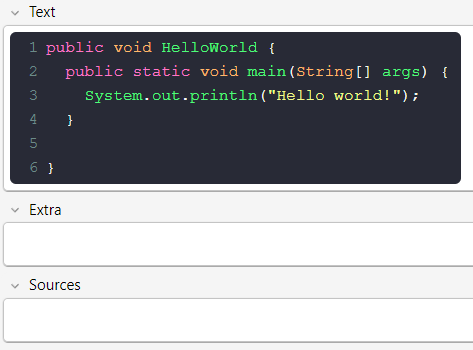
NEW NEW NEW

This addon didn't get mutch love from me lately. But now as I am advancing in university I have to learn several other languages, and I noticed that this didnt work. So now users can select the languages they want to learn themselfs.

✨ Features

  • Vim navigation: press Esc to enter the vim console.
  • Rich Syntax Highlighting: Supports a wide variety of languages out of the box.
  • Theme Support: Easily switch between popular code editor themes.
  • Live In-Editor Preview: See your formatted code directly within the Anki editor.
  • Seamless Editing: Simply double-click any code block to open it for modifications.
  • Easy Configuration: A simple dialog to manage which note types use the editor.
  • Highly Customizable: Directly edit the CSS files to fine-tune the appearance.

⚠️ Important: Before You Start

If you have used other code syntax highlighting add-ons in the past, they may have modified your note types in a way that can conflict with this add-on. For the best experience, it is highly recommended to:

  1. Deactivate any previous code highlighting add-ons.
  2. Create a fresh, new note type for your code cards (e.g., by cloning the basic type and naming it "Basic - CodeMirror").

πŸš€ Recommended Note Types

To get started immediately with note types that are perfectly adapted for this editor, you can download a pre-configured Anki package. These note types are optimized for both desktop and mobile viewing. (As I just uploaded these note types they available tomorrow.)

Download Recommended Note Types Here

✍️ How to Use

  1. Click the </> button in the editor toolbar to open the CodeMirror dialog.
  2. Select your language, write your code, and click Insert Code.
  3. To edit an existing block, simply double-click on it in the editor.

βš™οΈ Configuration

To configure the add-on, go to Tools > CodeMirror Configuration....

Here you can:

  • (new) Enter the languages which you want to use. Important: watch for spelling (see) https://codemirror.net/5/mode/index.html
  • Select which of your Note Types the editor should be active on.
  • Choose a global theme for all your code blocks.

🎨 Advanced Customization

For more direct control, got to: tools, addons, anki-coder and click the configure button. This will open the styles folder in your system's file explorer.

Inside this folder, you can edit the CSS files to change properties like font-size, font-family, and colors to perfectly match your preferences.

🀝 Perfect Synergy

For an even more powerful workflow, I highly recommend using this add-on alongside my Automatic Cloze add-on.

You can use CodeMirror to create a beautifully formatted code block, and then use Automatic Cloze which automatically converts the basic to a cloze card so you dont need to manually switch to a cloze card template. It's the perfect combination for quickly creating high-quality programming flashcards.

Get Automatic Cloze Here

❀️ Contributing

Contributions, issues, and feature requests are welcome!
Feel free to check the issues page or submit a pull request.

GitHub Logo View Project on GitHub

πŸ“„ License & Credits

This add-on is built upon the fantastic CodeMirror library and is licensed under the Creative Commons Attribution-NonCommercial 4.0 International License.

README

Anki CodeMirror Editor

A powerful, integrated code editor for Anki that brings beautiful syntax highlighting and a rich editing experience directly into your flashcards.

πŸ“œ Overview

This add-on replaces the default text areas for code with a full-featured CodeMirror instance. It's designed for students, developers, and anyone who wants to create flashcards with clean, readable, and beautifully formatted code snippets.

✨ Features

  • Rich Syntax Highlighting: Supports a wide variety of languages out of the box, including Python, JavaScript, HTML, CSS, SQL, C++, and more.
  • Theme Support: Easily switch between popular code editor themes to match your preference.
  • Live In-Editor Preview: See your formatted code directly within the Anki editor.
  • Seamless Editing: Double-click any code block in the editor to open it for modifications.
  • Easy Configuration: A simple configuration dialog lets you choose which note types should use the CodeMirror editor and select your global theme.
  • Highly Customizable: Advanced users can directly edit the CSS files to fine-tune the appearance of the code blocks.

πŸš€ Installation

  1. Download the .ankiaddon file from the releases page.
  2. Open Anki and go to Tools > Add-ons.
  3. Drag and drop the downloaded .ankiaddon file into the Add-ons window.
  4. Restart Anki to complete the installation.

✍️ How to Use

Adding a New Code Block

  1. Open the Anki editor for any note type you've enabled in the configuration.
  2. Click the </> button in the editor toolbar.
  3. A dialog will appear with the CodeMirror editor. Select your language, write your code, and click Insert Code.
  4. The formatted code block will be added to your card.

Editing an Existing Code Block

  1. In the Anki editor, simply double-click on any code block that was created with this add-on.
  2. The CodeMirror editor dialog will open with the existing code, ready for you to edit.
  3. Click Update Code to save your changes.

βš™οΈ Configuration & Customization

You can configure the add-on by going to the Anki Add-ons dialog, selecting "Anki CodeMirror Editor", and clicking the Config button.

In the main configuration window, you can:

  • Select Note Types: Check the box next to any note type where you want the editor to be active.
  • Choose a Theme: Select your preferred editor theme from the dropdown menu. This theme will be used in both the editor dialog and on your cards.

🎨 Advanced Customization

For more direct control, you can edit the add-on's style files. In the configuration window, click the Open Custom Styles Folder button. This will open the styles folder in your system's file explorer.

Inside this folder, you can edit the CSS files to change properties like font-size, font-family, and colors to perfectly match your preferences.


πŸ“„ License

This project is licensed under the Creative Commons Attribution-NonCommercial 4.0 International License. You are free to share and adapt the material, but you may not use it for commercial purposes. See the LICENSE file for more details.

❀️ Contributing & Credits

This add-on is built upon the fantastic CodeMirror library.

Contributions are welcome!

Just fork this project and when done create a pull request :)
Also: please add yourself to the CONTRIBUTORS.md file if you do so ^^.