Note: Anki 2.1.45 (from summer 2021) or later already have the extended html editor "codemirror" built-in. There's a good chance you won't need this add-on anymore. I still use it for me because my add-on offers a nicer formatting of the html source code and I can quickly search and replace code.
This add-on is mainly an editor for html or css source code using a codemirror instance.
You must read the sections "Limitations" and "Alternatives" below before you use it!
This editor offers syntax highlighting and a built-in search. You can adjust the theme and key layout it uses ("sublime","emacs","vim").
This editor is used for two functions:
-
In the anki editor you can edit the source code of a field. This add-on doesn't replace the built-in html view but uses it's own button and shortcut (that you can adjust in the add-on config):
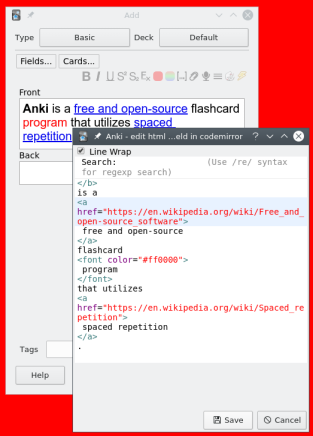
-
You can edit the Front Template, Styling, or Back Template in the Card Layout window. There's an additional entry in the context menu when you right-click on of those fields. You can also send the content to an external text editor like VSCode.
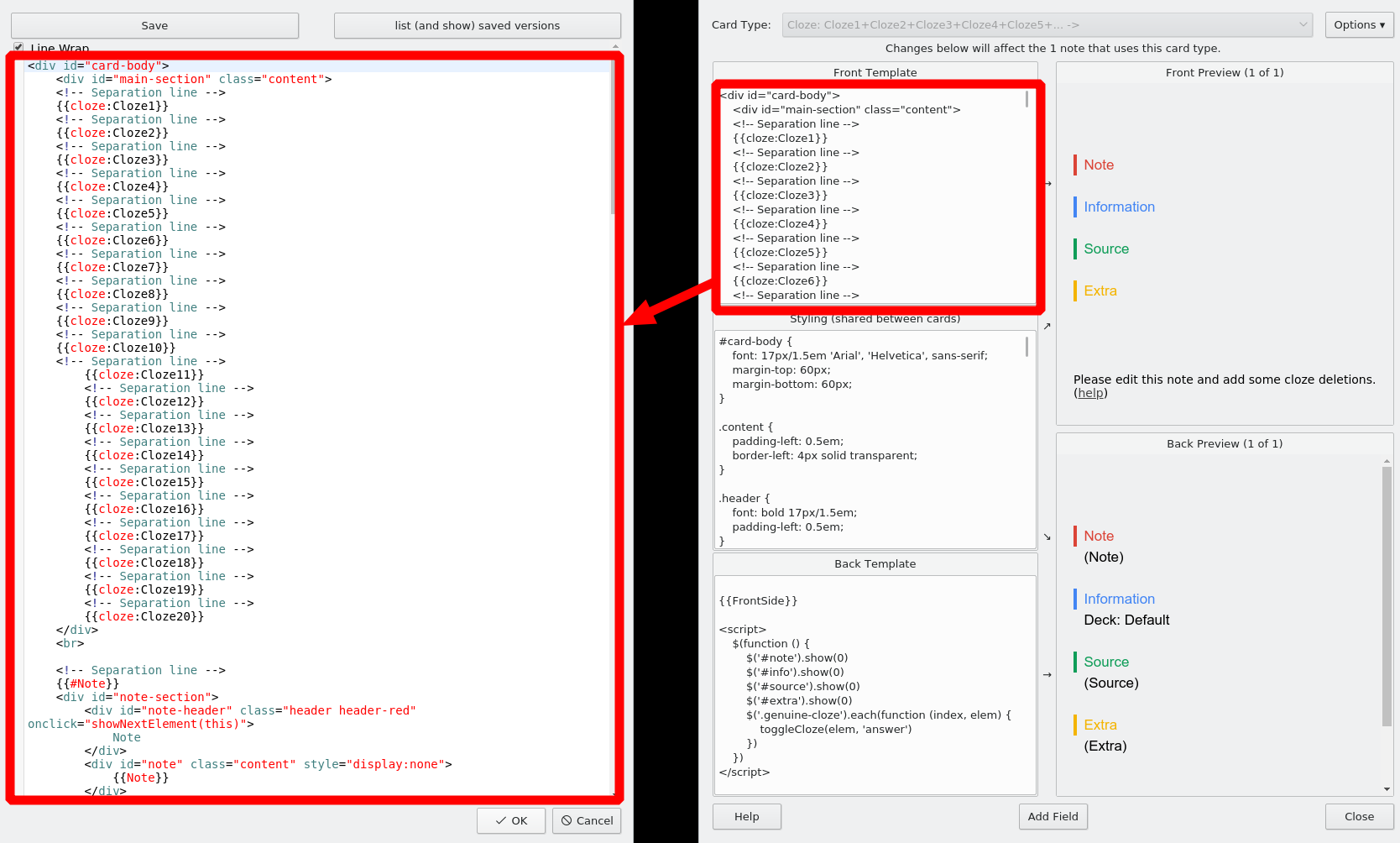
When you edit in the Card Layout window you can also save a version and then later compare it (or restore with copy and paste).
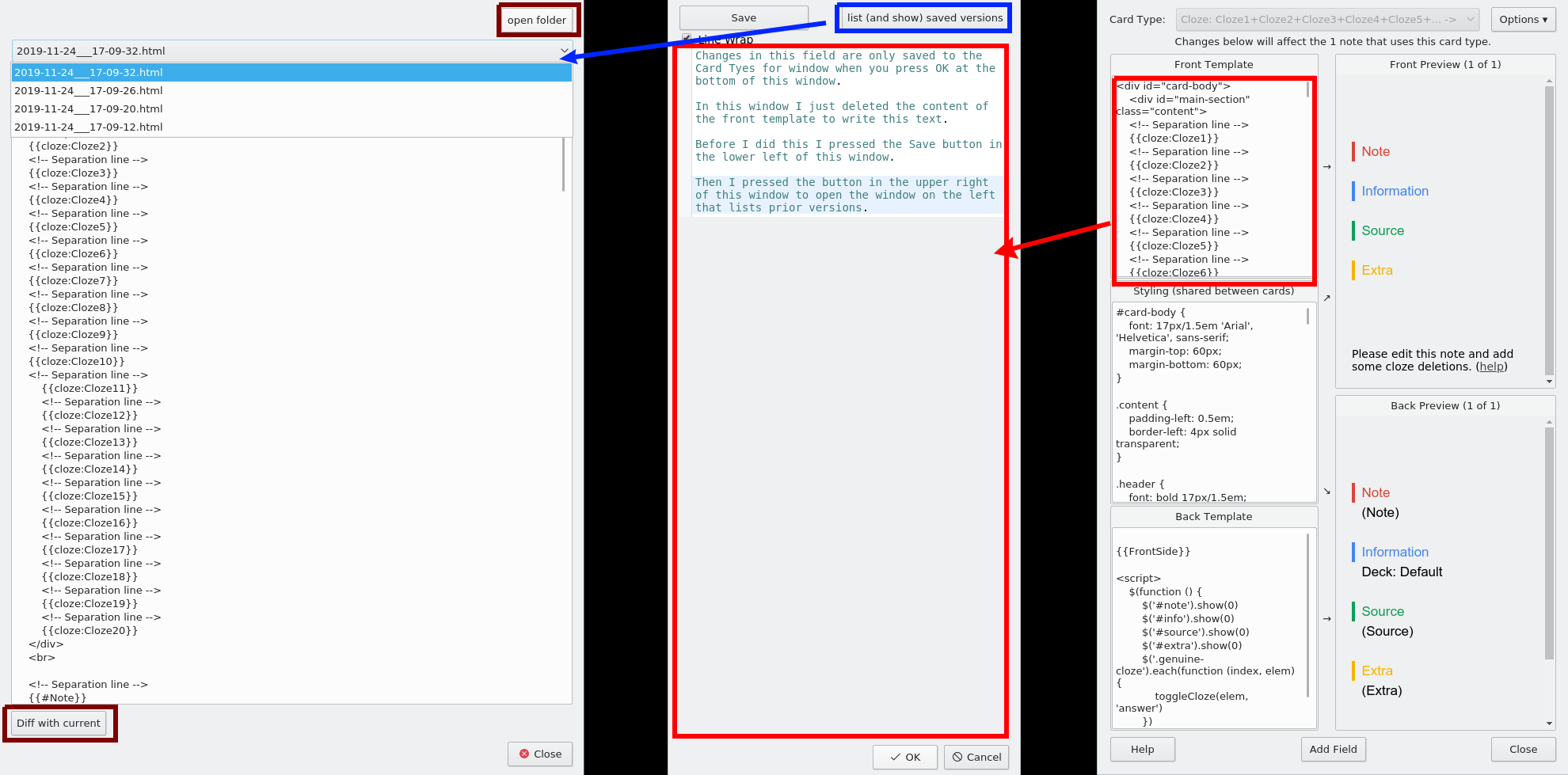
The dialog that lists versions (on the left in the following window) has a dropdown menu that lists all saved versions of the form you edit. Under the dropdown menu you have a simple preview of this saved version.
On the top right of this versions window there's a button "open folder" which shows the folder that contains the saved versions in your file explorer.
On the lower left there's a button "Diff with current" that diffs what you have in the extended editor and what you selected in the dropdown menu in an external program. The latter option requires that you adjust the add-on config.
# Editing a field
If you click the add-on button while holding the shift-key you revert the field to the state before you opened this html source view.
When you open the window the cursor position is synced by reusing code from glutanimate's Sync Cursor Between Fields and HTML Editor. When you close the window the cursor is not synced.
This add-on changes the html source code unless you close this html source code window with "Esc" or "Cancel". This doesn't bother me because I have problems very rarely and I always see them right after closing the codemirror window so that I can quickly undo with Shift. The problem mentioned in the negative review from 2020-07-15 should be fixed since summer 2020. Since then I haven't seen a complaint. Maybe my add-on just works for most people or maybe all users silently suffer or maybe no one uses it ...
This add-on will always remove the strings "<!--StartFragment-->" "<!--EndFragment-->".
Furthermore the js editor I use (codemirror) might modify your source code. I haven't investigated this.
By default my add-on processes the html of a field before and after you close the codemirror window. You can disable this in the add-on config by setting "Format code after closing (minify/compact)" and "Format code before opening (unfold)" to "false".
By default before the html source code is loaded into codemirror I process it with the python function "prettify" from the beautifulsoup4 package. By default after closing the editor I process the code with the python package htmlmin. Alternatively you can also use functions from luoliyan's add-on HTML Editor Tweaks. If you want to use luoliyan code the warning from HTML Editor Tweaks also applies here.
In the codemirror window there's a button "Autoformat Code". This is mostly relevant if you have set the config "Format code before opening (unfold)" to "false". This button uses the js library js-beautify. This js library is popular but apparently it has some problems, see the linked page for details. Btw: Codemirror does not include a similar library even though on the official codemirror site there's a demo Formatting demo. It uses code that was removed from the codemirror release due to low quality, see here
# Limitations
see the section "Editing a field" for details how this add-on will always change the html source code of your fields!!
This add-on does not save the front/css/back per card template. Instead all fronts are saved into one folder for one note type. This is not good if you use many quite similar card templates. As a workaround I add the current template number/card name as a comment. Changing this is on my long-term todo list.
# Alternatives
Before you use my add-on have a look at ...
# bugs
No support, if you find a bug let me know on github - maybe I'll have an idea. Also pull requests, improvements and feedback is welcome.
# some useful key combos for the default keymap:
- "Esc": Close window, discard changes
- "Ctrl+F": Find
- "Ctrl-H": Replace
- "Ctrl-Alt-Up": addCursorToPrevLine
- "Ctrl-Alt-Down": addCursorToNextLine
- "Ctrl-F3": search for word under cursor (findUnderNext)
- "Shift-Ctrl-F3": search for word under cursor backwards (findUnderPrevious)
# Versions
- 2025-08-31 fix for Anki 25.07+
- 2023-03-19 fix error occuring after backup restore, adjust to night/day mode toggle without reloading
- 2022-09-10 fix Anki crash with qt6 versions on MacOS (thanks @kvn1351), some code cleanup
- 2022-09-05 avoid harmless error message when no field is focused, use my version detection code throughout the add-on.
- 2021-12-11 update bundled codemirror, fixes for 2.1.50/qt6
- 2021-09-26 earlier garbage collection
- 2021-01-23 postprocess html as Anki does it for the default ctrl+shift+x window. If by accident you create illegal html in my editor window this should prevent some weird behavior.
- 2020-12-19 user can set font family and font size for editor in user config, fix #8
- 2020-11-30 revert some prior changes about external editor
- 2020-11-24 renamed some config options, slightly better support for external editors on MacOS (off by default), reused code to detect text editors from "External Editor", updated bundled codemirror, internal code changes
- 2020-07-29 properly remove webview
- 2020-07-25 in vim mode don't ask to close the window.
- 2020-07-23 fix external editor for template, fix subprocess environment for diff
- 2020-07-20 fix nbsp issue - set cm content with js
- 2020-07-16 stop breaking pre tags, fix bug from prior release
- 2020-07-15 dark theme for anki night mode, reorganized code, renamed some config keys, added autoformat button, config.schema.json
- 2020-07-13 update for 2.1.28, fix unicode error in windows, avoid some harmless error messages like when no prior version exists or when calling the external editor doesn't work, update codemirror, etc.
- 2020-04-27 diff enhancements, diff error fixed, codemirror update, more robust against config errors
- 2019-11-24 add save/diff when in card layout dialog
- 2019-11-23 card layout dialog
- 2019-10-28 minify with htmlmin to destroy less formatting, sync cursor when opening, highlight active line
- 2019-06-10 first release
Other Authors
see the included license.txt