This add-on is only about inserting a table. It is not designed for editing an existing table. You need a different tool for this. My add-on extended editor for field (for tables, search&replace, ...) should be useful for editing an existing table. Actually you can also use the "extended editor" add-on to insert tables if you don't like the dialog of this add-on and prefer setting the number of columns and rows you want by highlighting them with your mouse (as you would do it in WORD etc).
The add-on extended editor for field (for tables, search&replace, ...) is also useful to add tables into your field, i.e. it's an alternative to this add-on.
# Config
The shortcut (default is "Ctrl+0") to insert a table and some styling defaults can be changed using the add-on configuration dialog of 2.1: Tools>Add-ons, select the add-on "Add Table" and click on "Config".
# Use
You can insert a table in two ways:
-
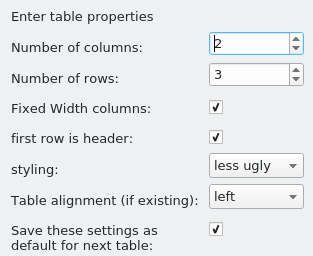
If you do not select any text, upon clicking the "Create a table button" (or pressing the shortcut) you will be presented with a dialog window asking you to specify some table properties (like number of rows, number of columns, alignment, styling). The dialog to insert tables looks like this:
-
If you have text selected you can usually convert a table (in a markdown-like format) into a full html table.
header1 | header2
-|-
elem1 | elem2
These will create a list with two columns and two rows. The -|- part is optional, but can be used to align the column to the left (:-), right (-:) or to the center (:-:). You can skip this line completely, but do make sure you add a pipe character | between elements to designate a border.
Limitations:
- This method is intended for one time use only. The original md-table is not saved so it can't be undone later. If you care about undoing use one of the markdown add-ons.
- The code in my add-on for transforming markdown tables is simple so that it doesn't convert all valid markdown tables. So it will fail sometimes. A fix for this is already on my todo list but it will take some time until this add-on is updated. If you need this look for another add-on.


# Versions
- 2023-06-18 2.1.50+: fix table sometimes inserted at the top
- 2022-12-21 remember dialog size, increase default dialog size. These changes are relevant for the bigger UI elements from Anki 2.1.55), remove unused code
- 2022-04-12 better text alignment detection in markdown (thanks @madmaximux)
- 2021-12-06 make it work on Anki 2.1.50+ with pyqt6 only
- 2021-11-21 no more startup message for new install (after 16 months)
- 2021-07-10 test version for 2.1.45
- 2020-07-25 better night mode compatibility
- 2020-04-27 classes for all defaults, better naming
- 2020-04-23 config.schema.json, function gc is more robust
- 2019-11-06 option to center table, fix for one line selection
- 2019-20-20 interoperability
- 2019-10-08 2.1 only, gui option for vertical alignment, set alignment in style, code cleanup
- 2019-02-24 Fix for UnicodeEncodeError in Anki 2.0 by khonkhortisan
- 2019-01-24 handle leading/trailing pipes and escaped pipes, fix shortcut for 2.0
- 2018-11-19 additional options in table creation dialog
- 2018-11-03 initial release
# Credits
This add-on and parts of this description are a partial fork of the great add-on Power Format Pack (Copyright 2014-2017 Stefan van den Akker) because it won't be ported to 2.1 (as of 2018-11). I extracted the table function into a standalone version for 2.1 and made additions so that you can better customize the table inserted.
# limitations, known bugs
Short selections of text, mostly if the last line doesn't contain real content but just empty fields (like '|| |') usually gives unexpected/wrong results.
Since early 2020 Anki removes most table properties when you copy a table from one field into another. a workaround is to copy the html source code from the source code window from the old field into the source code window of the other field. Or you could have a look at editor: paste raw unfiltered full html.
# bugs, errors, feedback
Please do not use reviews for bug reports or support requests. I don't get notified of your reviews, and properly troubleshooting an issue through them is nearly impossible (formatting is limited and I can't reply multiple times). If you find a bug let me know in the official anki support forum, on github.