extended editor for field (for tables, search&replace, ...)

AnkiWeb addon 805891399

1 other version of this addon exists. Compare versions ↓

Opens field content in a separate dialog using a customized TinyMCE editor for advanced table editing, with configurable shortcuts and optional custom CSS.
AI-generated summary; may contain mistakes.

note-managementformattingshortcuts

Open on AnkiWeb Forum topic Find alternatives

AnkiWeb

Votes
178 (πŸ‘ 177 Β· πŸ‘Ž 1)
Updated
2025-07-06
Anki versions
25.08~
License
AGPL-3.0 (from the license file in the package)
Virus scan
No ClamAV match A match does not prove malware. No match does not prove that the code is safe.
Languages
JavaScript, CSS, TypeScript, Python, HTML, JSON, HCL
Description language
en

Maintenance

stale

  • Last update or commit: 2025-07-06 (483 days before the snapshot).
  • Forks that may still be maintained: "extended editor for field (for tables, search&replace, ...)fixed by lisi" (2099893383).

GitHub

No GitHub repository linked.

Will it work on my Anki?

Version branches
Min AnkiMax AnkiUpdated
2.1.222.1.652023-07-31
2.1.6625.08+2025-07-06
History across monthly snapshots

Loading…

Compare versions

The original addon and its forks. The best value in each column is in bold.

VersionWorks on Anki 26.09.3MaintenanceLast activity VotesApprovalGitHub starsNotes
extended editor for field (for tables, search&replace, ...) this addon original likely stale 6 Jul 2025 πŸ‘ 177 Β· πŸ‘Ž 1 97% –
↳ extended editor for field (for tables, search&replace, ...)fixed by lisi (AI-detected; may be wrong) supported stale 11 Dec 2024 πŸ‘ 0 Β· πŸ‘Ž 0 – –

Forks can add features or work in a different way. Read the description before you change to another version. Fork detection is incomplete, so other versions can exist.

Similar addons

Add Table has 1 fork β†’

Inserts customizable HTML tables through a dialog or keyboard shortcut, or converts selected pipe-delimited markdown-like text into a table; it does not edit existing tables.

formattingshortcutsfork-or-reupload

144 votes 93% approval πŸ‘ 140 Β· πŸ‘Ž 4 ⭐ 7 Anki 2.1.65~ Updated 2023-06-18
Add Hyperlink

Adds a dialog and context menu entries for inserting, editing, and unlinking hyperlinks in note fields, with configurable keyboard shortcuts.

formattingshortcutsfork-or-reupload

86 votes 90% approval πŸ‘ 83 Β· πŸ‘Ž 3 ⭐ 5 Anki 2.1.65~ Updated 2023-06-18

Description

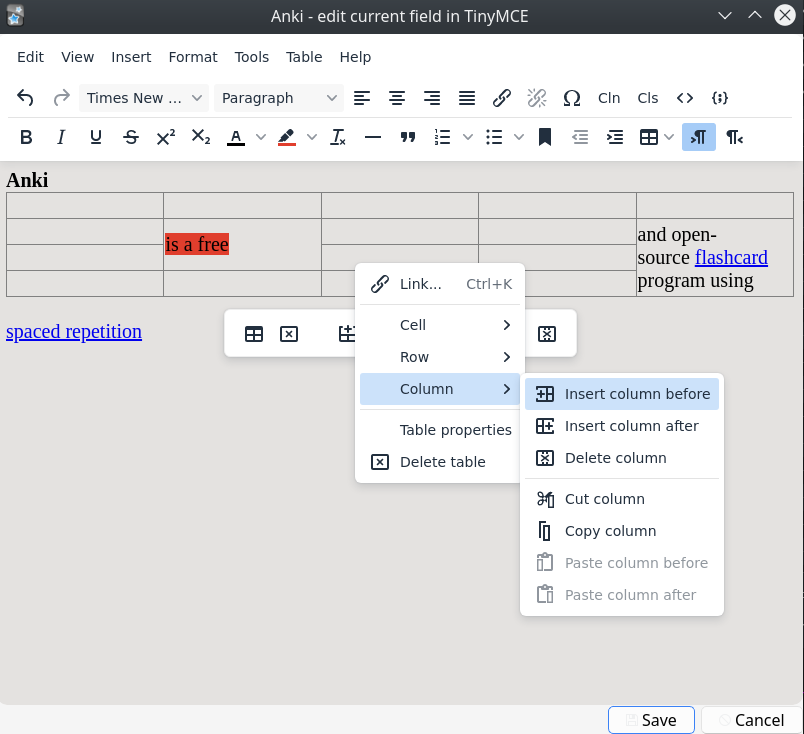
This add-on loads the content of a field from the editor into a new dialog with a slightly modified version of the wysiwyg html editor named tinymce. To open this editor click the "TM" button or use the shortcut (adjustable from the add-on config).

This editor offers some advanced editing options especially with regard to tables: You can add or delete rows or columns. You can style the table. You can merge cells. You can style the borders and background colors, etc.

This external editor sometimes automatically modifies the field content which in some cases alters the appearance of your cards. This is expected behavior because this add-on is mostly about bundling tinymce with the default settings.

A note about security: I only use this add-on to modify field content that is already in Anki and to add content from trusted pdf files. The addon is not designed for other use cases. E.g. I do not copy content from websites or other untrusted sources directly into this addon window. When working with content from those sources I close my addon window and copy the content in the anki editor in the Add or Browser window.

You can apply custom css to the editor in the extra dialog by putting it into a file named "_tinymce_custom.css" in the media folder of your profile. I don't need this so I don't know how this interacts with the tinymce skin and theme I use.

when you close the addon window with the external editor the field content gets processed as if you had pasted all of the field content into Anki. In some rare cases this will change the content of your field. This e.g. removes script or iframe tags. You can change that in the config of my addon by setting use Anki's built-in html processing to false.

General point: Use this at your own risk. If you find a problem, bug, or have a bug fix or improvement let me know in the official anki support forum.

Thanks @/u/glutanimate for pointing me to a way to display the images.
# Configuration see the readme in the add-on configuration dialog.

Versions

  • 2025-07-06 fix for Anki 25.07+, add some options to configure shortcuts, ltr, ...
  • 2023-07-31 save pasted images to local file
  • 2023-06-20 make toolbar buttons configurable, update bundled editor, code cleanup, ...