Parses a note type's CSS custom classes into one-click editor toolbar buttons that wrap or unwrap selected text, with drag reordering, previews, shortcuts, and customizable settings.
formattingshortcutsappearancecard-templates
Opens a cursor-centred menu to hide selected text as spoilers, change colors or font size, or strip added HTML, with a configurable hotkey.
formattingshortcutsappearance
Lets users customize the Editor widget’s stylesheet via an _editor.css file in their media collection, with a toggle and hotkey.
shortcutsappearance
Adds a legacy night mode to older Anki versions (not 2.1.20+), with manual or scheduled switching, color inversion, custom color rules, shortcuts, and dialog styling.
shortcutsappearanceobsolete
Adds a visual settings manager for creating custom editor toolbar buttons with background and text colors, bold, italic, underline, live preview, and assignable keyboard shortcuts.
formattingshortcutsfork-or-reupload
Customizes Anki's Again, Hard, Good, Easy, and Show Answer buttons with presets, separate light/dark palettes, and adjustable styles and colors.
appearance
 # Functions
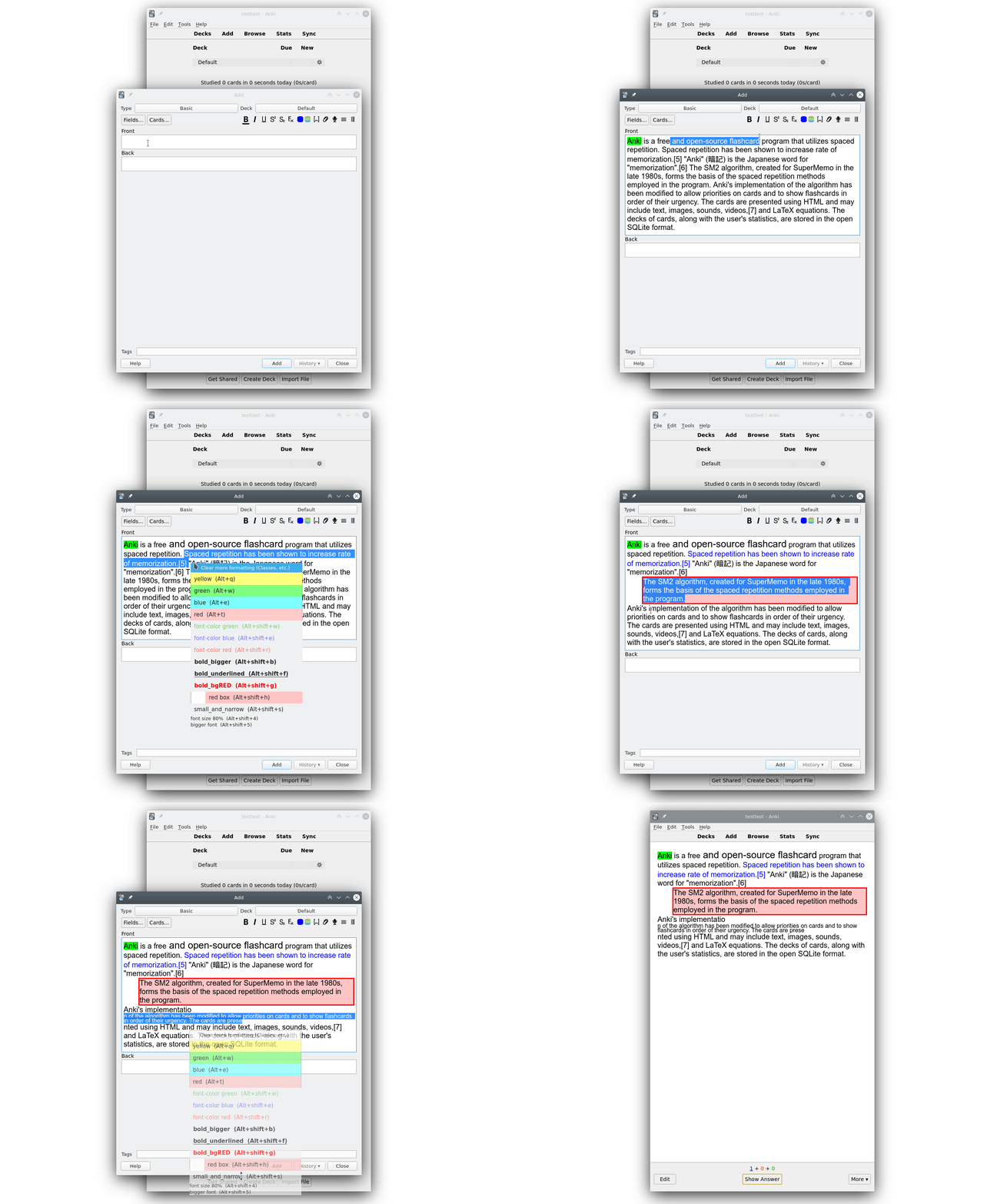
This add-on offers the following options:
1. directly changing the font color by changing the html color attribute. This is also built into Anki but switching between different colors is time consuming. You can set different font colors with the "Quick Colour Changing" add-on. This add-on additionally gives you the option to have multiple dedicated buttons or menu entries for font colors you often use. But my add-on might be easier to use.
2. you can set the background color directly using the html background-color attribute. The option to change the background color is also available in the add-on "Mini Format Pack". But switching between different colors is time consuming.
3. you can style text with the html style attribute.
4. you can set css for custom classes and apply these classes to the text selected using the inline "span" tag or using the "div" tag which is a block element which means you'll have a line-break before and after it. Some styling only makes sense when it's applied to a div.
5. There's are easy to use dialogs/options to change the font color, the background color, and the font size by using css and html classes. This has some advantages and some drawabacks: html classes are roughly similar to "styles" that you can apply in Word or LibreOffice. When you use html classes you can later change the color for all the fonts you've highlighted at the same time and you can also set different colors for night mode.
6. You can wrap the text selected with custom text snippets, see below.
# Text Wrapping
You can wrap selected text with fixed text snippets, e.g. you can set up a shortcut with "before" set to "Art ", and "after" set to " TFEU".
This lets you wrap, e.g., "2" in the Editor, and it will become "Art 2 TFEU" (which is Article 2 of the Treaty on the
Functioning of the European Union). This is useful for any kind of repetitive typing.
the text wrapping function is useful for hgiesel's Closet For Anki. Text Wrapping also supports counters that take the current field into account. The best way to show this is with an example:
- Having "before" set to "{{c%i::", and "after" to "}}", makes a text wrapper that mimics the built-in Ctrl-Shift-C cloze shortcut (think of %i as increment).
- Having "before" set to "{{c%t::", and "after" to "}}", makes a text wrapper that mimics the built-in Ctrl-Alt-Shift-C cloze shortcut (think of %t as top).
This is useful if you want to set the cloze shortcut to a custom key, or any add-on that mimics the built-in clozes in some way, see e.g. here. If you want a naked percentage sign, use "%%".
# Setup
Each note type MUST have the string

 # Alternatives
If you just want to sometimes change the text color or background color this add-on might be overkill. Or maybe you find the config too complicated. Or maybe you run into an error with this add-on. Then you could have a look at these options:
- The option to change the background color is available in the Mini Format Pack. But switching between different colors is time consuming.
- Anki has a function to change the font color. But switching between different colors is time consuming.
- There's the add-on Quick Colour Changing that allows to set shortcuts for different font colors.
- the extended editor for field allows to edit one field in a powerful WYYIWYG editor (TinyMCE)
- Wrapper meta-addon for wrapping text, etc.
- ...
# Authors
- Henrik Giesel/hgiesel: Many contributions and fundamental improvements since 2020, and maintainer since 2020-09
- ijgnd: Original add-on creator, all versions until 2020-09.
# Versions
- 2023-02 update for Anki 2.1.55+
- 2021-03-03 update for 2.1.41+
...
- 2020-06-26 Text Wrapper extended with counter
...
- 2019-08-06 v0.3: new configuration dialog
...
- 2019-02-19 v0.2: added context menu, styles, classes
...
- 2019-01-16 initial release